DYNAMIC RADAR CRUISE CONTROL SYSTEM, Diagnostic DTC:C1A50

| DTC Code | DTC Name |
|---|---|
| C1A50 | Brake System |
DESCRIPTION
When the driving support ECU receives an electronically controlled brake system malfunction signal from the skid control ECU via the CAN communication line, DTC C1A50 is stored.
| DTC No. | DTC Detection Condition | Trouble Area |
|---|---|---|
| C1A50 | When signal malfunction from skid control ECU continues for 1 second while dynamic radar cruise control is operating |
|
WIRING DIAGRAM
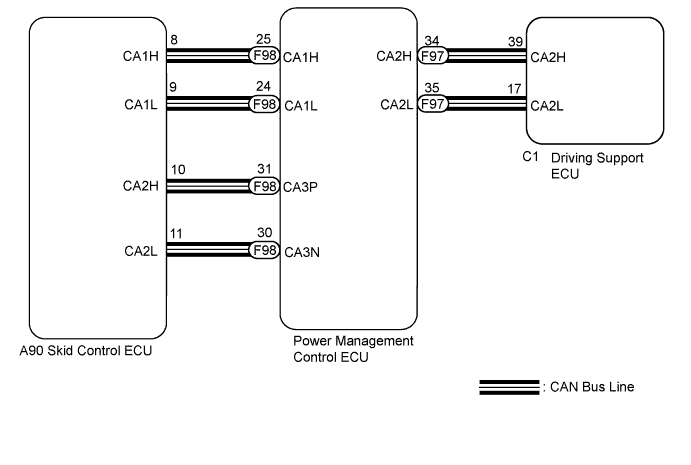
INSPECTION PROCEDURE
PROCEDURE
-
READ OUTPUT DTC (ELECTRONICALLY CONTROLLED BRAKE SYSTEM)
-
Connect the intelligent tester to the DLC3.
-
Turn the power switch on (IG).
-
Turn the tester on.
-
Enter the following menus: Chassis / ABS / VSC / TRC / DTC.
-
Read the DTCs.
Result Result Proceed to DTC is not output A DTC is output B
B 
GO TO ELECTRONICALLY CONTROLLED BRAKE SYSTEM Click here
A 
-
-
CHECK WHETHER DTC OUTPUT RECURS (DTC C1A50)
-
Connect the intelligent tester to the DLC3.
-
Turn the power switch on (IG).
-
Clear the DTCs Click here.
-
Perform the following to make sure that the DTC detection conditions are met.
Tech Tips
If the detection conditions are not met, the malfunction cannot be detected.
-
Drive the vehicle at a speed of 40 km/h (25 mph) or more.
-
Turn the cruise control main switch on.
-
Push the -SET switch to activate the cruise control.
-
-
Enter the following menus: Powertrain / Radar Cruise / DTC.
-
Read the DTCs.
Result Result Proceed to DTC is not output A DTC C1A50 is output B
B 
REPLACE DRIVING SUPPORT ECU Click here
A 
USE SIMULATION METHOD TO CHECK Click here
-
-
REPLACE DRIVING SUPPORT ECU
-
Replace the driving support ECU Click here.
NEXT
-
-
CHECK WHETHER DTC OUTPUT RECURS (DTC C1A50)
-
Connect the intelligent tester to the DLC3.
-
Turn the power switch on (IG).
-
Clear the DTCs Click here.
-
Perform the following to make sure that the DTC detection conditions are met.
Tech Tips
If the detection conditions are not met, the malfunction cannot be detected.
-
Drive the vehicle at a speed of 40 km/h (25 mph) or more.
-
Turn the cruise control main switch on.
-
Push the -SET switch to activate the cruise control.
-
-
Enter the following menus: Powertrain / Radar Cruise / DTC.
-
Read the DTCs.
Result Result Proceed to DTC is not output A DTC C1A50 is output B
B
REPLACE SKID CONTROL ECU Click here
A
END
-
-
REPLACE SKID CONTROL ECU
-
Replace the skid control ECU Click here.
NEXT
-
-
CHECK WHETHER DTC OUTPUT RECURS (DTC C1A50)
-
Connect the intelligent tester to the DLC3.
-
Turn the power switch on (IG).
-
Clear the DTCs Click here.
-
Perform the following to make sure that the DTC detection conditions are met.
Tech Tips
If the detection conditions are not met, the malfunction cannot be detected.
-
Drive the vehicle at a speed of 40 km/h (25 mph) or more.
-
Turn the cruise control main switch on.
-
Push the -SET switch to activate the cruise control.
-
-
Enter the following menus: Powertrain / Radar Cruise / DTC.
-
Read the DTCs.
Result Result Proceed to DTC is not output A DTC C1A50 is output (for LHD) B DTC C1A50 is output (for RHD) C
B
REPLACE POWER MANAGEMENT CONTROL ECU (for LHD) Click here
C
REPLACE POWER MANAGEMENT CONTROL ECU (for RHD) Click here
A
END
-