INSTRUMENT PANEL SAFETY PAD INSTALLATION
PROCEDURE
-
INSTALL INSTRUMENT PANEL SAFETY PAD ASSEMBLY
-
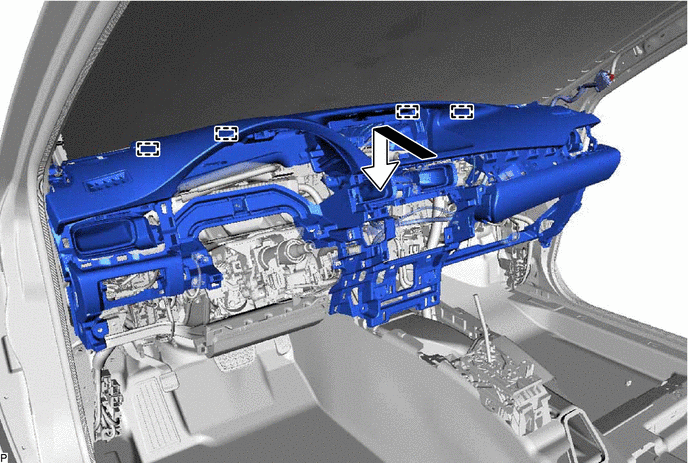
Engage the 4 guides and temporarily install the instrument panel safety pad assembly as shown in the illustration.
Note
-
Do not damage the instrument panel safety pad assembly.
-
Do not allow the wire harnesses to interfere with the surrounding parts.
-
-
Install the 3 clips.
-
Install the 4 bolts <C> and nut <F>.
-
Install the 2 instrument panel passenger airbag assembly bolts <A>.
- Torque:
- 20 N*m { 204 kgf*cm, 15 ft.*lbf }
-
Engage the 2 claws to connect the cooler (room temp. sensor) thermistor.
-
Engage each clamp.
-
Connect each connector.
-
-
CONNECT NO. 2 INSTRUMENT PANEL WIRE
-
INSTALL INSTRUMENT PANEL FINISH PANEL SUB-ASSEMBLY
-
Engage the 8 claws to install the instrument panel finish panel sub-assembly.
-
-
INSTALL NO. 1 ION GENERATOR SUB-ASSEMBLY (w/ Ion Generator)
-
INSTALL FRONT NO. 3 SPEAKER ASSEMBLY
-
INSTALL NO. 1 SPEAKER OPENING COVER ASSEMBLY
-
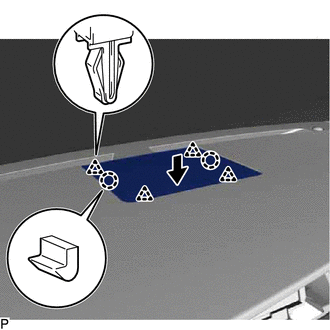
Engage the 2 claws and 4 clips to install the No. 1 speaker opening cover assembly.
-
-
INSTALL FRONT NO. 2 SPEAKER ASSEMBLY (for LH Side)
-
INSTALL NO. 1 INSTRUMENT PANEL SPEAKER PANEL SUB-ASSEMBLY
-
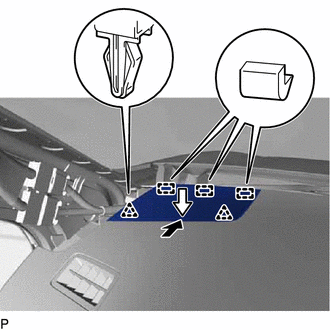
Engage the 3 guides.
-
Engage the 2 clips to install the No. 1 instrument panel speaker panel sub-assembly.
-
-
INSTALL FRONT PILLAR GARNISH LH
-
INSTALL FRONT NO. 2 SPEAKER ASSEMBLY (for RH Side)
Tech Tips
Use the same procedure as for the LH side Click here.
-
INSTALL NO. 2 INSTRUMENT PANEL SPEAKER PANEL SUB-ASSEMBLY
-
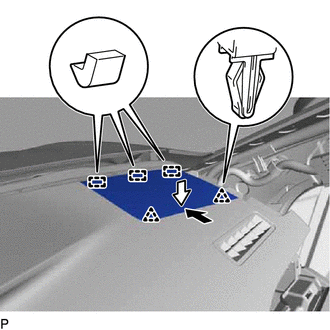
Engage the 3 guides.
-
Engage the 2 clips to install the No. 2 instrument panel speaker panel sub-assembly.
-
-
INSTALL FRONT PILLAR GARNISH RH
Tech Tips
Use the same procedure as for the LH side Click here.
-
INSTALL NO. 3 INSTRUMENT PANEL REGISTER ASSEMBLY
-
Engage the 4 claws, 2 clips and 2 guides to install the No. 3 instrument panel register assembly.
-
-
INSTALL LOWER INSTRUMENT PANEL SUB-ASSEMBLY
-
Connect each connector.
-
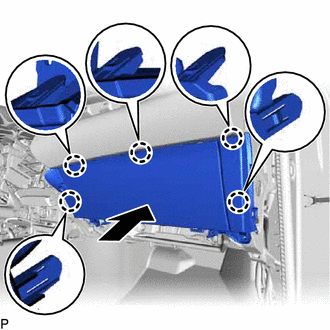
Engage the 5 claws.
-
Install the 2 screws <E>.
-
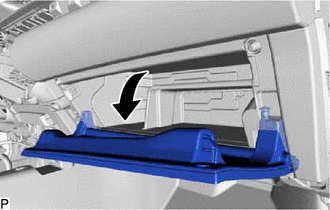
Open the lower instrument panel sub-assembly door as shown in the illustration.
-
Install the lower instrument panel sub-assembly with the 3 screws <E>.
-
-
INSTALL INSTRUMENT PANEL BOX DOOR COVER
-
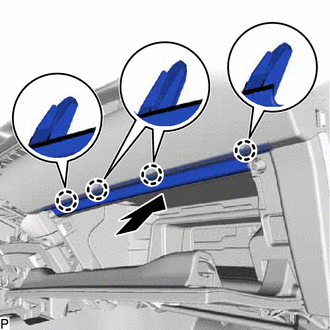
Engage the 4 claws to install the instrument panel box door cover as shown in the illustration.
-
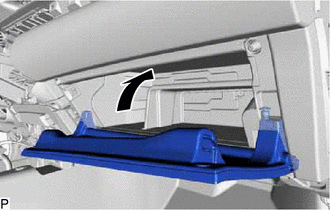
Close the lower instrument panel sub-assembly door as shown in the illustration.
-
-
INSTALL LOWER NO. 2 INSTRUMENT PANEL AIRBAG ASSEMBLY
-
INSTALL NO. 2 INSTRUMENT PANEL UNDER COVER SUB-ASSEMBLY
-
Connect the connector.
-
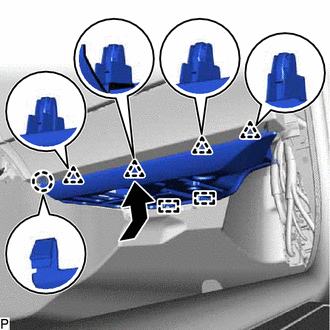
Engage the 2 guides, claw and 4 clips to install the No. 2 instrument panel under cover sub-assembly as shown in the illustration.
-
-
INSTALL INSTRUMENT SIDE PANEL RH
-
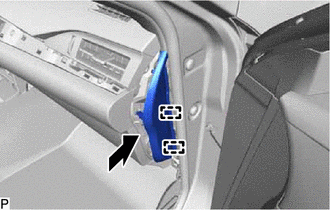
Engage the 2 guides as shown in the illustration.
-
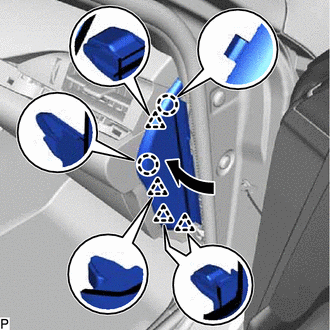
Engage the 2 claws and 4 clips to install the instrument side panel RH as shown in the illustration.
-
-
INSTALL FRONT DOOR OPENING TRIM COVER RH
Tech Tips
Use the same procedure as for the LH side Click here.
-
INSTALL COWL SIDE TRIM BOARD RH
Tech Tips
Use the same procedure as for the LH side Click here.
-
INSTALL FRONT DOOR SCUFF PLATE RH
Tech Tips
Use the same procedure as for the LH side Click here.
-
INSTALL REAR CONSOLE BOX ASSEMBLY
-
INSTALL ACCESSORY METER ASSEMBLY (w/o Navigation System)
-
INSTALL MULTI-DISPLAY ASSEMBLY (w/ Navigation System)
-
INSTALL CENTER INSTRUMENT CLUSTER FINISH PANEL SUB-ASSEMBLY
-
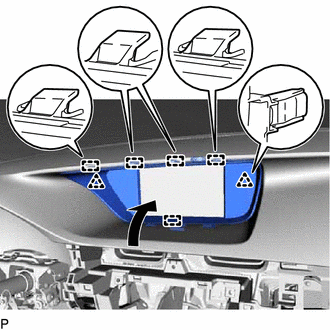
Engage the 2 clips and 5 guides as shown in the illustration.
-
Install the center instrument cluster finish panel sub-assembly with the 2 clips.
-
-
INSTALL SWITCH BASE
-
Connect the connector.
-
Engage the 3 claws to install the switch base.
-
-
INSTALL NO. 1 INSTRUMENT PANEL REGISTER ASSEMBLY
-
Engage the 6 claws and 2 guides to install the No. 1 instrument panel register assembly.
-
-
INSTALL NO. 1 SWITCH HOLE BASE
-
Connect each connector.
-
Engage the 4 claws to install the No. 1 switch hole base.
-
-
INSTALL COMBINATION METER ASSEMBLY
-
INSTALL LOWER NO. 1 INSTRUMENT PANEL FINISH PANEL
-
Connect each connector.
-
Engage the 12 claws, 2 clips and guide.
-
Install the lower No. 1 instrument panel finish panel with the 2 bolts <B>.
-
-
CONNECT HOOD LOCK CONTROL LEVER SUB-ASSEMBLY
-
Engage the claw and 2 guides to connect the hood lock control lever sub-assembly.
-
-
INSTALL INSTRUMENT SIDE PANEL LH
-
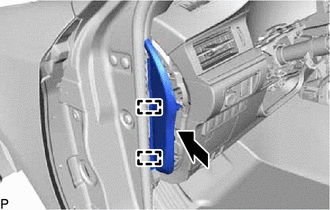
Engage the 2 guides.
-
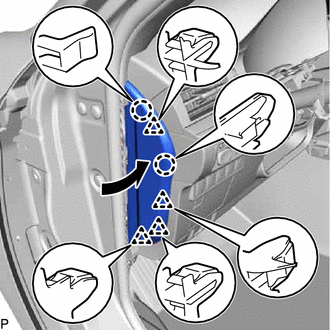
Engage the 2 claws and 4 clips to install the instrument side panel LH as shown in the illustration.
-
-
INSTALL FRONT DOOR OPENING TRIM COVER LH
-
INSTALL COWL SIDE TRIM BOARD LH
-
INSTALL FRONT DOOR SCUFF PLATE LH
-
INSTALL RADIO RECEIVER ASSEMBLY WITH BRACKET (w/o Navigation System)
-
INSTALL MULTI-MEDIA MODULE RECEIVER ASSEMBLY WITH BRACKET (w/ Navigation System)
-
INSTALL LOWER CENTER INSTRUMENT PANEL FINISH PANEL
-
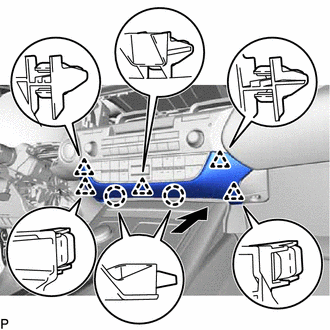
Engage the 2 claws and 5 clips to install the lower center instrument panel finish panel as shown in the illustration.
-
-
INSTALL NO. 2 INSTRUMENT PANEL REGISTER ASSEMBLY
-
Connect the connector.
-
Engage the 11 claws and clip to install the No. 2 instrument panel register assembly.
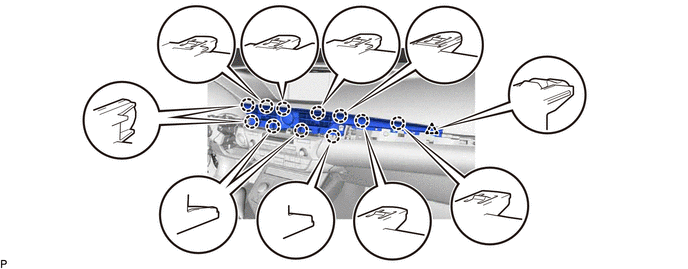
Note
When installing the No. 2 instrument panel register assembly, check that the wire harness is not caught between the No. 2 instrument panel register assembly and duct.
-
-
INSTALL CENTER INSTRUMENT CLUSTER FINISH PANEL GARNISH
-
Connect the connector.
-
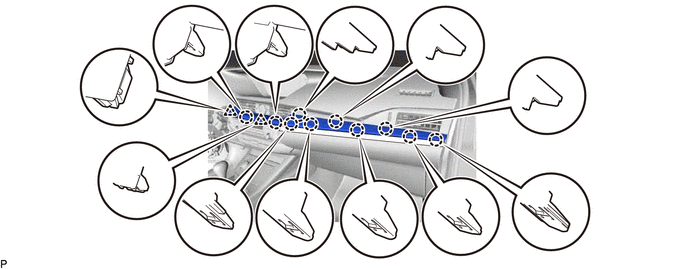
Engage the 10 claws and 2 clips to install the center instrument cluster finish panel garnish.
-
-
INSTALL INSTRUMENT CLUSTER FINISH PANEL SUB-ASSEMBLY
-
Connect the connector.
-
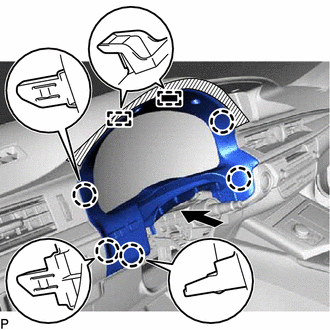
Engage the 5 claws and 2 guides.
-
Install the 2 screws <E> to install the instrument cluster finish panel sub-assembly.
-
-
INSTALL TURN SIGNAL SWITCH ASSEMBLY WITH SPIRAL CABLE SUB-ASSEMBLY
-
INSTALL UPPER STEERING COLUMN COVER
-
INSTALL LOWER STEERING COLUMN COVER
-
INSTALL STEERING WHEEL ASSEMBLY
-
INSTALL HORN BUTTON ASSEMBLY
-
CONNECT CABLE TO NEGATIVE AUXILIARY BATTERY TERMINAL
Note
-
Reset the auto away/return function setting to the previous condition by changing the customize parameter Click here.
-
When disconnecting the cable, some systems need to be initialized after the cable is reconnected Click here.
-
-
INSTALL LUGGAGE TRIM SERVICE HOLE COVER
-
INSPECT SRS WARNING LIGHT