TIRE PRESSURE WARNING SYSTEM Tire Pressure Warning Light Circuit
DESCRIPTION
If the tire pressure warning ECU and receiver detects any problems, the tire pressure warning light blinks (stays on after blinking for 1 minute) and tire pressure monitoring is canceled at the same time. At this time, the ECU stores a DTC in memory.
Connecting terminals TC and CG of the DLC3 makes the tire pressure warning light blink to output DTCs.
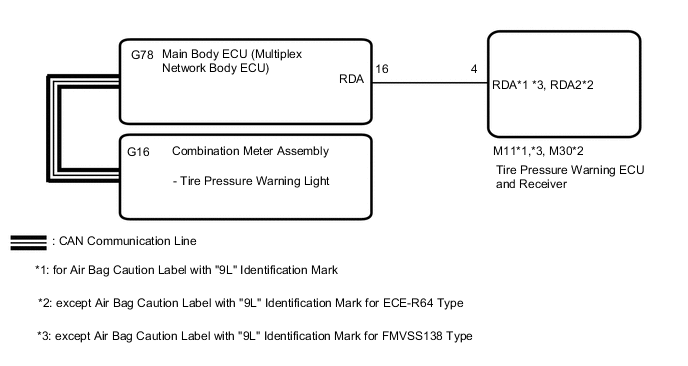
The tire pressure warning ECU and receiver sends the tire pressure warning light illumination request signal to the main body ECU (multiplex network body ECU) via a direct line. The main body ECU (multiplex network body ECU) then sends the signal to the combination meter assembly via CAN communication.
WIRING DIAGRAM
CAUTION / NOTICE / HINT
Note
-
When replacing the tire pressure warning ECU and receiver, read the transmitter IDs stored in the old ECU using the GTS and write them down before removal.
-
It is necessary to perform initialization (Click here ) after registration Click here of the transmitter IDs into the tire pressure warning ECU and receiver if the ECU has been replaced.
PROCEDURE
-
CHECK CAN COMMUNICATION SYSTEM
-
Check the CAN communication system.
for LHD with Central Gateway ECU: Click here
for RHD with Central Gateway ECU: Click here
for LHD without Central Gateway ECU: Click here
for RHD without Central Gateway ECU: Click here
CAN Bus CheckOK The CAN communication system is normal. Result Proceed to OK NG
NG 
GO TO CAN COMMUNICATION SYSTEM for LHD with Central Gateway ECU: Click here
GO TO CAN COMMUNICATION SYSTEM for RHD with Central Gateway ECU: Click here
GO TO CAN COMMUNICATION SYSTEM for LHD without Central Gateway ECU: Click here
GO TO CAN COMMUNICATION SYSTEM for RHD without Central Gateway ECU: Click hereOK 
-
-
CHECK DTC OUTPUT (B1247)
-
Clear the DTCs.
Body Electrical > Main Body > Clear DTCs -
Turn the ignition switch off.
-
Turn the ignition switch to ON.
-
Check for DTCs.
Body Electrical > Main Body > Trouble CodesOK DTC B1247 is not output. Result Proceed to OK NG
NG
GO TO DTC B1247 Click here
OK
-
-
CHECK OPERATION OF TIRE PRESSURE WARNING LIGHT (ACTIVE TEST)
-
Turn the ignition switch off.
-
Connect the GTS to the DLC3.
-
Turn the ignition switch to ON.
-
Turn the GTS on.
-
Enter the following menus: Body Electrical / Combination Meter / Active Test.
-
Check the condition of the tire pressure warning light by using the GTS.
Body Electrical > Combination Meter > Active TestTester Display Measurement Item Control Range Diagnostic Note Indicat. Tire Pressure Warning System Tire pressure warning light OFF or ON -
Body Electrical > Combination Meter > Active TestTester Display Indicat. Tire Pressure Warning System OK The tire pressure warning light turns on or off in accordance with the GTS operation. Result Proceed to OK NG
OK
REPLACE TIRE PRESSURE WARNING ECU AND RECEIVER Click here
NG
GO TO METER / GAUGE SYSTEM Click here
-