TELEVISION CAMERA(for Rear) REMOVAL
CAUTION / NOTICE / HINT
The necessary procedures (adjustment, calibration, initialization or registration) that must be performed after parts are removed, installed or replaced during the television camera assembly removal/installation are shown below.
| Replacement Part or Procedure | Necessary Procedures | Effects / Inoperative when not Performed | Link |
|---|---|---|---|
| Rear television camera assembly (Including removal and installation) |
|
|
|
|
Parking assist monitor system | ||
|
|
Panoramic view monitor system | |
| When the luggage compartment door is opened using a mechanical key | Initialize luggage closer motor assembly | The power trunk lid does not operate |
PROCEDURE
-
REMOVE LUGGAGE COMPARTMENT DOOR ASSIST GRIP
-
REMOVE SWITCH BEZEL
-
REMOVE NO. 2 LUGGAGE COMPARTMENT LIGHT ASSEMBLY
-
REMOVE LUGGAGE COMPARTMENT DOOR COVER
-
REMOVE REAR LIGHT ASSEMBLY LH
-
REMOVE REAR LIGHT ASSEMBLY RH
Tech Tips
Use the same procedure described for the LH side.
-
REMOVE UPPER LUGGAGE COMPARTMENT DOOR OUTSIDE GARNISH LH
-
REMOVE UPPER LUGGAGE COMPARTMENT DOOR OUTSIDE GARNISH RH
Tech Tips
Use the same procedure described for the LH side.
-
REMOVE LUGGAGE COMPARTMENT DOOR OUTSIDE GARNISH SUB-ASSEMBLY
-
REMOVE TELEVISION CAMERA ASSEMBLY
-
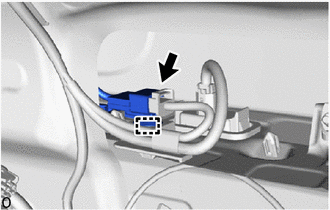
Disconnect the wire harness clamp.
-
Disconnect the connector.
-
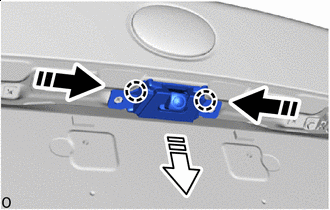

Push 
Remove in this Direction Detach the claw and remove the television camera assembly as shown in the illustration.
-
-
REMOVE TELEVISION CAMERA WIRE
-
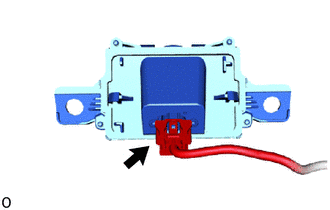
w/ Rear Camera Detection:
-
Disconnect the connector and remove television camera wire.
-
-
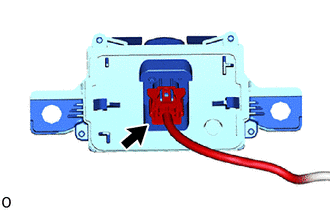
w/o Rear Camera Detection:
-
Disconnect the connector and remove television camera wire.
-
-