CAUTION / NOTICE / HINT
The necessary procedures (adjustment, calibration, initialization or registration) that must be performed after parts are removed, installed or replaced during the stereo jack adapter assembly removal/installation are shown below.
| Replacement Part or Procedure | Necessary Procedures | Effects / Inoperative when not Performed | Link |
|---|---|---|---|
| Disconnect cable from negative auxiliary battery terminal | Memorize steering angle neutral point | LKA/LDA system (for Mono camera type) | for Stereo Camera type:Click here for Mono Camera type:Click here |
| Lane control system (for Stereo camera type) | |||
| Parking support brake system* | |||
| Pre-collision system (for Mono camera type) | |||
| Pre-collision system (for Stereo camera type) | |||
| Adaptive high beam system | |||
|
|||
| Variable gear ratio steering system | |||
| Parking assist monitor system | |||
| Panoramic view monitor system | |||
| Initialize rear door sunshade system | Rear door sunshade system | ||
| Initialize power trunk lid system | Power trunk lid system |
PROCEDURE
- Click here
PRECAUTION
CAUTION:Note:After turning the power switch off, waiting time may be required before disconnecting the cable from the negative (-) auxiliary battery terminal. Therefore, make sure to read the disconnecting the cable from the negative (-) auxiliary battery terminal notices before proceeding with work.
- Click here
REMOVE LUGGAGE COMPARTMENT MAT SUB-ASSEMBLY
- Click here
DISCONNECT CABLE FROM NEGATIVE AUXILIARY BATTERY TERMINAL
CAUTION: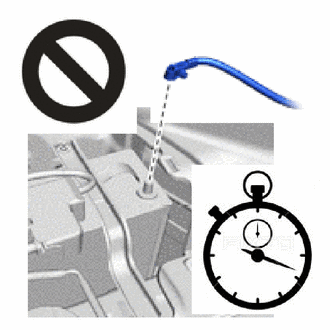
-
Wait at least 90 seconds after disconnecting the cable from the negative (-) auxiliary battery terminal to disable the SRS system.
-
If the airbag deploys for any reason, it may cause a serious accident.
Note:When disconnecting the cable, some systems need to be initialized after the cable is reconnected.
-
- Click here
REMOVE REAR SEAT ASSEMBLY (w/o Rear Seat Entertainment System)
- Click here
REMOVE REAR CENTER SEAT ARMREST ASSEMBLY (w/o Rear Seat Entertainment System)
- Click here
REMOVE CENTER ARMREST HINGE COVER (w/o Rear Seat Entertainment System)
- Click here
REMOVE REAR CENTER NO. 2 SEAT ARMREST PANEL SUB-ASSEMBLY (w/o Rear Seat Entertainment System)
- Click here
REMOVE REAR CENTER SEAT ARMREST PANEL SUB-ASSEMBLY (w/o Rear Seat Entertainment System)
- Click here
REMOVE REAR CENTER NO. 2 SEAT ARMREST PANEL (w/o Rear Seat Entertainment System)
- Click here
REMOVE REAR CENTER SEAT ARMREST CUP HOLDER SUB-ASSEMBLY (w/o Rear Seat Entertainment System)
- Click here
REMOVE REAR CENTER SEAT ARMREST DOOR SUB-ASSEMBLY (w/o Rear Seat Entertainment System)
- Click here
REMOVE REAR CENTER SEAT ARMREST COVER SUB-ASSEMBLY (w/o Rear Seat Entertainment System)
-
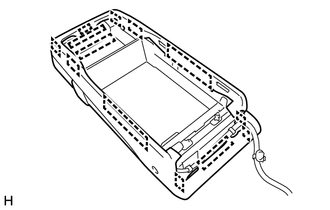
Detach the hook and remove the rear seat center armrest cover sub-assembly.
-
- Click here
REMOVE USB CHARGER SOCKET (w/o Rear Seat Entertainment System)
-
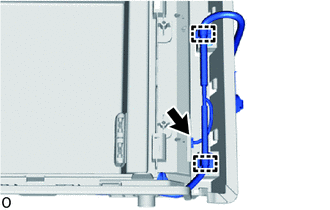
Detach the clamp.
-
Disconnect the connector.
-
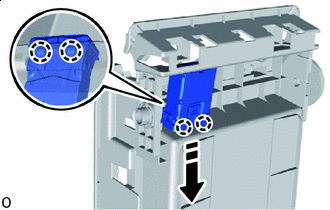

Remove in this Direction Detach the claw and remove the USB charger socket.
-
- Click here
REMOVE REAR CENTER SEAT CUSHION ASSEMBLY (w/ Rear Seat Entertainment System)
- Click here
REMOVE REAR CENTER SEATBACK ASSEMBLY (w/ Rear Seat Entertainment System)
- Click here
REMOVE REAR POWER SEAT SWITCH (w/ Rear Seat Entertainment System)
-
Remove in this Direction ScrewClick here
REMOVE CENTER ARMREST LOCK SUB-ASSEMBLY (w/ Rear Seat Entertainment System)
-
Remove the 4 screws and center armrest lock sub-assembly.
-
- Click here
REMOVE REAR CENTER SEAT ARMREST DOOR SUB-ASSEMBLY (w/ Rear Seat Entertainment System)
-
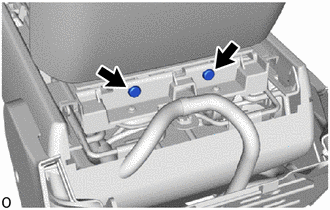
Remove the 2 console compartment door hinge shafts.
-
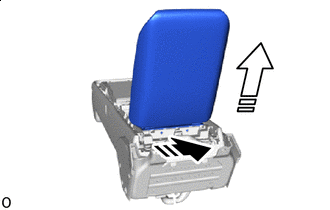
Remove in this Direction (1) 
Remove in this Direction (2) Slide the rear center seat armrest door in the removal direction (1) shown in the illustration and detach the hinge.
-
Remove the rear center seat armrest door in the removal direction (2) shown in the illustration.
-
- Click here
REMOVE REAR CENTER NO. 2 SEAT ARMREST BOX (w/ Rear Seat Entertainment System)
-
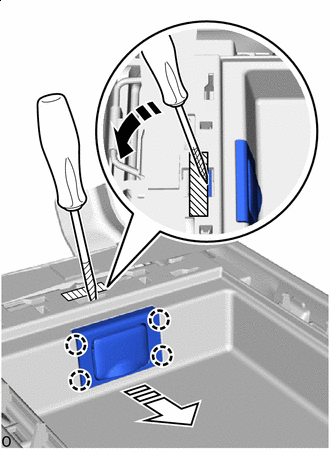
Incline in this Direction Remove in this Direction 
Protective tape Apply protective tape to the No. 2 rear seat center armrest box to prevent damage.
-
Insert a thin-bladed screwdriver with its tip wrapped with protective tape and push the HDMI cable cover toward the front of the vehicle.
-
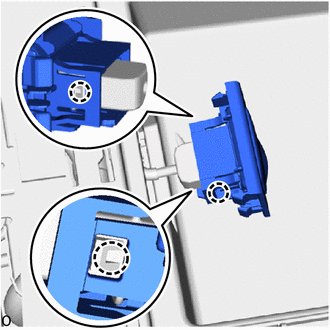
Detach the claw and disconnect wire harness from the HDMI cable cover.
-
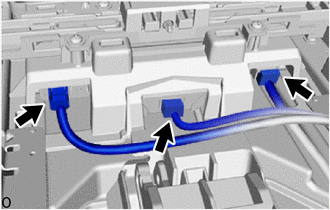
Disconnect the 3 connectors.
-
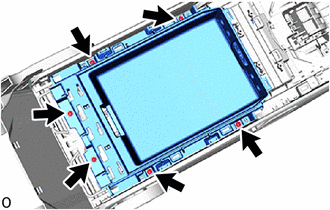
Remove the 6 screws.
-
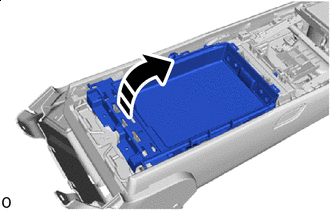
Tilt in this Direction Tilt the No. 2 rear seat center armrest box in the direction indicated by the arrow as shown in the illustration.
-
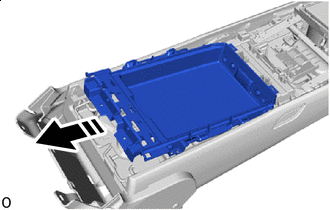
Remove in this Direction Remove the No. 2 rear seat center armrest box as shown in the illustration.
-
- Click here
REMOVE HEADPHONE TERMINAL (for LH Side, w/ Rear Seat Entertainment System)
-
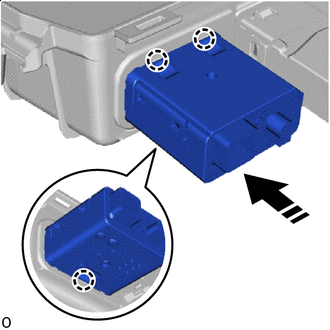
Remove in this Direction Detach the claw and remove the headphone terminal as shown in the illustration.
-
- Click here
REMOVE HEADPHONE TERMINAL (for RH Side, w/ Rear Seat Entertainment System)
-
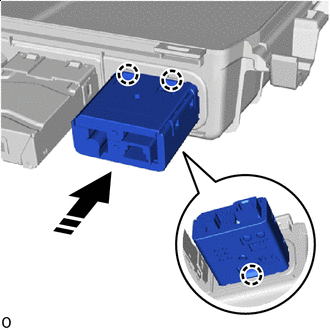
Remove in this Direction Detach the claw and remove the headphone terminal as shown in the illustration.
-
- Click here
REMOVE USB CHARGER SOCKET (w/ Rear Seat Entertainment System)
-
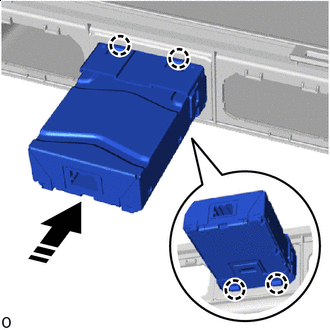
Remove in this Direction Detach the claw and remove USB charger socket as shown in the illustration.
-