REAR SUNSHADE ASSEMBLY(for Package Tray) REMOVAL
CAUTION / NOTICE / HINT
The necessary procedures (adjustment, calibration, initialization or registration) that must be performed after parts are removed, installed or replaced during the rear window shade assembly removal/installation are shown below.
| Replacement Part or Procedure | Necessary Procedures | Effects / Inoperative when not Performed | Link |
|---|---|---|---|
| Disconnect cable from negative (-) auxiliary battery terminal | Memorize steering angle neutral point | LKA/LDA system (for Mono camera type) | for Mono Camera type: for Stereo Camera type: |
| Lane control system (for Stereo camera type) | |||
| Parking support brake system* | |||
| Pre-collision system (for Mono camera type) | |||
| Pre-collision system (for Stereo camera type) | |||
| Adaptive high beam system | |||
Lighting system (EXT) |
|||
| Variable gear ratio steering system | |||
| Parking assist monitor system | |||
| Panoramic View Monitor System | |||
| Initialize rear door sunshade system | Rear door sunshade system | ||
| Initialize power trunk lid system | Power trunk lid system |
Click here Click here
Tech Tips
-
Use the same procedure for RHD and LHD vehicles.
-
The procedure listed below is for LHD vehicles.
PROCEDURE
-
PRECAUTION
Note
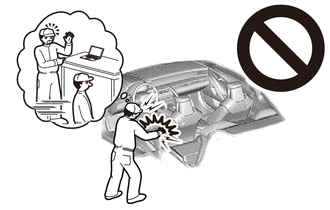
After turning the power switch off, waiting time may be required before disconnecting the cable from the negative (-) auxiliary battery terminal. Therefore, make sure to read the disconnecting the cable from the negative (-) auxiliary battery terminal notices before proceeding with work.
-
REMOVE LUGGAGE COMPARTMENT MAT SUB-ASSEMBLY
-
DISCONNECT CABLE FROM NEGATIVE AUXILIARY BATTERY TERMINAL
CAUTION:
-
Wait at least 90 seconds after disconnecting the cable from the negative (-) auxiliary battery terminal to disable the SRS system.
-
If the airbag deploys for any reason, it may cause a serious accident.
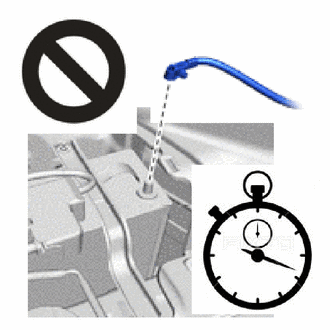
Note
When disconnecting the cable, some systems need to be initialized after the cable is reconnected.
-
-
REMOVE REAR SEAT CUSHION ASSEMBLY (for Fixed Seat Type)
-
REMOVE NO. 1 SEAT ARMREST CAP (for Fixed Seat Type)
-
REMOVE REAR SEATBACK ASSEMBLY (for Fixed Seat Type)
-
REMOVE REAR SEAT CUSHION LOCK HOOK (for Fixed Seat Type)
-
REMOVE REAR SEATBACK HOLDER (for Fixed Seat Type)
-
REMOVE REAR SEAT CUSHION ASSEMBLY LH (for Power Seat)
-
REMOVE REAR SEAT CUSHION ASSEMBLY RH (for Power Seat)
Tech Tips
Use the same procedure described for the LH side.
-
REMOVE REAR SEAT CUSHION LOCK HOOK (for Power Seat)
-
REMOVE REAR SEATBACK ASSEMBLY LH (for Power Seat)
-
REMOVE REAR SEATBACK ASSEMBLY RH (for Power Seat)
Tech Tips
Use the same procedure described for the LH side.
-
REMOVE REAR DOOR SCUFF PLATE LH
-
REMOVE REAR DOOR SCUFF PLATE RH
Tech Tips
Use the same procedure described for the LH side.
-
REMOVE REAR SEAT SIDE GARNISH LH
-
REMOVE REAR SEAT SIDE GARNISH RH
Tech Tips
Use the same procedure described for the LH side.
-
REMOVE ROOF SIDE RAIL GARNISH ASSEMBLY LH
-
REMOVE ROOF SIDE RAIL GARNISH ASSEMBLY RH
Tech Tips
Use the same procedure described for the LH side.
-
REMOVE PACKAGE TRAY TRIM GARNISH LH
-
REMOVE PACKAGE TRAY TRIM GARNISH RH
Tech Tips
Use the same procedure described for the LH side.
-
REMOVE PACKAGE TRAY TRIM SIDE COVER LH
-
REMOVE PACKAGE TRAY TRIM SIDE COVER RH
Tech Tips
Use the same procedure described for the LH side.
-
REMOVE INNER ROOF SIDE GARNISH ASSEMBLY LH
-
REMOVE INNER ROOF SIDE GARNISH ASSEMBLY RH
Tech Tips
Use the same procedure described for the LH side.
-
REMOVE NO. 1 CENTER SPEAKER GRILLE SUB-ASSEMEBLY
-
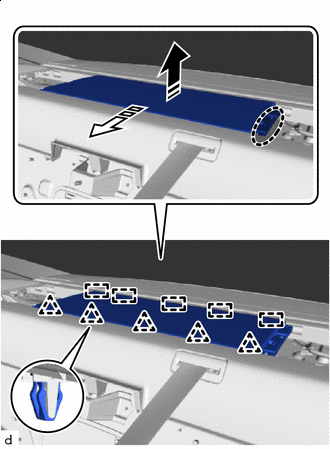

Place hand here 
Remove in this Direction (1) 
Remove in this Direction (2) Place your hand in the position shown in the illustration and detach the clip in the removal direction (1).
-
Pull in the removal direction (2) shown in the illustration to remove the center No. 1 speaker grille sub-assembly.
-
for Power Seat:
-
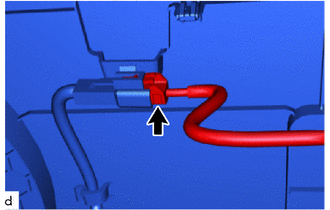
Disconnect the connector.
-
-
-
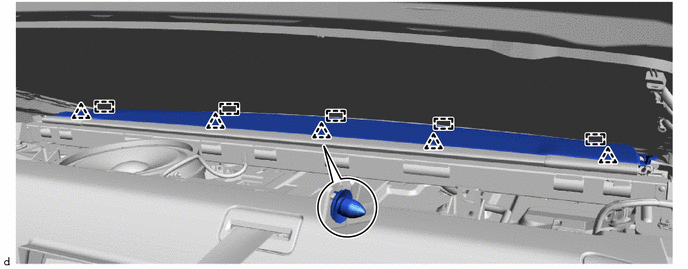
REMOVE NO. 2 PACKAGE TRAY TRIM PANEL ASSEMBLY
-
Detach the clip.
-
Detach the hook and remove the No. 2 package tray trim panel assembly.
-
-
REMOVE REAR WINDOW SHADE ASSEMBLY
-
Disconnect the connector.
-
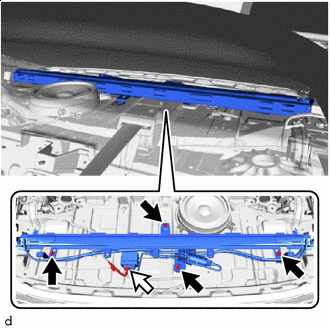

Bolt 
Connector Remove the 4 bolts and rear window sunshade assembly.
Note
When removing the rear window shade assembly, do not contact the rear window glass assembly.
-