FRONT AIR CONDITIONING UNIT REMOVAL
CAUTION / NOTICE / HINT
The necessary procedures (adjustment, calibration, initialization or registration) that must be performed after parts are removed, installed or replaced during the air conditioner unit assembly removal/installation are shown below.
| Replaced Part or Performed Procedure | Necessary Procedure | Effect/Inoperative Function when Necessary Procedure not Performed | Link |
|---|---|---|---|
| Disconnect cable from negative auxiliary battery terminal | Memorize steering angle neutral point | LKA/LDA system | |
| Pre-collision system | |||
| Parking assist monitor system | |||
| Steering sensor zero point calibration | Variable gear ratio steering system | ||
| Parts between the steering wheel and tires have been removed/installed, replaced or adjusted | Perform Actuator Angle Neutral Point Calibration and Initialization |
|
|
| Steering sensor (Including removal and installation) |
|
Parking assist monitor system | for Initialization: Click here for Calibration: Click here |
|
Initialize position control ECU | Front Power Seat Control System | |
|
Initialization servo motor | DTCs are output |
CAUTION:
-
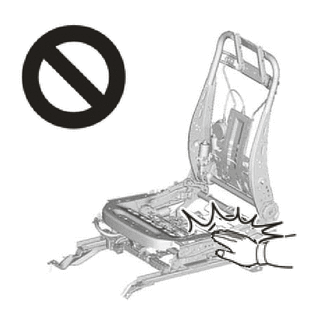
Wear protective gloves. Sharp areas on the parts may injure your hands.
-
There is risk of injury.
CAUTION:
-
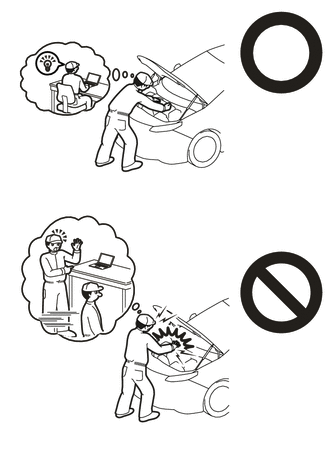
This vehicle has contains high voltage circuits standardized with orange colored wiring and connectors, so follow the instructions in this manual to perform the procedures correctly.
-
If the correct procedures are not followed according to the instructions in this manual, there is a danger of electric shock from the high voltage circuits.
-
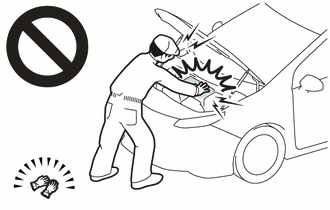
Be sure to wear insulating gloves when working on high voltage wiring or components.
-
If work is performed without wearing insulating gloves, there is a danger of electric shock.
CAUTION:
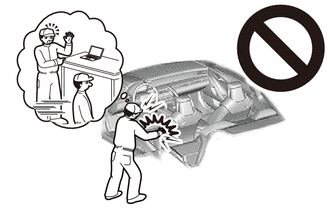
Some of these service operations affect the SRS airbag system. Read the precautionary notices concerning the SRS airbag system before servicing.
Tech Tips
When removing the air conditioner radiator damper servo sub-assembly, reinstallation is easier to perform if the following conditions are set before disconnecting the negative (-) auxiliary battery terminal.
| Item | Condition |
|---|---|
| Air vent damper position | Face |
| Set temperature | Max cool |
Tech Tips
-
Use the same procedure for RHD and LHD vehicles.
-
The procedure listed below is for LHD vehicles.
PROCEDURE
-
PRECAUTION
Note
Make sure to perform initialization after replacing the air conditioning radiator damper servo sub-assembly. If initialization is not performed, the air conditioning unit assembly will not perform properly as the air conditioning amplifier assembly will not be able to recognize the position of the air conditioning radiator damper sub-assembly.
-
CHECK FOR DTC
CAUTION:
-
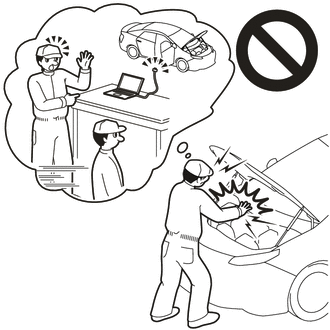
Confirm that DTC P0AA649 (Hybrid/EV Battery Voltage System Isolation Internal Electronic Failure), P1C7C49 (Hybrid/EV Battery Voltage System Isolation (A/C Area) Internal Electronic Failure), P1C7D49 (Hybrid/EV Battery Voltage System Isolation (Hybrid/EV Battery Area) Internal Electronic Failure), P1C7E49 (Hybrid/EV Battery Voltage System Isolation (Transaxle Area) Internal Electronic Failure) or P1C7F49 (Hybrid/EV Battery Voltage System Isolation (Direct Current Area) Internal Electronic Failure) is not output before removing or installing the HV battery assembly. If this DTC is output, perform troubleshooting for this DTC first.
-
To reduce the risk of electric shock, do not perform troubleshooting before checking for DTCs.
-
-
REMOVE V-BANK COVER SUB-ASSEMBLY
-
RECOVER REFRIGERANT FROM REFRIGERATION SYSTEM
for HFC-134a(R134a):
for HFO-1234yf(R1234yf):
-
REMOVE NO. 1 ENGINE UNDER COVER ASSEMBLY
-
REMOVE NO. 2 ENGINE UNDER COVER ASSEMBLY
-
DRAIN ENGINE COOLANT
-
REMOVE NO. 2 FRONT WIPER MOTOR AND BRACKET ASSEMBLY
-
ALIGN FRONT WHEELS FACING STRAIGHT AHEAD
-
REMOVE FRONT SEAT ASSEMBLY LH
-
REMOVE FRONT SEAT ASSEMBLY RH
Tech Tips
Use the same procedure as for the front seat assembly LH.
-
PRECAUTION
Note
After turning the power switch off, waiting time may be required before disconnecting the cable from the negative (-) auxiliary battery terminal. Therefore, make sure to read the disconnecting the cable from the negative (-) auxiliary battery terminal notices before proceeding with work.
-
REMOVE NO. 2 DECK BOARD
-
DISCONNECT CABLE FROM NEGATIVE AUXILIARY BATTERY TERMINAL
CAUTION:
-
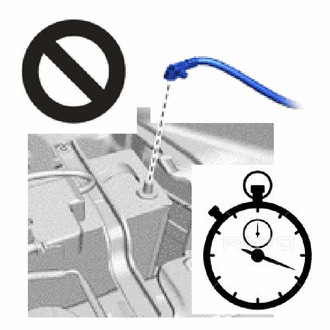
Wait at least 90 seconds after disconnecting the cable from the negative (-) auxiliary battery terminal to disable the SRS system.
-
If the airbag deploys for any reason, it may cause a serious accident.
Note
It is necessary to remove the shift control ECU while no power is being supplied from the sub-battery. Therefore, perform the following procedures.
-
Turn the power switch off.
-
Check that the ODO meter display has turned off.
Tech Tips
The ODO meter continues to display for 30 seconds after turning off. Therefore, allow sufficient time for the shift control ECU to enter sleep mode and for the sub-battery power supply to end. In addition to monitoring the sub-battery voltage directly, the only other method for checking on the vehicle is to use the ODO meter display.
-
Check that the voltage between the terminals of the sub-battery assembly with control is 0 V.
-
Disconnect the cable from the negative (-) auxiliary battery terminal.
-
-
REMOVE STEERING COLUMN ASSEMBLY
-
REMOVE INSTRUMENT PANEL SAFETY PAD SUB-ASSEMBLY
-
REMOVE HEADUP DISPLAY (w/ Headup Display)
-
REMOVE SERVICE PLUG GRIP
-
CHECK TERMINAL VOLTAGE
-
Remove the connector cover assembly.
-
Check the terminal voltage.
-
Install the connector cover assembly.
-
-
REMOVE INVERTER TERMINAL COVER
-
DISCONNECT GENERATOR CABLE
-
DISCONNECT MOTOR CABLE
-
REMOVE INVERTER MOTOR CABLE BRACKET ASSEMBLY (for LHD)
CAUTION:
Wear insulated gloves.
-
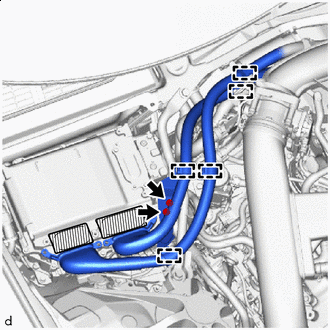

Tape (Non-residue Type) or equivalent Detach the clamp.
-
Remove the 2 bolts and inverter motor cable bracket assembly from the inverter with converter assembly.
-
-
REMOVE FENDER APRON BRACE SUB-ASSEMBLY RH
-
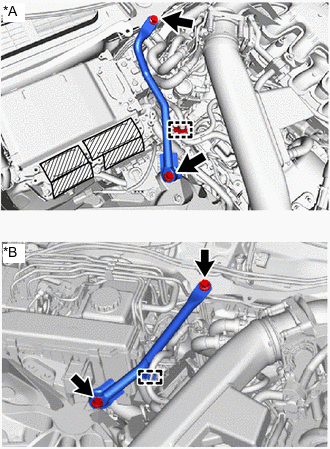
*A for LHD *B for RHD Tape (Non-residue Type) or equivalent Detach the clamp.
-
Remove the 2 bolts and fender apron brace sub-assembly RH.
-
-
REMOVE HEATER WATER HOSE OUTLET
-
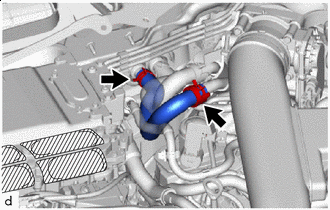
Tape (Non-residue Type) or equivalent Using pliers, grip the claws of the 2 hose clips and slide the hose clip to remove the heater water hose outlet.
Note
-
Do not apply excessive force to the heater water hose outlet.
-
Prepare a drain pan or cloth in case the coolant leaks.
-
-
-
REMOVE HEATER WATER HOSE INLET
-
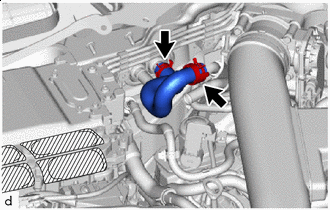
Tape (Non-residue Type) or equivalent Using pliers, grip the claws of the 2 hose clips and slide the hose clip to remove the heater water hose inlet.
Note
-
Do not apply excessive force to the heater water hose inlet.
-
Prepare a drain pan or cloth in case the coolant leaks.
-
-
-
REMOVE HEATER PIPE GROMMET
-
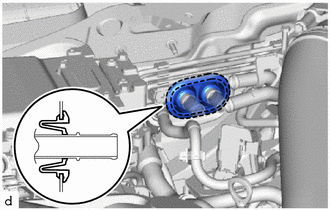
Remove the heater pipe grommet.
-
-
DISCONNECT SUCTION TUBE SUB-ASSEMBLY B
-
for RHD:
-
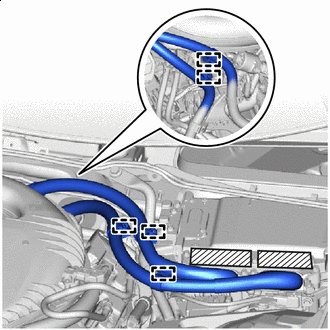
Tape (Non-residue Type) or equivalent Detach the clamp and disconnect the generator cable and motor cable.
-
-
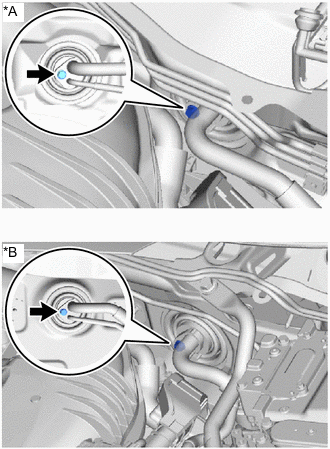
*A for LHD *B for RHD Remove the bolt.
-
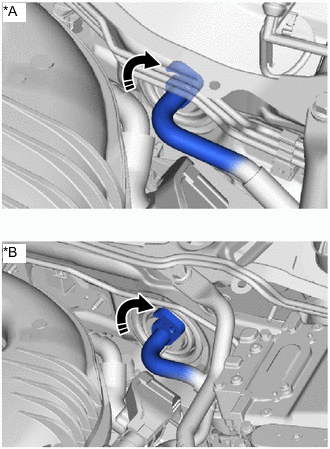
*A for LHD *B for RHD 
Rotate in this Direction Rotate the hook-type connector in the direction of the arrow shown in the illustration and disconnect the suction tube sub-assembly B.
Note
Do not apply excessive force to the suction tube sub-assembly B.
-
Remove the O-ring from the suction tube sub-assembly B.
Note
Seal the openings of the disconnected parts using vinyl tape to prevent the entry of moisture and foreign matter.
-
-
DISCONNECT COOLER REFRIGERANT LIQUID PIPE A
-
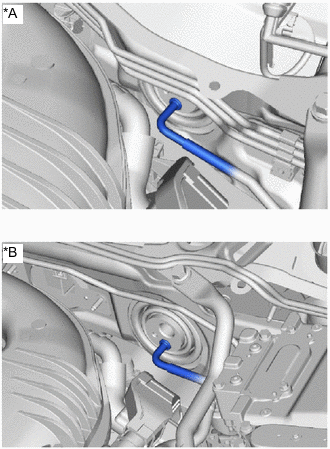
*A for LHD *B for RHD Disconnect the cooler refrigerant liquid pipe A.
Note
Do not apply excessive force to the cooler refrigerant liquid pipe A.
-
Remove the O-ring from the cooler refrigerant liquid pipe A.
Note
Seal the openings of the disconnected parts using vinyl tape to prevent the entry of moisture and foreign matter.
-
-
REMOVE COOLER PIPE GROMMET
-
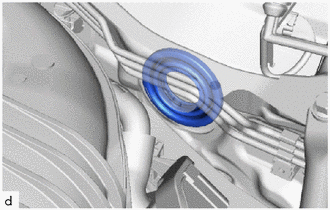
Remove the cooler pipe grommet.
-
-
REMOVE ACCELERATOR PEDAL
-
REMOVE NO. 1 SIDE TRIM BRACKET
-
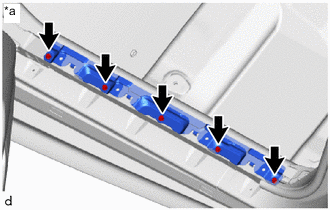
*a Left Side Remove the 5 bolts and No. 1 side trim bracket.
Tech Tips
Use the same procedure for the right side.
-
-
REMOVE FRONT FLOOR CARPET ASSEMBLY LH
-
Using a clip remover, remove the 3 clips.
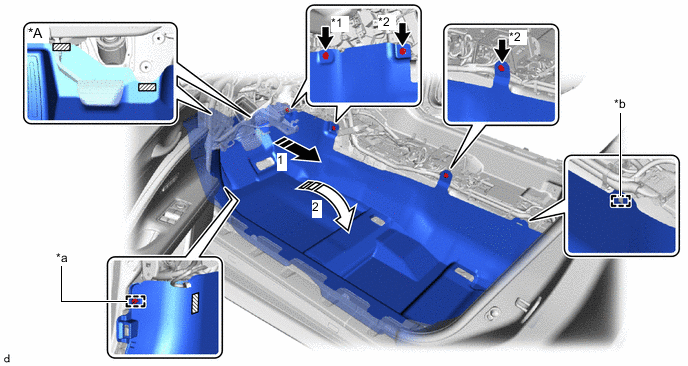
*A for LHD - - *1 Black Clip *2 Light Gray Clip *a Clamp *b Guide Pull Out 
Fold Up Fastener - - -
Detach the guide.
-
for LHD:
-
Detach the clamp and each fastener.
-
Remove part of the front floor carpet assembly LH enough that the instrument wire and drain cooler hose (for driver's side) can be removed in the order shown in the illustration.
-
-
for RHD:
-
Detach the clamp and fastener.
-
Remove part of the front floor carpet assembly LH enough that the instrument wire and drain cooler hose (for front passenger side) can be removed in the order shown in the illustration.
-
-
-
REMOVE FRONT FLOOR CARPET ASSEMBLY RH
-
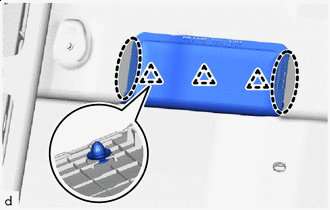

Place Hands Here Place your hand at the position shown in the illustration and lift up the carpet to detach the clips and remove the front floor caution plate cover.
-
Using a clip remover, remove the 3 clips.
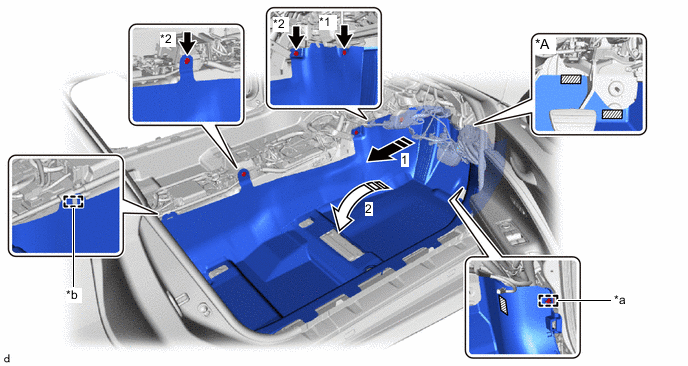
*A for RHD - - *1 Black Clip *2 Light Gray Clip *a Clamp *b Guide Pull Out Fold Up Fastener - - -
Detach the guide.
-
for LHD:
-
Detach the clamp and fastener.
-
Remove part of the front floor carpet assembly RH enough that the instrument wire and drain cooler hose (for front passenger side) can be removed in the order shown in the illustration.
-
-
for RHD:
-
Detach the clamp and each fastener.
-
Remove part of the front floor carpet assembly RH enough that the instrument wire and drain cooler hose (for driver's side) can be removed in the order shown in the illustration.
-
-
-
REMOVE NO. 2 AIR DUCT (for LHD)
-
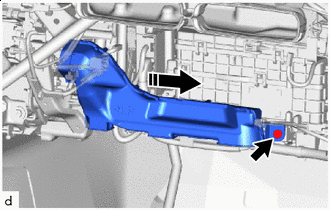
Remove in this Direction Using a clip remover, remove the clip and the No. 2 air duct.
-
-
REMOVE NO. 1 AIR DUCT (for RHD)
-
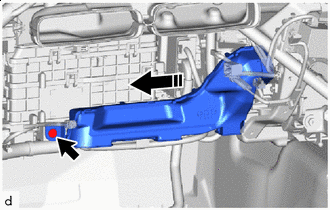
Remove in this Direction Using a clip remover, remove the clip and the No. 1 air duct.
-
-
REMOVE TRANSMISSION FLOOR SHIFT ASSEMBLY (for LHD)
-
REMOVE INSTRUMENT PANEL WIRE (for LHD)
-
Remove the 3 bolts and disconnect the 3 ground wires.
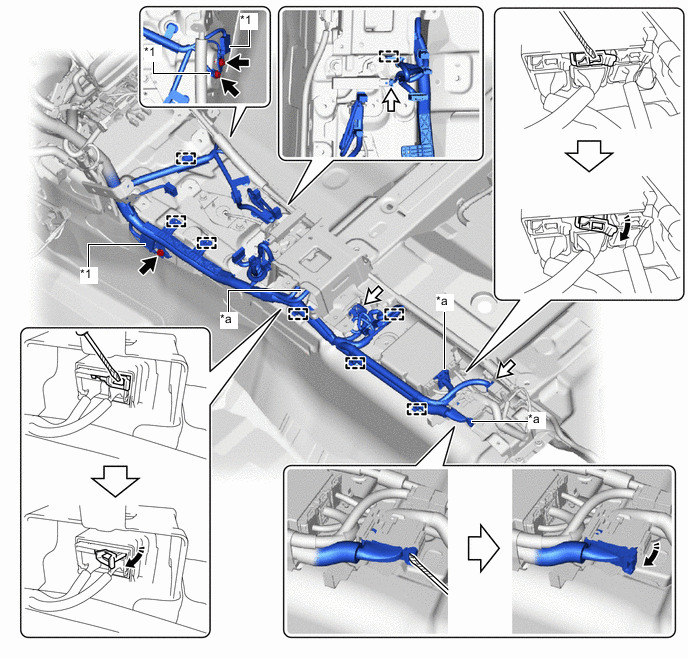
*1 Ground Wire - - *a Lever Connector - - 
Bolt 
Connector Release in this Direction Protective Tape -
Using a thin-bladed screwdriver with its tip wrapped with protective tape, disconnect the 3 lever connectors.
-
Disconnect the 3 connectors and detach the clamp.
-
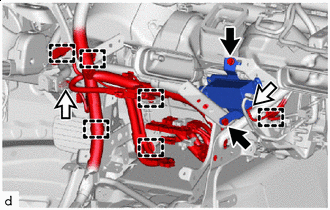
Bolt Connector Disconnect the connector from the ion generator with bracket.
-
Remove the 2 bolts and ion generator with bracket.
-
Disconnect the connector and detach the clamp.
-
Remove the 2 bolts and disconnect the 2 ground wires.
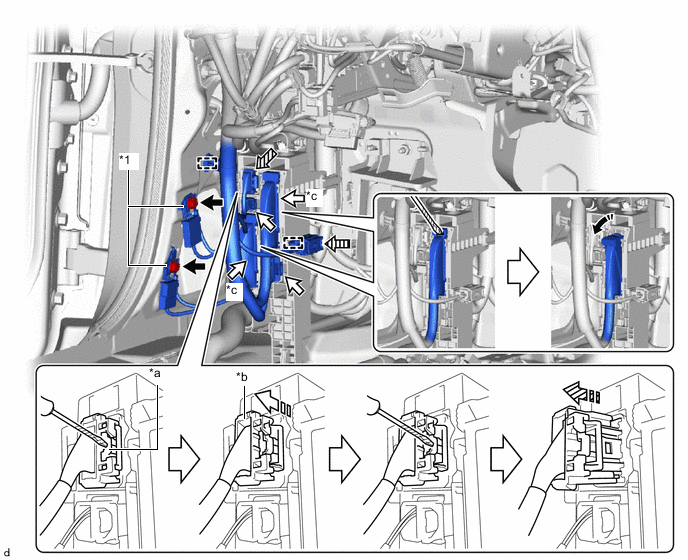
*1 Ground Wire - - *a Lock *b CPA *c Lever Connector - - Bolt Connector 
Yellow Connector (A) 
Yellow Connector (B) Release in this Direction Pull out lock 
Pull Out Protective Tape -
Using a thin-bladed screwdriver with its tip wrapped with protective tape, disconnect the yellow connector (A) as shown in the illustration.
-
Push down the lock and slide the CPA to release the lock.
Note
Do not pull while holding the wire harness.
-
With the lock pushed down again, slide the CPA to disconnect the yellow connector (A).
-
After disconnecting the yellow connector (A), check that the CPA is positioned further back than the housing.
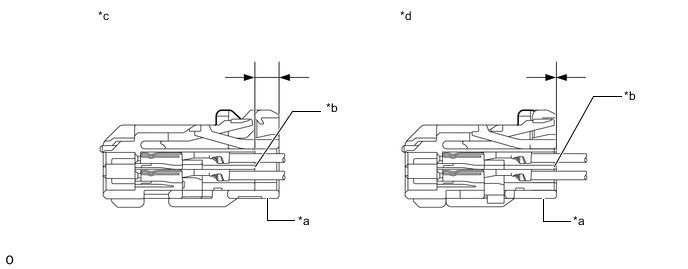
*a CPA *b Housing *c Correct *d Incorrect
-
-
Disconnect the yellow connector (B).
-
Push the slider to detach the primary lock. Continue pushing and slide the slider to detach the secondary lock and then disconnect the yellow connector (B).
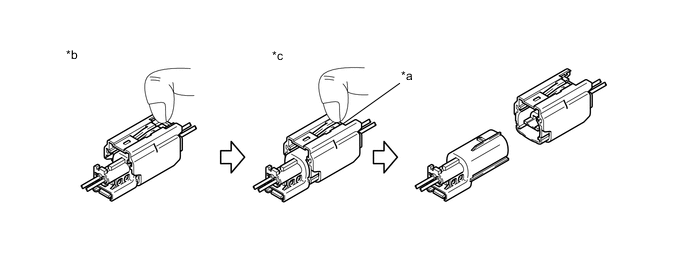
*a Slider *b Push *c Slide - -
-
-
Using a thin-bladed screwdriver with its tip wrapped with protective tape, disconnect the 2 lever connectors.
-
Disconnect the 2 connectors and detach the clamp.
-
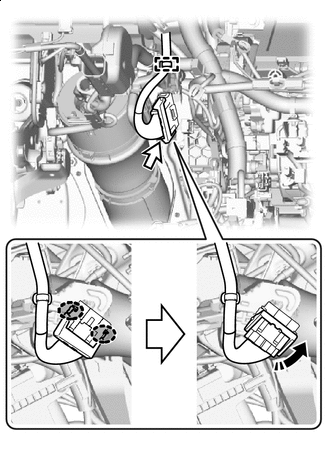
Pinch Release in this Direction w/ VGRS:
-
Detach the clamp.
-
Disconnect the connector.
-
-
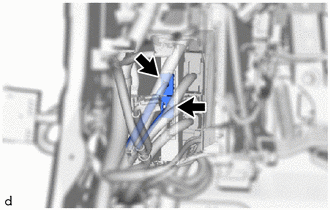
Disconnect the 2 connectors.
-
Remove the 2 bolts and disconnect the 2 ground wires.
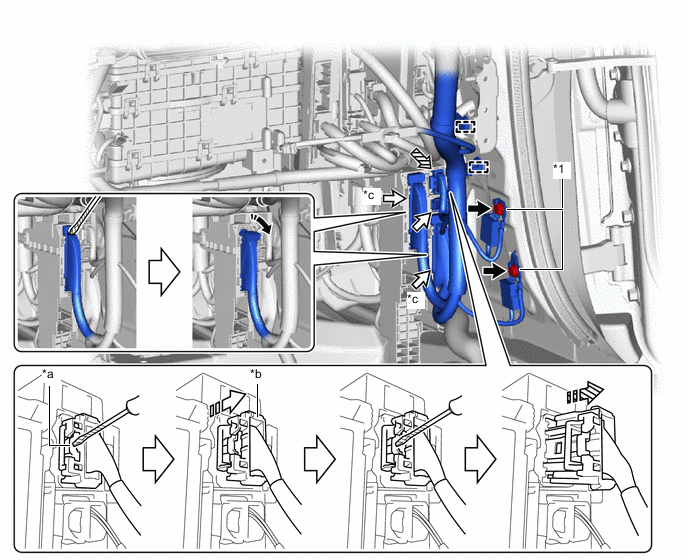
*1 Ground Wire - - *a Lock *b CPA *c Lever Connector - - Bolt Connector Yellow Connector Release in this Direction Pull out lock Pull Out Protective Tape - - -
Using a thin-bladed screwdriver with its tip wrapped with protective tape, disconnect the yellow connector as shown in the illustration.
-
Push down the lock and slide the CPA to release the lock.
Note
Do not pull while holding the wire harness.
-
With the lock pushed down again, slide the CPA to disconnect the yellow connector.
-
After disconnecting the yellow connector, check that the CPA is positioned further back than the housing.
*a CPA *b Housing *c Correct *d Incorrect
-
-
Using a thin-bladed screwdriver with its tip wrapped with protective tape, disconnect the 2 lever connectors.
-
Disconnect the connector and detach the clamp.
-
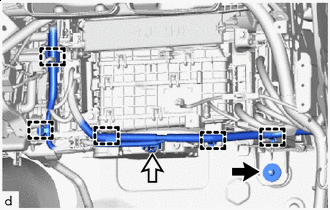
Nut Connector Remove the nut.
-
Disconnect the connector and detach the clamp.
-
-
REMOVE INSTRUMENT PANEL WIRE (for RHD)
-
Remove the bolt (A).
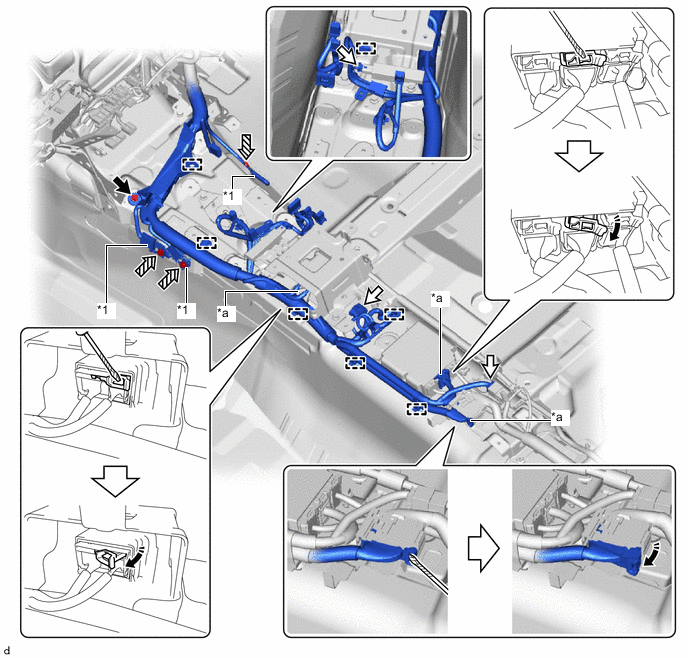
*a Ground Wire - - *1 Lever Connector - - Bolt (A) Connector Bolt (B) Release in this Direction Protective Tape - - -
Remove the 3 bolts (B) and disconnect the 3 ground wires.
-
Using a thin-bladed screwdriver with its tip wrapped with protective tape, disconnect the 3 lever connectors.
-
Disconnect the 3 connectors and detach the clamp.
-
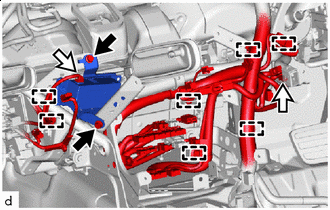
Bolt Connector Remove the 2 bolts and ion generator with bracket from the No. 2 instrument panel brace sub-assembly.
-
Disconnect the connector and detach the clamp from the ion generator with bracket.
-
Disconnect the connector and detach the clamp.
-
Remove the 2 bolts and disconnect the 2 ground wires.
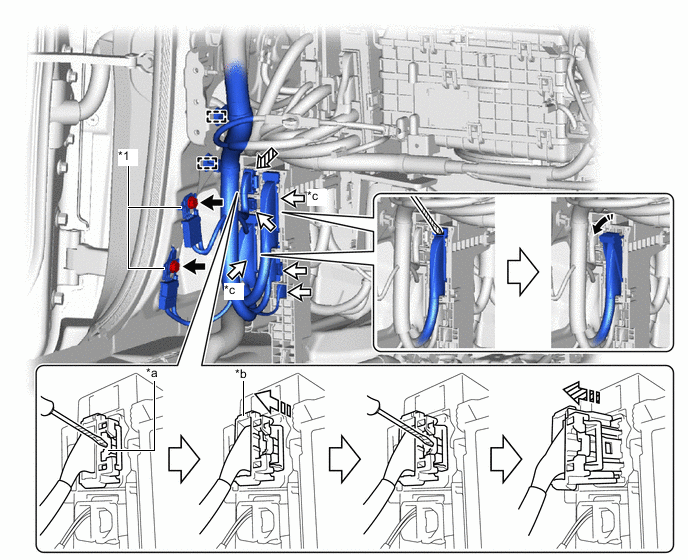
*1 Ground Wire - - *a Lock *b CPA *c Lever Connector - - Bolt Connector Yellow Connector Release in this Direction Pull out lock Pull Out Protective Tape - - -
Using a thin-bladed screwdriver with its tip wrapped with protective tape, disconnect the yellow connector as shown in the illustration.
-
Push down the lock and slide the CPA to release the lock.
Note
Do not pull while holding the wire harness.
-
With the lock pushed down again, slide the CPA to disconnect the yellow connector.
-
After disconnecting the yellow connector, check that the CPA is positioned further back than the housing.
*a CPA *b Housing *c Correct *d Incorrect
-
-
Using a thin-bladed screwdriver with its tip wrapped with protective tape, disconnect the 2 lever connectors.
-
Disconnect the 3 connectors and detach the clamp.
-
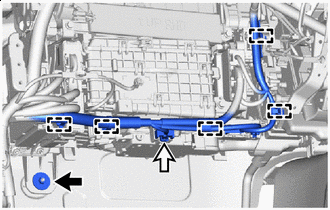
Nut Connector Remove the nut.
-
Disconnect the connector and detach the clamp.
-
Remove the 2 bolts and disconnect the 2 ground wires.
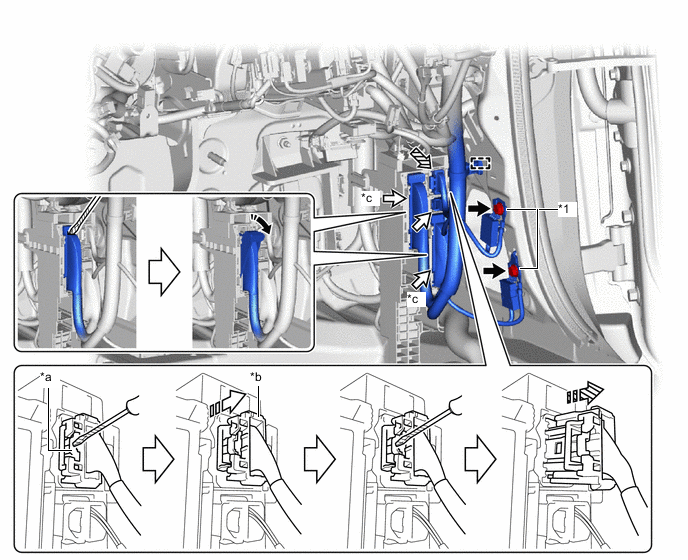
*1 Ground Wire - - *a Lock *b CPA *c Lever Connector - - Bolt Connector Yellow Connector Release in this Direction Pull out lock Pull Out Protective Tape - - -
Using a thin-bladed screwdriver with its tip wrapped with protective tape, disconnect the yellow connector as shown in the illustration.
-
Push down the lock and slide the CPA to release the lock.
Note
Do not pull while holding the wire harness.
-
With the lock pushed down again, slide the CPA to disconnect the yellow connector.
-
After disconnecting the yellow connector, check that the CPA is positioned further back than the housing.
*a CPA *b Housing *c Correct *d Incorrect
-
-
Using a thin-bladed screwdriver with its tip wrapped with protective tape, disconnect the 2 lever connectors.
-
Disconnect the connector and detach the clamp.
-
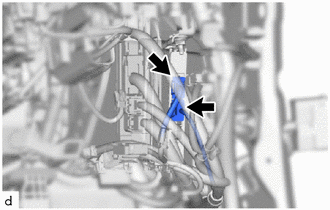
Disconnect the 2 connectors.
-
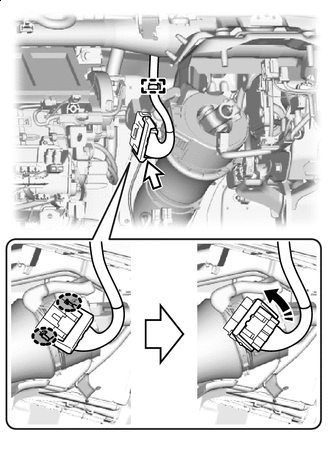
Pinch Release in this Direction w/ VGRS:
-
Detach the clamp.
-
Disconnect the connector.
-
-
-
REMOVE NO. 2 SEMICONDUCTOR POWER INTEGRATION ECU (w/ PTC Heater)
-
REMOVE SEMICONDUCTOR POWER INTEGRATION ECU (w/o PTC Heater)
Tech Tips
Use the same procedure as for the No. 2 semiconductor power integration ECU.
-
REMOVE SHIFT CONTROL ECU
-
REMOVE HYBRID VEHICLE CONTROL ECU ASSEMBLY
-
REMOVE FRONT STEERING CONTROL ECU (w/ VGRS)
-
REMOVE PASSENGER SIDE JUNCTION BLOCK ASSEMBLY WITH NETWORK GATEWAY ECU
-
REMOVE WIRING HARNESS CLAMP BRACKET
-
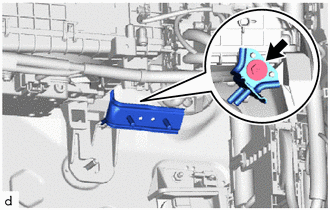
Remove the screw and wiring harness clamp bracket.
-
-
REMOVE DRIVER SIDE JUNCTION BLOCK ASSEMBLY WITH MAIN BODY ECU
-
REMOVE DRIVING SUPPORT ECU ASSEMBLY
-
REMOVE NO. 3 HEATER TO REGISTER DUCT SUB-ASSEMBLY
-
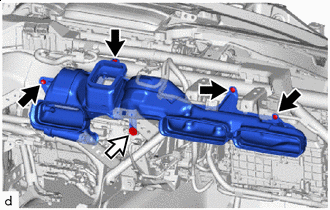
Clip Screw Using a clip remover, remove the 4 clips.
-
Remove the screw and No. 3 heater to register duct sub-assembly.
-
-
REMOVE NO. 2 INSTRUMENT PANEL BRACE SUB-ASSEMBLY
-
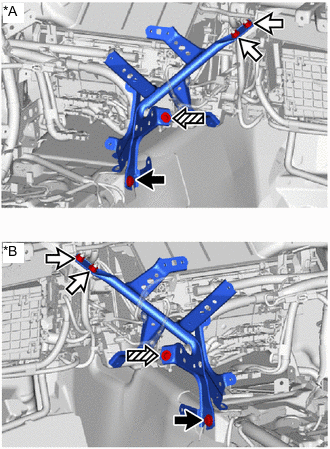
*A for LHD *B for RHD Bolt Nut Screw Remove the 2 nuts, bolt, screw and No. 2 instrument panel brace sub-assembly.
-
-
REMOVE NO. 1 INSTRUMENT PANEL BRACE SUB-ASSEMBLY
-
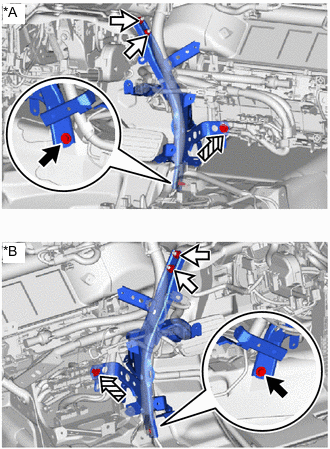
*A for LHD *B for RHD Bolt Nut Screw Remove the 2 nuts, bolt, screw and No. 1 instrument panel brace sub-assembly.
-
-
REMOVE NO. 5 HEATER TO REGISTER DUCT
-
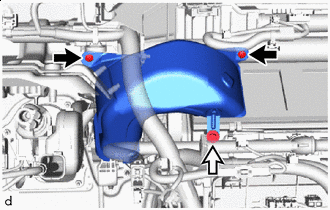
Clip Screw Using a clip remover, remove the 2 clips.
-
Remove the screw and No. 5 heater to register duct.
-
-
DISCONNECT DRAIN COOLER HOSE (for Driver's Side) (for LHD)
-
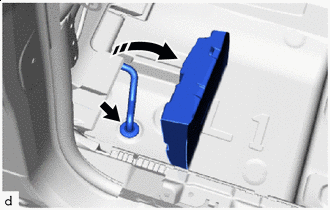
Turn up in this Direction Fold back part of the No. 2 floor mat and pull out the drain cooler hose (for driver's side) from the cooler unit drain hose grommet as shown in the illustration.
-
Close part of the No. 2 floor mat.
-
-
DISCONNECT DRAIN COOLER HOSE (for Driver's Side) (for RHD)
-
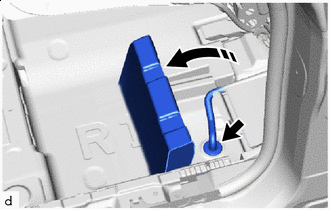
Turn up in this Direction Fold back part of the No. 1 floor mat and pull out the drain cooler hose (for driver's side) from the cooler unit drain hose grommet as shown in the illustration.
-
Close part of the No. 1 floor mat.
-
-
DISCONNECT DRAIN COOLER HOSE (for Front Passenger Side) (for LHD)
-
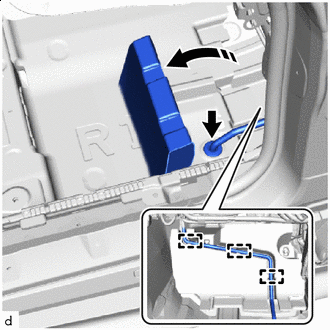
Turn up in this Direction Fold back part of the No. 1 floor mat and pull out the drain cooler hose (for front passenger side) from the cooler unit drain hose grommet as shown in the illustration.
-
Close part of the No. 1 floor mat.
-
Detach the guide from the drain cooler hose (for front passenger side).
-
-
DISCONNECT DRAIN COOLER HOSE (for Front Passenger Side) (for RHD)
-
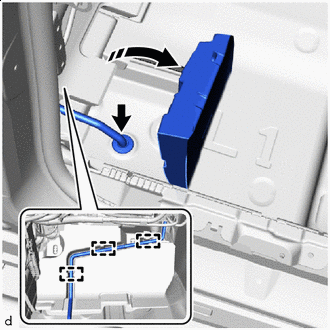
Turn up in this Direction Fold back part of the No. 2 floor mat and pull out the drain cooler hose (for front passenger side) from the cooler unit drain hose grommet as shown in the illustration.
-
Close part of the No. 2 floor mat.
-
Detach the guide from the drain cooler hose (for front passenger side).
-
-
REMOVE INSTRUMENT PANEL REINFORCEMENT ASSEMBLY WITH AIR CONDITIONING UNIT ASSEMBLY
Note
-
Be sure to support the air conditioning unit assembly when removing it because failure to do so may cause the bracket of the air conditioning unit assembly to break.
-
When disassembling the air conditioning unit assembly, eliminate static electricity by touching the vehicle body to prevent the components from being damaged.
-
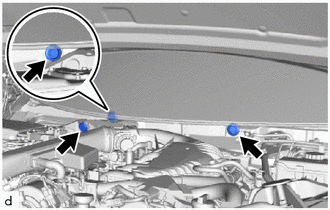
Remove the 3 hole plugs.
-
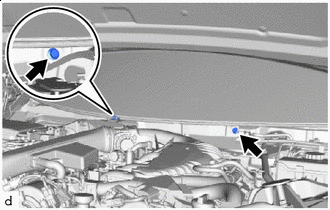
Bolt (A) Using a universal socket wrench 12 mm, remove the 2 bolts (A).
-
Remove the 4 bolts (B) and bolt (D).
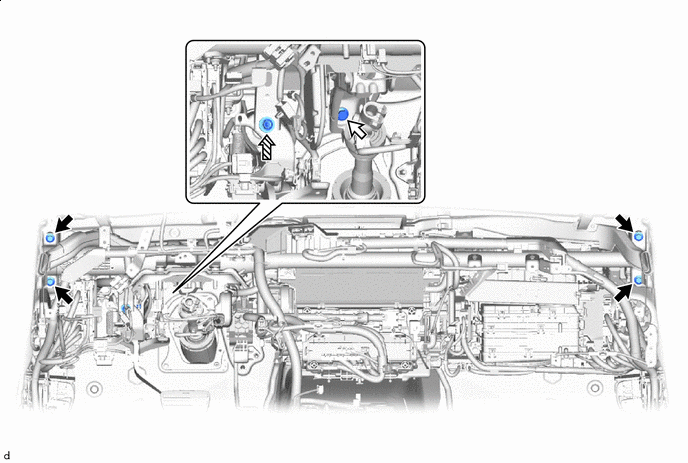
Bolt (B) Bolt (C) Bolt (D) - - -
Using a universal socket wrench 12 mm, remove the bolt (C).
-
Remove the instrument panel reinforcement assembly with air conditioning unit assembly together with the instrument panel wire from the guide as shown in the illustration.
Note
Be careful not to damage the internal components of the instrument panel reinforcement assembly and air conditioning unit assembly and instrument panel wire on the glass etc. Only perform removal after first taking the appropriate actions.
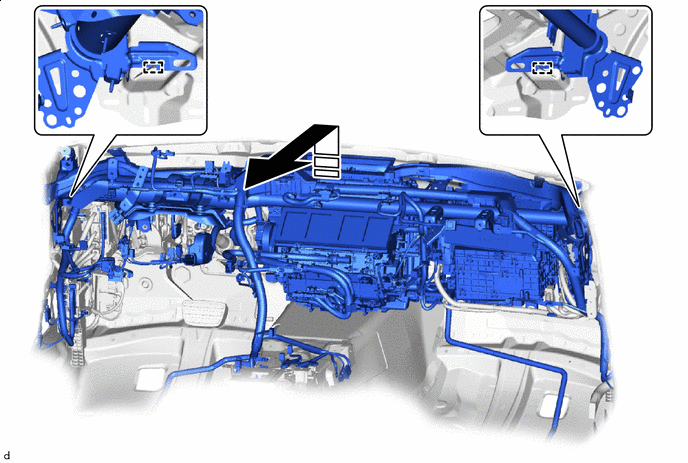
After detaching from the lift up guide, pull it towards you to remove it from the vehicle - -
-
-
REMOVE AIR CONDITIONING AMPLIFIER ASSEMBLY
-
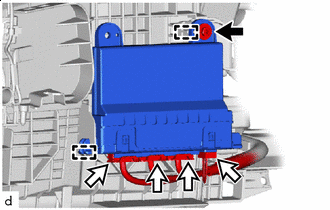
Screw Connector Disconnect 4 connectors.
-
Remove the screw.
-
Detach the guide to remove the air conditioning amplifier assembly.
-
-
REMOVE NO. 1 SIDE DEFROSTER NOZZLE DUCT
-
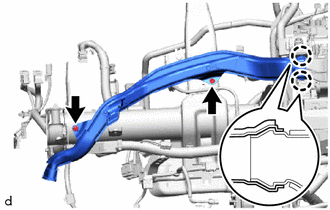
Using a clip remover, remove the 2 clips.
-
Detach the claw and remove the No. 1 side defroster nozzle duct.
-
-
REMOVE NO. 2 SIDE DEFROSTER NOZZLE DUCT
-
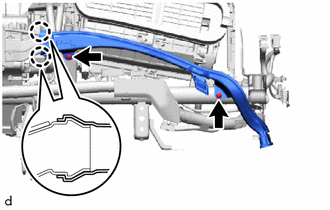
Using a clip remover, remove the 2 clips.
-
Detach the claw and remove the No. 2 side defroster nozzle duct.
-
-
REMOVE LOWER DEFROSTER NOZZLE ASSEMBLY
-
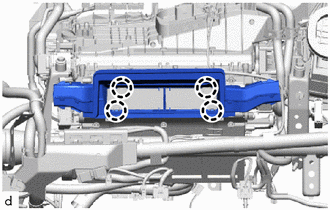
Detach the claw and remove the lower defroster nozzle assembly.
-
-
REMOVE INSTRUMENT PANEL REINFORCEMENT ASSEMBLY
-
Disconnect the 2 connectors and detach the clamp.
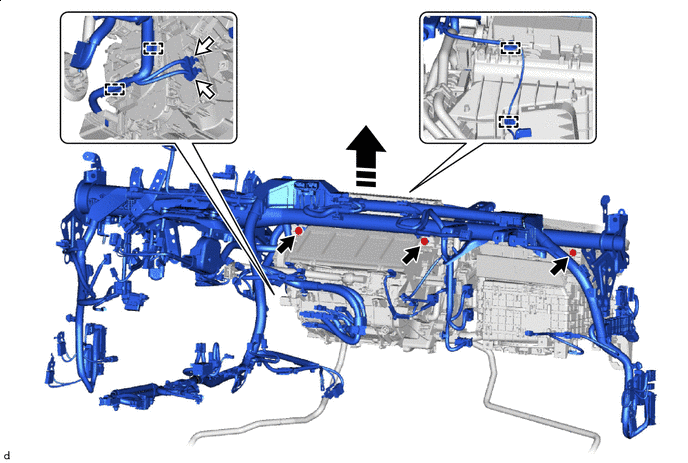
Lift Straight Up - - -
Remove the 3 bolts.
-
Remove the instrument panel reinforcement assembly together with the instrument panel wire.
-
-
REMOVE AIR CONDITIONER UNIT ASSEMBLY