INSTRUMENT PANEL SAFETY PAD REMOVAL
PROCEDURE
-
PRECAUTION
Note
After turning the power switch off, waiting time may be required before disconnecting the cable from the negative (-) auxiliary battery terminal. Therefore, make sure to read the disconnecting the cable from the negative(-) auxiliary battery terminal notices before proceeding with work.
-
ALIGN FRONT WHEELS FACING STRAIGHT AHEAD
-
CHANGE POWER TILT AND POWER TELESCOPIC STEERING COLUMN SYSTEM SETTINGS (for Power Tilt and Power Telescopic Steering Column)
-
REMOVE BATTERY SERVICE HOLE COVER LH
-
DISCONNECT CABLE TO NEGATIVE AUXILIARY BATTERY TERMINAL
CAUTION:
Wait at least 90 seconds after disconnecting the cable from the negative (-) auxiliary battery terminal to disable the SRS system.
Note
When disconnecting the cable, some systems need to be initialized after the cable is reconnected.
-
REMOVE CONSOLE BOX ASSEMBLY
-
REMOVE FRONT DOOR SCUFF PLATE LH
-
REMOVE FRONT DOOR OPENING TRIM COVER LH
-
REMOVE INSTRUMENT SIDE PANEL LH
-
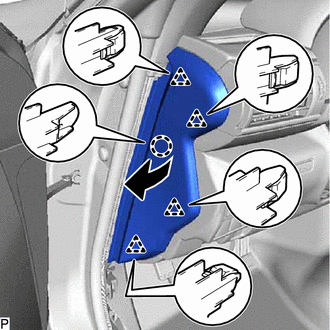
Disengage the claw and 4 clips as shown in the illustration.
-
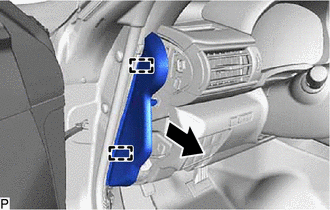
Disengage the 2 guides to remove the instrument side panel LH as shown in the illustration.
-
-
REMOVE NO. 1 INSTRUMENT PANEL UNDER COVER SUB-ASSEMBLY
-
for LHD:
-
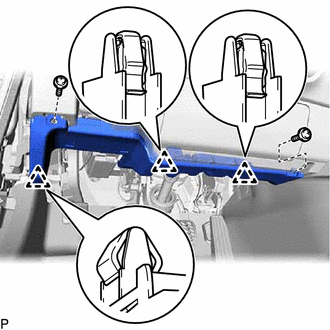
Remove the 2 screws <D>.
-
Disengage the 3 clips.
-
Disengage the connector clamp.
-
Disconnect each connector to remove the No. 1 instrument panel under cover sub-assembly.
-
-
for RHD:
-
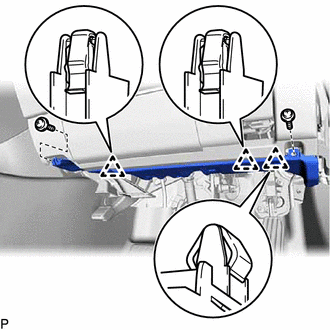
Remove the 2 screws <D>.
-
Disengage the 3 clips.
-
Disengage the connector clamp.
-
Disconnect each connector to remove the No. 1 instrument panel under cover sub-assembly.
-
-
-
DISCONNECT HOOD LOCK CONTROL LEVER SUB-ASSEMBLY
-
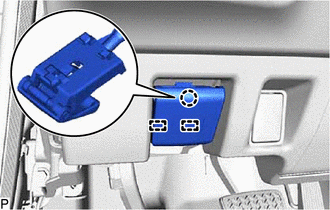
Disengage the claw and 2 guides to disconnect the hood lock control lever sub-assembly.
-
-
REMOVE LOWER INSTRUMENT PANEL FINISH PANEL SUB-ASSEMBLY
-
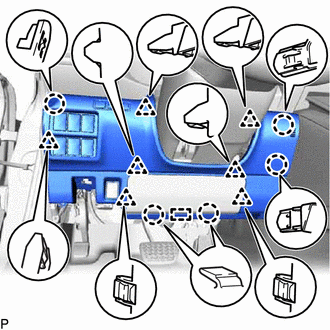
Disengage the 5 claws, 7 clips and guide.
-
Disconnect each connector to remove the lower instrument panel finish panel sub-assembly.
-
-
REMOVE SKID CONTROL BUZZER ASSEMBLY (w/ Pre-collision System)
-
REMOVE LOWER NO. 1 INSTRUMENT PANEL AIRBAG ASSEMBLY
-
REMOVE METER HOOD SUB-ASSEMBLY
-
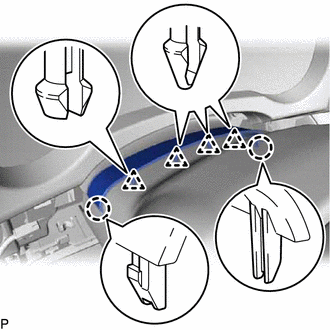
Disengage the 4 clips and 2 claws.
-
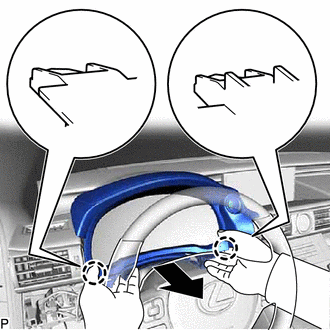
Disengage the 2 claws as shown in the illustration.
-
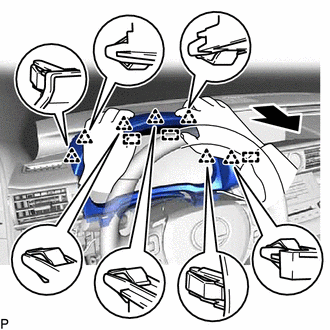
Disengage the 7 clips and 3 guides as shown in the illustration.
-
Disconnect the connector to remove the meter hood sub-assembly.
-
-
REMOVE COMBINATION METER ASSEMBLY
-
REMOVE STEREO COMPONENT EQUALIZER ASSEMBLY (for RHD)
-
REMOVE NO. 1 INSTRUMENT PANEL REGISTER ASSEMBLY
-
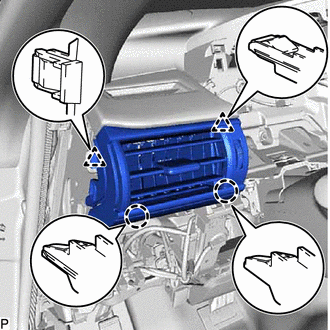
Disengage the 2 claws and 2 clips to remove the No. 1 instrument panel register assembly.
-
-
REMOVE HORN BUTTON ASSEMBLY
-
REMOVE STEERING WHEEL ASSEMBLY
w/ Lane Departure Alert System:
w/o Lane Departure Alert System:
-
REMOVE FRONT DOOR SCUFF PLATE RH
Tech Tips
Use the same procedure as for the LH side.
-
REMOVE FRONT DOOR OPENING TRIM COVER RH
Tech Tips
Use the same procedure as for the LH side.
-
REMOVE INSTRUMENT SIDE PANEL RH
-
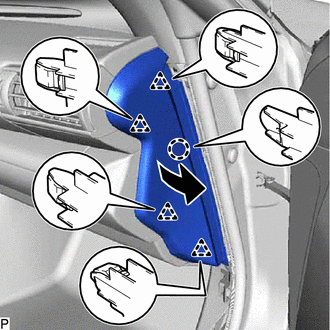
Disengage the claw and 4 clips as shown in the illustration.
-
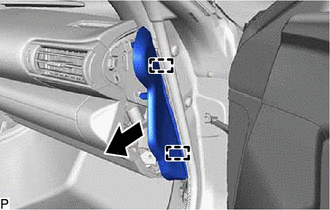
Disengage the 2 guides to remove the instrument side panel RH as shown in the illustration.
-
w/ Airbag Cut Off Switch:
-
Disconnect the connector.
-
-
-
REMOVE NO. 2 INSTRUMENT PANEL UNDER COVER SUB-ASSEMBLY
-
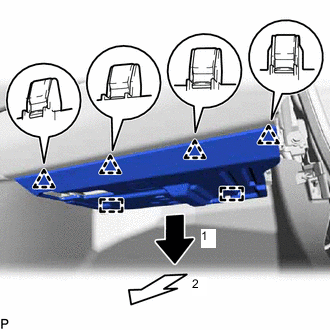
Disengage the 4 clips and 2 guides as indicated by the arrows, in the order shown in the illustration.
-
Disconnect each connector to remove the No. 2 instrument panel under cover sub-assembly.
-
-
REMOVE LOWER NO. 2 INSTRUMENT PANEL AIRBAG ASSEMBLY
-
REMOVE GLOVE COMPARTMENT DOOR ASSEMBLY
-
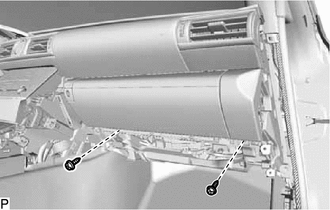
Remove the 2 screws <D>.
-
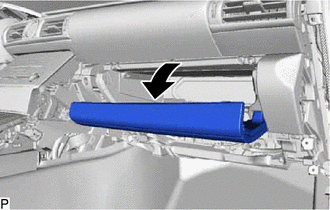
Open the glove compartment door assembly.
-
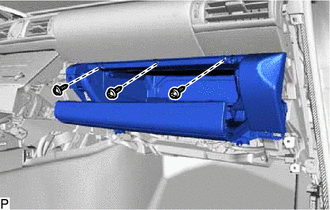
Remove the 3 screws <D>.
-
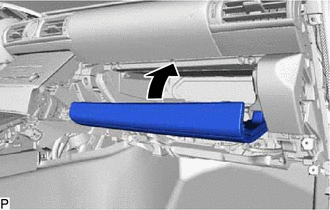
Close the glove compartment door assembly.
-
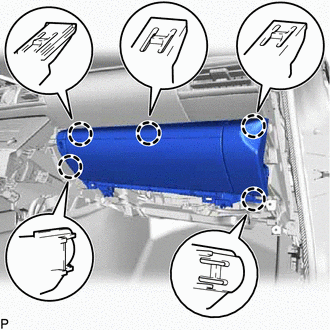
Disengage the 5 claws.
-
Disengage the connector clamp.
-
Disconnect each connector to remove the glove compartment door assembly.
-
-
REMOVE NO. 2 INSTRUMENT PANEL REGISTER ASSEMBLY
-
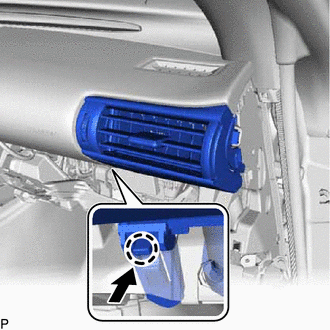
Disengage the claw as shown in the illustration.
-
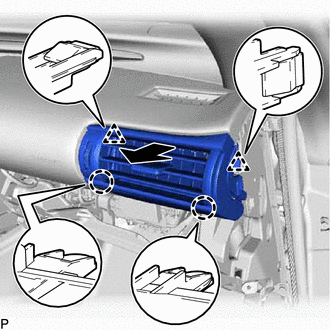
Disengage the 2 claws and 2 clips to remove the No. 2 instrument panel register assembly as shown in the illustration.
-
-
REMOVE RADIO RECEIVER ASSEMBLY WITH BRACKET
-
REMOVE AIR CONDITIONING CONTROL ASSEMBLY
-
REMOVE NO. 1 SPEAKER ASSEMBLY WITH BOX
-
REMOVE CENTER INSTRUMENT PANEL REGISTER ASSEMBLY
-
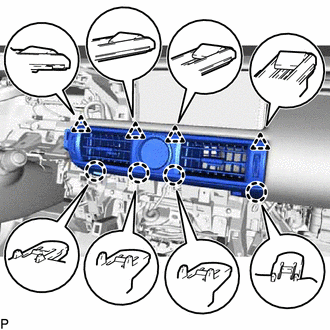
Disengage the 4 claws and 4 clips.
-
Disconnect the connector to remove the center instrument panel register assembly.
-
-
REMOVE INSTRUMENT CLUSTER FINISH PANEL SUB-ASSEMBLY
-
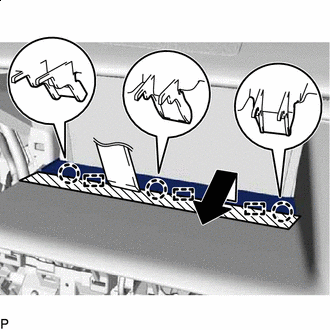

Protective Tape Apply protective tape to the area shown in the illustration.
-
Using a moulding remover, disengage the 3 claws as shown in the illustration.
-
Disengage the 3 guides to remove the instrument cluster finish panel sub-assembly as shown in the illustration.
-
-
REMOVE MULTI-DISPLAY ASSEMBLY WITH BRACKET
-
REMOVE FRONT PILLAR GARNISH LH
-
REMOVE NO. 1 INSTRUMENT PANEL SPEAKER PANEL SUB-ASSEMBLY
-
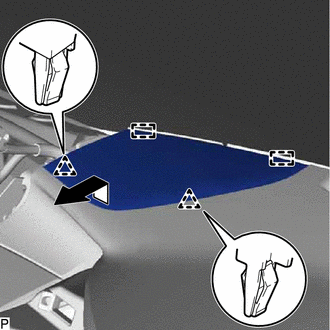
Disengage the 2 clips and 2 guides to remove the No. 1 instrument panel speaker panel sub-assembly as shown in the illustration.
-
-
REMOVE FRONT NO. 2 SPEAKER ASSEMBLY (for LH Side)
-
REMOVE INSTRUMENT CLUSTER FINISH PANEL ASSEMBLY
-
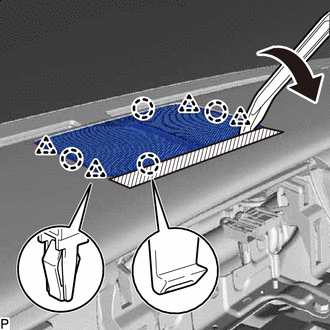
Protective Tape Apply protective tape to the area shown in the illustration.
-
Using a moulding remover, disengage the 4 claws and 4 clips to remove the instrument cluster finish panel assembly as shown in the illustration.
-
-
REMOVE FRONT NO. 3 SPEAKER ASSEMBLY
-
REMOVE FRONT PILLAR GARNISH RH
Tech Tips
Use the same procedure as for the LH side.
-
REMOVE NO. 2 INSTRUMENT PANEL SPEAKER PANEL SUB-ASSEMBLY
-
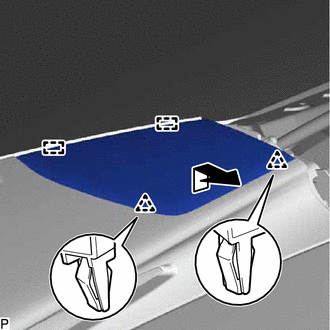
Disengage the 2 clips and 2 guides to remove the No. 2 instrument panel speaker panel sub-assembly as shown in the illustration.
-
-
REMOVE FRONT NO. 2 SPEAKER ASSEMBLY (for RH Side)
Tech Tips
Use the same procedure as for the LH side.
-
REMOVE INSTRUMENT CLUSTER FINISH PANEL ORNAMENT
-
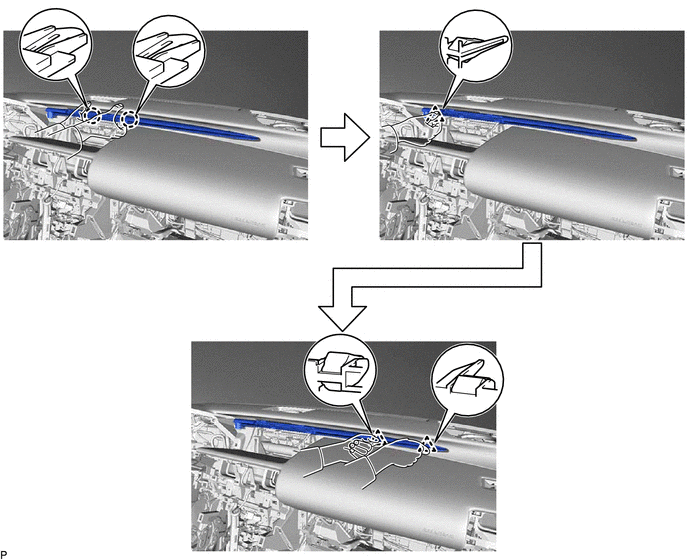
Disengage the 3 clips and 2 claws to remove the instrument cluster finish panel ornament as shown in the illustration.
-
-
DISCONNECT NO. 2 INSTRUMENT PANEL WIRE
-
REMOVE INSTRUMENT PANEL SAFETY PAD SUB-ASSEMBLY
-
Disengage the 2 claws to disconnect the room temperature sensor.
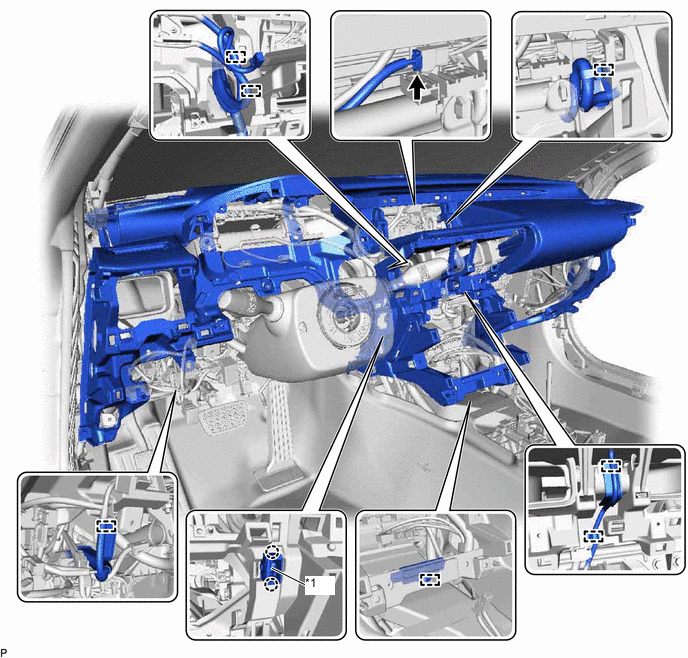
*1 Room Temperature Sensor - - -
Disconnect each connector.
-
Disengage each clamp.
-
Remove the 9 bolts <A>, 4 bolts <B>, 2 bolts <C> and nut <F>.
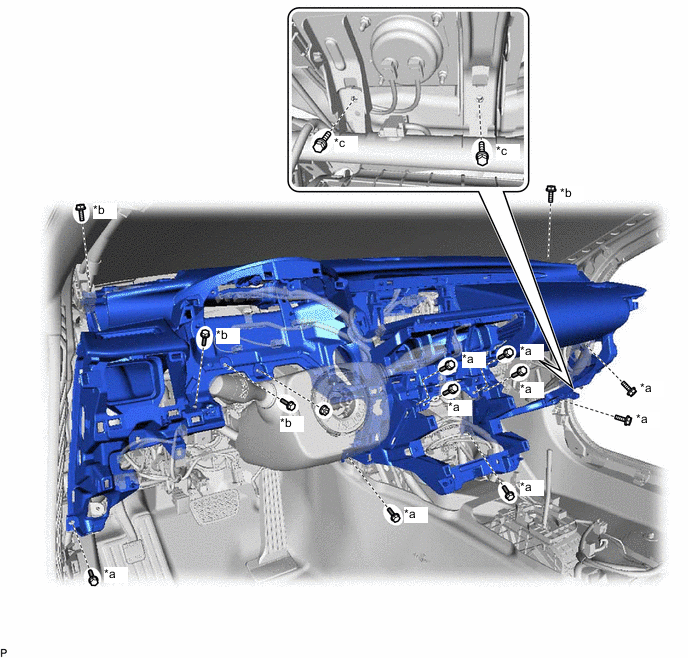
*a Bolt <A> *b Bolt <B> *c Bolt <C> - - -
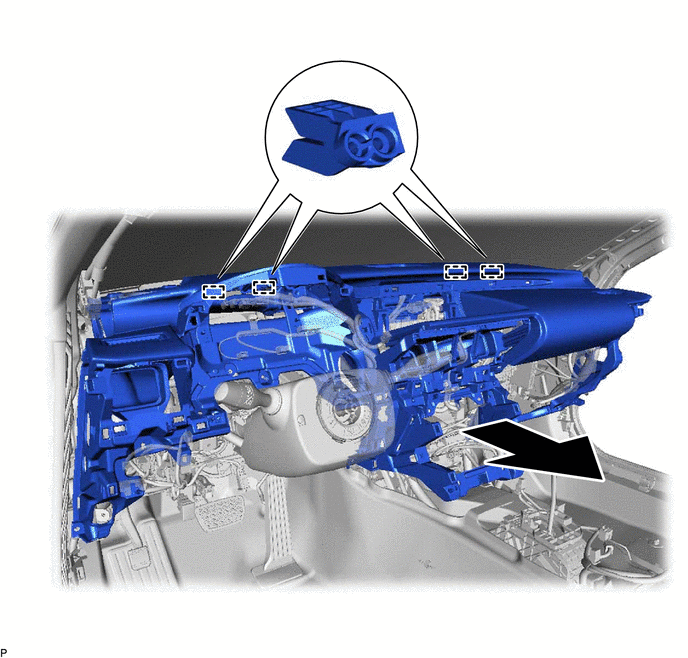
Disengage the 4 guides and remove the instrument panel safety pad sub-assembly as shown in the illustration.
Note
-
Do not damage the instrument panel safety pad sub-assembly.
-
Do not allow the wire harnesses to interfere with the surrounding parts.
-
-