NAVIGATION SYSTEM, Diagnostic DTC:B1574
| DTC Code | DTC Name |
|---|---|
| B1574 | GVIF Disconnected (from Park Assist/Monitoring ECU to EMV/MM Integrated Device) |
DESCRIPTION
| DTC No. | Detection Item | DTC Detection Condition | Trouble Area |
|---|---|---|---|
| B1574 | GVIF Disconnected (from Park Assist/Monitoring ECU to EMV/MM Integrated Device) | GVIF disconnected (from parking assist ECU to multi-display) |
|
WIRING DIAGRAM
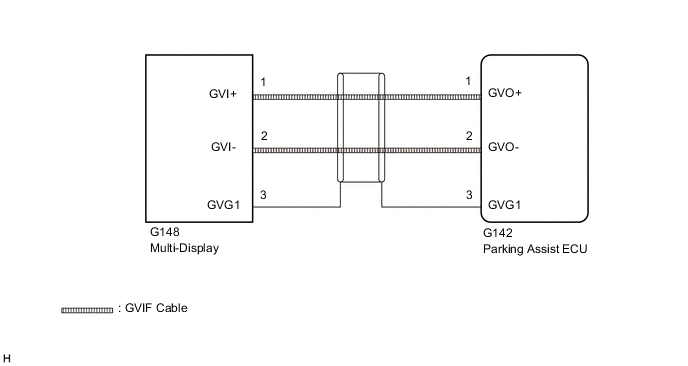
CAUTION / NOTICE / HINT
Tech Tips
Depending on the parts that are replaced during vehicle inspection or maintenance, performing initialization, registration or calibration may be needed. Refer to Precaution for Navigation System.
PROCEDURE
-
CHECK DTC
-
Clear the DTCs.
Body Electrical > Navigation System > Clear DTCs -
Turn the engine switch off.
-
Recheck for DTCs and check that no DTCs are output.
Body Electrical > Navigation System > Trouble CodesOK No DTCs are output. Result Proceed to OK NG
OK 
USE SIMULATION METHOD TO CHECK Click here
NG 
-
-
CHECK HARNESS AND CONNECTOR (MULTI-DISPLAY - PARKING ASSIST ECU)
-
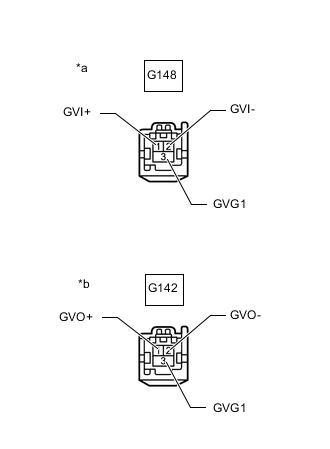
*a Front view of wire harness connector
(to Multi-display)
*b Front view of wire harness connector
(to Parking Assist ECU)
Disconnect the G148 multi-display connector.
-
Disconnect the G142 parking assist ECU connector.
-
Measure the resistance according to the value(s) in the table below.
Standard Resistance Tester Connection Condition Specified Condition G142-1 (GVO+) - G148-1 (GVI+) Always Below 1 Ω G142-2 (GVO-) - G148-2 (GVI-) Always Below 1 Ω G142-3 (GVG1) - G148-3 (GVG1) Always Below 1 Ω G142-1 (GVO+) - Body ground Always 10 kΩ or higher G142-2 (GVO-) - Body ground Always 10 kΩ or higher G142-3 (GVG1) - Body ground Always 10 kΩ or higher Result Proceed to OK NG
NG
REPAIR OR REPLACE HARNESS OR CONNECTOR
OK
-
-
CHECK MULTI-DISPLAY
-
Replace the multi-display with a new or known good one.
-
Clear the DTCs.
Body Electrical > Navigation System > Clear DTCs -
Turn the engine switch off.
-
Recheck for DTCs and check that no DTCs are output.
Body Electrical > Navigation System > Trouble CodesOK No DTCs are output. Result Proceed to OK NG
OK
END (MULTI-DISPLAY IS DEFECTIVE)
NG
REPLACE PARKING ASSIST ECU Click here
-