VEHICLE STABILITY CONTROL SYSTEM Slip Indicator Light does not Come ON
DESCRIPTION
Refer to Slip Indicator Light Remains ON Click here.
WIRING DIAGRAM
Refer to Slip Indicator Light Remains ON Click here.
INSPECTION PROCEDURE
Note
-
After replacing the brake actuator assembly, perform calibration Click here.
-
Before disconnecting the connector, make sure that there are no problems with the connection.
-
After disconnecting the connector, make sure that the connector case and terminals are not deformed or corroded.
PROCEDURE
-
CHECK IF SKID CONTROL ECU CONNECTOR IS SECURELY CONNECTED
-
Check if the skid control ECU connector is securely connected.
OK The connector is securely connected.
NG 
CONNECT CONNECTOR TO ECU CORRECTLY
OK 
-
-
CHECK TERMINAL VOLTAGE (IG1 TERMINAL)
-
Turn the ignition switch off.
-
Disconnect the skid control ECU (brake actuator assembly) connector.
-
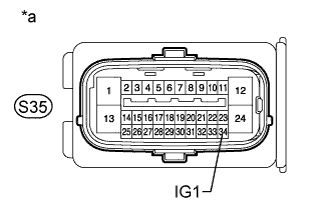
Text in Illustration *a Front view of wire harness connector
(to Skid Control ECU [Brake Actuator Assembly])
Measure the voltage according to the value(s) in the table below.
Standard Voltage Tester Connection Switch Condition Specified Condition S35-34 (IG1) - Body ground Ignition switch ON 11 to 14 V
NG
REPAIR OR REPLACE HARNESS OR CONNECTOR
OK
-
-
CHECK HARNESS AND CONNECTOR (GND1 TERMINAL)
-
Turn the ignition switch off.
-
Disconnect the skid control ECU (brake actuator assembly) connector.
-
Measure the resistance according to the value(s) in the table below.
Standard Resistance Tester Connection Condition Specified Condition S35-1 (GND1) - Body ground Always Below 1 Ω
NG
REPAIR OR REPLACE HARNESS OR CONNECTOR
OK
-
-
CHECK HARNESS AND CONNECTOR (SKID CONTROL ECU - COMBINATION METER)
-
Turn the ignition switch off.
-
Disconnect the skid control ECU (brake actuator assembly) connector.
-
Disconnect the C26 combination meter connector.
-
Measure the resistance according to the value(s) in the table below.
Standard Resistance Tester Connection Condition Specified Condition S35-3 (IND) - C26-17 Always Below 1 Ω S35-3 (IND) - Body ground Always 10 kΩ or higher
NG
REPAIR OR REPLACE HARNESS OR CONNECTOR
OK
-
-
PERFORM ACTIVE TEST USING INTELLIGENT TESTER (SLIP INDICATOR LIGHT)
-
Turn the ignition switch off.
-
Connect the intelligent tester to the DLC3.
-
Turn the ignition switch to ON.
-
Turn the intelligent tester on.
-
Enter the following menus: Chassis / ABS/VSC/TRC / Active Test.
ABS/VSC/TRC Tester Display Test Part Control Range Diagnostic Note Slip Indicator Light Slip indicator light Indicator light ON / OFF Observe the combination meter. -
When performing the Slip Indicator Light Active Test, check Slip Indicator Light in the Data List.
ABS/VSC/TRC Tester Display Measurement Item / Range Normal Condition Diagnostic Note Slip Indicator Light Slip indicator light /
ON or OFF
ON: Slip indicator light on
OFF: Slip indicator light off
- Result Result Proceed to Data List Display Data List Display When Performing Active Test ON/OFF Operation ON Does not change between ON and OFF for LHD A Does not change between ON and OFF for RHD B Changes between ON and OFF C OFF Does not change between ON and OFF for LHD A Does not change between ON and OFF for RHD B Changes between ON and OFF C
B
REPLACE BRAKE ACTUATOR ASSEMBLY Click here
C
GO TO METER / GAUGE SYSTEM (HOW TO PROCEED WITH TROUBLESHOOTING) Click here
A 
REPLACE BRAKE ACTUATOR ASSEMBLY Click here
-