CONTINUOUSLY VARIABLE TRANSAXLE SYSTEM, Diagnostic DTC:P084015
| DTC Code | DTC Name |
|---|---|
| P084015 | Transmission Fluid Pressure Sensor/Switch "A" Circuit Short To Battery or Open |
DESCRIPTION
The ECM performs learning control for the belt clamping pressure based on the belt clamping pressure signal, which is output by the oil pressure sensor.
| DTC No. | Detection Item | DTC Detection Condition | Trouble Area | MIL | Memory | Note |
|---|---|---|---|---|---|---|
| P084015 | Transmission Fluid Pressure Sensor/Switch "A" Circuit Short To Battery or Open | When 2 seconds or more have elapsed after engine start, there is an open or a short to +B in the oil pressure sensor circuit for 0.5 seconds (1 trip detection logic). |
|
Comes on | DTC stored | SAE Code: P0843 |
MONITOR DESCRIPTION
This DTC indicates an open in the oil pressure sensor circuit. If there is an open or short in the oil pressure sensor circuit, the ECM detects the malfunction, illuminates the MIL and stores a DTC.
CAUTION / NOTICE / HINT
CAUTION:
-
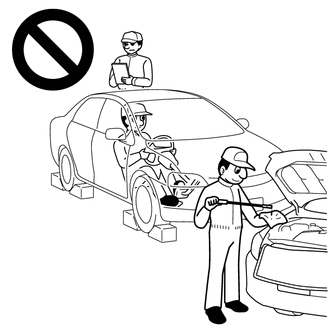
-
Do not perform a stall test if there are any people or objects near the vehicle.
-
The vehicle could begin moving suddenly, resulting in a serious accident.
-
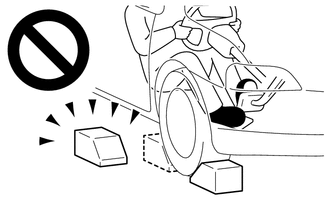
-
Do not perform a stall test if any wheel chocks are out of position.
-
The vehicle could begin moving suddenly, resulting in a serious accident.
-
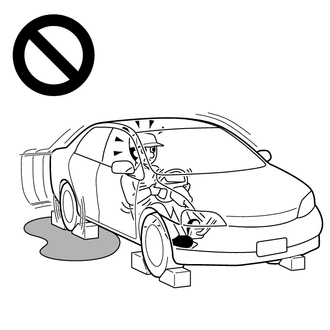
-
Do not perform the stall test on a slippery or low-friction surface that could allow the tires to spin.
-
The vehicle could begin moving suddenly, resulting in a serious accident.
Note
-
Perform initialization after replacing any parts related to the continuously variable transaxle system.
-
Check that no DTCs are stored after performing initialization.
Tech Tips
After performing repair, clear the DTCs and perform the following procedure to check that DTCs are not output.
-
Start the engine and wait for 2 seconds or more.
-
Check for DTCs again.
PROCEDURE
-
READ VALUE USING GTS (BELT CLAMPING FORCE SENSOR)
CAUTION:
A stall speed test should always be performed with at least 2 people. One person should observe the condition of the wheels and wheel chocks while the other is performing the test.
Note
-
This test must be performed after checking and confirming that the engine is normal.
-
Perform this test with the CVT fluid temperature between 50 and 100°C (122 and 212°F).
-
Perform this test with the air conditioning off.
-
Do not perform the stall speed test for longer than 5 seconds.
-
When performing the stall speed test repeatedly, wait for 15 seconds or more between tests.
-
Perform this test with the AUTO function (shift-linked function) of the electric parking brake system off.
-
Warm up the engine.
-
Fully apply the parking brake and chock all 4 wheels.
Tech Tips
When the parking brake indicator (red) is illuminated after the electric parking brake switch (electric parking brake switch assembly) has been pulled to the lock side, the maximum amount of braking force is applied if the electric parking brake switch (electric parking brake switch assembly) is pulled to the lock side one more time.
-
Connect the GTS to the DLC3.
-
Turn the ignition switch to ON.
-
Turn the GTS on.
-
Enter the following menus: Powertrain / Transmission / Active Test / Activate the TC Terminal.
Powertrain > Transmission > Active TestActive Test Display Activate the TC Terminal Data List Display Belt Clamping Force Sensor -
According to the display on the GTS, perform the Active Test.
-
According to the display on the GTS, read the Data List.
Powertrain > Transmission > Data ListTester Display Measurement Item Range Normal Condition Diagnostic Note Belt Clamping Force Sensor Secondary oil pressure value Min.: -64 MPa
Max.: 63.998 MPa
Secondary oil pressure inspection:
-
3.5 to 5.5 MPa (35.6 to 56.1 kgf/cm2, 507 to 798 psi): D position stall test
-
3.6 to 5.5 MPa (36.7 to 56.1 kgf/cm2, 522 to 798 psi): R position stall test
- Result Result Proceed to Data List value is not normal A Data List value is normal B -
B 
REPLACE ECM Click here
A 
-
-
CHECK HARNESS AND CONNECTOR (OIL PRESSURE SENSOR - ECM)
-
Disconnect the C44 oil pressure sensor connector.
-
Disconnect the C62 ECM connector.
-
Measure the resistance according to the value(s) in the table below.
Standard Resistance Tester Connection Condition Specified Condition C44-1 (E2) - C62-117 (EPTO) Always Below 1 Ω C44-2 (PTO) - C62-86 (PTO) Always Below 1 Ω C44-3 (VC) - C62-118 (VCPT) Always Below 1 Ω C44-1 (E2) or C62-117 (EPTO) - Other terminals Always 10 kΩ or higher C44-2 (PTO) or C62-86 (PTO) - Other terminals Always 10 kΩ or higher C44-3 (VC) or C62-118 (VCPT) - Other terminals Always 10 kΩ or higher -
Measure the voltage according to the value(s) in the table below.
Standard Voltage Tester Connection Switch Condition Specified Condition C62-86 (PTO) - Body ground Ignition switch ON Below 1 V C44-2 (PTO) - Body ground Ignition switch ON Below 1 V -
Connect the C62 ECM connector.
-
Connect the C44 oil pressure sensor connector.
Result Proceed to OK NG
NG 
REPAIR OR REPLACE HARNESS OR CONNECTOR (OIL PRESSURE SENSOR - ECM)
OK
-
-
CHECK ECM (VCPT TERMINAL VOLTAGE)
-
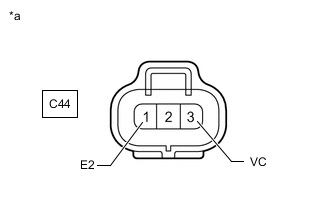
*a Front view of wire harness connector
(to Oil Pressure Sensor)
Disconnect the oil pressure sensor connector.
-
Measure the voltage according to the value(s) in the table below.
Standard Voltage Tester Connection Switch Condition Specified Condition C44-3 (VC) - C44-1 (E2) Ignition switch ON 4.75 to 5.25 V -
Connect the oil pressure sensor connector.
Result Proceed to OK NG
NG
REPLACE ECM Click here
OK
-
-
REPLACE OIL PRESSURE SENSOR
-
Replace the oil pressure sensor.
Result Proceed to NEXT
NEXT
PERFORM INITIALIZATION Click here
-
-
REPLACE ECM
-
Replace the ECM.
Result Proceed to NEXT
NEXT
PERFORM INITIALIZATION Click here
-
-
REPLACE ECM
-
Replace the ECM.
Result Proceed to NEXT
NEXT
PERFORM INITIALIZATION Click here
-