SMART ENTRY AND START SYSTEM (for Entry Function) Back Door Entry Unlock Function does not Operate
DESCRIPTION
If the door unlock function does not operate via smart operation from only the back door, but the lock function operates normally, a normal request code is sent from the back door. The trouble area may be the certification ECU (smart key ECU assembly) or the instrument panel junction block assembly (body computer).
WIRING DIAGRAM
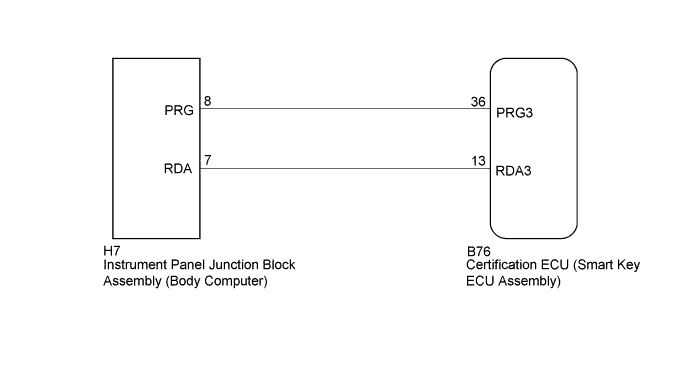
INSPECTION PROCEDURE
Note
-
The smart entry and start system (for Entry Function) uses a multiplex communication system (LIN communication system) and the CAN communication system. Inspect the communication function by following How to Proceed with Troubleshooting Click here. Troubleshoot the smart entry and start system (for Entry Function) after confirming that the communication systems are functioning properly.
-
and turn a courtesy light switch on and off at intervals of 1.5 seconds or less until communication between the GTS and the vehicle begins. Then select the Model Code "KEY REGIST" under manual mode and enter the following menus: Body Electrical / Entry&Start(CAN).
While using the GTS, periodically turn a courtesy light switch on and off at intervals of 1.5 seconds or less to maintain communication between the GTS and the vehicle.
-
Check that there are no electrical key transmitter sub-assemblies in the vehicle.
-
Before performing the inspection, check that DTC B1242 (wireless door lock control) or B27B0 is not output.
-
Before replacing the certification ECU (smart key ECU assembly), refer to the smart entry and start system (for Entry Function) precaution Click here.
-
After repair, confirm that no DTCs are output by performing the "DTC Output Confirmation Operation".
PROCEDURE
-
CHECK POWER DOOR LOCK OPERATION
-
When the door control switch on the power window regulator master switch assembly is operated, check that the doors unlock and lock according to the switch operation Click here.
OK Door locks operate normally.
NG 
GO TO POWER DOOR LOCK CONTROL SYSTEM Click here
OK 
-
-
REPLACE INSTRUMENT PANEL JUNCTION BLOCK ASSEMBLY (BODY COMPUTER)
-
Replace the instrument panel junction block assembly (body computer) with a new or known good one.
NEXT
-
-
CHECK ENTRY DOOR LOCK OPERATION
-
Check the door lock/unlock operation via smart operation from the back door.
OK Entry lock/unlock operate normally.
NG
REPLACE CERTIFICATION ECU (SMART KEY ECU ASSEMBLY)
OK 
END (INSTRUMENT PANEL JUNCTION BLOCK ASSEMBLY [BODY COMPUTER] WAS DEFECTIVE)
-