PARKING BRAKE LEVER INSTALLATION

Tech Tips
-
Use the same procedure for RHD and LHD vehicles.
-
The procedure listed below is for LHD vehicles.
-
INSTALL PARKING BRAKE LEVER SUPPORT BRACKET
-
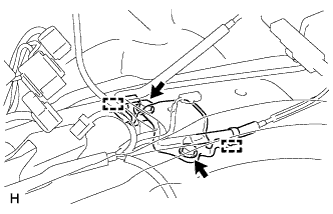
Install the parking brake lever support bracket with the 2 bolts.
- Torque:
- 15 N*m { 148 kgf*cm, 11 ft.*lbf }
-
Attach the 2 clamps to the parking brake lever support bracket.
-
-
INSTALL PARKING BRAKE SWITCH ASSEMBLY
-
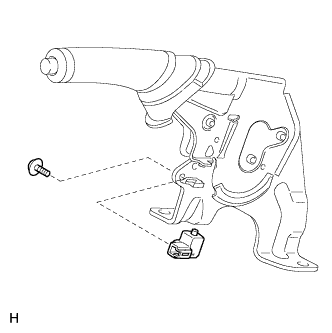
Install the parking brake switch to the parking brake lever with the screw.
- Torque:
- 0.9 N*m { 9 kgf*cm, 8 in.*lbf }
-
-
INSTALL NO. 1 PARKING BRAKE CABLE ASSEMBLY
-
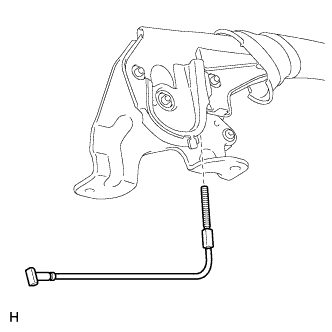
Pass the No. 1 parking brake cable through the parking brake lever.
-
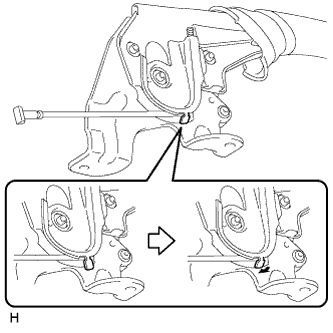
Bend the parking brake lever claw.
-
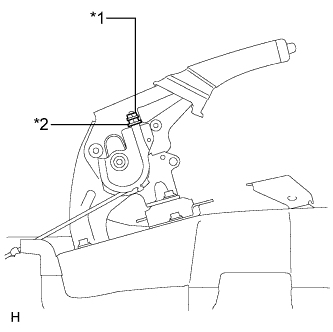
Text in Illustration *1 Lock Nut *2 Adjusting Nut Temporarily install the adjusting nut and the lock nut to the No. 1 parking brake cable.
-
-
INSTALL PARKING BRAKE CABLE END STOPPER
-
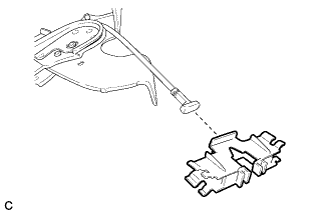
Install the parking brake cable end stopper to the No. 1 parking brake cable.
-
-
INSTALL PARKING BRAKE EQUALIZER
-
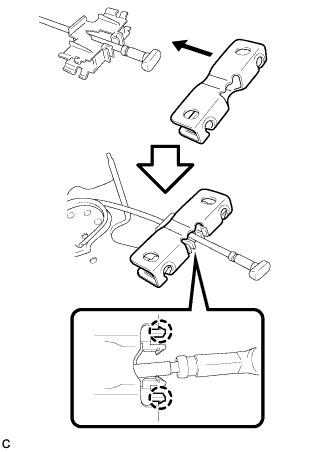
Attach the 2 claws to install the parking brake equalizer to the parking brake cable end stopper.
-
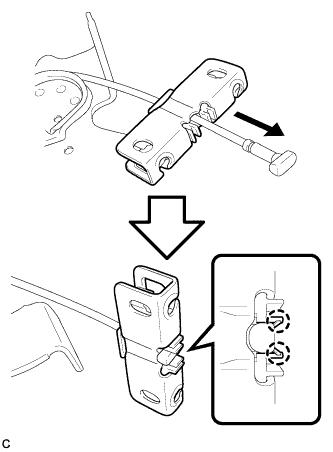
Attach the 2 claws to connect the parking brake equalizer to the No. 1 parking brake cable.
-
-
INSTALL PARKING BRAKE LEVER ASSEMBLY
-
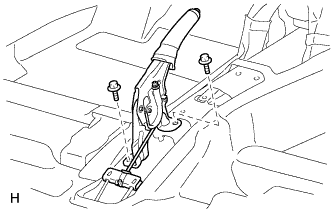
Install the parking brake lever with the 2 bolts.
- Torque:
- 15 N*m { 148 kgf*cm, 11 ft.*lbf }
-
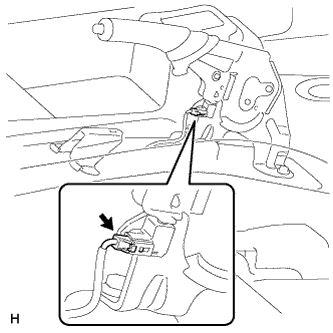
Connect the parking brake switch connector.
-
-
CONNECT PARKING BRAKE CABLE
-
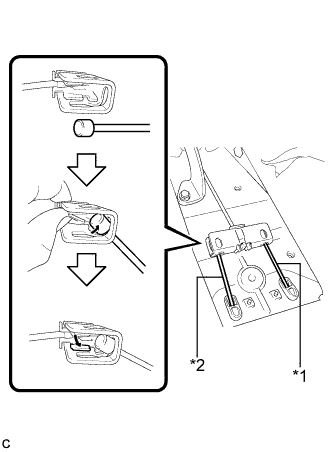
Text in Illustration *1 No. 2 Parking Brake Cable *2 No. 3 Parking Brake Cable Connect the No. 3 parking brake cable to the parking brake equalizer as shown in the illustration.
-
Connect the No. 2 parking brake cable to the parking brake equalizer.
Tech Tips
Use the same procedure described for the No. 3 parking brake cable.
-
-
INSTALL NO. 2 CONSOLE BOX MOUNTING BRACKET
-
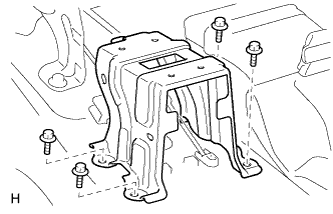
Install the No. 2 console box mounting bracket with the 4 bolts.
- Torque:
- 27 N*m { 275 kgf*cm, 19 ft.*lbf }
-
Install the floor carpet.
-
-
CHECK PARKING BRAKE LEVER TRAVEL
-
Pull the parking brake lever to fully engage the parking brake.
-
Release the lever to disengage the parking brake.
-
Slowly pull the parking brake lever all the way, and count the number of clicks.
Standard parking brake lever travel when pulled with a force of 200 N (20 kgf, 45 lbf) 6 to 9 clicks
-
-
ADJUST PARKING BRAKE LEVER TRAVEL
-
Remove the console box assembly Click here.
-
Completely release the parking brake lever.
-
Text in Illustration *1 Lock Nut *2 Adjusting Nut Loosen the lock nut and adjusting nut to completely release the parking brake cable.
-
Temporarily install the hub nuts.
-
Remove the shoe adjusting hole plug.
-
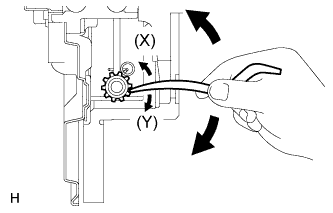
Insert an adjustment tool into the adjustment hole of the disc. Rotate the adjustment wheel in the "X" direction until the shoes are locked. Then rotate the adjustment wheel in the "Y" direction 8 notches.
-
Check that the disc can be rotated lightly. If not, rotate the adjustment wheel in the "Y" direction and check again.
-
Install the hole plug.
-
Remove the hub nuts.
-
Turn the adjusting nut until the parking brake lever travel becomes correct.
Standard parking brake lever travel when pulled with a force of 200 N (20 kgf, 45 lbf) 6 to 9 clicks -
Using a wrench or equivalent, hold the adjusting nut and tighten the lock nut.
- Torque:
- 6.0 N*m { 61 kgf*cm, 53 in.*lbf }
-
Operate the parking brake lever 3 to 4 times, and check the parking brake lever travel.
Standard parking brake lever travel when pulled with a force of 200 N (20 kgf, 45 lbf) 6 to 9 clicks -
Check whether the parking brake drags or not.
-
Operate the parking brake lever and check the illumination condition of the brake warning light.
OK The brake warning light always illuminates at the first click. -
Install the console box assembly Click here.
-
-
INSTALL CONSOLE BOX ASSEMBLY
-
Install the console box assembly Click here.
-
-
INSTALL FRONT SEAT ASSEMBLY LH
-
Install the front seat assembly Click here.
-
-
INSTALL FRONT SEAT ASSEMBLY RH
Tech Tips
Use the same procedure described for the LH side.
-
CONNECT CABLE TO NEGATIVE BATTERY TERMINAL
Note
When disconnecting the cable, some systems need to be initialized after the cable is reconnected Click here.
-
CHECK SRS WARNING LIGHT
-
Check the SRS warning light Click here.
-