ECD SYSTEM (for CCo), Diagnostic DTC:P1229

| DTC Code | DTC Name |
|---|---|
| P1229 | Fuel Pump System |
DESCRIPTION
| DTC Detection Drive Pattern | DTC Detection Condition | Trouble Area |
|---|---|---|
| Idling for 60 seconds | The actual fuel pressure exceeds the target fuel pressure by 40000 kPa or higher for 10 seconds. (1 trip detection logic) |
|
| DTC No. | Data List |
|---|---|
| P1229 |
|
Tech Tips
-
For more information on the fuel supply pump (suction control valve) and common rail system, refer to the System Description Click here.
-
When DTC P1229 is stored, check the internal fuel pressure of the common rail by entering the following menus: Powertrain / Engine and ECT / Data List / Fuel Press, Target Common Rail Pressure.
Under a stable condition such as idling or running the engine at 2500 rpm without load, Fuel Press is within +/-5000 kPa of Target Common Rail Pressure when normal.
-
When there is a movement problem with the fuel supply pump (when Fuel Press is more than Target Common Rail Pressure due to a problem of the suction valve difficult to close), the values of Injection Pressure Correction and Target Pump SCV Current decrease.
MONITOR DESCRIPTION
P1229 (Fuel over-feed):The ECM stores this DTC if the actual fuel pressure inside the common rail remains higher than the target fuel pressure, despite the ECM closing the suction control valve. This DTC indicates that the suction control valve may be stuck open, or there may be a short in its circuit.
If this DTC is stored, the ECM enters fail-safe mode and limits the engine power. The fail-safe mode continues until the ignition switch is turned off.
WIRING DIAGRAM
Refer to DTC P0088 Click here.
INSPECTION PROCEDURE
Note
-
After replacing the ECM, the new ECM needs registration Click here and initialization Click here.
-
After replacing the fuel supply pump, the ECM needs initialization Click here.
Tech Tips
-
Read freeze frame data using the intelligent tester. Freeze frame data records the engine condition when malfunctions are detected. When troubleshooting, freeze frame data can help determine if the vehicle was moving or stationary, if the engine was warmed up or not, and other data from the time the malfunction occurred.
-
When this DTC is stored, be sure to carefully examine "Fuel Press", "Target Common Rail Pressure", "Target Pump SCV Current", and "Pump SCV Learning Value" in the freeze frame data.
PROCEDURE
-
READ OUTPUT DTC (RECORD STORED DTC AND FREEZE FRAME DATA)
-
Connect the intelligent tester to the DLC3.
-
Turn the ignition switch to ON and turn the tester on.
-
Enter the following menus: Powertrain / Engine and ECT / DTC.
-
Record the stored DTC and Freeze Frame Data.
NEXT 
-
-
CHECK ANY OTHER DTCS OUTPUT
-
Connect the intelligent tester to the DLC3.
-
Turn the ignition switch to ON and turn the tester on.
-
Enter the following menus: Powertrain / Engine and ECT / DTC.
-
Read the DTCs.
Result Result Proceed to DTC P1229 A DTC P1229 and other DTCs B Tech Tips
If any DTCs other than DTC P1229 are output, troubleshoot those DTCs first.
B 
GO TO DTC CHART Click here
A
-
-
READ VALUE USING INTELLIGENT TESTER (TARGET PUMP SCV CURRENT AND PUMP SCV LEARNING VALUE)
-
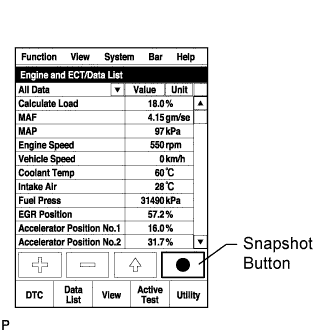
Connect the intelligent tester to the DLC3.
-
Turn the ignition switch to ON and turn the tester on.
-
Clear the DTCs Click here.
-
Turn the ignition switch off for 30 seconds or more.
-
Start the engine.
-
Turn the tester on.
-
Enter the following menus: Powertrain / Engine and ECT / Data List / Target Pump SCV Current and Pump SCV Learning Value.
-
Take a snapshot while driving the vehicle under the conditions indicated by the freeze frame data recorded previously.
-
Read the values of "Target Pump SCV Current" and "Pump SCV Learning Value" in the Data List using the snapshot review function.
-
Compare "Target Pump SCV Current" and "Pump SCV Learning Value" of the freeze frame data recorded previously with "Target Pump SCV Current" and "Pump SCV Learning Value" of the Data List.
-
Read the value.
Result Result Proceed to The freeze frame data values are higher than the Data List values by 100 mA or more B Except above A Tech Tips
If the Data List values are below the freeze frame data values, the suction control valve may have malfunctioned temporarily.
B 
REPLACE SUCTION CONTROL VALVE Click here
A
-
-
READ VALUE USING INTELLIGENT TESTER (FUEL PRESS AND TARGET COMMON RAIL PRESSURE)
-
Connect the intelligent tester to the DLC3.
-
Start the engine and turn the tester on.
-
Enter the following menus: Powertrain / Engine and ECT / Data List / Fuel Press and target Common Rail Pressure.
-
Check that the internal fuel pressure of the common rail is within the specification below.
OK Fuel Press is within +/-5000 kPa of Target Common Rail Pressure when engine is idling and running at 2500 rpm without load.
OK
CHECK WHETHER DTC OUTPUT RECURS Click here
NG
CHECK HARNESS AND CONNECTOR (SUCTION CONTROL VALVE CONNECTOR - ECM) Click here
-
-
CHECK HARNESS AND CONNECTOR (SUCTION CONTROL VALVE CONNECTOR - ECM)
-
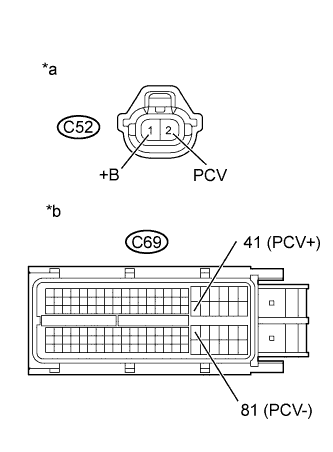
Text in Illustration *a Front view of wire harness connector
(to Suction Control Valve)
*b Front view of wire harness connector
(to ECM)
Disconnect the suction control valve connector.
-
Disconnect the ECM connector.
-
Measure the resistance according to the value(s) in the table below.
Standard Resistance (Check for Open) Tester Connection Condition Specified Condition C52-1 (+B) - C69-41 (PCV+) Always Below 1 Ω C52-2 (PCV) - C69-81 (PCV-) Always Below 1 Ω Standard Resistance (Check for Short) Tester Connection Condition Specified Condition C52-1 (+B) or C69-41 (PCV+) - Body ground Always 10 kΩ or higher C52-2 (PCV) or C69-81 (PCV-) - Body ground Always 10 kΩ or higher -
Reconnect the suction control valve connector.
-
Reconnect the ECM connector.
NG
REPAIR OR REPLACE HARNESS OR CONNECTOR Click here
OK
-
-
CHECK WHETHER DTC OUTPUT RECURS
-
Clear DTCs Click here.
-
Turn the ignition switch off for 30 seconds or more.
-
Connect the intelligent tester to the DLC3.
-
Turn the ignition switch to ON and turn the tester on.
-
Start the engine.
-
Idle the engine for 60 seconds and run it at 2500 rpm without load for 60 seconds.
-
Enter the following menus: Powertrain / Engine and ECT / DTC.
-
Read the DTCs.
Result Result Proceed to P1229 is output A No DTC is output B
B
END
A
-
-
REPLACE SUCTION CONTROL VALVE
-
Replace the suction control valve Click here.
NEXT
-
-
BLEED AIR FROM FUEL SYSTEM
-
Bleed the air from the fuel system Click here.
NEXT
-
-
PERFORM FUEL SUPPLY PUMP INITIALIZATION
-
Perform fuel supply pump initialization Click here.
NEXT
-
-
READ VALUE USING INTELLIGENT TESTER (FUEL PRESS AND TARGET COMMON RAIL PRESSURE)
-
Connect the intelligent tester to the DLC3.
-
Turn the ignition switch to ON and turn the tester on.
-
Clear the DTCs Click here.
-
Turn the ignition switch off for 30 seconds or more.
-
Start the engine and turn the tester on.
-
Enter the following menus: Powertrain / Engine and ECT / Data List / Fuel Press and target Common Rail Pressure.
-
Check that the internal fuel pressure of the common rail is within the specification below.
OK Fuel Press is within +/-5000 kPa of Target Common Rail Pressure when engine is idling and running at 2500 rpm without load.
NG
REPLACE COMMON RAIL (FUEL PRESSURE SENSOR) Click here
OK
-
-
CHECK WHETHER DTC OUTPUT RECURS
-
Clear the DTCs Click here.
-
Turn the ignition switch off for 30 seconds or more.
-
Connect the intelligent tester to the DLC3.
-
Turn the ignition switch to ON and turn the tester on.
-
Start the engine.
-
Idle the engine for 60 seconds and run it at 2500 rpm without load for 60 seconds.
-
Enter the following menus: Powertrain / Engine and ECT / DTC.
-
Read the DTCs.
Result Result Proceed to P1229 is output A No DTC is output B
B
END
A
-
-
REPLACE ECM
-
Replace the ECM Click here.
NEXT
CONFIRM WHETHER MALFUNCTION HAS BEEN SUCCESSFULLY REPAIRED Click here
-
-
REPLACE COMMON RAIL (FUEL PRESSURE SENSOR)
-
Replace the common rail Click here.
NEXT
-
-
BLEED AIR FROM FUEL SYSTEM
-
Bleed the air from the fuel system Click here.
NEXT
CONFIRM WHETHER MALFUNCTION HAS BEEN SUCCESSFULLY REPAIRED Click here
-
-
REPAIR OR REPLACE HARNESS OR CONNECTOR
-
Repair or replace the harness or connector.
NEXT
-
-
CONFIRM WHETHER MALFUNCTION HAS BEEN SUCCESSFULLY REPAIRED
-
Connect the intelligent tester to the DLC3.
-
Clear the DTCs Click here.
-
Turn the ignition switch off for 30 seconds or more.
-
Start the engine.
-
Idle the engine for 60 seconds and run it at 2500 rpm without load for 60 seconds.
-
Confirm that the DTC is not output again.
Tech Tips
Perform the following procedure using the tester to determine whether or not the DTC judgment has been carried out.
-
Enter the following menus: Powertrain / Engine and ECT / Utility / All Readiness.
-
Input DTC P1229.
-
Check that STATUS is NORMAL. If STATUS is INCOMPLETE or UNKNOWN, increase the idling time.
-
NEXT 
END
-