VEHICLE STABILITY CONTROL SYSTEM, Diagnostic DTC:C1492, C1493
| DTC Code | DTC Name |
|---|---|
| C1492 | Clutch Switch OFF Stuck |
| C1493 | Clutch Switch ON Stuck |
DESCRIPTION
The clutch switch signal is sent to the skid control ECU (brake actuator assembly) via the CAN communication system.
If any faults are present in the CAN communication cable with the ECM, DTC U0100 (Lost Communication with ECM / PCM "A") is stored.
| DTC No. | DTC Detection Condition | Trouble Area |
|---|---|---|
| C1492 | Clutch switch system circuit has a malfunction |
|
| C1493 | Clutch switch system circuit has a malfunction |
|
WIRING DIAGRAM
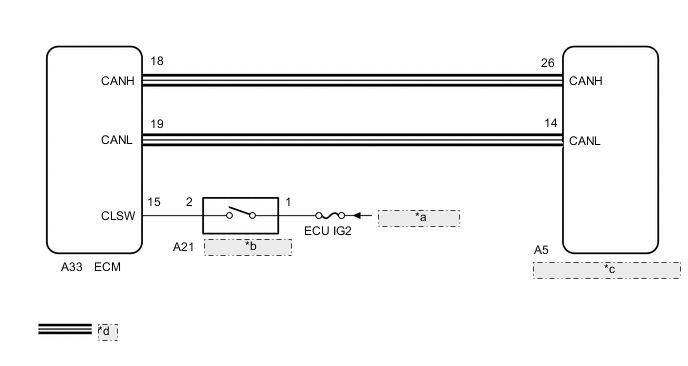
| *a | from IG2 Relay |
| *b | Clutch Switch Assembly |
| *c | Skid Control ECU (Brake Actuator Assembly) |
| *d | CAN Communication Line |
CAUTION / NOTICE / HINT
Note
-
When replacing the skid control ECU (brake actuator assembly), perform VSC sensor neutral memorization Click here.
-
Inspect the fuses for circuits related to this system before performing the following inspection procedure.
PROCEDURE
-
CHECK CAN COMMUNICATION SYSTEM
-
Check if a CAN communication system DTC is output Click here.
Result Result Proceed to DTC is not output. A DTC is output. B
B 
GO TO CAN COMMUNICATION SYSTEM (HOW TO PROCEED WITH TROUBLESHOOTING) Click here
A 
-
-
READ VALUE USING GTS (CLUTCH SWITCH)
-
Connect the GTS to the DLC3.
-
Turn the ignition switch to ON.
-
Select the Data List using the GTS.
Powertrain / Engine / Data List Tester Display Measurement Item/Range Normal Condition Diagnostic Note Clutch Switch Clutch switch status/ ON or OFF ON: Clutch pedal depressed
OFF: Clutch pedal released
- OK The GTS displays ON or OFF according to the brake pedal operation.
NG 
INSPECT CLUTCH SWITCH ASSEMBLY Click here
OK
-
-
RECONFIRM DTC
-
Clear the DTCs Click here.
-
Turn the ignition switch off.
-
Start the engine.
-
Drive the vehicle at a speed of 45 km/h (28 mph) or more for at least 120 seconds.
-
Check if the same DTC is output Click here.
Result Result Proceed to DTCs C1492 and/or C1493 are not output. A DTCs C1492 and/or C1493 are output. B
A
USE SIMULATION METHOD TO CHECK Click here
B
REPLACE BRAKE ACTUATOR ASSEMBLY Click here
-
-
INSPECT CLUTCH SWITCH ASSEMBLY
-
Inspect the clutch switch assembly.
for LHD: Click here
for RHD: Click here
Result Result Proceed to OK A NG (for LHD) B NG (for RHD) C
B
REPLACE CLUTCH SWITCH ASSEMBLY Click here
C
REPLACE CLUTCH SWITCH ASSEMBLY Click here
A
-
-
CHECK HARNESS AND CONNECTOR (CLUTCH SWITCH ASSEMBLY POWER SOURCE TERMINAL)
-
Disconnect the clutch switch assembly connector.
-
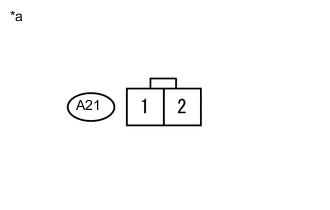
Measure the voltage according to the value(s) in the table below.
Standard Voltage Tester Connection Switch Condition Specified Condition A21-1 - Body ground Ignition Switch ON 11 to 14 V Text in Illustration *a Front view of wire harness connector
(to Clutch Switch Assembly)
NG
REPAIR OR REPLACE HARNESS AND CONNECTOR
OK
-
-
CHECK HARNESS AND CONNECTOR (ECM - CLUTCH SWITCH ASSEMBLY)
-
Disconnect the clutch switch connector.
-
Disconnect the ECM connector.
-
Measure the resistance according to the value(s) in the table below.
Standard Resistance (Check for open) Tester Connection Condition Specified Condition A33-15 (CLSW) - A21-2 Always Below 1 Ω Standard Resistance (Check for short) Tester Connection Condition Specified Condition A33-15 (CLSW) or A21-2 - Body ground Always 10 kΩ or higher
OK
REPLACE ECM Click here
NG
REPAIR OR REPLACE HARNESS AND CONNECTOR
-