AIRBAG SYSTEM, Diagnostic DTC:B1800/51, B1801/51, B1802/51, B1803/51

| DTC Code | DTC Name |
|---|---|
| B1800/51 | Short in Driver Side Squib Circuit |
| B1801/51 | Open in Driver Side Squib Circuit |
| B1802/51 | Short to GND in Driver Side Squib Circuit |
| B1803/51 | Short to B+ in Driver Side Squib Circuit |
DESCRIPTION
-
The driver side squib circuit consists of the center airbag sensor assembly, spiral with sensor cable sub-assembly and horn button assembly.
-
The circuit instructs the SRS to deploy when deployment conditions are met.
-
These DTCs are stored when a malfunction is detected in the driver side squib circuit.
| DTC Code | DTC Detection Condition | Trouble Area |
|---|---|---|
| B1800/51 | One of the following conditions is met:
|
|
| B1801/51 | One of the following conditions is met:
|
|
| B1802/51 | One of the following conditions is met:
|
|
| B1803/51 | One of the following conditions is met:
|
WIRING DIAGRAM
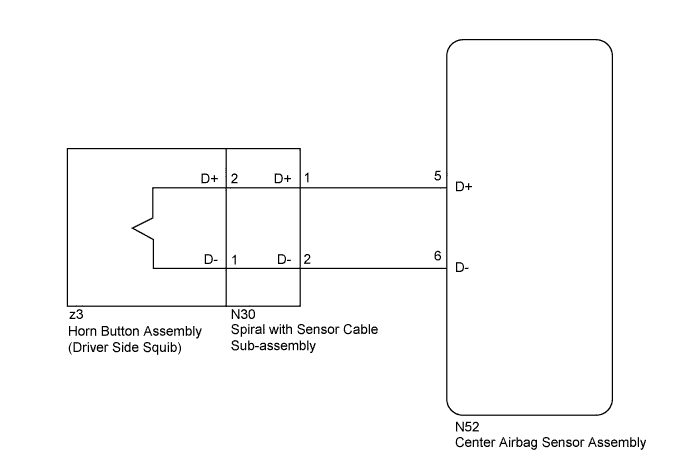
INSPECTION PROCEDURE
Note
-
When installing the spiral with sensor cable sub-assembly and steering wheel, be sure to adjust the spiral with sensor cable sub-assembly as it may break if the steering wheel is turned before adjusting the spiral with sensor cable sub-assembly Click here.
-
After turning the power switch off, waiting time may be required before disconnecting the cable from the negative (-) auxiliary battery terminal. Therefore, make sure to read the disconnecting the cable from the negative (-) auxiliary battery terminal notices before proceeding with work Click here.
-
When disconnecting the cable from the negative (-) auxiliary battery terminal while performing repairs, some systems need to be initialized after the cable is reconnected Click here.
Tech Tips
To perform the simulation method, enter check mode (signal check) with the GTS Click here, and then wiggle each connector of the airbag system or drive the vehicle on various types of road Click here.
PROCEDURE
-
CHECK HORN BUTTON ASSEMBLY (DRIVER SIDE SQUIB)
-
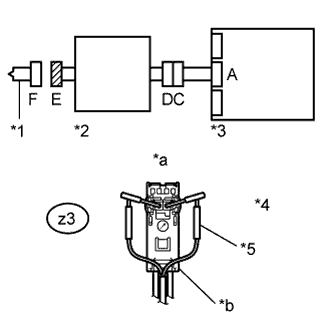
Text in Illustration *1 Driver Side Squib *2 Spiral with Sensor Cable Sub-assembly *3 Center Airbag Sensor Assembly *4 Connector E *5 SST *a Front view of wire harness connector
(to Driver Side Squib)
*b Color: Orange Turn the power switch off.
-
Disconnect the cable from the negative (-) auxiliary battery terminal, and wait for at least 90 seconds.
-
Disconnect the connectors from the horn button assembly.
-
Connect the white wire side of SST (resistance: 2.1 Ω) to connector E (orange connector).
CAUTION:
Never connect the tester to the horn button assembly (driver side squib) for measurement, as this may lead to a serious injury due to airbag deployment.
Note
-
Do not forcibly insert SST into the terminals of the connector when connecting SST.
-
Insert SST straight into the terminals of the connector.
- SST
- 09843-18061
-
-
Connect the cable to the negative (-) auxiliary battery terminal, and wait for at least 2 seconds.
-
Turn the power switch on (IG), and wait for at least 60 seconds.
-
Clear the DTCs Click here.
-
Turn the power switch off.
-
Turn the power switch on (IG), and wait for at least 60 seconds.
-
Check for DTCs Click here.
OK DTC B1800/51, B1801/51, B1802/51 or B1803/51 is not output. Tech Tips
Codes other than DTC B1800/51, B1801/51, B1802/51 and B1803/51 may be output at this time, but they are not related to this check.
-
Turn the power switch off.
-
Disconnect the cable from the negative (-) auxiliary battery terminal, and wait for at least 90 seconds.
-
Disconnect SST from connector E.
NG 
CHECK CONNECTOR Click here
OK 
REPLACE HORN BUTTON ASSEMBLY Click here
-
-
CHECK CONNECTOR
-
Disconnect the connectors from the center airbag sensor assembly.
-
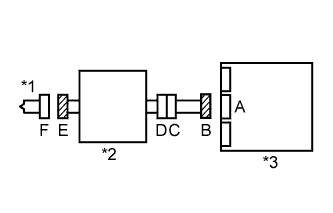
Text in Illustration *1 Driver Side Squib *2 Spiral with Sensor Cable Sub-assembly *3 Center Airbag Sensor Assembly Check that the connectors (on the center airbag sensor assembly side and horn button assembly side) are not damaged.
OK The lock button is not disengaged, and the claw of the lock is not deformed or damaged.
NG 
REPLACE HARNESS AND CONNECTOR
OK 
-
-
CHECK DRIVER SIDE SQUIB CIRCUIT
-
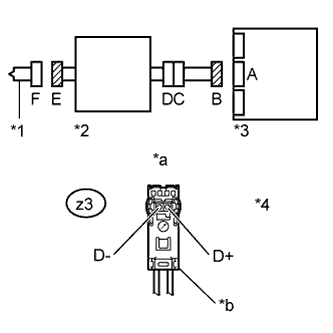
Text in Illustration *1 Driver Side Squib *2 Spiral with Sensor Cable Sub-assembly *3 Center Airbag Sensor Assembly *4 Connector E *a Front view of wire harness connector
(to Driver Side Squib)
*b Color: Orange Connect the cable to the negative (-) auxiliary battery terminal, and wait for at least 2 seconds.
-
Turn the power switch on (IG).
-
Measure the voltage according to the value(s) in the table below.
Standard Voltage Tester Connection Switch Condition Specified Condition z3-2 (D+) - Body ground Power switch on (IG) Below 1 V z3-1 (D-) - Body ground Power switch on (IG) Below 1 V -
Turn the power switch off.
-
Disconnect the cable from the negative (-) auxiliary battery terminal, and wait for at least 90 seconds.
-
Measure the resistance according to the value(s) in the table below.
Standard Resistance Tester Connection Condition Specified Condition z3-2 (D+) - z3-1 (D-) Always Below 1 Ω -
Release the activation prevention mechanism built into connector B Click here.
-
Measure the resistance according to the value(s) in the table below.
Standard Resistance Tester Connection Condition Specified Condition z3-2 (D+) - z3-1 (D-) Always 1 MΩ or higher z3-2 (D+) - Body ground Always 1 MΩ or higher z3-1 (D-) - Body ground Always 1 MΩ or higher -
Restore the released activation prevention mechanism of connector B to its original condition.
NG
CHECK INSTRUMENT PANEL WIRE Click here
OK
-
-
CHECK CENTER AIRBAG SENSOR ASSEMBLY
-
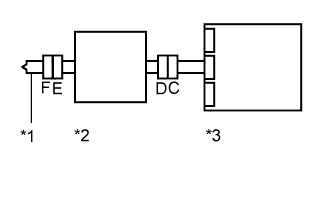
Text in Illustration *1 Driver Side Squib *2 Spiral with Sensor Cable Sub-assembly *3 Center Airbag Sensor Assembly Connect the connectors to the horn button assembly and center airbag sensor assembly.
-
Connect the cable to the negative (-) auxiliary battery terminal, and wait for at least 2 seconds.
-
Turn the power switch on (IG), and wait for at least 60 seconds.
-
Clear the DTCs Click here.
-
Turn the power switch off.
-
Turn the power switch on (IG), and wait for at least 60 seconds.
-
Check for DTCs Click here.
OK DTC B1800/51, B1801/51, B1802/51 or B1803/51 is not output. Tech Tips
Codes other than DTC B1800/51, B1801/51, B1802/51 and B1803/51 may be output at this time, but they are not related to this check.
NG
REPLACE CENTER AIRBAG SENSOR ASSEMBLY Click here
OK
USE SIMULATION METHOD TO CHECK Click here
-
-
CHECK INSTRUMENT PANEL WIRE
-
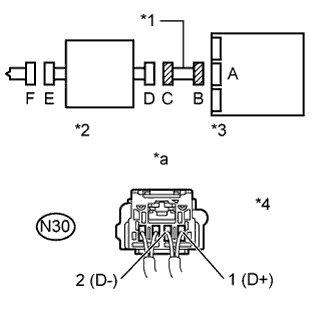
Text in Illustration *1 Instrument Panel Wire *2 Spiral with Sensor Cable Sub-assembly *3 Center Airbag Sensor Assembly *4 Connector C *a Rear view of wire harness connector
(to Spiral with Sensor Cable Sub-assembly)
Disconnect the instrument panel wire connector from the spiral with sensor cable sub-assembly.
-
Connect the cable to the negative (-) auxiliary battery terminal, and wait for at least 2 seconds.
-
Turn the power switch on (IG).
-
Measure the voltage according to the value(s) in the table below.
Standard Voltage Tester Connection Switch Condition Specified Condition N30-1 (D+) - Body ground Power switch on (IG) Below 1 V N30-2 (D-) - Body ground Power switch on (IG) Below 1 V -
Turn the power switch off.
-
Disconnect the cable from the negative (-) auxiliary battery terminal, and wait for at least 90 seconds.
-
Measure the resistance according to the value(s) in the table below.
Standard Resistance Tester Connection Condition Specified Condition N30-1 (D+) - N30-2 (D-) Always Below 1 Ω -
Release the activation prevention mechanism built into connector B Click here.
-
Measure the resistance according to the value(s) in the table below.
Standard Resistance Tester Connection Condition Specified Condition N30-1 (D+) - N30-2 (D-) Always 1 MΩ or higher N30-1 (D+) - Body ground Always 1 MΩ or higher N30-2 (D-) - Body ground Always 1 MΩ or higher -
Restore the released activation prevention mechanism of connector B to its original condition.
NG
REPLACE INSTRUMENT PANEL WIRE
OK
REPLACE SPIRAL WITH SENSOR CABLE SUB-ASSEMBLY Click here
-