MULTI-DISPLAY REMOVAL

Tech Tips
-
Use the same procedure for RHD and LHD vehicles.
-
The procedure listed below is for LHD vehicles.
-
PRECAUTION
Note
After turning the power switch off, waiting time may be required before disconnecting the cable from the auxiliary battery terminal. Therefore, make sure to read the disconnecting the cable from the auxiliary battery terminal notice before proceeding with work Click here.
-
REMOVE LUGGAGE COMPARTMENT FLOOR MAT
-
Remove the luggage compartment floor mat.
-
-
REMOVE LUGGAGE COMPARTMENT TRIM COVER LH
-
Remove the luggage compartment trim cover LH.
-
-
DISCONNECT CABLE FROM AUXILIARY BATTERY NEGATIVE TERMINAL
Note
When disconnecting the cable, some systems need to be initialized after the cable is reconnected Click here.
-
REMOVE UPPER INSTRUMENT CLUSTER FINISH PANEL
-
Put protective tape around the upper instrument cluster finish panel.
-
Remove the 3 clips <B>.
-
Detach the 2 clips and 3 claws and remove the upper instrument cluster finish panel.
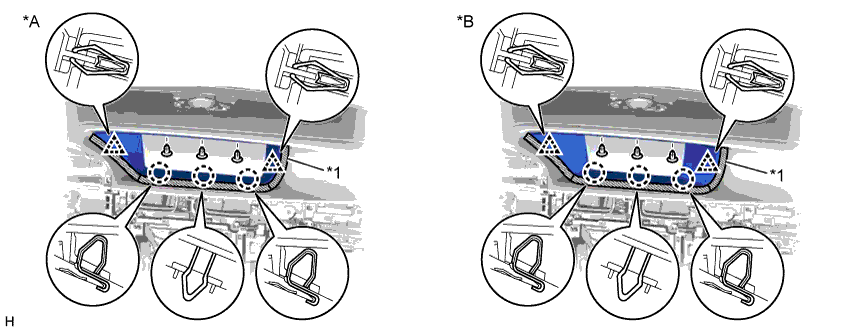
Text in Illustration *A for 12.3 Inch *B for 8 Inch *1 Protective Tape - -
-
-
REMOVE MULTI-DISPLAY (for 8 Inch)
-
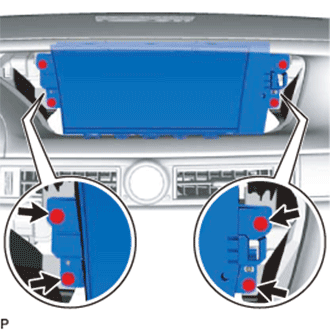
Remove the 4 screws.
-
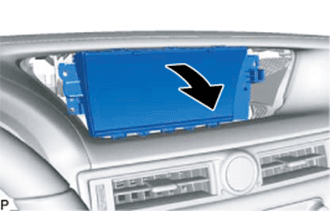
Move the multi-display in the direction of the arrow in the illustration.
-
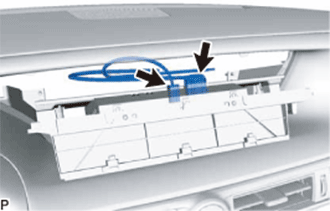
Disconnect all the connectors and remove multi-display.
-
-
REMOVE ACCESSORY METER ASSEMBLY (for 12.3 Inch)
-
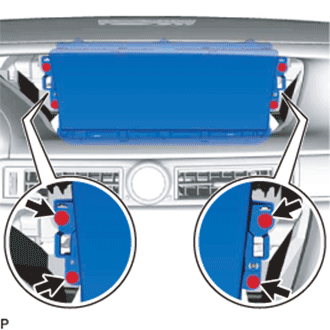
Remove the 4 screws.
-
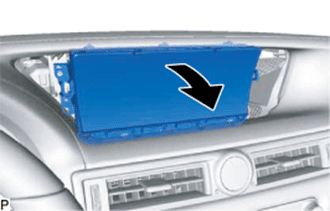
Move the multi-display in the direction of the arrow in the illustration.
-
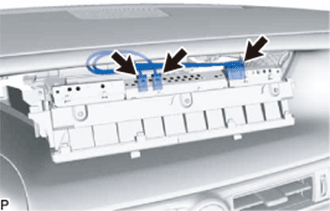
Disconnect all the connectors and remove multi-display.
-