ENGINE ASSEMBLY REMOVAL

CAUTION:
As the engine assembly with transmission is extremely heavy, the engine lifter may suddenly drop if the instructions listed in the repair manual are not followed. Therefore, always follow the instructions listed in the repair manual when performing this procedure.
-
REMOVE ENGINE ROOM SIDE COVER
-
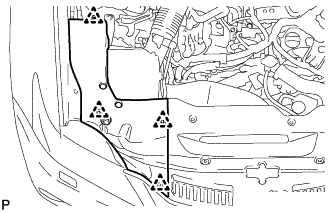
Remove the 4 clips and engine room side cover.
-
-
REMOVE COOL AIR INTAKE DUCT SEAL
-
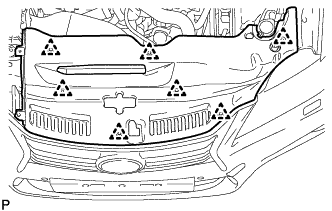
Remove the 7 clips and cool air intake duct seal.
-
-
REMOVE V-BANK COVER SUB-ASSEMBLY
-
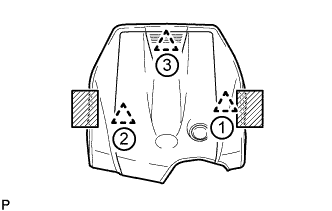
Place both hands on the sides of the cover as shown in the illustration, lift the cover to detach the 2 clips near the front in the order shown in the illustration, and then lift the cover further to detach the rear clip and remove the cover.
Text in Illustration 
Areas to place hands when lifting cover Note
If the cover is lifted rearward or forward and to the right or left at the same time, the cover may be damaged.
-
-
RECOVER REFRIGERANT FROM AIR CONDITIONING SYSTEM (for HFC-134a(R134a))
-
Turn the power switch on (READY).
-
Turn the A/C switch on.
-
Operate the air conditioning with a set temperature of 25°C (77°F) and the blower at low for 10 minutes to circulate the refrigerant. This causes most of the compressor oil from the various components of the air conditioning system to collect in the air conditioning compressor.
-
Turn the power switch off.
-
Recover the refrigerant from the air conditioning system using a refrigerant recovery unit.
-
-
RECOVER REFRIGERANT FROM AIR CONDITIONING SYSTEM (for HFO-1234yf(R1234yf))
-
Turn the power switch on (READY).
-
Turn the A/C switch on.
-
Operate the air conditioning with a set temperature of 25°C (77°F) and the blower at low for 10 minutes to circulate the refrigerant. This causes most of the compressor oil from the various components of the air conditioning system to collect in the air conditioning compressor.
-
Turn the power switch off.
-
Recover the refrigerant from the air conditioning system using a refrigerant recovery unit.
-
-
DISCHARGE FUEL SYSTEM PRESSURE
-
PLACE FRONT WHEELS FACING STRAIGHT AHEAD
-
REMOVE LUGGAGE COMPARTMENT FLOOR MAT
-
Remove the luggage compartment floor mat.
-
-
REMOVE LUGGAGE COMPARTMENT TRIM COVER LH
-
Remove the luggage compartment trim cover.
-
-
PRECAUTION
CAUTION:
Be sure to read Precaution thoroughly before servicing Click here.
Note
After turning the power switch off, waiting time may be required before disconnecting the cable from the auxiliary battery terminal. Therefore, make sure to read the disconnecting the cable from the auxiliary battery terminal notice before proceeding with work Click here.
-
DISCONNECT CABLE FROM AUXILIARY BATTERY NEGATIVE TERMINAL
Note
When disconnecting the cable, some systems need to be initialized after the cable is reconnected Click here.
-
REMOVE NO. 1 SEAT ARMREST CAP
-
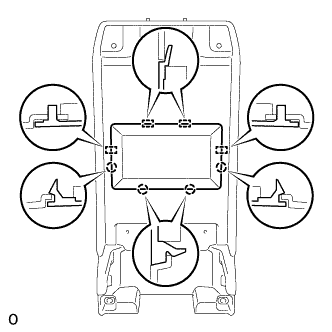
Detach the 4 claws and 4 guides, and remove the No. 1 seat armrest cap.
-
-
REMOVE LOWER HYBRID VEHICLE BATTERY COVER PANEL
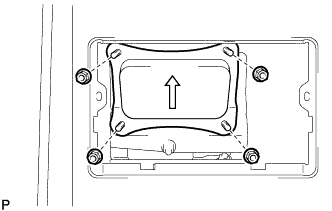
CAUTION:
Perform work using insulated gloves and insulated tools.
-
Remove the 4 nuts and lower hybrid vehicle battery cover panel.
-
-
REMOVE SERVICE PLUG GRIP
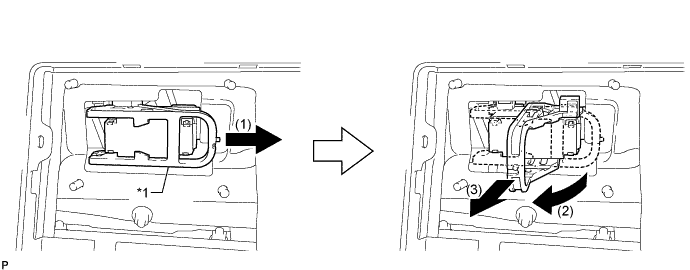
Text in Illustration *1 Lever - -
-
Remove the service plug grip in the order shown in the illustration.
CAUTION:
-
Wear insulated gloves.
-
Remove the service plug grip to interrupt a high voltage circuit at the time of the check.
-
Keep the removed service plug grip in your pocket to prevent other technicians from accidentally reconnecting it while you are servicing the vehicle.
-
After disconnecting the service plug grip, wait for at least 10 minutes before touching any of the high-voltage connectors or terminals.
-
Never turn the power switch on (READY) with the service plug grip removed as malfunctions may occur.
Tech Tips
-
Waiting for at least 10 minutes is required to discharge the high-voltage capacitor inside the inverter with converter assembly.
-
High voltage wiring connectors are orange.
-
Slide the lever and release the lock.
-
Raise the lever and pull the service plug grip to remove it.
-
-
-
REMOVE INVERTER COVER
-
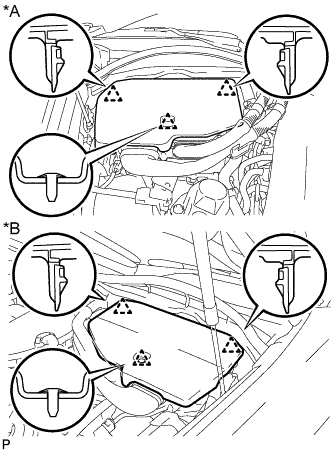
Text in Illustration *A for LHD *B for RHD Raise the front of the inverter cover to detach the clip. Then remove the 2 inverter cover clips from the bracket, and remove the inverter cover.
-
-
REMOVE CONNECTOR COVER ASSEMBLY
CAUTION:
-
Do not touch the high voltage connectors and terminals for 10 minutes after the service plug grip is removed.
-
Wear insulated gloves.
Note
Do not start the hybrid system with the service plug grip removed because it may cause a malfunction.
-
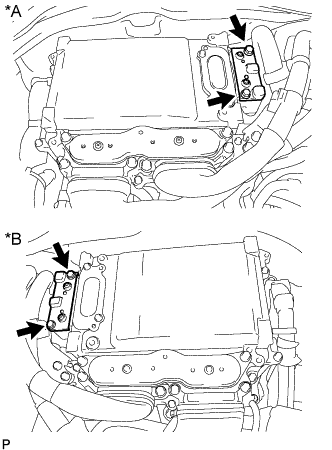
Text in Illustration *A for LHD *B for RHD Using an insulated tool, remove the 2 bolts and connector cover.
Note
-
Make sure to pull the connector cover straight up, as a connector is connected to the bottom of the cover.
-
Do not allow any foreign objects or water to enter the inverter with converter.
-
-
-
CHECK TERMINAL VOLTAGE
CAUTION:
Wear insulated gloves.
Note
Do not allow any foreign objects or water to enter the inverter with converter assembly.
-
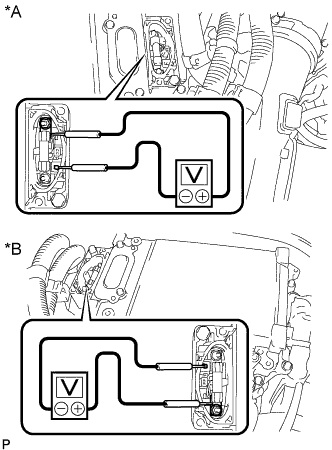
Text in Illustration *A for LHD *B for RHD Using a voltmeter, measure the voltage between the terminals of the 2 phase connectors.
Standard voltage 0 V Tech Tips
Use a measuring range of DC 750 V or more on the voltmeter.
-
-
TEMPORARILY INSTALL CONNECTOR COVER ASSEMBLY
CAUTION:
Wear insulated gloves.
-
Temporarily install the connector cover with the bolt to prevent any foreign objects or water from entering the inverter with converter.
-
-
REMOVE INVERTER MOTOR CABLE BRACKET ASSEMBLY
-
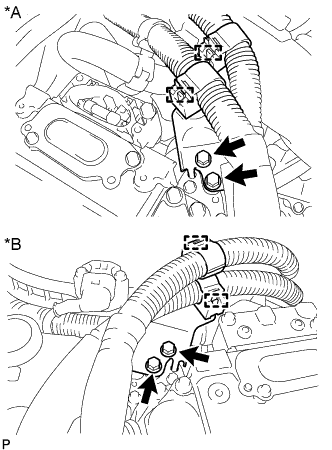
Text in Illustration *A for LHD *B for RHD Detach the 2 clamps from the inverter motor cable bracket.
-
Remove the 2 bolts and inverter motor cable bracket.
-
-
REMOVE INVERTER TERMINAL COVER
CAUTION:
Wear insulated gloves.
-
for Type A:
-
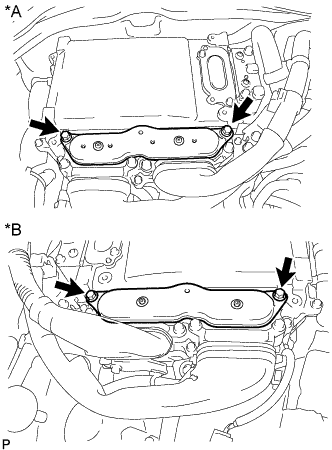
Text in Illustration *A for LHD *B for RHD Using an insulated tool, remove the 2 bolts and inverter terminal cover.
Note
-
Make sure to pull the inverter terminal cover straight up, as a connector is connected to the bottom of the cover.
-
Do not touch the inverter terminal cover waterproofing rubber.
-
-
-
for Type B:
-
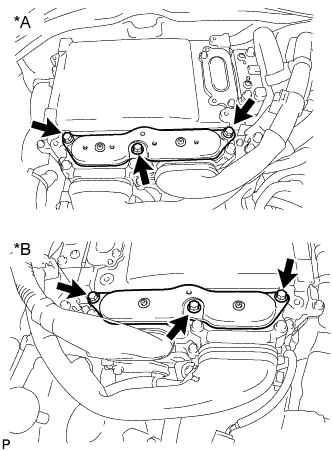
Text in Illustration *A for LHD *B for RHD Using an insulated tool, remove the 3 bolts and inverter terminal cover.
Note
-
Make sure to pull the inverter terminal cover straight up, as a connector is connected to the bottom of the cover.
-
Do not touch the inverter terminal cover waterproofing rubber.
-
-
-
-
REMOVE FRONT WHEEL
-
REMOVE ENGINE UNDER COVER
-
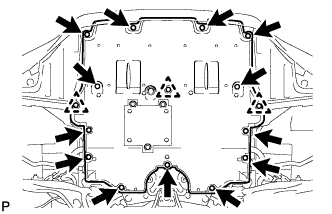
Remove the 13 screws, 3 clips and engine under cover.
-
-
REMOVE REAR ENGINE UNDER COVER LH
-
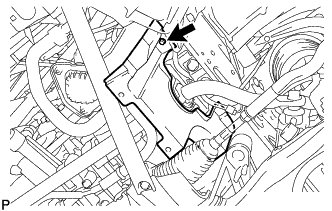
Remove the screw and rear engine under cover LH.
-
-
REMOVE REAR ENGINE UNDER COVER RH
Tech Tips
Remove the RH side following the same procedure as for the LH side.
-
REMOVE FRONT SUSPENSION MEMBER BRACE
-
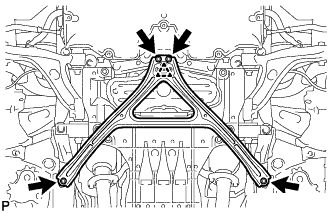
Remove the 4 bolts, and then turn the clip and remove the front suspension member brace.
Tech Tips
Do not remove the clip from the front suspension member brace.
-
-
REMOVE NO. 2 ENGINE UNDER COVER
-
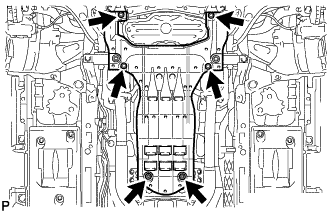
Remove the 4 screws, 2 grommets and No. 2 engine under cover.
-
-
DRAIN ENGINE OIL
-
Remove the oil filler cap.
-
Remove the drain plug and gasket.
-
Install a new gasket and the drain plug.
- Torque:
- 40 N*m { 408 kgf*cm, 30 ft.*lbf }
-
-
DRAIN ENGINE COOLANT
CAUTION:
Do not remove the radiator cap or reservoir tank cap while the engine and radiator are still hot. Pressurized hot engine coolant and steam may be released and cause serious burns.
-
Loosen the radiator drain cock plug.
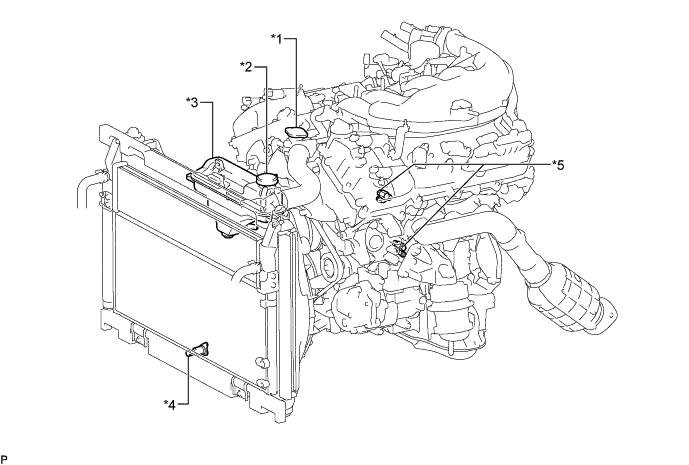
Text in Illustration *1 Radiator Cap *2 Reservoir Tank Cap *3 Radiator Reservoir Tank *4 Radiator Drain Cock Plug *5 Cylinder Block Drain Cock Plug - - -
Remove the reservoir tank cap and drain the coolant.
Tech Tips
Collect the coolant in a container and dispose of it according to the local regulations.
-
Loosen the 2 cylinder block drain cock plugs and drain the coolant from the engine.
-
-
DRAIN COOLANT (for Inverter)
Note
-
Do not reuse the drained coolant because it may contain foreign objects.
-
Collect the drained coolant and measure its volume to establish a benchmark. When adding coolant, make sure to add more coolant than the measured amount.
-
Remove the reservoir tank cap.
CAUTION:
To avoid the danger of being burned, do not remove the reservoir tank cap while the coolant for the inverter is still hot.
-
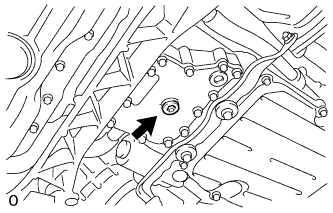
Using a 10 mm hexagon wrench, remove the drain plug indicated in the illustration and drain the coolant.
CAUTION:
Use caution when handling coolant immediately after driving or in summer because it may be hot.
-
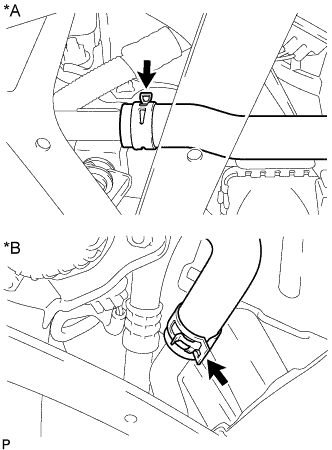
Text in Illustration *A for LHD *B for RHD Disconnect the No. 5 inverter cooling hose.
-
Install the plug with a new gasket.
- Torque:
- 39 N*m { 398 kgf*cm, 29 ft.*lbf }
-
Connect the No. 5 inverter cooling hose.
-
-
REMOVE NO. 1 AIR CLEANER INLET
-
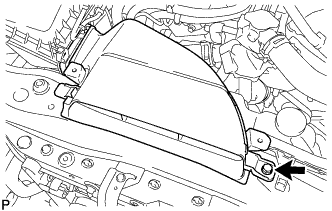
Remove the bolt and No. 1 air cleaner inlet.
-
-
REMOVE AIR CLEANER CAP WITH AIR CLEANER HOSE
-
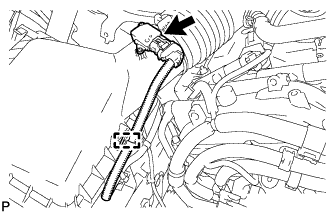
Disconnect the mass air flow meter connector.
-
Disconnect the clamp from the air cleaner.
-
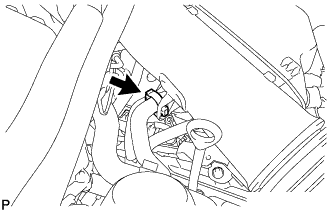
Disconnect the VSV hose.
-
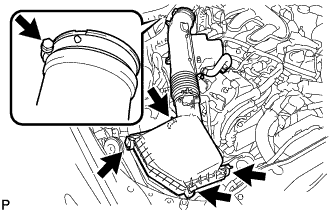
Disconnect the 4 clamps.
-
Remove the hose clamp and air cleaner cap with air cleaner hose.
-
-
REMOVE AIR CLEANER FILTER ELEMENT SUB-ASSEMBLY
-
REMOVE AIR CLEANER CASE SUB-ASSEMBLY
-
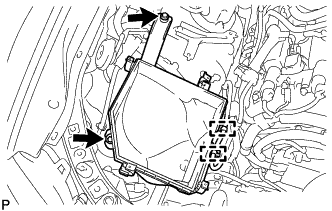
Remove the 2 bolts, 2 clamps and air cleaner case sub-assembly.
Note
When removing the air cleaner case sub-assembly, be careful not to lose the grommet on the underside of the air cleaner case.
-
-
DISCONNECT WIRE HARNESS
-
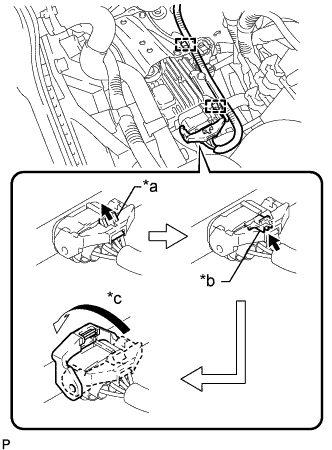
Text in Illustration *a Pull out the lock *b Release the lock *c Rotate the lever Release the lock of the connector.
-
Release the lock lever of the connector as shown in the illustration. Disconnect the connector from the oil pump motor controller.
-
Disconnect the 2 clamps.
-
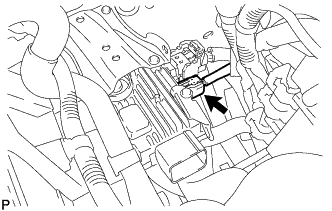
Disconnect the connector from the oil pump motor controller.
-
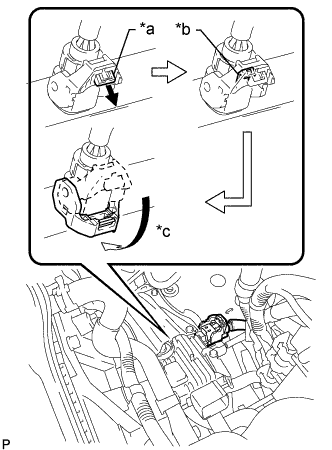
Text in Illustration *a Pull out the lock *b Release the lock *c Rotate the lever Release the lock of the connector.
-
Release the lock lever of the connector as shown in the illustration. Disconnect the connector from the oil pump motor controller.
-
-
REMOVE OIL PUMP MOTOR CONTROLLER
-
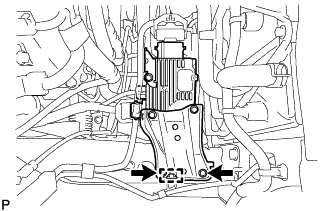
Remove the 2 bolts, clamp and oil pump motor controller with bracket.
Note
Do not drop the oil pump motor controller.
-
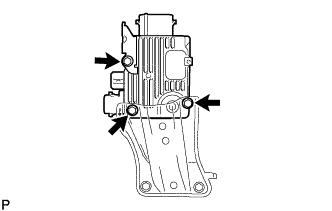
Remove the 3 bolts and 2 oil pump motor controller brackets.
-
-
REMOVE WIRING HARNESS PROTECTOR
-
Separate the clamp and turn the protector upward to remove it from the vehicle.
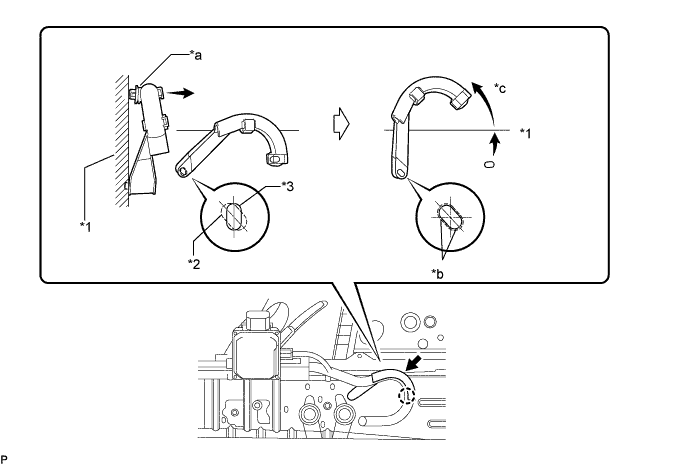
Text in Illustration *1 Side Member *2 Hole *3 Claw - - *a Separate the clamp from the vehicle *b Align the hole in the side member and clamp claw *c Turn the protector - - Note
Do not apply excessive force when turning the wiring harness protector.
-
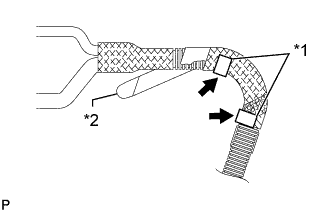
Text in Illustration *1 Lock *2 Tape Remove the tape and the 2 locks, and remove the wiring harness protector.
Note
When removing the wiring harness protector, mark the installation location.
-
-
REMOVE HEATER ACCESSORY ASSEMBLY
-
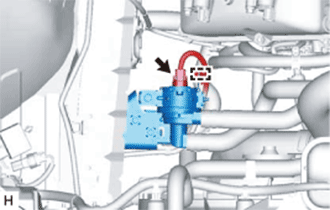
Detach the clamp and disconnect the connector.
-
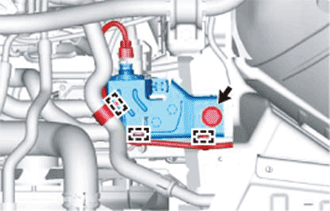
Detach the 3 clamps and remove the bolt.
-
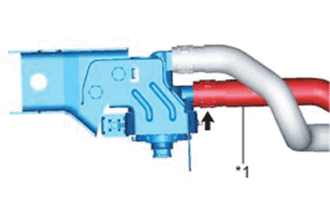
Using pliers, grip the claws of the clip and slide the clip.
-
Disconnect the heater water outlet hose C.
Text in Illustration *1 Heater Water Outlet Hose C -
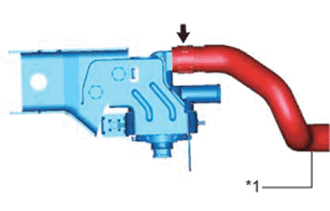
Using pliers, grip the claws of the clip and slide the clip.
-
Disconnect the heater water inlet hose C and remove the heater accessory assembly (heater water pump).
Text in Illustration *1 Heater Water Inlet Hose C
-
-
DISCONNECT PURGE LINE HOSE
-
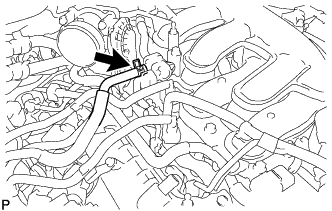
Remove the clamp and disconnect the purge line hose.
-
-
DISCONNECT NO. 3 FUEL TUBE SUB-ASSEMBLY
-
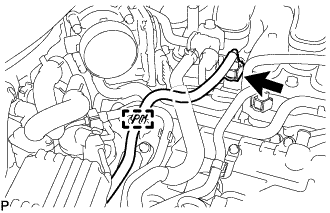
Disconnect the No. 3 fuel tube sub-assembly Click here.
-
-
DISCONNECT NO. 2 FUEL TUBE SUB-ASSEMBLY
-
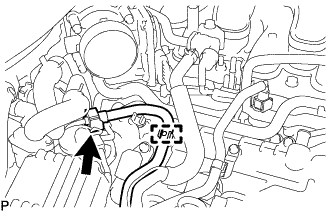
Disconnect the No. 2 fuel tube sub-assembly Click here.
-
-
DISCONNECT FUEL TUBE SUB-ASSEMBLY
-
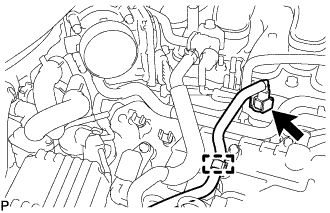
Disconnect the fuel tube sub-assembly Click here.
-
-
REMOVE NO. 1 RADIATOR HOSE
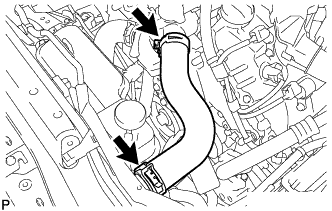
-
DISCONNECT NO. 2 RADIATOR HOSE
-
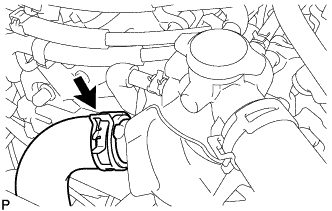
Disconnect the No. 2 radiator hose from the water inlet with thermostat sub-assembly.
-
-
DISCONNECT INLET HEATER WATER HOSE
-
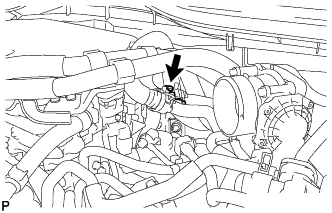
Remove the water hose set.
-
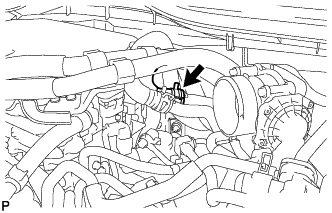
Disconnect the inlet heater water hose.
-
-
DISCONNECT OUTLET HEATER WATER HOSE
-
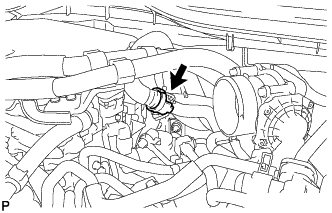
Remove the water hose set.
-
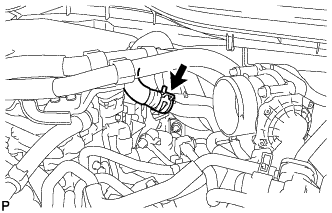
Disconnect the outlet heater water hose.
-
-
DISCONNECT AIR CONDITIONING HARNESS
-
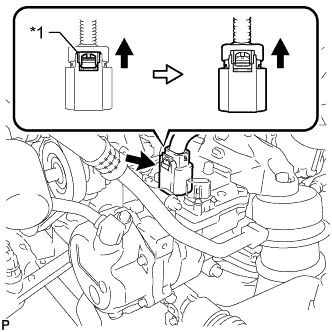
Text in Illustration *1 Green-colored Lock Release the green-colored lock and disconnect the connector as shown in the illustration.
CAUTION:
Wear insulated gloves when performing the procedure.
Note
Insulate the connector by sealing it with tape.
-
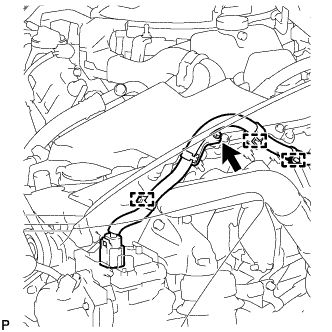
Remove the bolt and 3 wire harness clamps to disconnect the air conditioning harness.
-
-
DISCONNECT NO. 2 OIL COOLER INLET HOSE
-
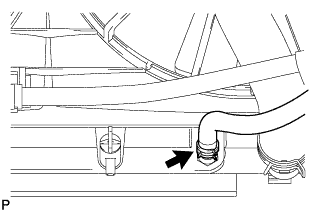
Disconnect the No. 2 oil cooler inlet hose from the radiator assembly.
-
-
DISCONNECT NO. 2 OIL COOLER OUTLET HOSE
-
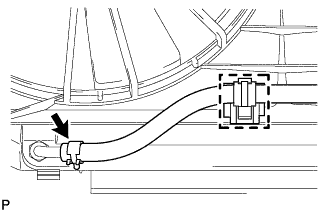
Disengage the clamp and disconnect the No. 2 oil cooler outlet hose from the No. 1 flexible hose clamp.
-
Remove the No. 1 flexible hose clamp from the radiator assembly.
-
Slide the clip and disconnect the No. 2 oil cooler outlet hose from the radiator assembly.
-
-
DISCONNECT NO. 5 INVERTER COOLING HOSE (for LHD)
-
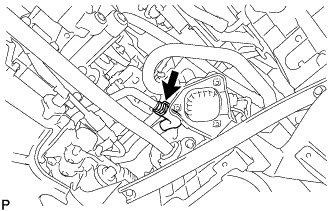
Disconnect the No. 5 inverter cooling hose.
-
-
DISCONNECT NO. 2 MOTOR COOLING HOSE (for RHD)
-
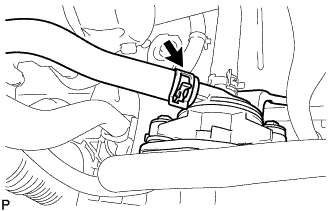
Disconnect the No. 2 motor cooling hose.
-
-
REMOVE NO. 1 INVERTER COOLING PIPE (for LHD)
-
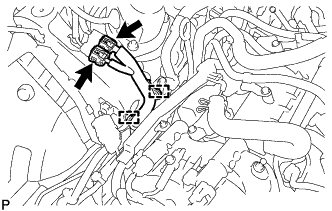
Disconnect the 2 connectors, 2 wire harness clamps and wire harness.
-
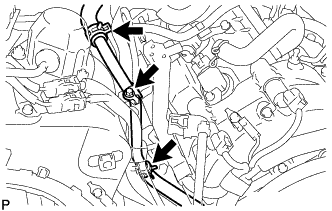
Remove the bolt and disconnect the 2 hoses to remove the No. 1 inverter cooling pipe.
-
-
DISCONNECT NO. 7 INVERTER COOLING HOSE (for RHD)
-
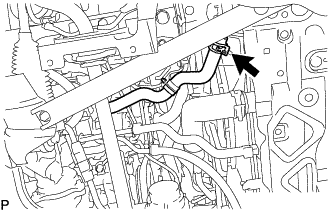
Disconnect the No. 7 inverter cooling hose.
-
-
DISCONNECT NO. 1 COOLER REFRIGERANT DISCHARGE HOSE
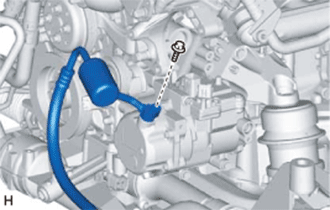
-
Remove the bolt and disconnect the No. 1 cooler refrigerant discharge hose from the compressor with motor assembly.
-
Remove the O-ring from the No. 1 cooler refrigerant discharge hose.
Note
Seal the openings of the disconnected parts using vinyl tape to prevent moisture and foreign matter from entering them.
-
-
DISCONNECT SUCTION HOSE
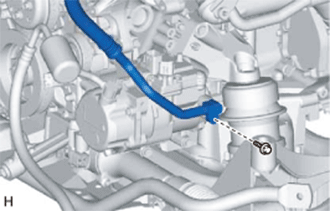
-
Remove the bolt and disconnect the suction hose from the compressor with motor assembly.
-
Remove the O-ring from the suction hose.
Note
Seal the openings of the disconnected parts using vinyl tape to prevent moisture and foreign matter from entering them.
-
-
REMOVE ECM
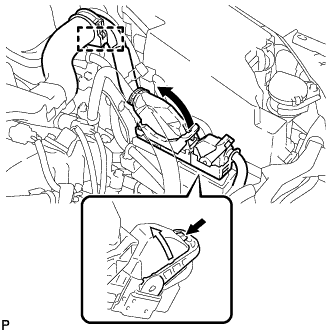
-
Disconnect the 2 ECM connectors and wire harness clamp.
-
Push in the locks on the 2 levers, raise the levers, and disconnect the 2 ECM connectors.
Note
After disconnecting the connectors, make sure that dirt, water or other foreign matter does not contact the connecting part of the connectors.
-
-
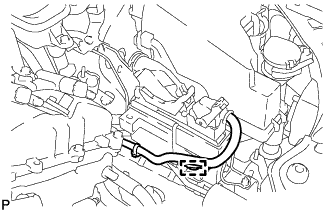
for LHD:
Disconnect the clamp.
-
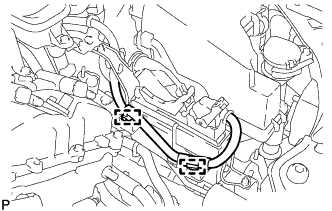
for RHD:
Disconnect the 2 clamps.
-
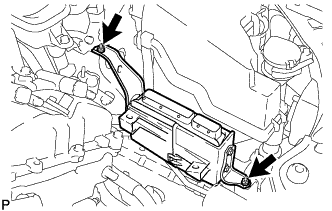
Remove the 2 nuts and ECM.
-
-
DISCONNECT MOTOR CABLE
CAUTION:
Wear insulated gloves.
Note
Route the cable so that it passes inside the guide of the inverter motor cable bracket.
-
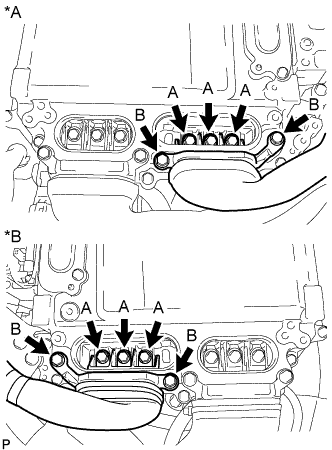
Text in Illustration *A for LHD *B for RHD Using an insulated tool, remove the 3 bolts labeled A in the illustration.
Note
-
Do not damage the terminals, connector housings or inverter with converter when disconnecting them.
-
Do not touch the connector waterproofing rubber or terminals.
-
Do not allow any foreign objects or water to enter the inverter with converter.
-
-
Using an insulated tool, remove the 2 bolts labeled B in the illustration.
Note
-
Do not damage the terminals, connector housings or inverter with converter when disconnecting them.
-
Do not touch the connector waterproofing rubber or terminals.
-
Insulate the removed terminals with insulating tape.
-
Do not allow any foreign objects or water to enter the inverter with converter.
-
-
-
DISCONNECT GENERATOR CABLE
CAUTION:
Wear insulated gloves.
Note
Route the cable so that it passes inside the guide of the inverter motor cable bracket.
-
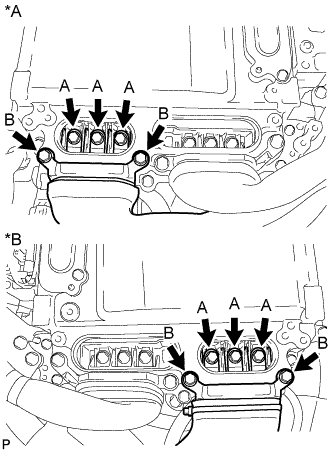
Text in Illustration *A for LHD *B for RHD Using an insulated tool, remove the 3 bolts labeled A in the illustration.
Note
-
Do not damage the terminals, connector housings or inverter with converter when disconnecting them.
-
Do not touch the connector waterproofing rubber or terminals.
-
Do not allow any foreign objects or water to enter the inverter with converter.
-
-
Using an insulated tool, remove the 2 bolts labeled B in the illustration.
Note
-
Do not damage the terminals, connector housings or inverter with converter when disconnecting them.
-
Do not touch the connector waterproofing rubber or terminals.
-
Insulate the removed terminals with insulating tape.
-
Do not allow any foreign objects or water to enter the inverter with converter.
-
-
-
REMOVE INVERTER RESERVOIR TANK ASSEMBLY (for LHD)
-
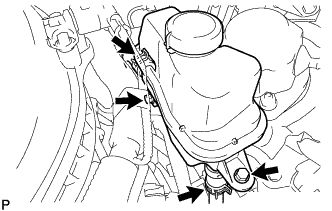
Disconnect the No. 3 inverter cooling hose and No. 4 inverter cooling hose.
-
Remove the 2 bolts and inverter reservoir tank assembly.
-
-
REMOVE INVERTER RESERVOIR TANK ASSEMBLY (for RHD)
-
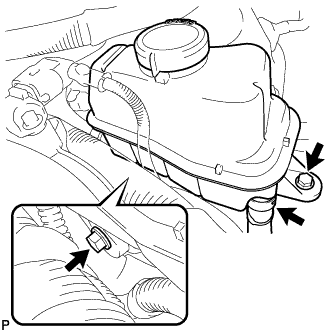
Remove the 2 bolts and disconnect the inverter reservoir tank from the No. 4 inverter cooling hose.
-
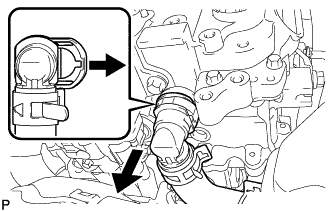
Release the retainer and disconnect the No. 2 inverter cooling outlet hose from the inverter with converter.
Note
Apply insulating tape to the pipes and in the disconnected hoses, or cover the pipes and hoses with plastic bags to prevent foreign matter from entering the cooling system and to prevent coolant from spilling near the inverter with converter.
-
-
DISCONNECT ENGINE WIRE
-
Engine Room LH Side:
-
Remove the No. 1 engine room relay block cover.
-
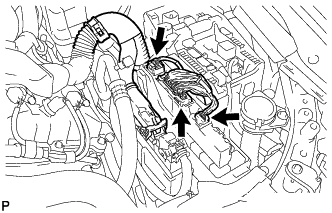
Disconnect the 3 connectors from the No. 2 connector holder.
-
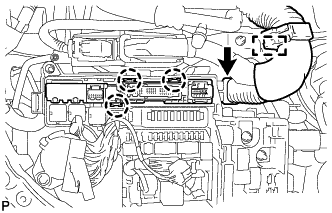
Detach the clamp and 3 claws, and then disconnect the No. 2 connector holder.
-
-
Engine Room RH Side:
-
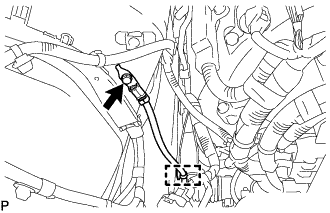
Remove the bolt, clamp and No. 3 engine wire.
-
-
-
REMOVE NO. 1 REAR FLOOR BOARD SUB-ASSEMBLY
-
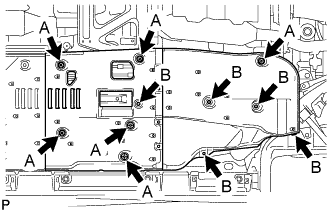
Remove the 5 clips labeled B in the illustration.
-
Loosen the 6 clips labeled A in the illustration and remove the No. 1 rear floor board sub-assembly.
-
-
REMOVE NO. 2 REAR FLOOR BOARD SUB-ASSEMBLY
-
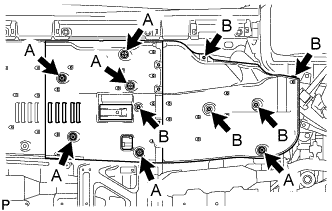
Remove the 5 clips labeled B in the illustration.
-
Loosen the 6 clips labeled A in the illustration and remove the No. 2 rear floor board sub-assembly.
-
-
REMOVE FRONT CENTER FLOOR BRACE
-
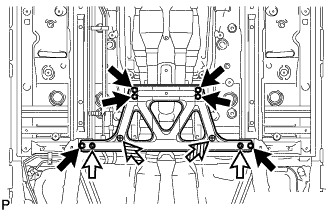
Remove the 6 bolts and 2 nuts.
Text in Illustration 
Bolt 
Nut 
Clip -
Loosen the 2 clips and remove the front center floor brace.
-
-
DISCONNECT HEATED OXYGEN SENSOR (for Bank 1 Sensor 2)
-
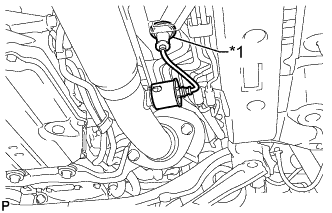
Text in Illustration *1 Grommet Disconnect the grommet of the heated oxygen sensor.
-
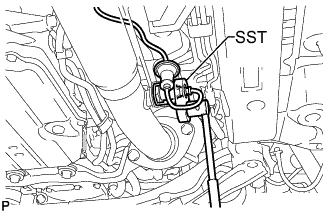
Using SST, disconnect the heated oxygen sensor.
- SST
- 09224-00010
-
-
DISCONNECT HEATED OXYGEN SENSOR (for Bank 2 Sensor 2)
-
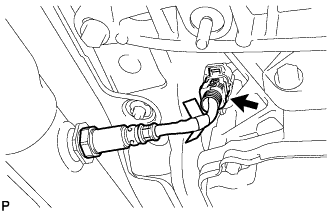
Disconnect the heated oxygen sensor connector.
-
-
REMOVE FRONT EXHAUST PIPE ASSEMBLY
-
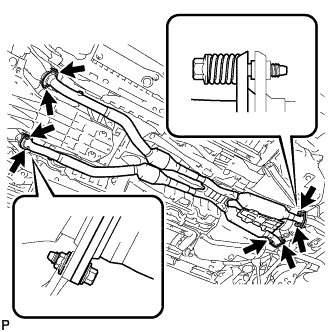
Remove the 4 nuts, 8 bolts, 4 compression springs and front exhaust pipe assembly.
-
Remove the 4 gaskets.
-
w/ Towing Package:
Tech Tips
Only perform this procedure when replacement of the front No. 1 exhaust pipe protector is necessary.
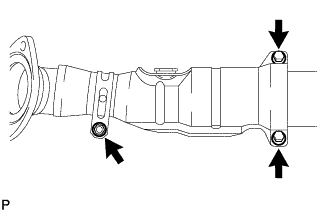
-
Remove the bolt and clamp.
-
Remove the 2 bolts, 2 nuts, exhaust pipe protector stay and front No. 1 exhaust pipe protector.
-
-
-
REMOVE NO. 1 EXHAUST PIPE SUPPORT BRACKET SUB-ASSEMBLY
-
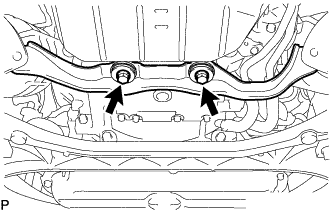
Remove the 2 bolts and No. 1 exhaust pipe support bracket sub-assembly.
-
-
REMOVE FRONT CENTER FLOOR BRACE SUB-ASSEMBLY
-
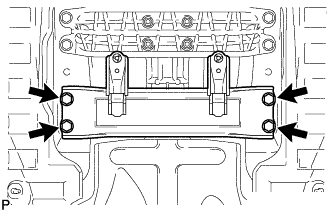
Remove the 4 bolts and front center floor brace sub-assembly.
-
-
REMOVE NO. 1 FUEL TANK PROTECTOR
-
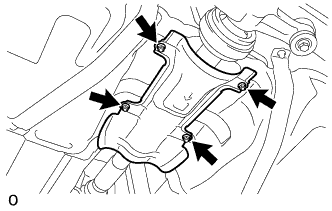
Remove the 4 nuts and No. 1 fuel tank protector.
-
-
REMOVE FRONT NO. 1 FLOOR HEAT INSULATOR
-
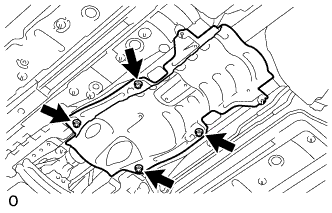
Remove the 4 nuts and front No. 1 floor heat insulator.
-
-
REMOVE PROPELLER WITH CENTER BEARING SHAFT ASSEMBLY
-
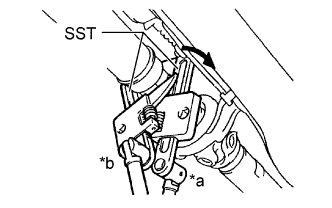
Text in Illustration *a Turn *b Hold Using SST, loosen the adjusting nut until it can be turned by hand.
- SST
- 09922-10010
Note
Make sure to turn SST in the direction shown in the illustration.
Tech Tips
Use 2 of the same type of SST.
-
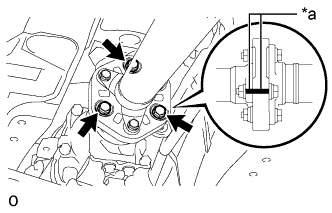
Text in Illustration *a Matchmark Put matchmarks on the transmission companion flange and flexible coupling.
-
Remove the 3 bolts, 3 washers and 3 nuts.
Note
The propeller intermediate shaft and flexible coupling should not be disconnected.
-
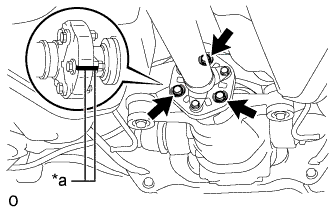
Text in Illustration *a Matchmark Put matchmarks on the differential companion flange and flexible coupling.
-
Remove the 3 bolts, 3 washers and 3 nuts.
Note
The propeller shaft assembly and flexible coupling should not be disconnected.
-
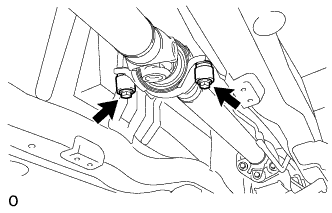
Remove the 2 center support bearing dampers and 2 washers.
Tech Tips
Some vehicles are not equipped with the washers.
-
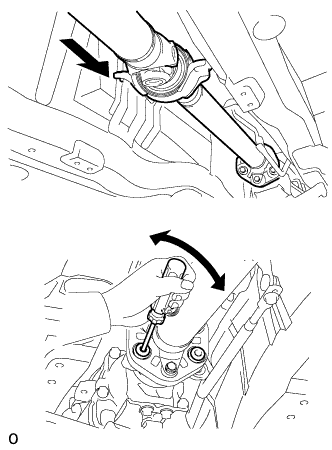
Push the propeller shaft assembly straight forward to compress the propeller shaft assembly and pull out the propeller shaft assembly from the centering pin of the differential.
Note
Press the propeller shaft assembly straight ahead to keep the transmission and propeller intermediate shaft aligned straight.
Tech Tips
If it is difficult to disconnect the flange from the flexible coupling, pry it using a screwdriver.
-
Pull the propeller shaft outward from the vehicle's rear.
Note
The propeller intermediate shaft and propeller shaft assembly should not be disconnected.
-
-
DISCONNECT STEERING SLIDING WITH SHAFT YOKE SUB-ASSEMBLY (w/o VGRS)
-
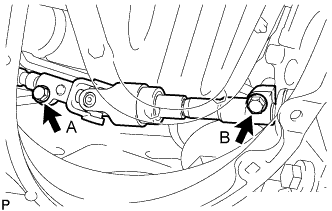
Loosen the bolt labeled A, remove the bolt labeled B.
Note
Do not remove the bolt labeled A, only loosen it.
-
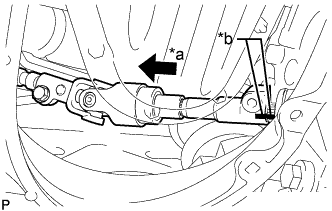
Text in Illustration *a Slide *b Matchmarks Slide the steering sliding with shaft yoke in the direction of the arrow and place matchmarks.
-
Disconnect the steering sliding with shaft yoke from the steering link.
-
-
DISCONNECT STEERING SLIDING WITH SHAFT YOKE SUB-ASSEMBLY (w/ VGRS)
-
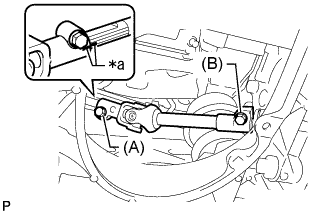
Text in Illustration *a Matchmark Loosen the bolt labeled A and remove the bolt labeled B, and then slide the steering sliding with shaft yoke sub-assembly.
Note
-
Do not remove the bolt labeled A.
-
Do not disconnect the steering sliding with shaft yoke sub-assembly from the power steering link assembly.
-
-
Put matchmark on the steering sliding with shaft yoke sub-assembly and steering actuator assembly.
-
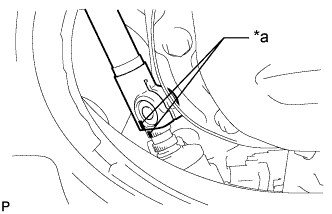
Text in Illustration *a Matchmark Put matchmarks on the steering sliding with shaft yoke sub-assembly and power steering link assembly.
-
Disconnect the steering sliding with shaft yoke sub-assembly from the power steering link assembly.
-
Remove the bolt and steering sliding with shaft yoke sub-assembly from the steering actuator assembly.
-
-
DISCONNECT FRONT SHOCK ABSORBER ASSEMBLY LH
-
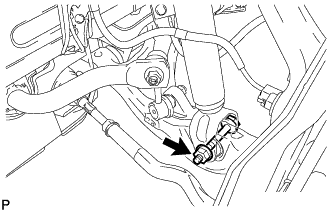
Remove the bolt and nut, and disconnect the lower part of the front shock absorber assembly LH from the front lower suspension arm assembly.
Note
When removing the bolt, keep the nut from rotating.
-
-
DISCONNECT FRONT SHOCK ABSORBER ASSEMBLY RH
Tech Tips
Remove the RH side following the same procedure as for the LH side.
-
DISCONNECT FRONT LOWER BALL JOINT ASSEMBLY LH
-
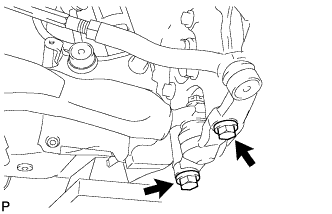
Remove the 2 bolts and steering knuckle from the lower ball joint.
-
-
DISCONNECT FRONT LOWER BALL JOINT ASSEMBLY RH
Tech Tips
Remove the RH side following the same procedure as for the LH side.
-
DISCONNECT POWER STEERING LINK WIRE HARNESS
-
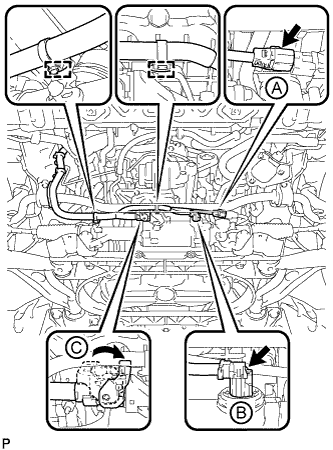
Disconnect the 2 wire harness clamps from the bracket.
-
Disconnect the 2 connectors (A) and (B) from the power steering link assembly.
-
Release the lock of connector (C) and disconnect the connector from the power steering link assembly.
-
-
DISCONNECT FLOOR SHIFT GEAR SHIFTING ROD SUB-ASSEMBLY
-
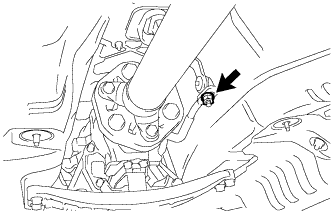
Remove the nut and disconnect the floor shift gear shifting rod sub-assembly.
-
-
REMOVE FRONT NO. 2 UPPER SUSPENSION MEMBER
-
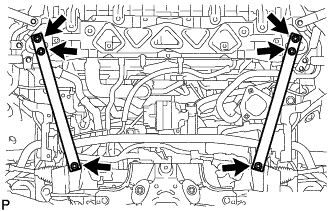
Remove the 6 bolts and front No. 2 upper suspension member.
-
-
REMOVE FRONT LOWER SUSPENSION MEMBER PROTECTOR
-
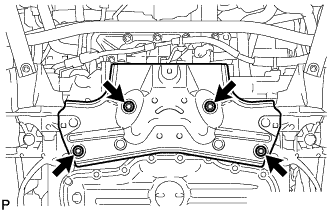
Remove the 4 bolts and suspension member protector.
-
-
INSTALL ENGINE HANGER
-
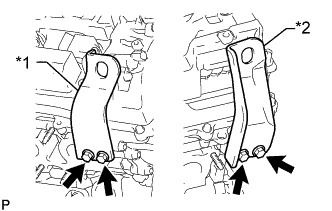
Text in Illustration *1 No. 1 Engine Hanger *2 No. 2 Engine Hanger Install the 2 No. 1 engine hangers with the 4 bolts as shown in the illustration.
- Torque:
- 33 N*m { 337 kgf*cm, 24 ft.*lbf }
Tech Tips
No. 1 engine hanger 12281 - 31130 No. 2 engine hanger 12282 - 31140 Bolt 91671 - F0822
-
-
REMOVE ENGINE AND TRANSMISSION ASSEMBLY
-
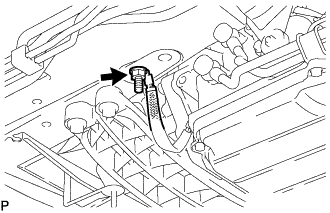
Remove the nut and disconnect the wire harness.
-
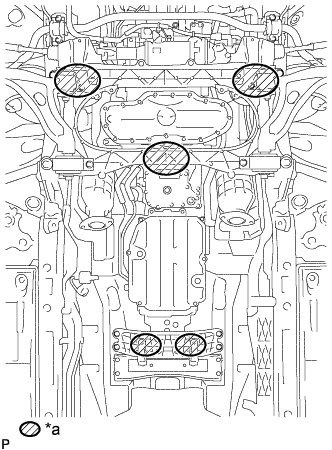
Text in Illustration *a Place Wooden Block or Plate Attachments Set the engine on an engine lifter.
Note
-
Place wooden blocks or plate lift attachments so that the engine is level.
-
With the exception of installing the engine assembly to an engine stand or removing the engine assembly from an engine stand, do not perform any work on the engine while it is suspended, as doing so is dangerous.
-
Never install attachments to the oil pan of the engine assembly or transmission as doing so may deform the oil pan.
-
-
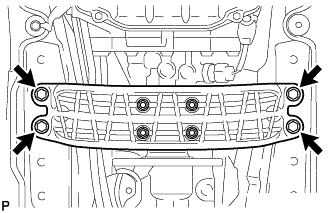
Remove the 4 bolts, and then disconnect the rear engine mounting member.
-
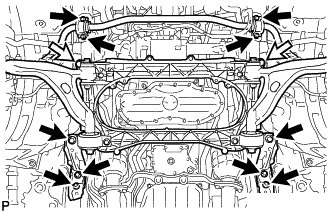
Remove the 10 bolts and 2 nuts shown in the illustration.
Text in Illustration Bolt Nut -
Operate the engine lifter, and then slowly remove the engine from the vehicle.
Note
-
Make sure the engine is clear of all wiring and hoses.
-
While lowering the engine from the vehicle, do not allow it to contact the vehicle.
-
-
Attach an engine sling device and hang the engine with a chain block.
Note
Pay attention to the angle of the sling device as the engine assembly or engine hangers may be damaged or deformed if the angle is incorrect.
-
-
REMOVE NO. 2 ENGINE OIL LEVEL DIPSTICK GUIDE
-
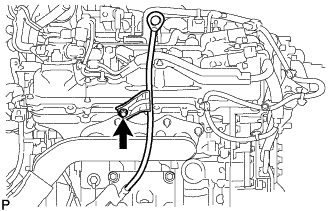
Remove the oil level dipstick.
-
Remove the bolt and No. 2 oil level dipstick guide.
-
Remove the O-ring from the No. 2 oil level dipstick guide.
-
-
REMOVE ENGINE OIL LEVEL DIPSTICK GUIDE
-
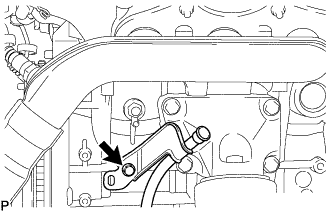
Remove the bolt and engine oil level dipstick guide.
-
Remove the O-ring from the engine oil level dipstick guide.
-
-
REMOVE ENGINE UNDER COVER SUB-ASSEMBLY LH
-
Remove the engine under cover sub-assembly LH.
-
-
REMOVE ENGINE UNDER COVER SUB-ASSEMBLY RH
-
Remove the engine under cover sub-assembly RH.
-
-
REMOVE EXHAUST MANIFOLD SUB-ASSEMBLY LH
-
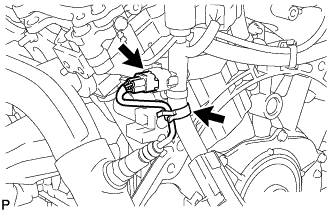
Detach the clamp and disconnect the air fuel ratio sensor connector.
-
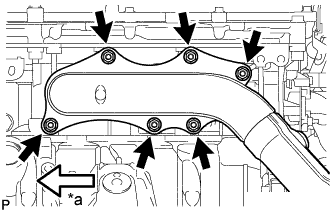
Text in Illustration *a Front Remove the 6 nuts, exhaust manifold sub-assembly LH and gasket.
-
-
REMOVE EXHAUST MANIFOLD SUB-ASSEMBLY RH
-
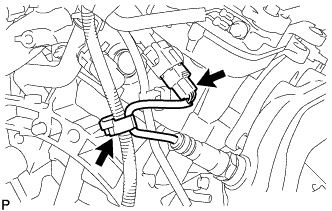
Detach the clamp and disconnect the air fuel ratio sensor connector.
-
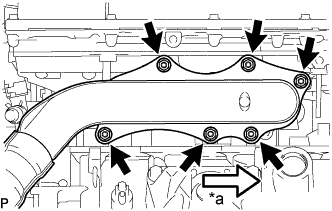
Text in Illustration *a Front Remove the 6 nuts, exhaust manifold sub-assembly RH and gasket.
-
-
REMOVE CONNECTOR
-
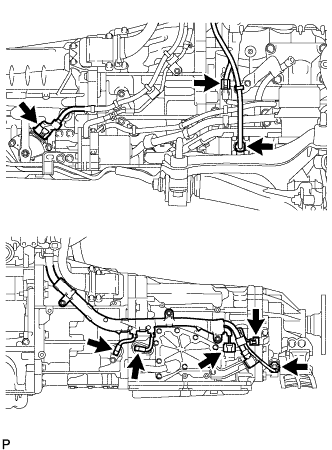
Disconnect the shift lever position sensor connector, transmission wire connector, oil pressure sensor connector, transmission speed sensor connector, O/P THERM connector, engine oil level sensor connector, motor revolution sensor connector and generator revolution sensor connector.
-
-
REMOVE WIRE HARNESS
-
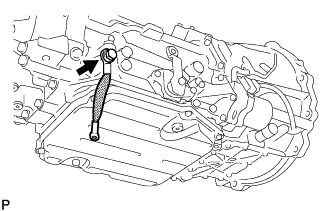
Remove the bolt and ground cable.
-
Disconnect the cable clamps.
-
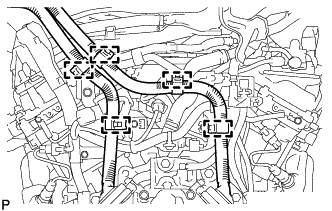
for RHD:
Disconnect the 5 cable clamps.
-
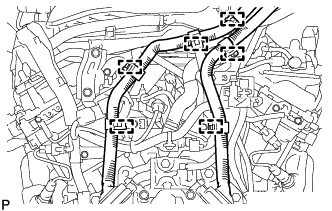
for LHD:
Disconnect the 6 cable clamps.
-
-
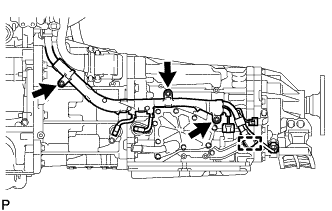
Remove the 3 bolts and disconnect the wire harness clamp from the hybrid vehicle transmission assembly.
-
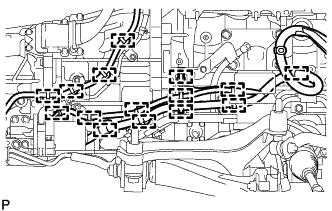
Disconnect the 15 wire harness clamps and remove the wire harness from the hybrid vehicle transmission assembly.
-
-
REMOVE OIL COOLER HOSE TUBE SUB-ASSEMBLY
-
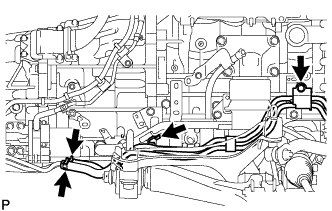
Remove the 2 bolts, 2 clips and oil cooler tube sub-assembly.
-
-
REMOVE WATER PIPE AND HOSE SUB-ASSEMBLY
-
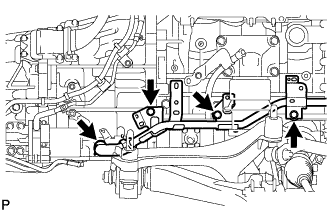
for RH Side:
Remove the 3 bolts, clips and the water pipe and hose sub-assembly.
-
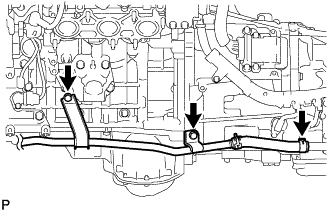
for LH Side:
Remove the 2 bolts, clip and the water pipe and hose sub-assembly.
-
-
REMOVE TRANSMISSION BREATHER HOSE SUB-ASSEMBLY
-
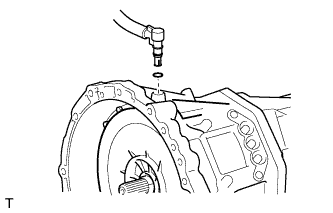
Using a screwdriver, remove the transmission breather plug.
-
Remove the O-ring.
-
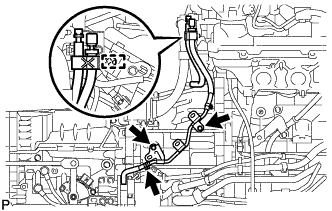
Remove the 2 bolts, clamp and transmission breather hose.
-
Remove the clamp and transmission breather hose.
-
-
SUPPORT HYBRID VEHICLE TRANSMISSION ASSEMBLY
-
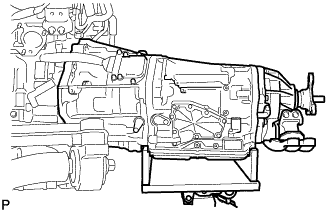
Support the hybrid vehicle transmission assembly with a transmission jack.
Note
-
In order to protect the oil pan, place attachments onto the transmission jack.
-
Make sure that the attachments and the oil pan are centered on the transmission jack.
-
Using an engine sling device and mini crane, hold the engine.
-
Using rope and attachments, securely set the hybrid vehicle transmission assembly on the transmission jack.
-
-
-
REMOVE STARTER HOLE INSULATOR
-
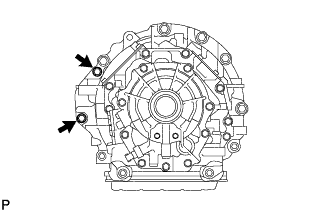
Remove the 2 bolts and starter hole insulator.
-
-
REMOVE FLYWHEEL HOUSING SIDE COVER
-
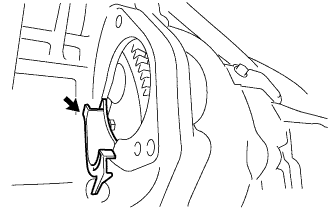
Remove the flywheel housing side cover.
-
-
REMOVE HYBRID VEHICLE TRANSMISSION ASSEMBLY
-
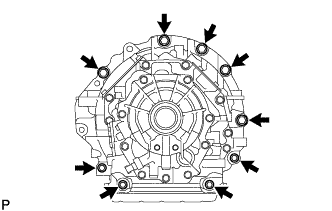
Remove the 9 bolts and hybrid vehicle transmission assembly.
Note
Do not use excessive force to pry out the transmission assembly when separating it from the engine to prevent the knock pins from being damaged.
-
-
REMOVE TRANSMISSION INPUT DAMPER COVER ASSEMBLY
-
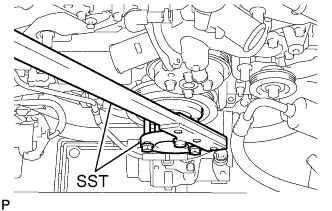
Using SST, hold the crankshaft pulley.
- SST
- 09213-70011 ( 09213-70020 )
- 09330-00021
-
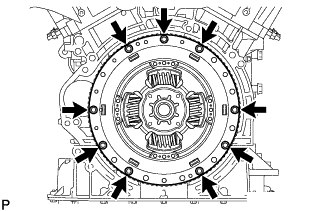
Remove the 9 bolts and transmission input damper cover assembly.
-
-
REMOVE FLYWHEEL SUB-ASSEMBLY
-
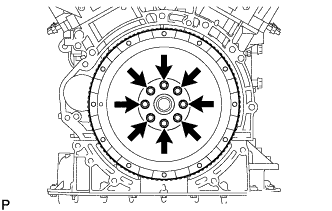
Remove the 8 bolts and flywheel sub-assembly.
-
-
REMOVE COMPRESSOR WITH MOTOR ASSEMBLY
-
Disconnect the connector.
-
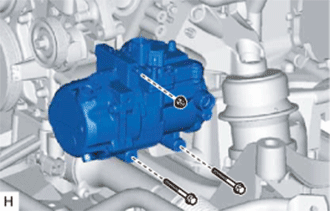
Remove the 2 bolts and nut.
-
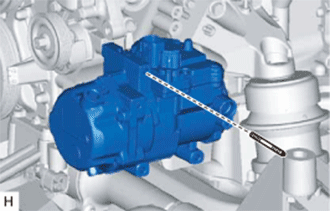
Using an E8 "TORX" socket, remove the stud bolt and compressor with motor assembly.
-
-
REMOVE FAN AND GENERATOR V BELT
-
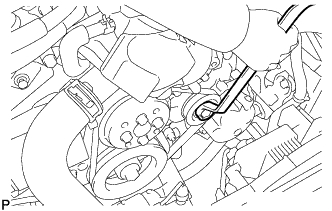
While releasing the belt tension by turning the belt tensioner counterclockwise, remove the fan and generator V belt from the belt tensioner.
-
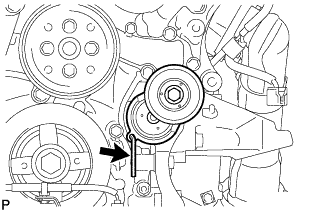
While turning the belt tensioner counterclockwise, align its holes, and then insert the 5 mm bi-hexagon wrench into the holes to secure the belt tensioner.
-
-
REMOVE FRONT SUSPENSION CROSSMEMBER SUB-ASSEMBLY
-
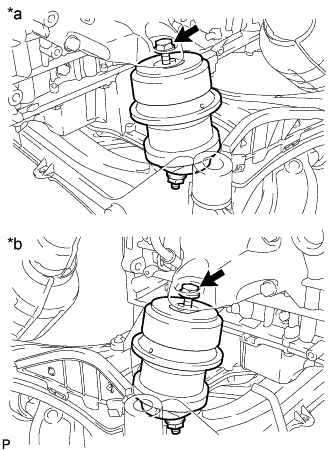
Text in Illustration *a LH Side *b RH Side Remove the 2 bolts, and then disconnect the front suspension crossmember sub-assembly from the engine.
-
-
INSTALL ENGINE ON ENGINE STAND
-
Install the engine to an engine stand with bolts.
Note
-
Pay attention to the angle of the sling device as the engine assembly or engine hangers may be damaged or deformed if the angle is incorrect.
-
With the exception of installing the engine assembly to an engine stand or removing the engine assembly from an engine stand, do not perform any work on the engine while it is suspended, as doing so is dangerous.
-
-
Remove the 4 bolts and 2 engine hangers.
-
-
REMOVE FRONT ENGINE MOUNTING INSULATOR
Tech Tips
Only perform this procedure when replacement of the engine mounting insulator is necessary.
-
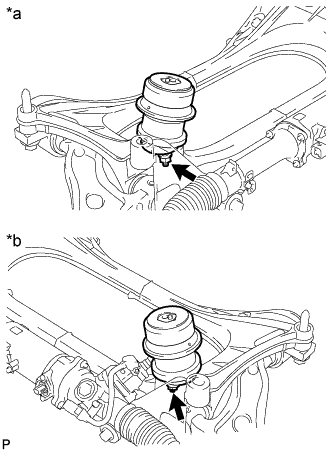
Text in Illustration *a LH Side *b RH Side Remove the 2 nuts and front engine mounting insulator RH and LH.
-
-
REMOVE REAR ENGINE MOUNTING MEMBER
-
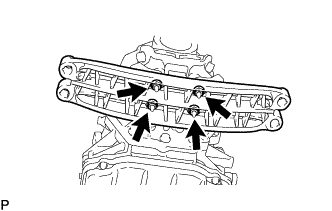
Remove the 4 nuts and rear engine mounting member from the rear No. 1 engine mounting insulator.
-
-
REMOVE REAR NO. 1 ENGINE MOUNTING INSULATOR
Tech Tips
Only perform this procedure when replacement of the engine mounting insulator is necessary.
-
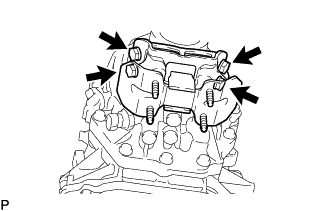
Remove the 4 bolts and rear No. 1 engine mounting insulator from the hybrid vehicle transmission assembly.
-