NAVIGATION SYSTEM Panel Switches do not Function
INSPECTION PROCEDURE
Note
Depending on the parts that are replaced during vehicle inspection or maintenance, performing initialization, registration or calibration may be needed. Refer to Precaution for Navigation System Click here.
PROCEDURE
-
CHECK PANEL SWITCH
-
Check for foreign matter on the display.
OK The display is clean.
NG 
REMOVE ANY FOREIGN MATTER FOUND
OK 
-
-
CHECK PANEL SWITCH (OPERATION CHECK)
-
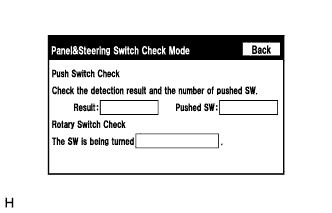
Enter the "Panel & Steering Switch Check Mode" screen. [Refer to Check Panel & Steering Switch in Operation Check Click here]
-
Operate the abnormal switch and check if the switch status is correctly displayed.
OK The switch status is correctly displayed as operated.
NG
PROCEED TO NEXT SUSPECTED AREA SHOWN IN PROBLEM SYMPTOMS TABLE Click here
OK 
REPLACE MULTI-MEDIA MODULE RECEIVER ASSEMBLY Click here
-