AUDIO AND VISUAL SYSTEM(for Radio and Display Type) Cannot Call in a Certain Place
CAUTION / NOTICE / HINT
Tech Tips
For vehicles equipped with an Extension Module, refer to optional equipment's manuals.
PROCEDURE
-
CHECK SURROUNDING CONDITIONS
-
Check if the cellular phone can make calls in the place where the problem occurred.
OK The cellular phone can make calls.
NG 
END (CELLULAR PHONES CAN ONLY FUNCTION IN CELLULAR SERVICE AREAS)
OK 
-
-
CHECK RECEPTION
-
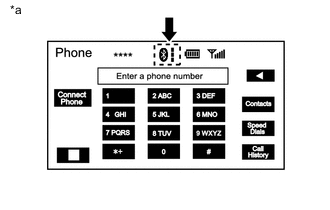
Text in Illustration *a Example Check the "Bluetooth" connection indicator.
Result Result Action Only one of the indicator bars is displayed. Bring cellular phone to location where three indicator bars are displayed. Three indicator bars are displayed. Replace the radio and display assembly Click here.
A slant line with no indicator bar is displayed. Select registered cellular phone or register "Bluetooth" compatible phone.
NEXT
END
-