AUDIO AND VISUAL SYSTEM(for Radio and Display Type) Radio Broadcast cannot be Received (Bad Reception)
CAUTION / NOTICE / HINT
Tech Tips
For vehicles equipped with an Extension Module, refer to optional equipment's manuals.
PROCEDURE
-
CHECK RADIO AND DISPLAY ASSEMBLY
-
Check if the radio auto-search functions properly.
-
Tune the radio using the auto-search function and check that it operates normally.
OK The radio auto-search functions properly.
-
OK 
END
NG 
-
-
CHECK OPTIONAL COMPONENTS
-
Check if any optional components, such as a telephone antenna, are installed.
Result Result Proceed to Optional component(s) installed. A Optional component(s) not installed. B
A
EFFECT FROM OPTIONAL COMPONENTS
B
-
-
CHECK ANTENNA FOR NOISE PRODUCTION
-
With the ignition switch ACC, turn on the radio and select the AM mode.
-
Remove the roof antenna pole sub-assembly.
-
Place the tip of a screwdriver on the antenna and check that noise is heard from the speaker.
OK Noise occurs. -
Install the roof antenna pole sub-assembly.
OK
REPLACE RADIO AND DISPLAY ASSEMBLY Click here
NG
-
-
CHECK INSTALLATION OF ANTENNA GROUND
-
Check that the amplifier antenna ground is securely fastened to the body.
OK Ground is securely fastened to body. -
Check that the antenna cord sub-assembly ground is securely fastened to the body.
OK Ground is securely fastened to body.
NG
CORRECTLY INSTALL GROUND
OK
-
-
CHECK AMPLIFIER ANTENNA ASSEMBLY
-
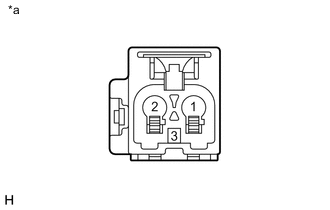
Text in Illustration *a Front view of wire harness connector
(to Amplifier Antenna Assembly)
Disconnect the amplifier antenna connectors.
-
With the ignition switch ON, turn on the radio and select the AM mode.
-
Place the tip of a screwdriver against the metal terminal of the No. 2 antenna cord sub-assembly and check that noise is heard from speakers.
OK Noise occurs. -
Measure the voltage according to the value(s) in the table below.
Standard Voltage Tester Connection Condition Specified Condition 3 - Body ground During radio (AM) reception 11 to 14 V -
Reconnect the amplifier antenna connectors.
OK
REPLACE AMPLIFIER ANTENNA ASSEMBLY Click here
NG
-
-
CHECK No. 2 ANTENNA CORD SUB-ASSEMBLY
-
Text in Illustration *a Front view of wire harness connector
(to No. 2 Antenna Cord Sub-Assembly)
Disconnect the antenna cord sub-assembly connectors.
-
With the ignition switch ACC, turn on the radio and select the AM mode.
-
Place the tip of a screwdriver against the metal terminal of the antenna cord sub-assembly and check that noise is heard from speakers.
OK Noise occurs. -
Measure the voltage according to the value(s) in the table below.
Standard Voltage Tester Connection Condition Specified Condition 3 - Body ground During radio (AM) reception 11 to 14 V -
Reconnect the antenna cord sub-assembly connectors.
OK
REPLACE No. 2 ANTENNA CORD SUB-ASSEMBLY Click here
NG
-
-
CHECK RADIO AND DISPLAY ASSEMBLY
-
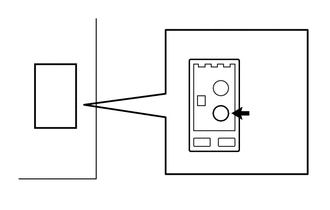
Disconnect the antenna connector from the radio and display assembly.
-
With the radio and display assembly connector connected, turn the ignition switch to ACC.
-
Turn on the radio and select the AM mode.
-
Place the tip of a screwdriver against the metal terminal of the radio and display assembly and check that noise is heard from the speaker.
OK Noise occurs. -
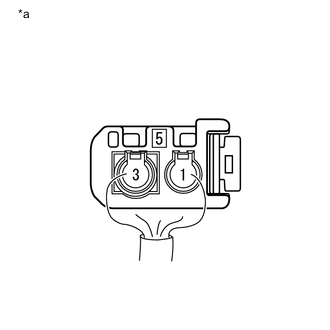
Reconnect the antenna connector to the radio and display assembly.
-
Measure the voltage according to the value(s) in the table below.
Standard Voltage Tester Connection Condition Specified Condition 5 - Body ground During radio (AM) reception 11 to 14 V Text in Illustration *a Component without antenna connector
(Radio and Display Assembly)
OK
REPLACE ANTENNA CORD SUB-ASSEMBLY Click here
NG
REPLACE RADIO AND DISPLAY ASSEMBLY Click here
-