CONTINUOUSLY VARIABLE TRANSAXLE SYSTEM, Diagnostic DTC:P1586
| DTC Code | DTC Name |
|---|---|
| P1586 | Acceleration Sensor Malfunction |
DESCRIPTION
The ECM determines the vehicle inclination based on a signal from the deceleration sensor to perform neutral control. If a malfunction is determined in the deceleration sensor based on a malfunction signal from the brake actuator assembly, the ECM cancels neutral control as a fail-safe function.
Tech Tips
-
The ECM receives a deceleration sensor signal from the brake actuator assembly via CAN communication.
If CAN communication DTCs are output, perform troubleshooting for those DTCs first.
| DTC No. | DTC Detection Condition
|
Trouble Area |
|---|---|---|
| P1586 |
|
|
|
WIRING DIAGRAM
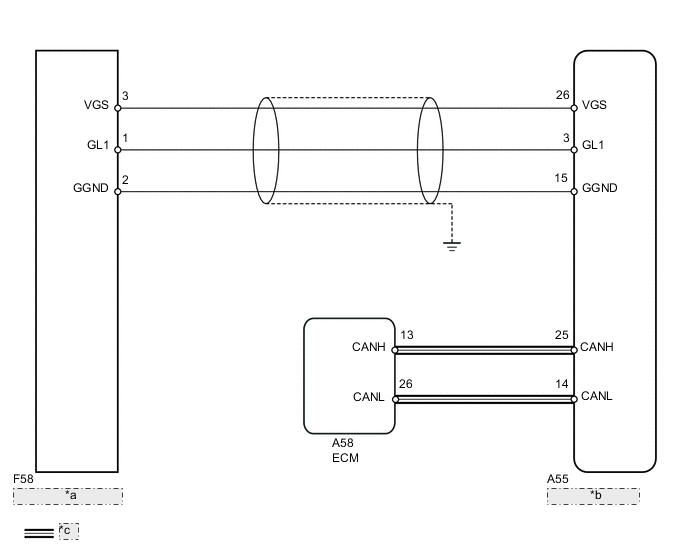
| *a | DECELERATION SENSOR |
| *b | SKID CONTROL ECU |
| *c | CAN communication line |
PROCEDURE
-
CHECK DTC OUTPUT (CAN COMMUNICATION SYSTEM)
-
Check for DTCs of the CAN communication system Click here.
Result Result Proceed to DTCs are not output A DTCs are output B
B 
GO TO CAN COMMUNICATION SYSTEM (HOW TO PROCEED WITH TROUBLESHOOTING) Click here
A 
-
-
READ VALUE USING INTELLIGENT TESTER
-
Connect the intelligent tester to the DLC3.
-
Turn the ignition switch to ON.
-
Turn the tester on.
-
Enter the following menus: Powertrain / Engine and ECT / Data List.
-
In accordance with the display on the tester, read the Data List.
Tester Display Measurement Item/Range Normal Condition Diagnostic Note G sensor Converted output voltage of deceleration sensor/
min.: 0 V
max.: 5 V
Displays converted voltage of deceleration sensor
-
Vehicle on level ground: 2.31 to 2.69 V
-
Decelerating: 0.5 to 2.5 V
-
Accelerating: 2.5 to 4.5 V
- Result Result Proceed to Data display is within Normal Condition range A Data display is not within Normal Condition range B -
B 
REPLACE DECELERATION SENSOR Click here
A
-
-
CHECK DTC OUTPUT
-
Clear the DTCs Click here.
-
Perform a road test where the vehicle is driven at 30 km/ h (18 mph) or more, the brakes are applied at least 16 times and the vehicle is finally stopped.
-
Connect the intelligent tester to the DLC3.
-
Turn the ignition switch to ON.
-
Turn the tester on.
-
Enter the following menus: Powertrain / Engine and ECT / DTC / Current or Pending.
-
Read the DTCs using the tester.
Result Result Proceed to P1586 is output A P1586 is not output B Tech Tips
If any other codes besides DTC P1586 are output, perform troubleshooting for those DTCs first.
A
REPLACE BRAKE ACTUATOR ASSEMBLY (SKID CONTROL ECU) Click here
B
CHECK FOR INTERMITTENT PROBLEMS (SYMPTOM SIMULATION) Click here
-
-
REPLACE DECELERATION SENSOR
-
Replace the deceleration sensor Click here.
NEXT
-
-
PERFORM INITIALIZATION
Note
-
Performing reset memory will clear the learned values of both the yaw rate sensor (deceleration sensor 0 point calibration) and CVT oil pressure (CVT oil pressure calibration). Make sure to perform reset memory, yaw rate sensor 0 point calibration and CVT oil pressure calibration when replacing any of the parts shown in the following table:
Replaced Part
-
Continuously variable transaxle assembly
-
ECM
-
Skid control computer
-
Oil pressure sensor
-
Deceleration sensor
-
-
After performing reset memory, always perform yaw rate sensor (deceleration sensor 0 point) calibration first, and then CVT oil pressure calibration.
-
Always perform 0 point calibration with the vehicle on level ground.
-
Do not shake or vibrate the vehicle during 0 point calibration.
-
Using the intelligent tester, perform reset memory, deceleration sensor 0 point calibration and CVT oil pressure calibration Click here.
-
Check that no DTC is stored.
NEXT
END
-