METER / GAUGE SYSTEM Speedometer Malfunction
DESCRIPTION
The meter CPU receives vehicle speed signals from the brake booster with master cylinder assembly (skid control ECU) via the CAN communication system (CAN V1 Bus). The speed sensor detects the wheel speed and sends the appropriate signals to the brake booster with master cylinder assembly (skid control ECU). The brake booster with master cylinder assembly (skid control ECU) supplies power to the vehicle speed sensor. The brake booster with master cylinder assembly (skid control ECU) detects vehicle speed signals based on the pulses of the voltage.
Tech Tips
-
Factors that affect the indicated vehicle speed include tire size, tire inflation, and tire wear. The speed indicated on the speedometer has an allowable margin of error. This can be tested using the GTS. For details about testing and the margin of error, see the reference chart Click here.
-
If the vehicle speed sensor circuit has a malfunction, the brake booster with master cylinder assembly (skid control ECU) stores the DTCs. Troubleshoot the Electronically Controlled Brake System Click here.
WIRING DIAGRAM
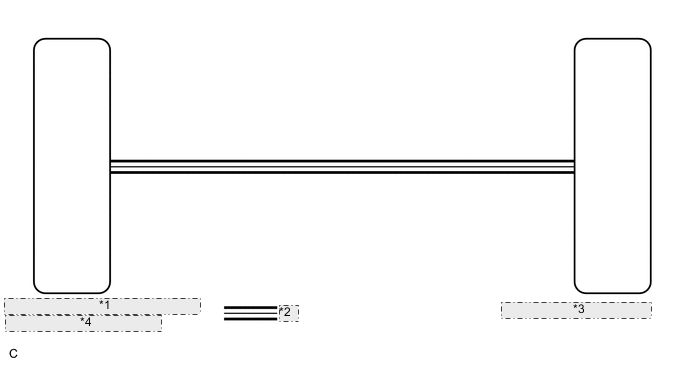
| *1 | Brake Booster with Master Cylinder |
| *2 | CAN Communication Line |
| *3 | Combination Meter Assembly |
| *4 | Assembly (Skid Control ECU) |
CAUTION / NOTICE / HINT
CAUTION:
If the vehicle speed is outside the allowable range when tested, perform the on-vehicle inspection Click here.
Tech Tips
Before starting the following inspection, check tire size and tire air pressure.
PROCEDURE
-
CHECK CAN COMMUNICATION SYSTEM
-
Check if a CAN communication DTC is output Click here.
Result Result Proceed to CAN communication DTC is not output A CAN communication DTC is output B
B 
GO TO CAN COMMUNICATION SYSTEM Click here
A 
-
-
PERFORM ACTIVE TEST USING GTS (SPEED METER OPERATION)
-
Connect the GTS to the DLC3.
-
Turn the ignition switch to ON (IG).
-
Turn the GTS on.
-
Enter the following menus: Body Electrical / Combination Meter / Active Test.
-
According to the display on the GTS, perform the Active Test.
Combination Meter Tester Display Test Part Control Range Diagnostic Note Speed Meter Operation Speedometer OFF, 0, 40, 80, 120, 160, 200 (km/h) Vehicle is stopped and the engine idling OK Speedometer indication is normal.
NG
REPLACE COMBINATION METER ASSEMBLY Click here
OK
-
-
READ VALUE USING GTS (VEHICLE SPEED METER)
-
Connect the GTS to the DLC3.
-
Turn the ignition switch to ON (IG).
-
Turn the GTS on.
-
Enter the following menus: Body Electrical / Combination Meter / Data List.
-
According to the display on the GTS, read the Data List.
Combination Meter Tester Display Measurement Item/Range Normal Condition Diagnostic Note Vehicle Speed Meter Vehicle speed/
Min.: 0 (0)
Max.: 255 (158)
Approximately same as actual vehicle speed (When vehicle is being driven) - OK Vehicle speed displayed on the GTS is almost the same as the speedometer indication.
NG
REPLACE COMBINATION METER ASSEMBLY Click here
OK
-
-
CHECK ELECTRONICALLY CONTROLLED BRAKE SYSTEM
-
Check if a brake control DTC is output Click here.
Result Result Proceed to Electronically controlled brake DTC is not output A Electronically controlled brake DTC is output B
A
REPLACE COMBINATION METER ASSEMBLY Click here
B
GO TO ELECTRONICALLY CONTROLLED BRAKE SYSTEM Click here
-