HEIGHT CONTROL SENSOR REMOVAL

-
PRECAUTION
-
w/ Air Suspension:
Note
Be sure to read Precaution thoroughly before servicing Click here.
-
w/ Navigation System for HDD:
Note
After the power switch is turned off, the display and navigation module display (HDD navigation system) records various types of memory and settings. As a result, after turning the power switch off, make sure to wait for the time specified in the following table before disconnecting the cable from the negative (-) battery terminal.
Waiting Time before Disconnecting Cable from Negative (-) Battery Terminal Specification Waiting Time w/o Telematics transceiver 60 sec. w/ Telematics transceiver 120 sec.
-
-
REMOVE REAR DECK FLOOR BOX
-
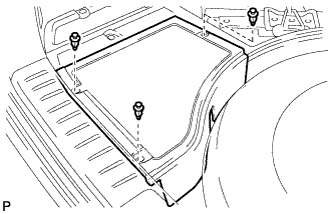
Remove the 3 clips and the rear deck floor box.
-
-
DISCONNECT CABLE FROM NEGATIVE BATTERY TERMINAL
Note
When disconnecting the cable, some systems need to be initialized after the cable is reconnected Click here.
-
REMOVE REAR WHEEL
-
REMOVE REAR HEIGHT CONTROL SENSOR SUB-ASSEMBLY
-
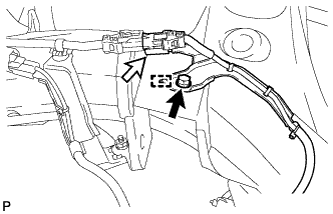
Disconnect the connector.
-
Remove the bolt and disengage the guide.
-
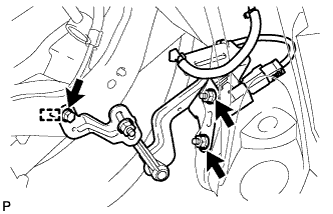
Remove the bolt and disengage the guide.
-
Remove the 2 nuts and rear height control sensor sub-assembly.
Note
Do not drop the rear height control sensor sub-assembly. If it is dropped, replace it with a new one.
-