NAVIGATION SYSTEM (for DVD) Illumination Circuit
DESCRIPTION
Power is supplied to the display and navigation module display, multi-display assembly and steering pad switch assembly illumination when the light control switch is in the tail or head position.
WIRING DIAGRAM
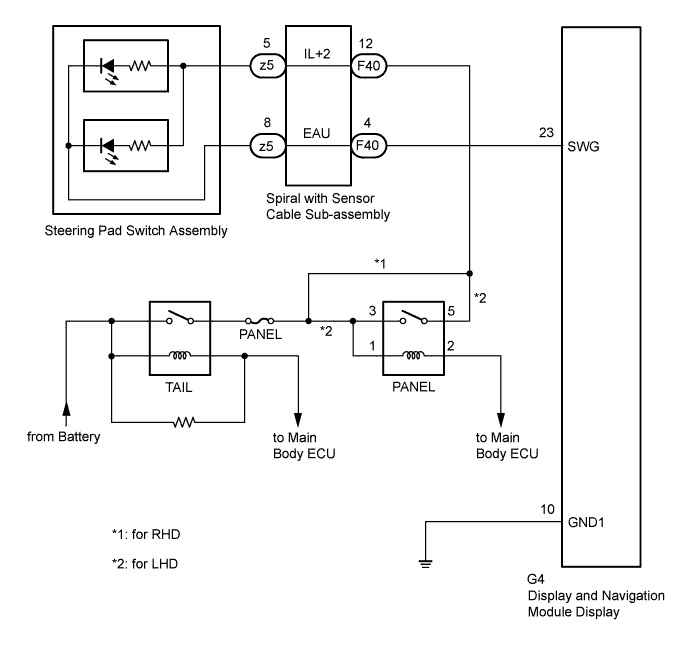
INSPECTION PROCEDURE
Note
The vehicle is equipped with an Supplemental Restraint System (SRS). Before servicing (including removal or installation of parts), be sure to read the precautionary notice for the Supplemental Restraint System Click here.
PROCEDURE
-
CHECK ILLUMINATION
-
Check if the illumination for the display and navigation module display, multi-display assembly, steering pad switch assembly, glove box or others (hazard switch, transmission control switch, etc.) comes on when the light control switch is turned to the head or tail position.
Result Result Proceed to Illumination comes on for all components except steering pad switch assembly. A No illumination comes on (radio receiver assembly, hazard switch, glove box, etc.). B
B 
GO TO LIGHTING SYSTEM Click here
A 
-
-
CHECK HARNESS AND CONNECTOR (BATTERY - SPIRAL WITH SENSOR CABLE SUB-ASSEMBLY)
-
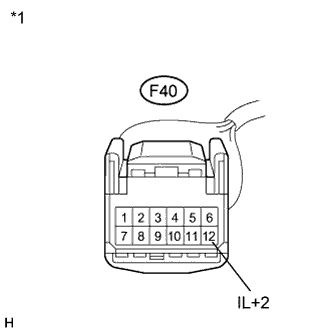
Text in Illustration *1 Front view of wire harness connector
(to Spiral with Sensor Cable Sub-assembly)
Disconnect the spiral with sensor cable sub-assembly connector.
-
Measure the voltage according to the value(s) in the table below.
Standard Voltage Tester Connection Condition Specified Condition F40-12 (IL+2) - Body ground Light control switch in tail or head 11 to 14 V
NG
REPAIR OR REPLACE HARNESS OR CONNECTOR
OK
-
-
INSPECT SPIRAL WITH SENSOR CABLE SUB-ASSEMBLY
-
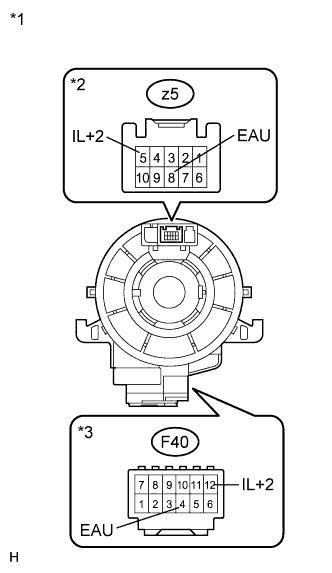
Text in Illustration *1 Component without harness connected
(Spiral with Sensor Cable Sub-assembly)
*2 Steering Pad Switch Side *3 Vehicle Side Disconnect the steering pad switch assembly connector.
-
Measure the resistance according to the value(s) in the table below.
Standard Resistance Tester Connection Condition Specified Condition z5-8 (EAU) - F40-4 (EAU) Center Below 1 Ω 2.5 rotations to the left 2.5 rotations to the right z5-5 (IL+2) - F40-12 (IL+2) Center Below 1 Ω 2.5 rotations to the left 2.5 rotations to the right Note
The spiral cable is an important part of the SRS airbag system. Incorrect removal or installation of the spiral cable may prevent the airbag from deploying. Refer to the pages shown in the brackets.
NG
REPLACE SPIRAL WITH SENSOR CABLE SUB-ASSEMBLY Click here
OK
-
-
CHECK HARNESS AND CONNECTOR (SPIRAL CABLE - DISPLAY AND NAVIGATION MODULE DISPLAY)
-
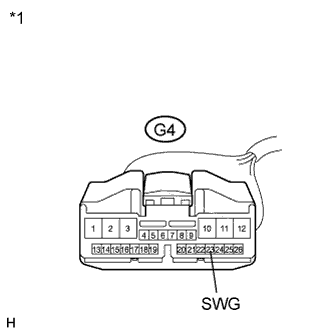
Disconnect the display and navigation module display connector.
-
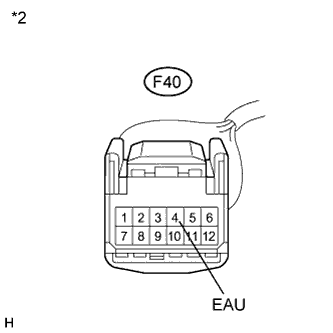
Disconnect the spiral with sensor cable sub-assembly connector.
-
Measure the resistance according to the value(s) in the table below.
Standard Resistance Tester Connection Condition Specified Condition G4-23 (SWG) - F40-4 (EAU) Always Below 1 Ω G4-23 (SWG) - Body ground Always 10 kΩ or higher Text in Illustration *1 Front view of wire harness connector
(to Display and Navigation Module Display)
*2 Front view of wire harness connector
(to Spiral with Sensor Cable Sub-assembly)
NG
REPAIR OR REPLACE HARNESS OR CONNECTOR
OK
-
-
INSPECT STEERING PAD SWITCH ASSEMBLY
-
Disconnect the steering pad switch assembly connector.
-
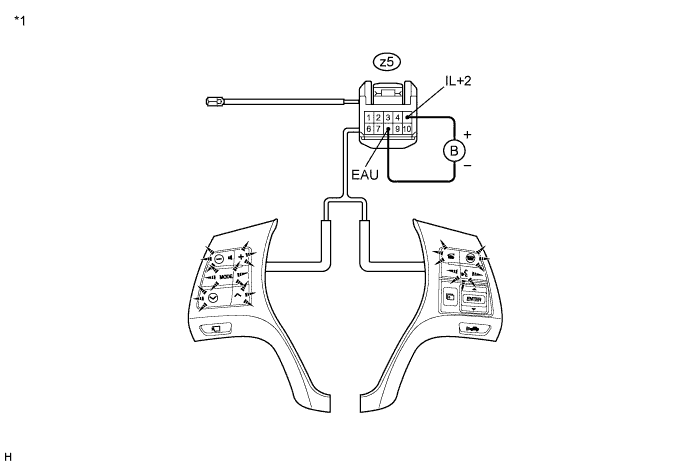
Connect the positive (+) lead to terminal IL+2 and the negative (-) lead to terminal EAU of the steering pad switch assembly connector.
-
Check if the illumination for the steering pad switch assembly comes on.
OK Illumination for the steering pad switch assembly comes on. Text in Illustration *1 Component without harness connected
(Steering Pad Switch Assembly)
NG
REPLACE STEERING PAD SWITCH ASSEMBLY Click here
OK 
PROCEED TO NEXT SUSPECTED AREA SHOWN IN PROBLEM SYMPTOMS TABLE Click here
-