PARKING BRAKE PEDAL (for RHD) REMOVAL

CAUTION:
Some of these service operations affect the SRS airbag system. Read the precautionary notices concerning the SRS airbag system before servicing Click here.
-
PRECAUTION (w/ Navigation System for HDD)
Note
After the power switch is turned off, the display and navigation module display (HDD navigation system) records various types of memory and settings. As a result, after turning the power switch off, make sure to wait for the time specified in the following table before disconnecting the cable from the negative (-) battery terminal.
Waiting Time before Disconnecting Cable from Negative (-) Battery Terminal Specification Waiting Time w/o Telematics transceiver 60 sec. w/ Telematics transceiver 120 sec. -
PRECAUTION (w/ Air Suspension)
Note
Be sure to read Precaution thoroughly before servicing Click here.
-
REMOVE FRONT SEAT ASSEMBLY LH
Tech Tips
Refer to the instructions for Removal of the front seat assembly Click here.
-
REMOVE REAR CONSOLE BOX ASSEMBLY
Tech Tips
Refer to the instructions for Removal of the rear console box assembly Click here.
-
REMOVE BRAKE PEDAL SUPPORT ASSEMBLY
Tech Tips
Refer to the instructions for Removal of the brake pedal support assembly Click here.
-
REMOVE INSTRUMENT PANEL FINISH PANEL
Tech Tips
This is symmetrical to the LHD model Click here.
-
REMOVE FRONT CONSOLE BOX COVER
-
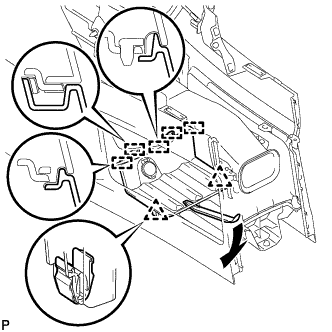
Using moulding remover A, disengage the 2 clips and 5 guides.
-
Disconnect the connector and remove the front console box cover.
-
-
REMOVE CONSOLE BOX
-
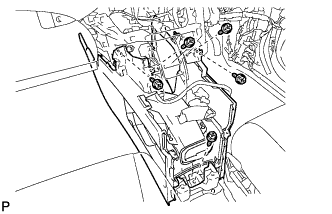
Remove the 5 screws <D>.
-
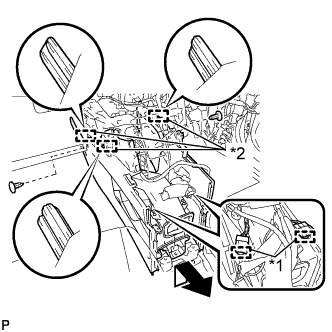
Text in Illustration *1 Clamp *2 Guide Disengage the 2 clamps.
-
Remove the 2 clips.
-
Disengage the 3 guides and remove the console box as shown in the illustration.
-
-
REMOVE FRONT DOOR SCUFF PLATE LH
-
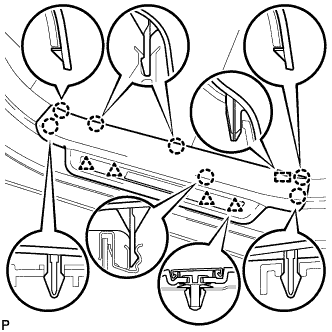
Disengage the 7 claws, 4 clips and guide, and remove the front door scuff plate LH.
Tech Tips
A part of the clip remains on the vehicle side.
-
w/ Illumination:
-
Disconnect the connector.
-
-
-
REMOVE COWL SIDE TRIM SUB-ASSEMBLY LH
-
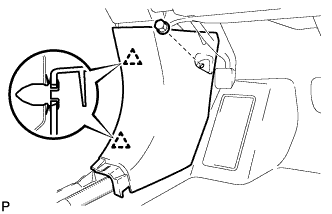
Remove the clip.
-
Disengage the 2 clips and remove the cowl side trim sub-assembly LH.
-
-
REMOVE REAR NO. 2 AIR DUCT
-
Turn back the front floor carpet.
-
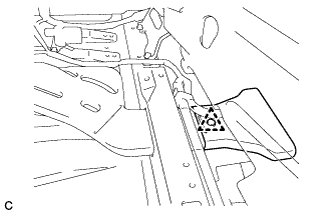
Remove the clip and rear No. 2 air duct.
-
-
REMOVE REAR NO. 1 AIR DUCT
-
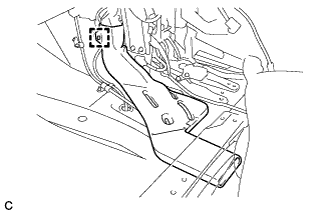
Disengage the wire harness clamp.
-
Remove the rear No. 1 air duct.
-
-
LOOSEN ADJUSTING NUT
-
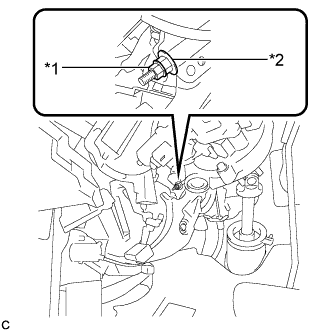
Text in Illustration *1 Lock Nut *2 Adjusting Nut Remove the lock nut and loosen the adjusting nut.
-
-
REMOVE CENTER FRONT FLOOR COVER
-
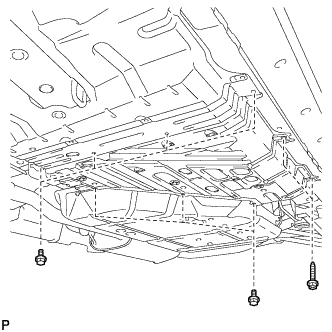
Remove the 7 bolts and 2 screws.
-
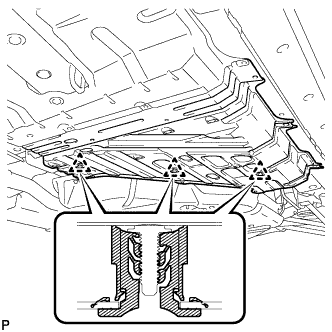
Disengage the 3 clips to remove the center front floor cover.
-
-
REMOVE REAR ENGINE SERVICE COVER ASSEMBLY
-
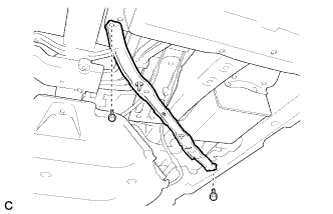
Remove the 2 bolts and rear engine service cover assembly.
-
-
SEPARATE NO. 3 PARKING BRAKE CABLE ASSEMBLY
-
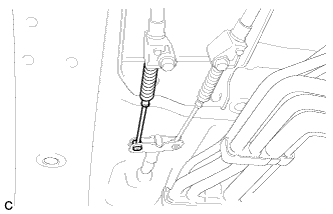
Separate the No. 3 parking brake cable assembly from the parking brake equalizer.
-
-
SEPARATE NO. 2 PARKING BRAKE CABLE ASSEMBLY
Tech Tips
Perform the same procedure as for the No. 3 parking brake cable assembly.
-
REMOVE PARKING BRAKE EQUALIZER
-
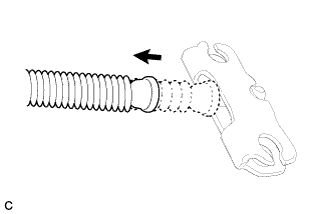
Slide the rubber boot as shown in the illustration.
-
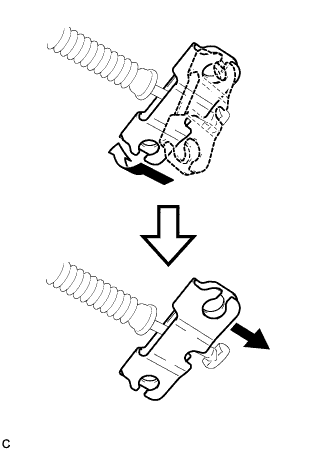
Remove the parking brake equalizer from the No. 1 parking brake cable assembly as shown in the illustration.
-
-
REMOVE PARKING BRAKE CONTROL PEDAL ASSEMBLY
-
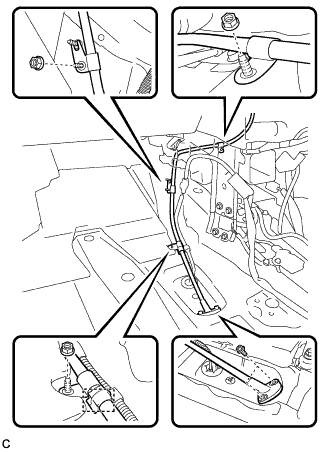
Remove the 2 bolts and 3 nuts, and separate the No. 1 parking brake cable assembly.
-
Remove the clamp.
-
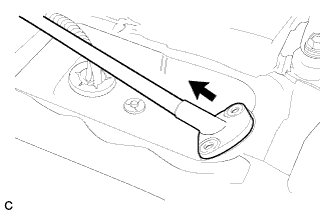
Pull out the No. 1 parking brake cable assembly toward the cabin.
-
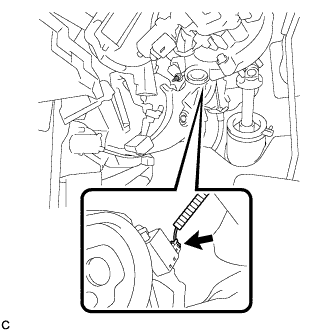
Disconnect the parking brake switch connector.
-
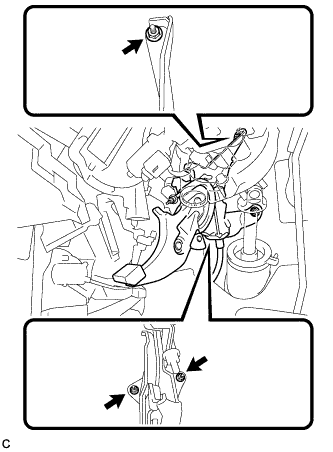
Remove the 3 nuts and the parking brake control pedal assembly.
-