BACK WINDOW GLASS (for Sedan) INSTALLATION

-
CLEAN BACK WINDOW GLASS
-
Using a scraper, remove the moulding and adhesive from the back window glass.
-
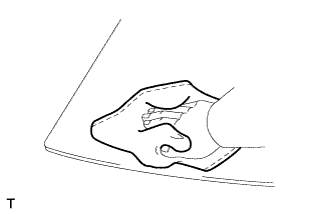
Clean the outer circumference of the glass with non-residue solvent.
Note
-
Do not touch the glass surface after cleaning it.
-
Be careful not to damage the glass.
-
Even if using new glass, clean the glass with non-residue solvent.
-
-
-
INSTALL NO. 2 BACK WINDOW GLASS STOPPER
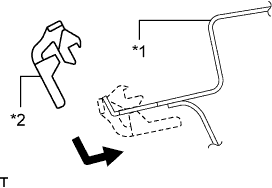
Text in Illustration *1 Vehicle Body *2 Stopper
-
Install 2 new stoppers to the vehicle body as shown in the illustration.
-
-
INSTALL NO. 1 BACK WINDOW GLASS STOPPER
-
Apply Primer G to the glass where the stoppers will be installed.
Note
-
Allow the primer to dry for 3 minutes or more.
-
Throw away any leftover primer.
-
Do not apply too much primer.
-
-
Install 2 new stoppers to the glass at the locations shown in the illustration.
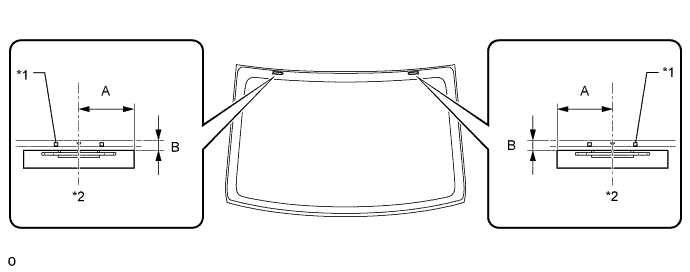
Standard Area Specified Condition A 40.0 mm (1.575 in.) B 14.2 mm (0.559 in.) Text in Illustration *1 Ceramic Notch *2 Center Line
-
-
INSTALL BACK WINDOW GLASS ADHESIVE DAM
-
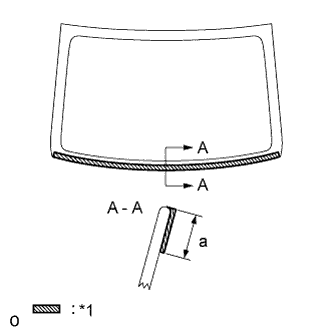
Text in Illustration *1 Primer G Apply Primer G to the glass where the glass adhesive dam will be installed.
Standard Area Specified Condition a 13.0 mm (0.512 in.) Note
-
Allow the primer coating to dry for 3 minutes or more.
-
Throw away any leftover primer.
-
Do not apply too much primer.
-
-
Remove the peeling paper from the adhesive part of a new dam. Install the dam (adhesive side) to the glass (Primer G area), but exclude the beyond the notches on the lower part of the glass.
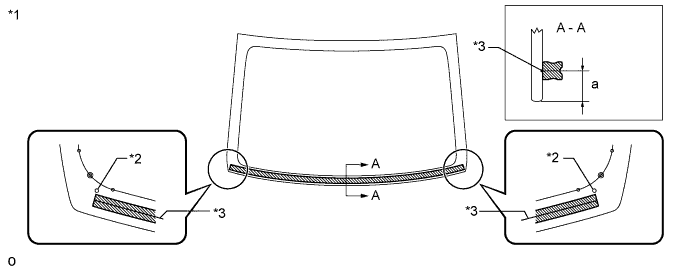
Text in Illustration *1 Backside *3 Dam Center Line *2 Ceramic Notch - -
-
-
INSTALL NO. 1 BACK WINDOW MOULDING
-
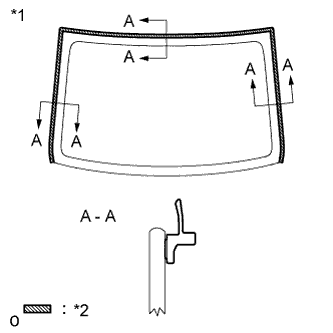
Text in Illustration *1 Backside *2 Primer G Using a brush or sponge, coat the contact surface of the glass and moulding with Primer G as shown in the illustration.
Note
-
Allow the primer to dry for 3 minutes or more.
-
Throw away any leftover primer.
-
Do not apply too much primer.
Tech Tips
If the primer is applied to an area that is not specified, apply non-residue solvent to a clean cloth and wipe off the excess primer before it dries.
-
-
Remove the peeling paper from a new back window outside moulding. Install the moulding as shown in the illustration.
-
-
INSTALL BACK WINDOW GLASS
-
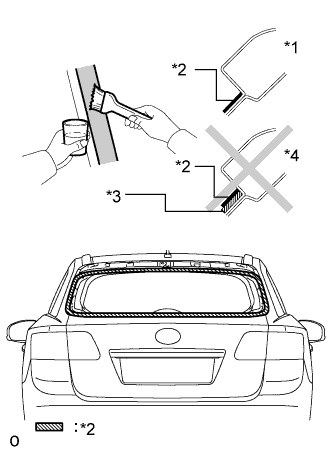
Using a brush or sponge, apply Primer M to the exposed part of the vehicle body.
Text in Illustration *1 CORRECT *2 Primer M *3 Adhesive *4 INCORRECT Note
-
Allow the primer to dry for 3 minutes or more.
-
Do not apply primer to the adhesive.
-
Throw away any leftover primer.
-
Do not apply too much primer.
-
-
Using a brush or sponge, apply Primer G to the contact surface of the back window glass.
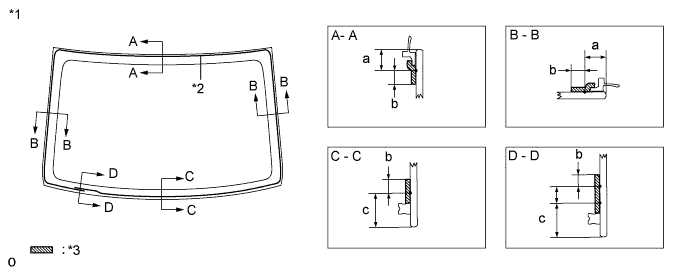
Standard Area Specified Condition a 10.0 mm (0.394 in.) b 7.0 mm (0.276 in.) c 17.0 mm (0.670 in.) Text in Illustration *1 Backside *3 Primer G *2 Adhesive Center Line - - Tech Tips
If primer is applied to an area that is not specified, wipe off the primer with a non-residue solvent before it dries.
Note
-
Allow the primer to dry for 3 minutes or more.
-
Throw away any leftover primer.
-
Do not apply too much primer.
-
-
Apply adhesive to the back window glass.
Adhesive Toyota Genuine Windshield Glass Adhesive or equivalent
-
Cut off the tip of a cartridge nozzle as shown in the illustration below.
Tech Tips
After cutting off the tip, use all adhesive within the time written in the table below.
Usage Time Frame Temperature Usage Time Frame 35°C (95°F) 15 minutes 20°C (68°F) 1 hour 40 minutes 5°C (41°F) 8 hours -
Load a sealer gun with the cartridge.
-
Apply adhesive to the back window glass as shown in the illustration.
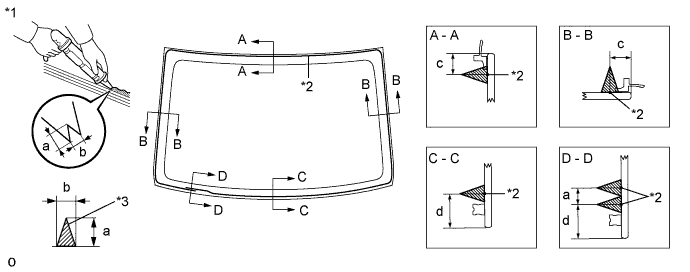
Standard Area Specified Condition a 12.0 mm (0.472 in.) b 8.0 mm (0.315 in.) c 10.0 mm (0.394 in.) d 17.0 mm (0.670 in.) Text in Illustration *1 Backside *3 Adhesive *2 Adhesive Center Line - -
-
-
Install the back window glass to the vehicle body.
-
Hold the back window glass securely in place with tape or equivalent until the adhesive has hardened.
Note
-
Check that the stoppers are attached correctly.
-
Check the clearance between the vehicle body and glass.
-
-
Lightly press the outer surface of the back window glass to ensure that the back window glass is securely fit to the vehicle body.
-
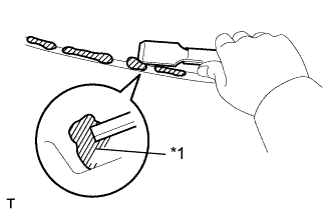
Text in Illustration *1 Adhesive Using a scraper, remove any excess or protruding adhesive.
Tech Tips
Apply adhesive to any areas where the amount of adhesive is inadequate.
Note
Do not drive the vehicle within the time written in the table below.
Minimum Time Temperature Minimum Time Prior to Driving Vehicle 35°C (95°F) 1 hour 30 minutes 20°C (68°F) 5 hours 5°C (41°F) 24 hours -
Connect the connectors.
-
-
-
CHECK FOR LEAK AND REPAIR
-
Conduct a leak test after the adhesive has completely hardened.
-
Seal any leaks with auto glass sealer.
-
-
INSTALL ROOF HEADLINING ASSEMBLY
-
Return the roof headlining to its original position.
Refer to the following procedure Click here.
-
-
INSTALL SUNSHADE TRIM HOLDER
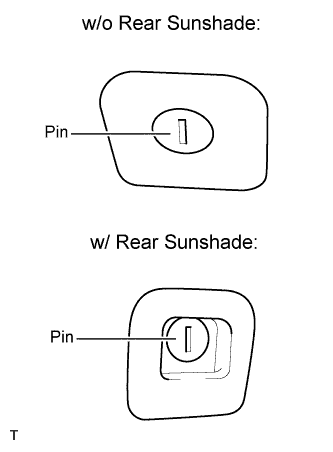
-
Position the pin as shown in the illustration and install the sunshade trim holder.
-
-
INSTALL NO. 1 ROOM LIGHT ASSEMBLY
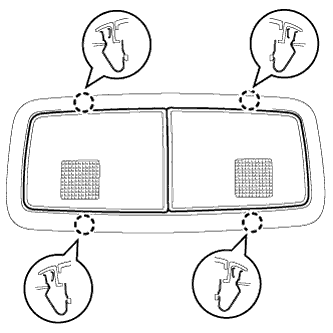
-
Connect the connector.
-
Attach the 4 clips to install the No. 1 room light.
-
-
INSTALL REAR ASSIST GRIP ASSEMBLY LH
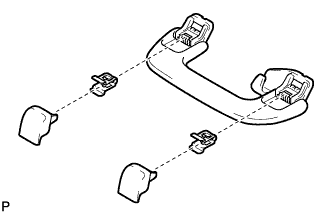
-
Assemble the rear assist grip as shown in the illustration.
-
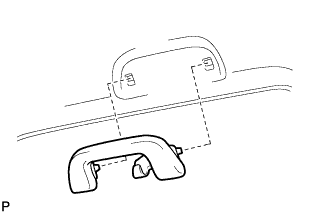
Install the rear assist grip.
-
-
INSTALL REAR ASSIST GRIP ASSEMBLY RH
Tech Tips
Use the same procedure described for the LH side.
-
INSTALL INNER ROOF SIDE GARNISH LH
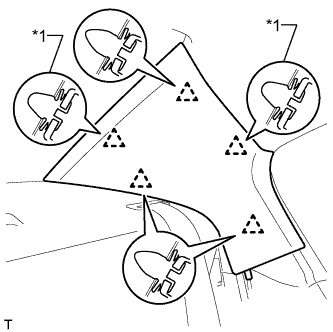
Text in Illustration *1 Clip A
-
Install 2 new clips labeled A to the inner roof side garnish.
-
Attach the 5 clips to install the inner roof side garnish.
-
-
INSTALL INNER ROOF SIDE GARNISH RH
Tech Tips
Use the same procedure described for the LH side.
-
INSTALL REAR DOOR OPENING TRIM WEATHERSTRIP LH
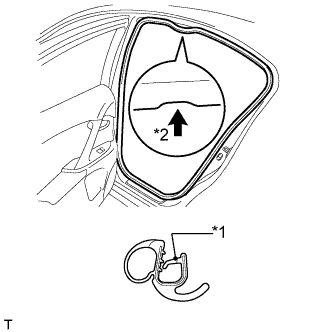
Text in Illustration *1 Paint Mark *2 Mark Position
-
Install the rear door opening trim weatherstrip as shown in the illustration.
-
-
INSTALL REAR DOOR OPENING TRIM WEATHERSTRIP RH
Tech Tips
Use the same procedure described for the LH side.
-
INSTALL REAR DOOR SCUFF PLATE LH
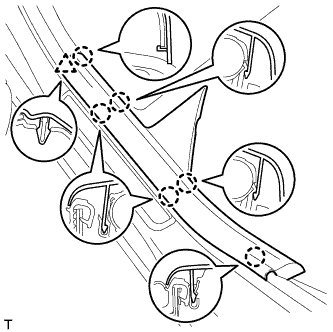
-
Attach the clip and 6 claws to install the front door scuff plate.
-
-
INSTALL REAR DOOR SCUFF PLATE RH
Tech Tips
Use the same procedure described for the LH side.
-
INSTALL REAR SIDE SEATBACK ASSEMBLY LH
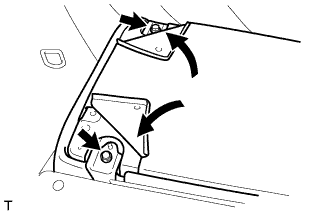
-
Attach the seatback with the 2 bolts.
- Torque:
- 37 N*m { 377 kgf*cm, 27 ft.*lbf }
-
Install the carpet with the 2 clips.
-
-
INSTALL REAR SIDE SEATBACK ASSEMBLY RH
Tech Tips
Use the same procedure described for the LH side.
-
INSTALL REAR BENCH TYPE SEAT CUSHION ASSEMBLY
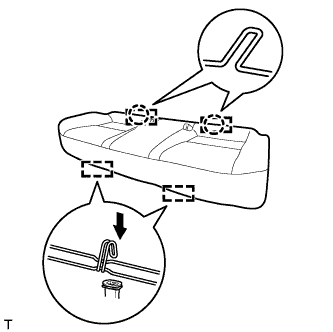
-
Attach the 2 rear hooks of the seat cushion to the seatback.
-
Attach the 2 front hooks to install the seat cushion.
-
Confirm that the seat cushion is firmly installed.
Note
When installing the seat cushion, make sure the seat belt buckle is not under the seat cushion.
-
-
CONNECT CABLE TO NEGATIVE BATTERY TERMINAL
Note
When disconnecting the cable, some systems need to be initialized after the cable is reconnected Click here.