ELECTRIC PARKING BRAKE SWITCH INSTALLATION

-
INSTALL ELECTRIC PARKING BRAKE SWITCH ASSEMBLY
-
Connect the connector.
-
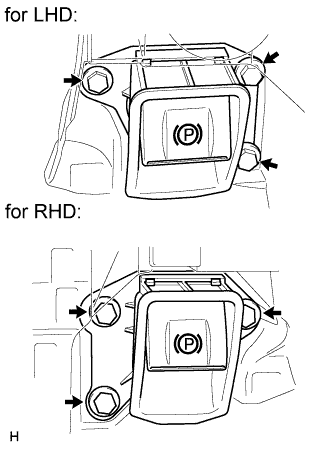
Install the electric parking brake switch with the 3 bolts.
- Torque:
- 7.1 N*m { 72 kgf*cm, 62 in.*lbf }
-
-
INSTALL INSTRUMENT PANEL FINISH PANEL END RH (for RHD)
-
w/o TOYOTA Parking Assist-sensor System:
-
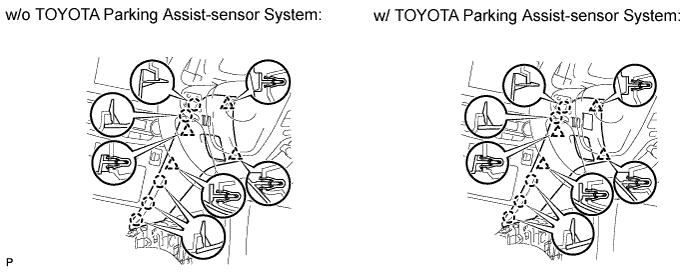
Attach the 4 clips and 5 claws to install the panel end.
-
-
w/ TOYOTA Parking Assist-sensor System:
-
Connect the connector.
-
Attach the 4 clips and 5 claws to install the panel end.
-
-
-
INSTALL INSTRUMENT PANEL FINISH PANEL END LH (for LHD)
-
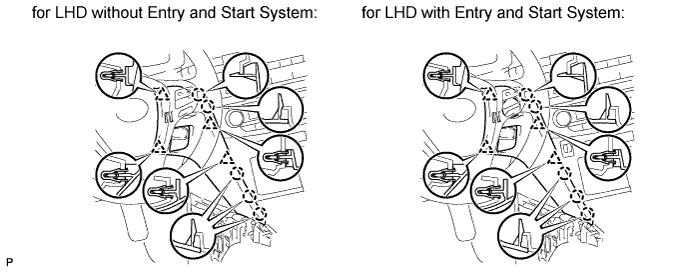
Attach the 4 clips and 5 claws to install the panel end.
-
-
INSTALL NO. 3 BOX PANEL (w/o Console Box Lid)
-
When replacing the No. 3 box panel with a new one:
-
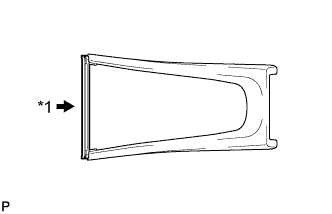
Text in Illustration *1 Cut Cut off the rib (the piece used to maintain the shape of the panel) shown in the illustration.
-
-
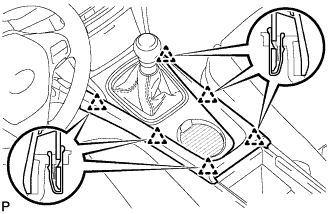
Attach the 6 clips to install the box panel.
-
-
INSTALL NO. 3 BOX PANEL (w/ Console Box Lid)
-
When replacing the No. 3 box panel with a new one:
-
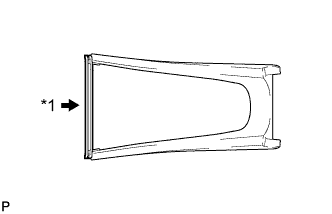
Text in Illustration *1 Cut Cut off the rib (the piece used to maintain the shape of the panel) shown in the illustration.
-
-
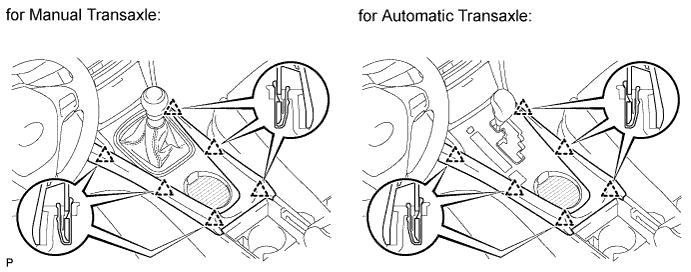
Attach the 6 clips to install the box panel.
-
-
INSTALL LOWER NO. 1 INSTRUMENT PANEL FINISH PANEL (for RHD)
-
w/o TOYOTA Parking Assist-sensor System:
-
Attach the 4 clips and 5 claws to install the panel end.
-
-
w/ TOYOTA Parking Assist-sensor System:
-
Connect the connector.
-
Attach the 4 clips and 5 claws to install the panel end.
-
-
-
INSTALL LOWER NO. 2 INSTRUMENT PANEL FINISH PANEL (for LHD)
-
Attach the 4 clips and 5 claws to install the panel end.
-
-
CONNECT CABLE TO NEGATIVE BATTERY TERMINAL
Note
When disconnecting the cable, some systems need to be initialized after the cable is reconnected Click here.
-
CHECK SRS WARNING LIGHT
-
Check the SRS warning light Click here.
-