LOWER INSTRUMENT PANEL REMOVAL

Tech Tips
-
Use the same procedure for RHD and LHD vehicles.
-
The procedure listed below is for LHD vehicles.
-
TABLE OF BOLT, SCREW AND BOLT
Tech Tips
All bolts, screws and nuts relevant to installing and removing the instrument panel are shown along with their alphabet code in the table below.
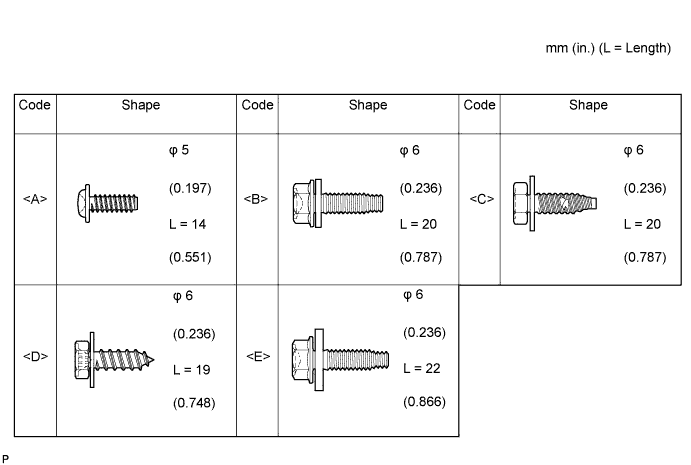
-
DISABLE AUTOAWAY/RETURN FUNCTION (for Power Tilt and Power Telescopic Steering Column)
-
Disable the Autoaway/Return function by changing the customize parameter Click here.
Note
Record the current customize parameter setting (whether the Autoaway/Return function is enabled or disabled) in order to restore the current setting after finishing the operation.
Tech Tips
Performing the above operation causes the Autoaway/Return function to be disabled when the ignition switch is turned off.
-
Turn the ignition switch to ON. Operate the tilt and telescopic switch to fully extend and lower the steering column.
-
Turn the ignition switch off.
-
-
DISCONNECT CABLE FROM NEGATIVE BATTERY TERMINAL
CAUTION:
Wait at least 90 seconds after disconnecting the cable from the negative (-) battery terminal to disable the SRS system.
Note
-
w/ Navigation System for HDD:
After the ignition switch is turned off, the HDD navigation system requires approximately a minute to record various types of memory and settings. As a result, after turning the ignition switch off, wait a minute or more before disconnecting the cable from the negative (-) battery terminal.
-
When disconnecting the cable, some systems need to be initialized after the cable is reconnected Click here.
-
-
REMOVE UPPER INSTRUMENT PANEL SUB-ASSEMBLY
-
Remove the upper instrument panel sub-assembly Click here.
-
-
REMOVE STEERING WHEEL ASSEMBLY
-
Remove the steering wheel assembly Click here.
-
-
REMOVE UPPER STEERING COLUMN COVER (for Manual Tilt and Manual Telescopic Steering Column)
-
REMOVE LOWER STEERING COLUMN COVER (for Manual Tilt and Manual Telescopic Steering Column)
-
REMOVE LOWER NO. 2 STEERING COLUMN COVER (for Power Tilt and Power Telescopic Steering Column)
-
REMOVE UPPER STEERING COLUMN COVER (for Power Tilt and Power Telescopic Steering Column)
-
REMOVE LOWER STEERING COLUMN COVER (for Power Tilt and Power Telescopic Steering Column)
-
REMOVE TILT AND TELESCOPIC SWITCH (for Power Tilt and Power Telescopic Steering Column)
-
REMOVE COMBINATION SWITCH ASSEMBLY WITH SPIRAL CABLE SUB-ASSEMBLY
-
REMOVE STEREO OPENING COVER WITH BRACKET (w/o Audio)
-
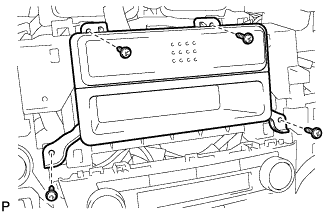
Remove the 4 screws and cover with bracket.
-
-
REMOVE RADIO RECEIVER ASSEMBLY WITH BRACKET (w/ Audio)
-
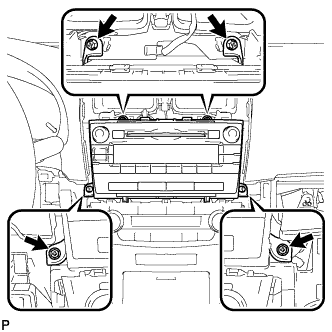
Remove the 4 screws.
-
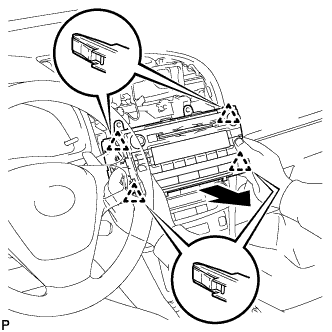
Pull the radio receiver to detach the 4 clips on the backside of the radio receiver.
-
Disconnect the connectors and remove the radio receiver.
-
-
REMOVE NAVIGATION RECEIVER ASSEMBLY WITH BRACKET (w/ Navigation System for DVD)
-
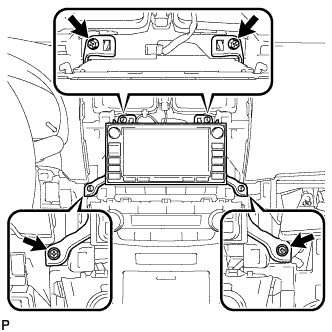
Remove the 4 screws.
-
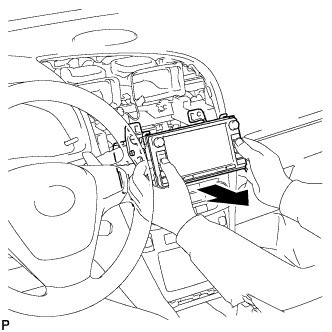
Pull the navigation receiver.
-
Disconnect the connectors and remove the navigation receiver.
-
-
REMOVE NAVIGATION RECEIVER ASSEMBLY WITH BRACKET (w/ Navigation System for HDD)
-
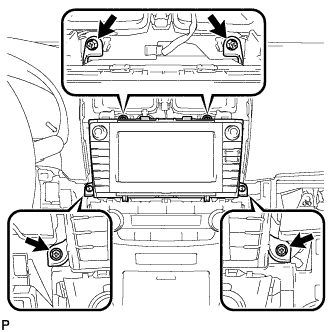
Remove the 4 screws.
-
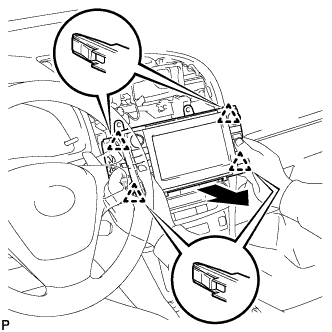
Pull the display to detach the 4 clips on the backside of the display.
-
Disconnect the connectors and remove the navigation receiver.
-
-
REMOVE AIR CONDITIONING CONTROL ASSEMBLY
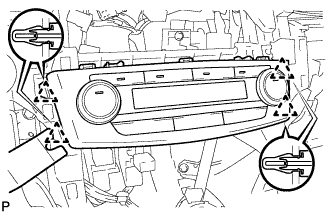
-
Using a moulding remover, detach the 4 clips.
-
Disconnect the connector and remove the air conditioning control.
-
-
REMOVE LOWER INSTRUMENT CLUSTER FINISH PANEL
-
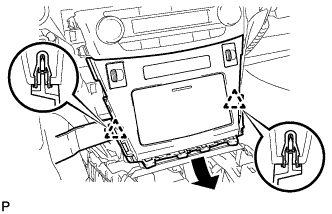
Using a moulding remover B, detach the 2 clips.
-
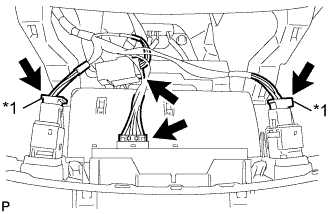
Text in Illustration *1 w/ Seat Heater System Remove the finish panel and then disconnect the connectors.
-
-
REMOVE SHIFT LEVER KNOB SUB-ASSEMBLY (for Manual Transaxle)
-
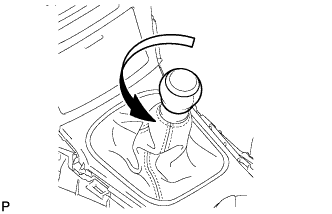
Twist the shift lever knob in the direction indicated by the arrow and remove it.
-
-
REMOVE SHIFT LEVER KNOB SUB-ASSEMBLY (for Automatic Transaxle)
-
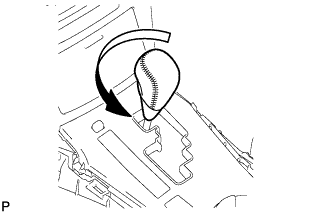
Twist the shift lever knob in the direction indicated by the arrow and remove it.
-
-
REMOVE REAR UPPER CONSOLE PANEL SUB-ASSEMBLY (for Manual Transaxle)
-
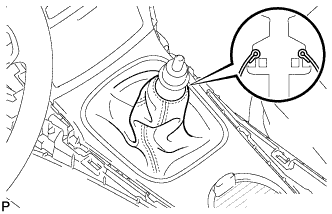
Detach the cover.
-
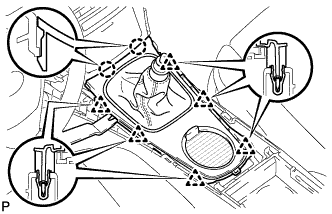
Using a moulding remover B, detach the 2 claws.
-
Detach the 6 clips and remove the console panel.
-
-
REMOVE REAR UPPER CONSOLE PANEL SUB-ASSEMBLY (for Automatic Transaxle)
-
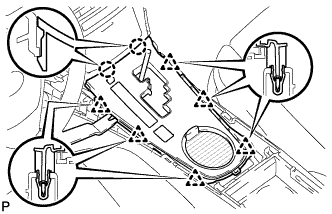
Using a moulding remover B, detach the 2 claws.
-
Detach the 6 clips.
-
Remove the console panel and then disconnect the connector.
-
-
REMOVE LOWER INSTRUMENT CLUSTER FINISH PANEL
-
Using a moulding remover B, detach the 2 clips.
-
Text in Illustration *1 w/ Seat Heater System Remove the finish panel and then disconnect the connectors.
-
-
REMOVE REAR CONSOLE BOX CUP HOLDER (w/ Console Box Lid)
-
Remove the cup holder.
-
-
REMOVE CONSOLE BOX CARPET (w/ Console Box Lid)
-
Remove the 2 carpets.
-
-
REMOVE CONSOLE BOX CARPET (w/o Console Box Lid)
-
Remove the 3 carpets.
-
-
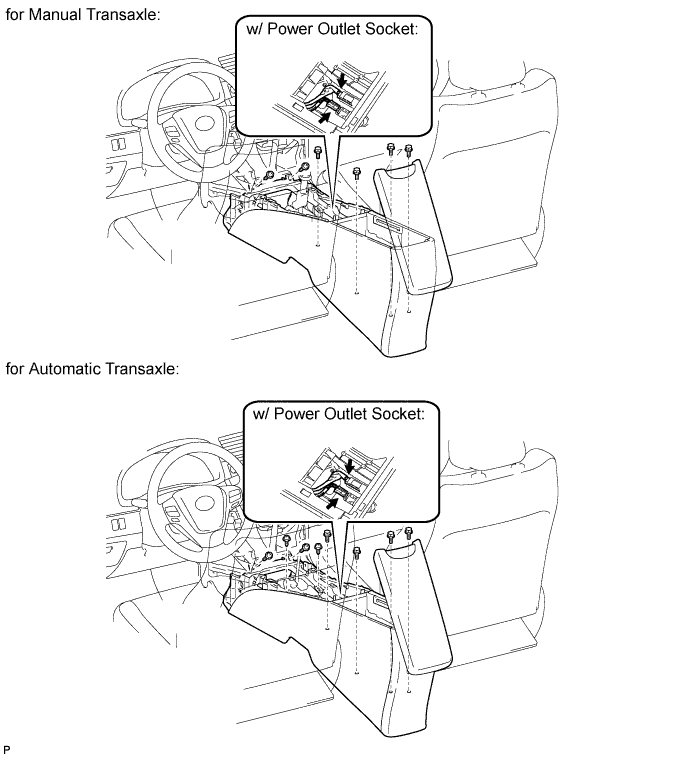
REMOVE CONSOLE BOX ASSEMBLY (w/ Console Box Lid)
-
for Manual Transaxle:
Remove the 2 screws.
-
for Automatic Transaxle
Remove the 4 screws.
-
w/ Power Outlet Socket:
Disconnect the connectors.
-
Remove the 4 bolts and console box.
-
-
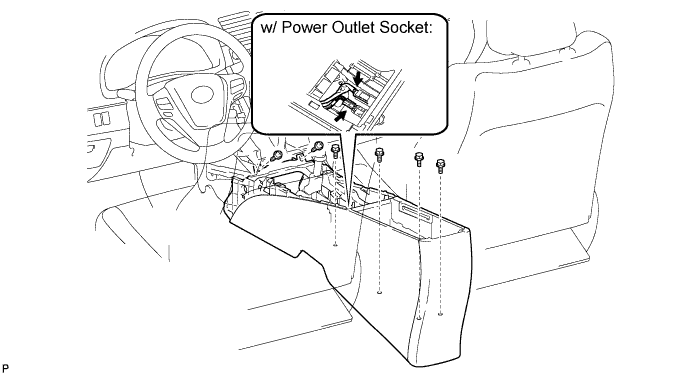
REMOVE CONSOLE BOX ASSEMBLY (w/o Console Box Lid)
-
w/ Power Outlet Socket:
-
Disconnect the connectors.
-
-
Remove the 2 screws.
-
Remove the 4 bolts and console box.
-
-
REMOVE NO. 1 SWITCH HOLE BASE (for LHD)
-
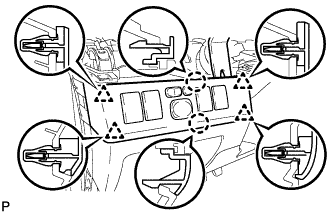
Using a moulding remover B, detach the 2 claws and 4 clips.
-
Disconnect the connectors and remove the switch hole base.
-
-
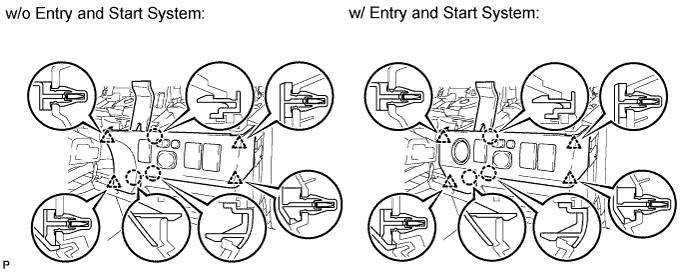
REMOVE NO. 1 SWITCH HOLE BASE (for RHD)
-
Using a moulding remover B, detach the 3 claws and 4 clips.
-
Disconnect the connectors and remove the switch hole base.
-
-
REMOVE COIN BOX ASSEMBLY
-
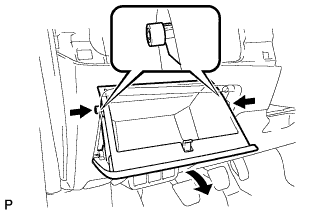
Slightly bend the upper part of the coin box to release the 2 stoppers and open the coin box until it is horizontal.
-
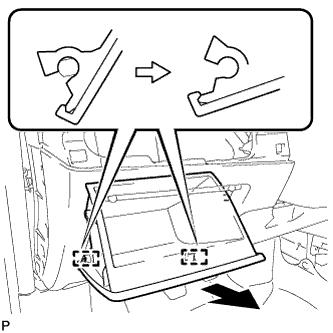
Pull the coin box toward the rear of the vehicle to detach the 2 hinges and remove the coin box.
-
-
REMOVE NO. 1 INSTRUMENT PANEL UNDER COVER SUB-ASSEMBLY
-
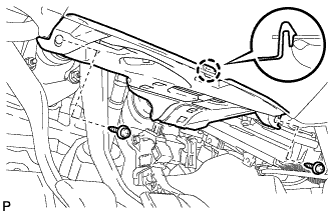
Remove the 2 screws <A>.
-
Detach the claw.
-
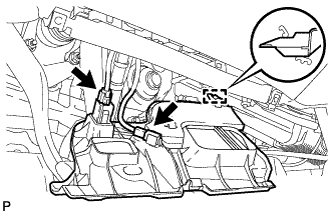
Disconnect the connectors.
-
Detach the guide and remove the under cover.
-
-
REMOVE LOWER NO. 1 INSTRUMENT PANEL AIRBAG ASSEMBLY
-
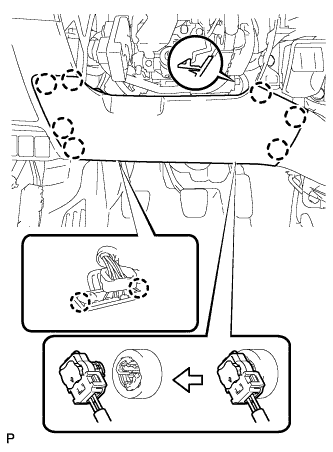
Remove the 4 bolts.
-
Detach the 7 claws and remove the instrument panel airbag.
-
Detach the 2 claws and disconnect the DLC3.
-
Disconnect the connector.
Note
When handling the airbag connector, take care not to damage the airbag wire harness.
-
-
REMOVE NO. 2 INSTRUMENT PANEL UNDER COVER SUB-ASSEMBLY
-
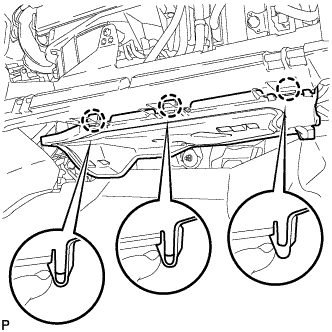
Detach the 3 claws.
-
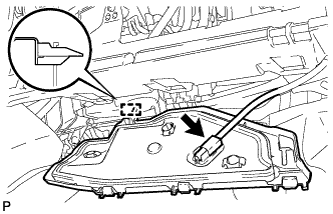
Disconnect the connector.
-
Detach the guide and remove the under cover.
-
-
REMOVE FRONT DOOR SCUFF PLATE LH
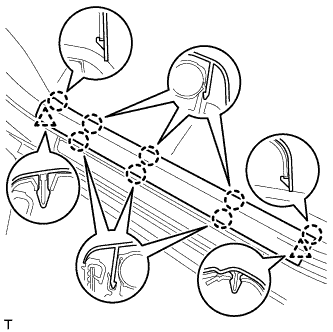
-
Detach the 8 claws and 2 clips, and remove the front door scuff plate.
-
-
REMOVE FRONT DOOR SCUFF PLATE RH
Tech Tips
Use the same procedure described for the LH side.
-
REMOVE COWL SIDE TRIM BOARD LH
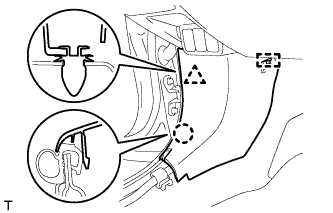
-
Detach the clip, claw and guide, and remove the cowl side trim board.
-
-
REMOVE COWL SIDE TRIM BOARD RH
Tech Tips
Use the same procedure described for the LH side.
-
REMOVE GLOVE BOX LIGHT ASSEMBLY
-
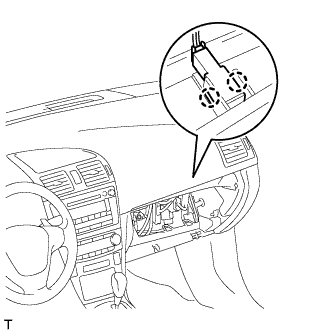
Detach the 2 claws and remove the glove box light.
-
Disconnect the connector.
-
-
REMOVE ELECTRIC PARKING BRAKE SWITCH ASSEMBLY
-
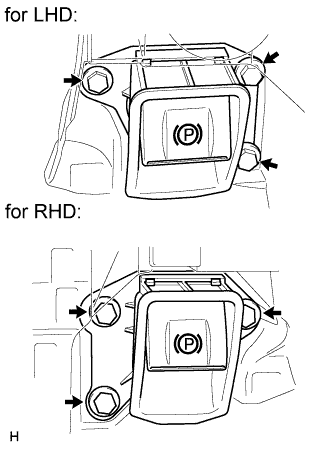
Remove the 3 bolts and electric parking brake switch.
-
-
REMOVE ENGINE SWITCH (for LHD with Entry and Start System)
-
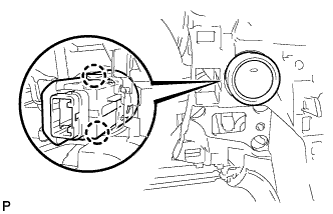
Detach the 2 claws.
-
Disconnect the connector and remove the switch.
-
-
REMOVE CLEARANCE WARNING ECU ASSEMBLY (w/ TOYOTA Parking Assist-sensor System)
-
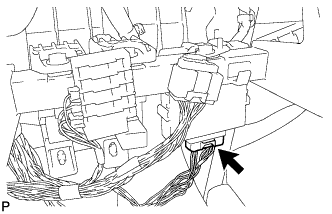
Disconnect the connector.
-
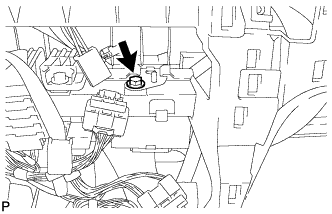
Remove the bolt and ECU.
-
-
REMOVE HEADLIGHT SWIVEL MAIN SWITCH (w/ AFS)
-
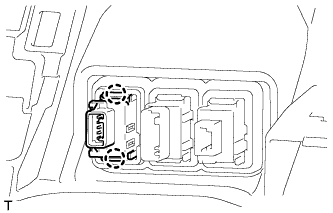
Detach the 2 claws and remove the switch.
-
Disconnect the connector.
-
-
REMOVE VSC OFF SWITCH
-
Disconnect the VSC OFF switch connector.
-
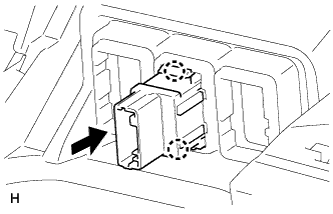
Detach the 2 claws and remove the VSC OFF switch from the lower instrument panel.
-
-
REMOVE FUEL LID OPENER SWITCH
-
Disconnect the connector.
-
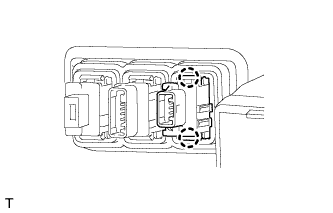
Detach the 2 claws and remove the fuel lid opener switch.
-
-
REMOVE HOOD LOCK CONTROL LEVER SUB-ASSEMBLY
-
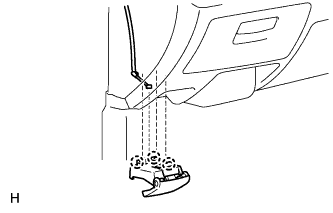
Detach the 3 claws.
-
Disconnect the hood lock control cable and remove the hood lock lever.
-
-
REMOVE COOLER (ROOM TEMPERATURE SENSOR) THERMISTOR (for Automatic Air Conditioning System)
-
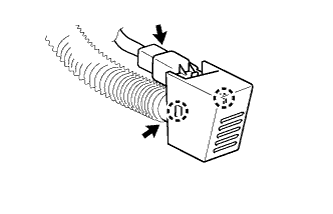
Disconnect the connector and then detach the 2 claws.
-
Disconnect the hose and remove the thermistor.
-
-
REMOVE LOWER INSTRUMENT PANEL SUB-ASSEMBLY
-
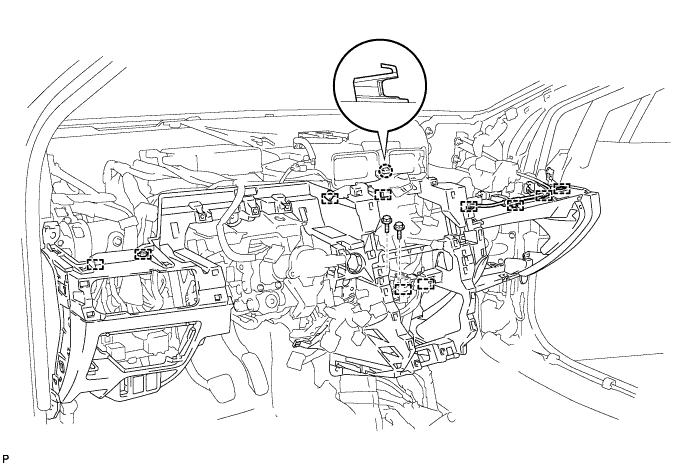
Remove the 2 bolts <B> and 8 screws <C>.
-
Remove the screw <D>.
-
Remove the screw.
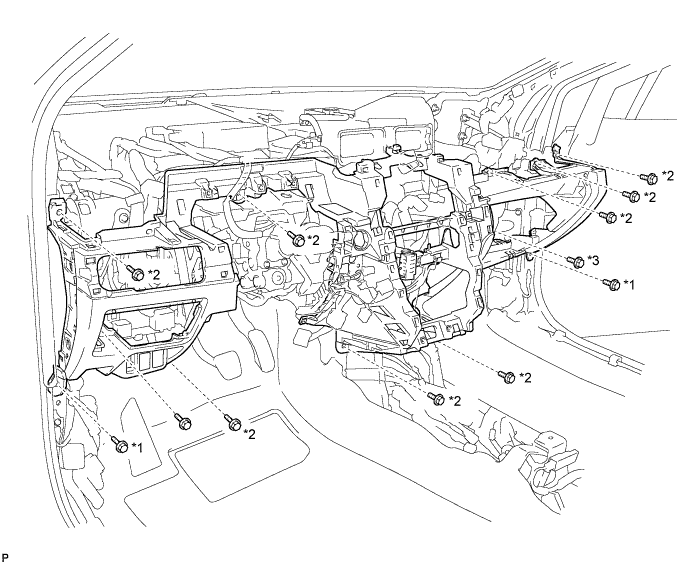
Text in Illustration *1 Bolt <B> *3 Screw <D> *2 Screw <C> - - -
Remove the 2 bolts.
-
Detach the 10 clamps.
-
Detach the claw and remove the instrument panel.
-