CLUTCH RELEASE CYLINDER REMOVAL

-
REMOVE ENGINE ROOM SIDE COVER
-
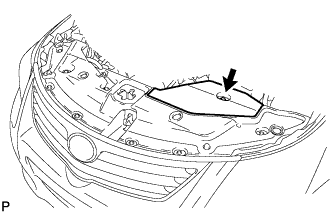
Remove the clip and engine room side cover.
-
-
DISCONNECT CABLE FROM NEGATIVE BATTERY TERMINAL
Note
-
When disconnecting the cable, some systems need to be initialized after the cable is reconnected Click here.
-
w/ Navigation System (for HDD):
After the ignition switch is turned off, the HDD navigation system requires approximately a minute to record various types of memory and settings. As a result, after turning the ignition switch off, wait a minute or more before disconnecting the cable from the negative (-) battery terminal.
-
-
DISCONNECT CABLE FROM POSITIVE BATTERY TERMINAL
-
REMOVE RADIATOR SUPPORT OPENING COVER
-
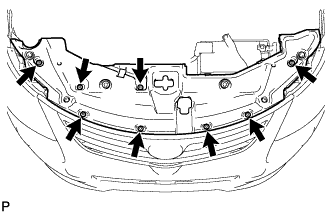
Remove the 8 clips and radiator support opening cover.
-
-
REMOVE BATTERY CLAMP SUB-ASSEMBLY
-
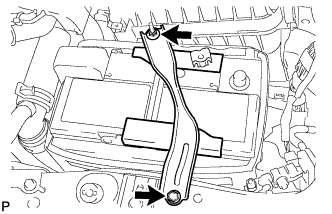
Remove the bolt and loosen the nut.
-
Detach the hook of the battery clamp from the battery carrier, and then remove the battery clamp.
-
-
REMOVE BATTERY
-
REMOVE BATTERY TRAY
-
DISCONNECT CLUTCH RELEASE CYLINDER TO ACCUMULATOR TUBE
-
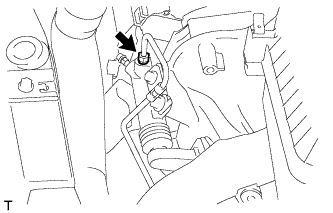
Using a union nut wrench, disconnect the clutch release cylinder to accumulator tube.
Tech Tips
Use a container to catch the fluid.
-
-
REMOVE CLUTCH RELEASE CYLINDER ASSEMBLY
-
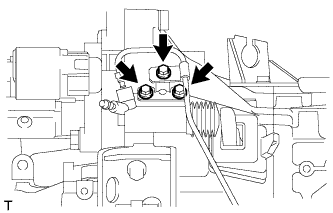
Remove the 3 bolts, clutch release cylinder assembly and No. 1 clutch tube bracket.
-
-
REMOVE RELEASE CYLINDER BLEEDER PLUG
-
Remove the boot from the cylinder body.
-
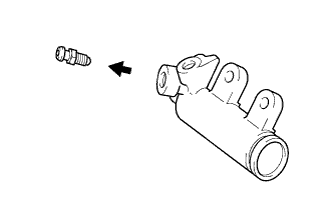
Remove the release cylinder bleeder plug from the cylinder body.
-
-
REMOVE CLUTCH RELEASE CYLINDER KIT
-
Remove the push rod from the cylinder body.
-
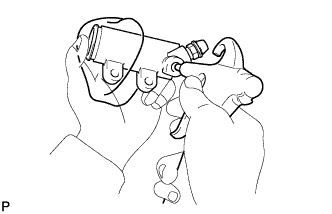
Using compressed air, remove the piston and spring from the cylinder body.
-
Remove the bleeder plug cap from the bleeder plug.
Note
Do not damage the inside of the cylinder body.
-