NAVIGATION SYSTEM TV Screen is Distorted
CAUTION / NOTICE / HINT
Note
-
Depending on the parts that are replaced during vehicle inspection or maintenance, performing initialization, registration or calibration may be needed. Refer to Precaution for Navigation System.
-
When replacing the radio receiver assembly or navigation ECU, always replace it with a new one. If a radio receiver assembly or navigation ECU which was installed to another vehicle is used, the following may occur:
-
A communication malfunction DTC may be stored.
-
The radio receiver assembly or navigation ECU may not operate normally.
PROCEDURE
-
CHECK OPTIONAL COMPONENTS
-
Check if any optional components that may decrease reception capacity, such as a sunshade film or telephone antenna, are installed.
Result Result Proceed to Optional components are not installed A Optional components are installed B Note
Do not remove optional components without the permission of the customer.
B 
REMOVE OPTIONAL COMPONENTS AND CHECK AGAIN (SEE NOTICE ABOVE)
A 
-
-
CHECK WINDOW GLASS ANTENNA WIRE
-
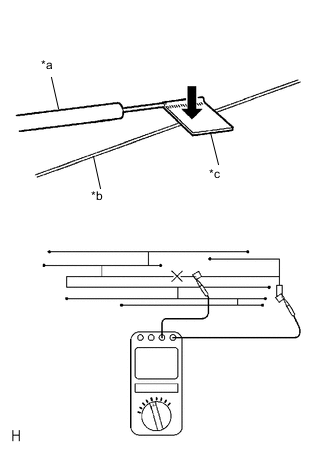
*a Tester Probe *b Antenna Wire *c Tin Foil Check for continuity in the window glass antenna wire.
Tech Tips
Check for continuity at the center of each antenna wire as shown in the illustration.
Note
When cleaning the glass, wipe it in the direction of the wire with a soft dry cloth. Take care not to damage the wire. Do not use detergents or glass cleaners with abrasive ingredients. When measuring resistance, wrap a piece of tin foil around the tip of each probe and press the foil against the wire with your finger, as shown in the illustration.
OK There is continuity in the window glass antenna wire. Result Proceed to OK NG
NG
REPAIR WINDOW GLASS ANTENNA WIRE Click here
OK
-
-
CHECK DTV RECEPTION CHECK (OPERATION CHECK)
-
Enter the "DTV reception check" screen. Refer to Check Digital Television Reception in Operation Check.
Tech Tips
-
As digital TV is a terrestrial broadcast, the digital TV antenna cannot receive the signal in places where the signal may not reach the vehicle, such as mountains or tunnels.
-
Even in areas where digital TV broadcasts for households can be received, the in-vehicle digital TV may not be able to receive the broadcast.
-
-
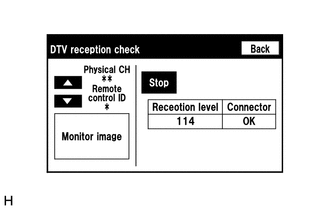
Check the digital TV tuner reception level.
Tech Tips
-
Do not depend solely on the reception level as a reference value as it may vary depending on signal condition such as wave interference.
-
If the result changes after turning around the vehicle, it is not due to a malfunction, but is caused by a local weak electric field.
OK Digital TV tuner reception level check result indicates good reception. Result Proceed to OK NG -
OK
REPLACE RADIO RECEIVER ASSEMBLY Click here
NG
-
-
REPLACE ANTENNA CORD SUB-ASSEMBLY
-
Replace the antenna cord sub-assembly with a new or known good one and check if digital television broadcasts can be received normally.
OK Digital television broadcasts can be received normally. Result Proceed to OK NG
OK
END
NG
-
-
REPLACE NO. 2 ANTENNA CORD SUB-ASSEMBLY
-
Replace the antenna cord sub-assembly with a new or known good one and check if digital television broadcasts can be received normally.
OK Digital television broadcasts can be received normally. Result Proceed to OK NG
OK
END
NG
-
-
REPLACE QUARTER WINDOW ASSEMBLY RH
-
Replace the quarter window assembly RH with a new or known good one and check if digital television broadcasts can be received normally.
OK Digital television broadcasts can be received normally. Result Proceed to OK NG
OK
END
NG
REPLACE NAVIGATION ECU Click here
-