CAN COMMUNICATION SYSTEM HOW TO PROCEED WITH TROUBLESHOOTING

Note
-
DTCs for the CAN communication system are as follows: U0073, U0100, U0101, U0110, U0123, U0124, U0126, U0129, U0131, U0140, U0142, U0155, U0199, U0201, U0202, U0208, U0230, U0327, U1002, U1110 and B2427.
-
Refer to troubleshooting of each system if DTCs regarding the CAN communication system are not output.
Tech Tips
*: Use the intelligent tester.
-
VEHICLE BROUGHT TO WORKSHOP
NEXT 
-
CUSTOMER PROBLEM ANALYSIS
-
Interview the customer and confirm the problem Click here.
NEXT
-
-
CHECK BATTERY
Standard Voltage 11 to 14 V Tech Tips
If the voltage is below 11 V, recharge or replace the battery before proceeding.
NEXT
-
CHECK AND CLEAR DTCS*
Tech Tips
-
CAN communication DTCs are stored when there is an open or short in any of the communication wires. Any problems with the power source of a corresponding ECU or sensor, or problems in the ECU or the sensor itself also cause these DTCs to be stored.
-
If a CAN communication wire connector is disconnected with the engine switch on (IG), the ECUs of the corresponding system and related systems record a DTC.
NEXT
-
-
CHECK DLC3 BRANCH WIRE AND CAN NO. 1 BUS MAIN WIRE (CANH - CANL)
Note
-
Turn the engine switch off before measuring the resistances of the CAN bus main wires and the CAN bus branch wires.
-
After the engine switch is turned off, check that the key reminder warning system and light reminder warning system are not in operation.
-
Before measuring the resistance, leave the vehicle as is for at least 1 minute and do not operate the engine switch, any other switches or doors. If any doors need to be opened in order to check the connectors, open the doors and leave them open.
Tech Tips
Operating the engine switch, any other switches or a door triggers related ECU and sensor communication on the CAN. This communication will cause the resistance value to change.
-
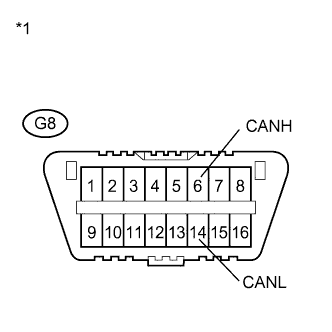
Turn the engine switch off.
-
Measure the resistance according to the value(s) in the table below.
Standard Resistance Tester Connection Switch Condition Specified Condition G8-6 (CANH) - G8-14 (CANL) Engine switch off 54 to 69 Ω Text in Illustration *1 DLC3 Result Result Proceed to OK A NG (70 Ω or higher) for RHD B NG (70 Ω or higher) for LHD C NG (Below 54 Ω) for RHD D NG (Below 54 Ω) for LHD E
B 
GO TO OPEN IN CAN MAIN BUS WIRE (RHD Models) Click here
C
GO TO OPEN IN CAN MAIN BUS WIRE (LHD Models) Click here
D
GO TO SHORT IN CAN BUS LINES (RHD Models) Click here
E
GO TO SHORT IN CAN BUS LINES (LHD Models) Click here
A
-
-
CHECK FOR SHORT TO GND IN CAN NO. 1 BUS (CANH, CANL - CG)
-
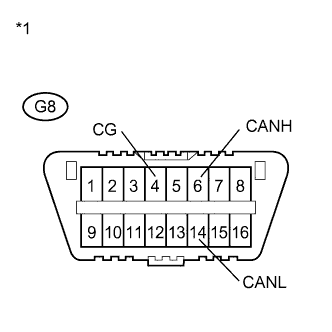
Turn the engine switch off.
-
Measure the resistance according to the value(s) in the table below.
Standard Resistance Tester Connection Switch Condition Specified Condition G8-6 (CANH) - G8-4 (CG) Engine switch off 200 Ω or higher G8-14 (CANL) - G8-4 (CG) Engine switch off 200 Ω or higher Text in Illustration *1 DLC3 Result Result Proceed to OK A NG (RHD Models) B NG (LHD Models) C
B
GO TO SHORT TO GND IN CAN BUS LINE (RHD Models) Click here
C
GO TO SHORT TO GND IN CAN BUS LINE (LHD Models) Click here
A
-
-
CHECK FOR SHORT TO +B IN CAN NO. 1 BUS (CANH, CANL - BAT)
-
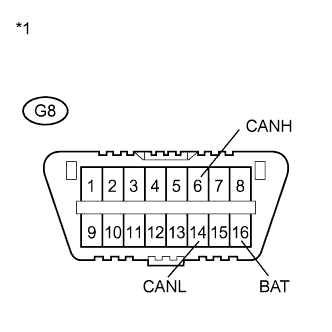
Text in Illustration *1 DLC3 Measure the resistance according to the value(s) in the table below.
Standard Resistance Tester Connection Condition Specified Condition G8-6 (CANH) - G8-16 (BAT) Cable from negative (-) battery terminal disconnected 6 kΩ or higher G8-14 (CANL) - G8-16 (BAT) Cable from negative (-) battery terminal disconnected 6 kΩ or higher Result Result Proceed to OK A NG (RHD Models) B NG (LHD Models) C
B
GO TO SHORT TO +B IN CAN BUS LINE (RHD Models) Click here
C
GO TO SHORT TO +B IN CAN BUS LINE (LHD Models) Click here
A
-
-
CHECK INSTALLED SYSTEMS (ECU AND SENSOR) THAT USE CAN COMMUNICATION
-
Based on the vehicle equipment and specifications, confirm the systems that use CAN communication Click here.
NEXT
-
-
CHECK ECUS CONNECTED TO CAN BUS*
-
Select "Bus Check" from the "System Select" screen on the intelligent tester Click here.
-
Select "Communication Bus Check" from the "Bus Check" screen, and then select "Enter".
-
Observe the screen for approximately 1 minute to check the ECUs and sensors displayed on the screen.
Result Result Proceed to All ECUs and sensors connected to the CAN communication system are displayed on the screen.
(CAN bus circuit is currently normal.)
A
-
All ECUs, except the main body ECU, connected to the CAN MS bus are not displayed on the screen.
-
The main body ECU outputs DTC U1002.
(Open or short in CAN MS bus main wires.)
B*1 All ECUs connected to the CAN MS bus are not displayed on the screen.
(Open in main body ECU branch wire or main body ECU malfunction.)
C One of the ECUs and sensors connected to the CAN communication system is not displayed on the screen.
(Open in ECU or sensor branch wires, or communication interrupted.)
D Some ECUs and sensors repeatedly appear and disappear on the screen during this check.
(Open in one side of ECU or sensor branch wires.)
E Note
-
The systems (ECUs and sensors) that adopt CAN communication vary depending on the vehicle and optional equipment. Check which systems (ECUs and sensors) are installed on the vehicle Click here.
-
Non-installed ECUs or sensors will not be displayed. Do not mistake them for being in the communication stop mode.
-
The ECUs and sensors that repeatedly appear and disappear from on screen during this check are considered normal. (The response to the intelligent tester and the tester display are affected by signals output from other ECUs which have an open circuit in either of their CAN bus branch wires.)
Tech Tips
-
*1: See the Diagnostic Trouble Code Chart instead of the Communication Stop Mode Table when some of the ECUs connected to the CAN MS bus are not displayed on the screen Click here.
-
The ECUs connected to the CAN MS bus are displayed on the screen by the main body ECU.
B
GO TO U1002 (CAN MS BUS) Click here
C
GO TO MAIN BODY ECU COMMUNICATION STOP MODE Click here
D
GO TO COMMUNICATION STOP MODE TABLE Click here
E
GO TO OPEN IN ONE SIDE OF CAN BRANCH LINE Click here
A
-
-
-
RECHECK DTC
Tech Tips
-
Sometimes CAN communication system DTCs are output, but all ECUs and sensors connected to the CAN communication system are displayed on the intelligent tester. In this case, previous or history DTCs may indicate the cause of the problem.
-
ECUs related to a problem in the CAN bus will store DTCs to indicate communication malfunctions. The communication stop mode in the CAN bus can be determined by comparing the combination of DTCs that have been set. Refer to DTC Combination Table for the CAN bus.
-
The main body ECU will store communication error DTCs when the ECUs connected to the CAN MS bus cannot communicate, or if a network malfunction occurs.
Result Result Proceed to Communication error DTCs other than the codes output from the main body ECU are output. (A malfunction occurred in the CAN No. 1 bus.) A The main body ECU outputs DTC U1002.
(A malfunction occurred in the CAN MS bus.)
B The main body ECU outputs DTCs other than DTC U1002.
(A malfunction occurred in an ECU branch wire connected to the CAN MS bus.)
C
B
GO TO U1002 (CAN MS BUS) Click here
C
GO TO DIAGNOSTIC TROUBLE CODE CHART Click here
A
-
-
DTC COMBINATION TABLE
-
Confirm the problem according to the combination of output DTCs regarding the CAN communication system Click here.
Tech Tips
Previous CAN communication system DTCs may be the cause if CAN communication system DTCs are output and all ECUs and sensors connected to the CAN communication system are displayed on the "Communication Bus Check" of the intelligent tester.
NEXT
-
-
CIRCUIT INSPECTION
NEXT
-
IDENTIFICATION OF PROBLEM
NEXT
-
REPAIR OR REPLACEMENT
NEXT
-
CONFIRMATION TEST*
NEXT
END