Click here
-
PRECAUTION FOR DISCONNECTING CABLE FROM NEGATIVE BATTERY TERMINAL
Note:
-
After the engine switch is turned off, the navigation receiver assembly records various types of memory and settings. As a result, after turning the engine switch off, make sure to wait at least 60 seconds before disconnecting the cable from the negative (-) battery terminal.
-
When disconnecting the cable from the negative (-) battery terminal, initialize the following system after the cable is reconnected.
System Name See Procedure Parking Assist Monitor System
-
-
PRECAUTION FOR NAVIGATION SYSTEM
-
If replacing any of the following parts, refer to Initialization of Repair Instruction (Click here).
-
Navigation ECU sub-assembly
-
Hard disk drive
-
-
-
PRECAUTIONS FOR NAVIGATION RECEIVER ASSEMBLY
-
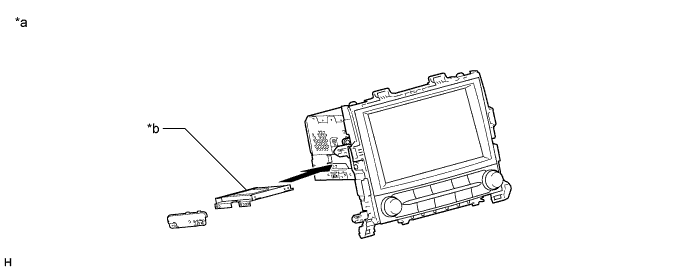
A Hard Disk Drive (HDD) is built into the navigation receiver assembly to store map and other data, and is used for the navigation system. Therefore, care must be taken for the following points when handling:
Table 1. Text in Illustration *a Example *b Hard Disk Drive
-
When it is necessary to replace the navigation ECU sub-assembly, be sure to replace it with a new one.
Note:If a used navigation ECU sub-assembly is installed as a replacement part, the customer's HDD will not be recognized.
-
Do not apply any vibration or shock to the navigation receiver assembly.
Note:
-
Do not drop or subject the navigation receiver assembly to severe impacts.
-
Do not use the navigation receiver assembly if it has been dropped or subjected to a severe impact.
-
Do not store the navigation receiver assembly without the HDD installed. (Only remove the HDD from the navigation ECU sub-assembly when the replacement navigation receiver assembly or HDD is ready.)
-
-
Do not remove the navigation receiver assembly if there is a risk that condensation may occur.
Note:If the temperature of the navigation receiver assembly changes rapidly, condensation may occur inside the unit. This may cause a malfunction of the HDD. Therefore, when the navigation receiver assembly is removed from the instrument panel, it needs to be kept inside the vehicle or in an environment with an equivalent temperature and humidity.
-
Take measures to prevent static electricity.
Note:Touching the terminals of a connector can cause static electricity to be transmitted to the internal circuits. This may cause a malfunction of the HDD.
-
Keep the navigation receiver assembly away from magnets or magnetized items.
Note:Keep the navigation receiver assembly away from speakers, motors, magnetized tools and other magnetic items.
-
-
-
PRECAUTIONS FOR HARD DISK DRIVE (HDD)
-
Map and other data for the navigation system is stored on the Hard Disk Drive (HDD). Make sure to follow the following instructions when replacing the HDD:
Note:Data downloaded by the customer may be stored on the HDD. This data will be lost when the HDD is replaced. Make sure to warn the customer that their data will be lost and obtain their consent prior to replacing the HDD.
-
The HDD must only be replaced with a new one. Do not attempt to install a used HDD from another vehicle.
Note:The navigation ECU sub-assembly can recognize only a new HDD.
-
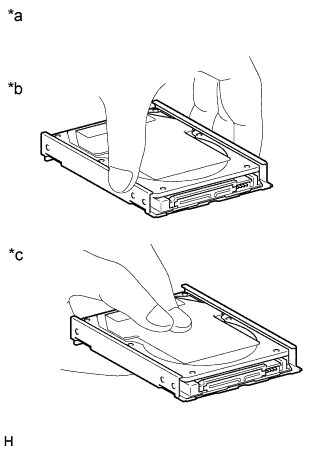
Do not touch the HDD cover.
Note:When removing or installing the HDD, only hold it by the areas shown in the illustration.
Table 2. Text in Illustration *a Example *b Correct *c Incorrect -
Do not apply any vibration or shock to the HDD.
Note:
-
Do not drop or subject the HDD to severe impacts.
-
Do not use the HDD if it has been dropped or subjected to a severe impact.
-
Do not store the HDD by itself if it has been removed from the navigation receiver assembly. (Only remove the HDD from the navigation receiver assembly when the replacement navigation ECU sub-assembly or HDD is ready.)
-
-
Do not remove the HDD if there is a risk that condensation may occur.
Note:If the temperature of the HDD changes rapidly, condensation may occur inside the unit. This may cause a malfunction of the HDD. Therefore, when the navigation receiver assembly is removed from the instrument panel, it needs to be kept inside the vehicle or in an environment with an equivalent temperature and humidity.
-
Take measures to prevent static electricity.
Note:Touching the terminals of a connector can cause static electricity to be transmitted to the internal circuits. This may cause a malfunction of the HDD.
-
Keep the HDD away from magnets or magnetized items.
Note:Keep the HDD away from speakers, motors, magnetized tools and other magnetic items.
-
Inspect after HDD replacement.
Note:Make sure to perform Check Hard Disk Drive in Operation Check to confirm that there are no HDD abnormalities after removal or installation (Click here).
-
-
-
PRECAUTIONS FOR G-BOOK (w/ G-BOOK System)
-
The navigation ECU sub-assembly functions as the G-BOOK device and holds the G-BOOK ID.
Note:When replacing the navigation ECU sub-assembly, perform vehicle contract setting (Click here).
-
Necessary data for the G-BOOK system is stored in the HDD that is built into the navigation ECU sub-assembly.
Note:Download necessary data after replacing the hard disk drive (Click here).
-