MULTI-MEDIA INTERFACE ECU INSTALLATION

Tech Tips
A bolt without a torque specification is shown in the standard bolt chart Click here.
-
INSTALL NO. 1 MULTI-MEDIA INTERFACE BRACKET
-
Install the bracket with the 2 bolts.
-
-
INSTALL NO. 2 MULTI-MEDIA INTERFACE BRACKET
-
Install the bracket with the 2 bolts.
-
-
INSTALL MULTI-MEDIA INTERFACE ECU
-
Install the multi-media interface ECU with the 2 bolts.
-
Connect the connectors.
-
-
INSTALL FRONT FLOOR CARPET ASSEMBLY
-
Install the carpet that was pulled back to remove the selector. For further details, refer to the installation procedure Click here.
-
-
INSTALL FRONT DOOR SCUFF PLATE RH
Tech Tips
Use the same procedures described for the LH side.
-
INSTALL COWL SIDE TRIM BOARD RH
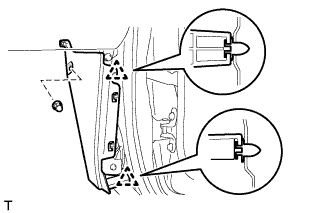
-
Attach the 2 clips to install the cowl side trim board.
-
Install the cap nut.
-
-
INSTALL INSTRUMENT SIDE PANEL RH (w/o Airbag Cut Off Switch)
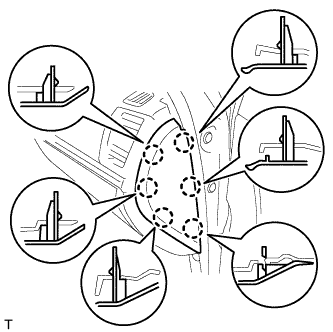
-
Attach the 6 claws to install the instrument side panel.
-
-
INSTALL INSTRUMENT SIDE PANEL RH (w/ Airbag Cut Off Switch)
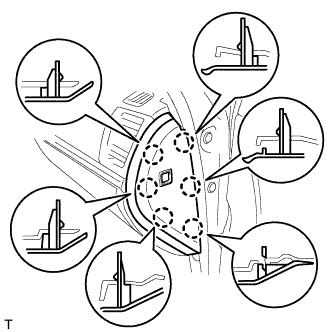
-
Connect the connector.
-
Attach the 6 claws to install the instrument side panel.
-
-
INSTALL FRONT SEAT ASSEMBLY RH (for Manual Seat)
-
Install the front seat assembly RH Click here.
-
-
INSTALL FRONT SEAT ASSEMBLY RH (for Power Seat)
-
Install the front seat assembly RH Click here.
-
-
CONNECT CABLE TO NEGATIVE BATTERY TERMINAL
Note
When disconnecting the cable, some systems need to be initialized after the cable is reconnected Click here.
-
CHECK SRS WARNING LIGHT
-
Check the SRS warning light Click here.
-