STEERING ACTUATOR INSTALLATION

-
HANDLING PRECAUTIONS FOR STEERING ACTUATOR ASSEMBLY
Note
-
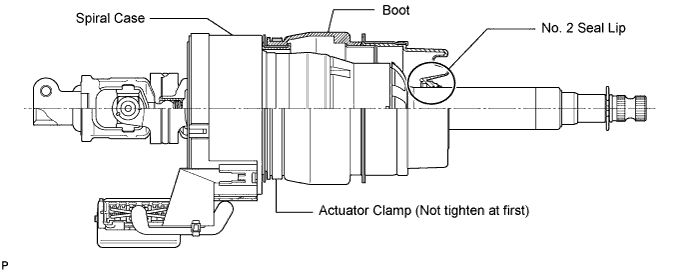
Be careful that the No. 2 seal lip or boot does not turn outward while carrying or installing the steering actuator assembly. If installing a new steering actuator assembly, make sure that the spiral center lock pin is securely inserted.
-
Do not use the steering actuator assembly if it has been dropped.
-
-
INSTALL STEERING ACTUATOR ASSEMBLY
-
Make sure that the power steering link assembly is centered.
-
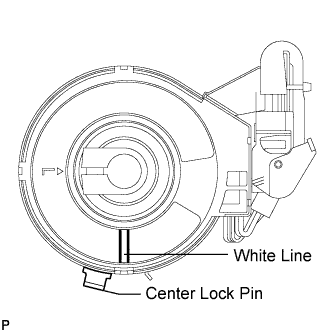
Install the steering actuator assembly.
-
If installing a new steering actuator assembly:
Install the steering actuator assembly with the white paint on the upper surface of the spiral case facing down.
Note
Do not pull out the center lock pin.
-
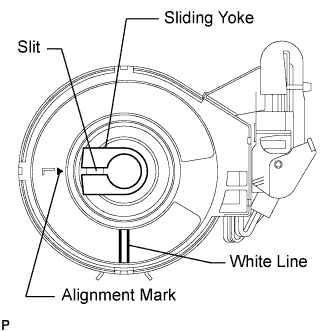
If reinstalling the removed steering actuator assembly:
-
Slowly turn the spiral case clockwise until it locks.
-
Turn the spiral case two turns counterclockwise from the lock position.
-
Align the slit of the sliding yoke with the alignment mark (▲).
-
Install the steering actuator assembly with the white paint on the upper surface of the spiral case facing down.
-
-
-
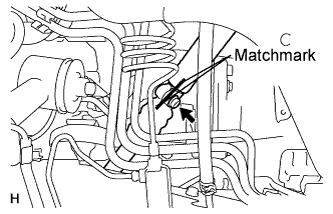
Align the matchmarks on the No. 2 steering intermediate shaft and steering actuator.
Note
-
Do not fold back the boot part of the steering hole cover or turn it excessively. If it is turned excessively, return it to its original position.
-
Do not turn the actuator body and the spiral case.
Tech Tips
Install the steering actuator from the inside of the vehicle.
-
-
Install the bolt.
- Torque:
- 35 N*m { 360 kgf*cm, 26 ft.*lbf }
-
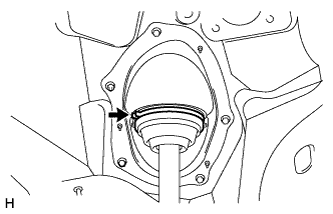
Using needle nose pliers, lock the clamp to the steering column hole cover to install it.
Note
Be careful when performing the operation as the clamp may not lock if the claws of the clamp are deformed.
-
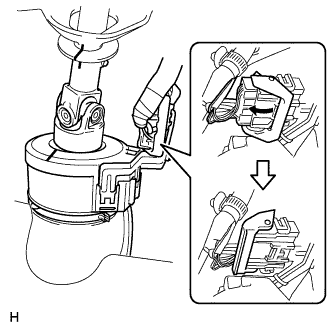
Move the lock in the direction of the arrow and connect the steering actuator connector.
Tech Tips
When a new actuator is installed, remove the center lock pin.
-
Connect the connector.
-
-
INSTALL STEERING COLUMN ASSEMBLY
-
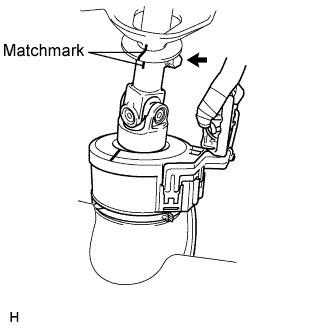
Align the matchmarks on the steering actuator and steering column.
-
Install the bolt.
- Torque:
- 35 N*m { 360 kgf*cm, 26 ft.*lbf }
-
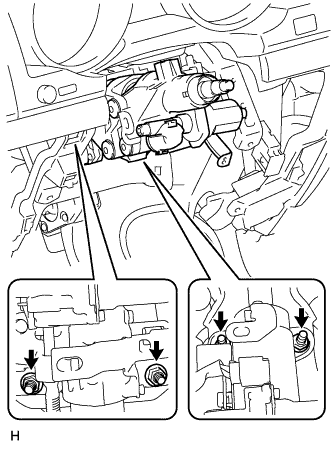
Install the steering column with the 4 nuts.
- Torque:
- 26 N*m { 265 kgf*cm, 19 ft.*lbf }
-
-
INSTALL NO. 3 AIR DUCT SUB-ASSEMBLY
-
Attach the 2 claws to install the duct.
-
Install the clip.
-
-
CONNECT WIRE HARNESS PROTECTOR AND WIRE HARNESS
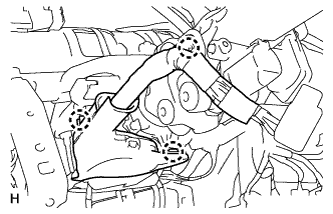
-
Attach the 3 claws to connect the wire harness protector and wire harness.
-
-
INSTALL DRIVER SIDE KNEE AIRBAG ASSEMBLY (w/ Driver Side Knee Airbag)
-
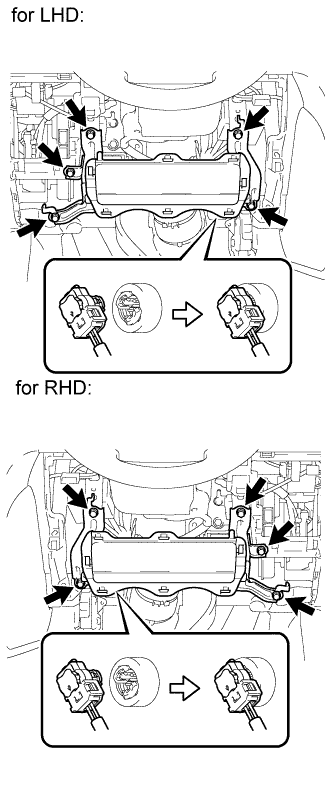
Connect the connector.
Note
When handling the airbag connector, take care not to damage the airbag wire harness.
-
Install the driver side knee airbag with the 5 bolts.
- Torque:
- 10 N*m { 102 kgf*cm, 7 ft.*lbf }
-
-
INSTALL LOWER INSTRUMENT PANEL SUB-ASSEMBLY (w/o Driver Side Knee Airbag)
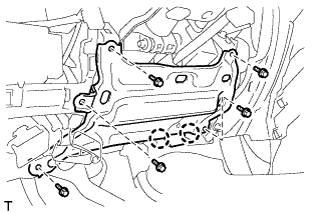
-
Attach the 2 claws and connect the DLC3.
-
Install the lower instrument panel with the 5 bolts.
-
-
INSTALL NO. 1 SWITCH HOLE BASE
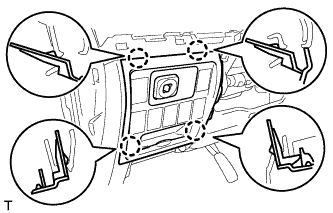
-
Connect the connectors.
-
Attach the 4 claws to install the No. 1 switch hole base.
-
-
INSTALL LOWER NO. 1 INSTRUMENT PANEL FINISH PANEL
-
Connect the connectors.
-
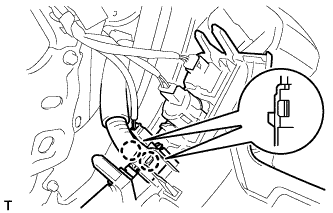
for Automatic Air Conditioning System:
-
Attach the 2 claws to install the room temperature sensor.
-
-
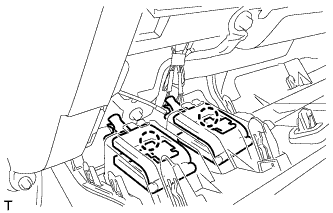
Attach the 2 claws to connect the 2 control cables.
-
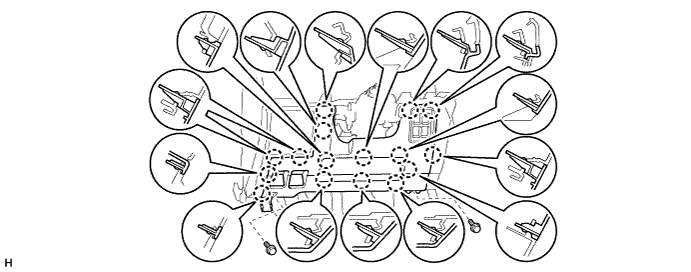
w/ Driver Side Knee Airbag:
-
Attach the 16 claws to install the lower No. 1 instrument panel finish panel.
-
Install the 2 bolts.
-
-
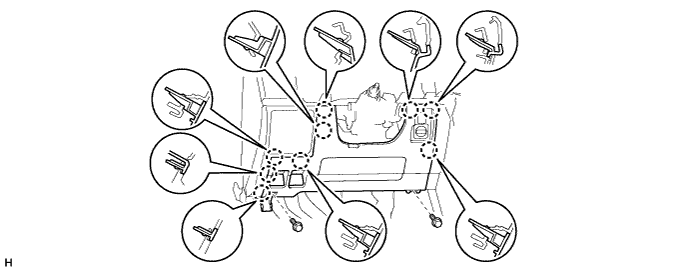
w/o Driver Side Knee Airbag:
-
Attach the 9 claws to install the lower No. 1 instrument panel finish panel.
-
Install the 2 bolts.
-
-
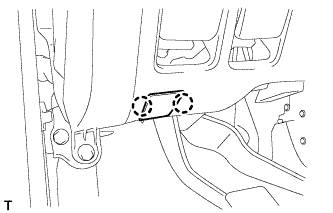
Attach the 2 claws to close the hole cover.
-
-
INSTALL COWL SIDE TRIM BOARD LH
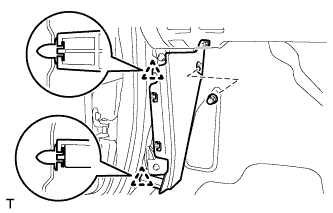
-
Attach the 2 clips to install the cowl side trim board.
-
Install the cap nut.
-
-
INSTALL NO. 1 INSTRUMENT PANEL UNDER COVER SUB-ASSEMBLY (w/ Floor Under Cover)
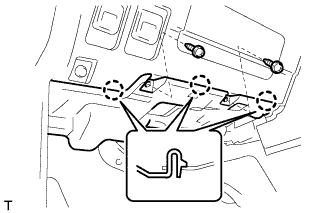
-
Connect the connectors.
-
Attach the 3 claws to install the No. 1 instrument panel under cover.
-
Install the 2 screws.
-
-
INSTALL FRONT DOOR SCUFF PLATE LH
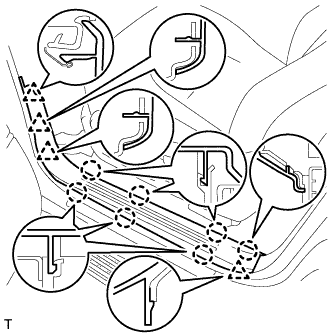
-
Attach the 7 claws and 4 clips to install the scuff plate.
-
-
INSTALL INSTRUMENT CLUSTER FINISH PANEL SUB-ASSEMBLY (w/o Multi-information Display)
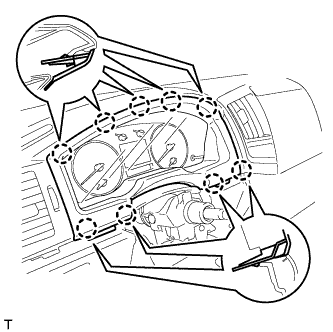
-
Attach the 9 claws to install the instrument cluster finish panel.
-
-
INSTALL INSTRUMENT CLUSTER FINISH PANEL SUB-ASSEMBLY (w/ Multi-information Display)
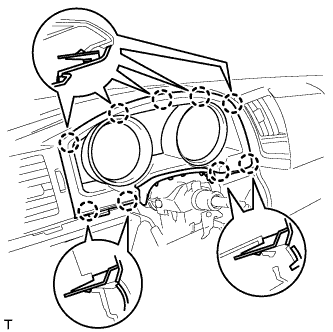
-
Connect the connector.
-
Attach the 9 claws to install the instrument cluster finish panel.
-
-
INSTALL NO. 2 INSTRUMENT CLUSTER FINISH PANEL GARNISH
-
Attach the 2 claws to install the No. 2 instrument cluster finish panel garnish.
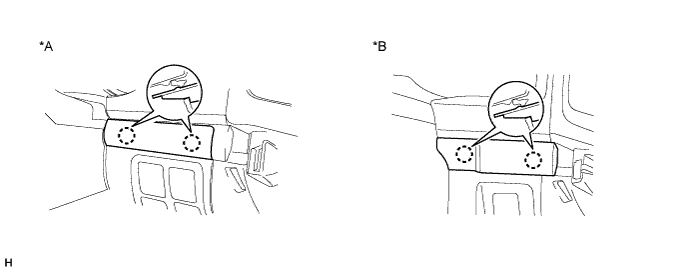
Text in Illustration *A w/ Entry and Start System *B w/o Entry and Start System
-
-
INSTALL NO. 1 INSTRUMENT CLUSTER FINISH PANEL GARNISH
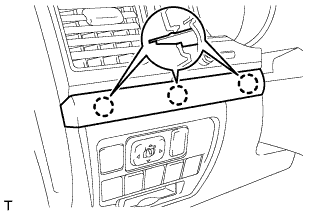
-
Attach the 3 claws to install the No. 1 instrument cluster finish panel garnish.
-
-
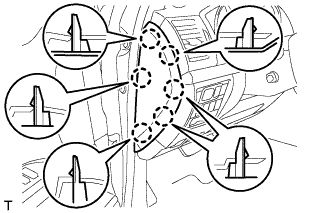
INSTALL INSTRUMENT SIDE PANEL LH
-
Attach the 6 claws to install the instrument side panel.
-
-
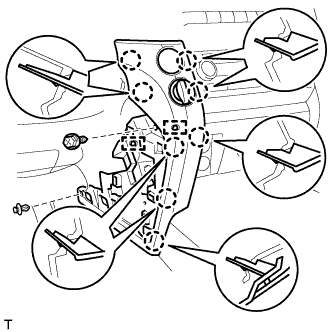
INSTALL LOWER INSTRUMENT PANEL PAD SUB-ASSEMBLY LH
-
Connect the connectors and attach the 2 clamps.
-
Attach the 8 claws to install the lower instrument panel pad sub-assembly.
-
Install the clip and screw.
-
-
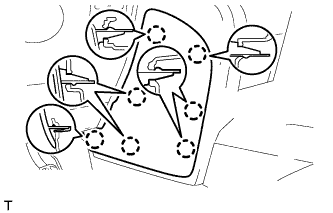
INSTALL NO. 2 INSTRUMENT PANEL FINISH PANEL CUSHION
-
Attach the 7 claws to install the No. 2 instrument panel finish panel cushion.
-
-
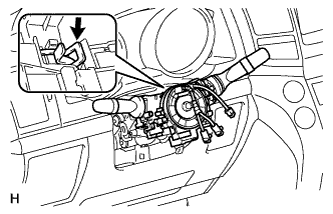
INSTALL COMBINATION SWITCH ASSEMBLY WITH SPIRAL CABLE SUB-ASSEMBLY
-
Using pliers, grip the claws of the clamp and install the combination signal switch assembly with spiral cable sub-assembly to the steering column assembly with the clamp.
-
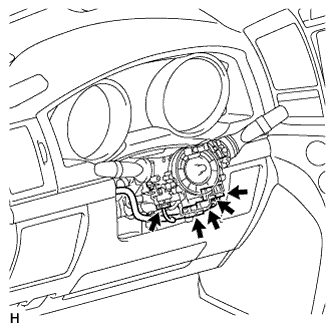
Connect the 5 connectors to the combination switch with spiral cable.
-
-
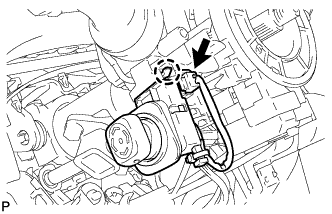
INSTALL TILT AND TELESCOPIC SWITCH
-
Attach the claw to install the switch.
-
Connect the switch connector.
-
-
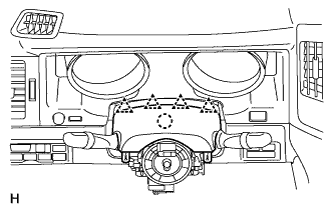
INSTALL UPPER STEERING COLUMN COVER
-
Attach the claw to install the upper steering column cover.
-
Attach the 4 clips to the instrument cluster finish panel.
-
-
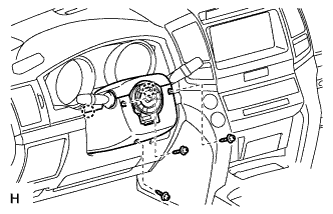
INSTALL LOWER STEERING COLUMN COVER
-
Attach the 2 claws to install the lower steering column cover.
Note
Do not damage the tilt and telescopic switch.
-
Install the 3 screws.
- Torque:
- 1.5 N*m { 15 kgf*cm, 13 in.*lbf }
-
-
INSTALL STEERING WHEEL ASSEMBLY
-
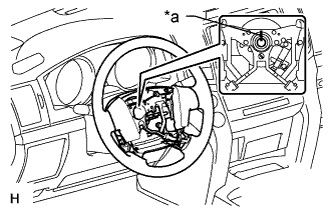
Text in Illustration *a Matchmark Align the matchmarks on the steering wheel assembly and steering main shaft assembly.
-
Install the steering wheel assembly set nut.
- Torque:
- 50 N*m { 510 kgf*cm, 37 ft.*lbf }
-
-
INSTALL STEERING PAD
-
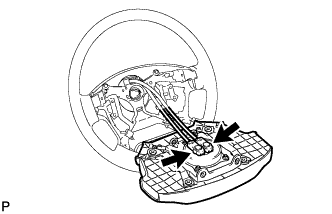
Support the steering pad with one hand.
-
Connect the 2 connectors to the steering pad.
Note
When handling the airbag connector, take care not to damage the airbag wire harness.
-
Connect the horn connector.
-
Confirm that the circumference groove of the "TORX" screw fits in the screw case, and place the steering pad onto the steering wheel.
-
Using a T30 "TORX" socket wrench, tighten the 2 screws.
- Torque:
- 8.8 N*m { 90 kgf*cm, 78 in.*lbf }
-
-
INSTALL LOWER NO. 2 STEERING WHEEL COVER
-
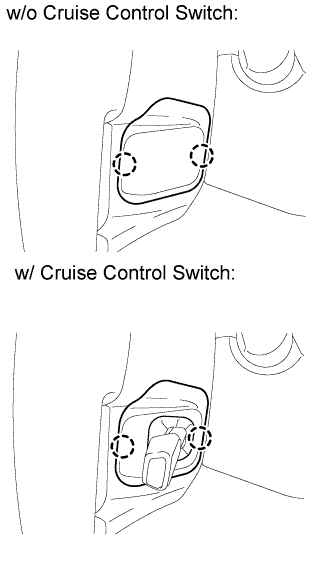
Attach the 2 claws to install the cover.
-
-
INSTALL LOWER NO. 3 STEERING WHEEL COVER
-
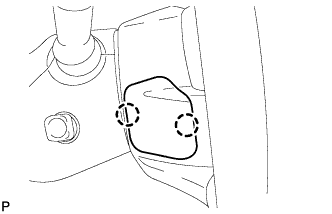
Attach the 2 claws to install the cover.
-
-
CONNECT CABLE TO NEGATIVE BATTERY TERMINAL
Note
-
Reset the AUTO TILT AWAY function setting to the previous condition by changing the customize parameter Click here.
-
When disconnecting the cable, some systems need to be initialized after the cable is reconnected Click here.
-
-
INSPECT SRS WARNING LIGHT
-
Inspect the SRS warning light Click here.
-
-
PERFORM VARIABLE GEAR RATIO STEERING SYSTEM CALIBRATION
-
Perform variable gear ratio steering system calibration Click here.
-