-
Click here
INSTALL STEERING CONTROL ECU
-
Install the steering control ECU to the junction block with the bolt and nut.
8.0 N*m 82 kgf*cm 71 in.*lbf
-
-
Click here
INSTALL STEERING CONTROL ECU WITH JUNCTION BLOCK
-
Front side:
-
Connect the 5 connectors.
-
-
Rear side:
-
Install the steering control ECU with junction block with the bolt and 2 nuts.
8.0 N*m 82 kgf*cm 71 in.*lbf -
Attach the 2 clamps.
-
Connect the 7 connectors.
-
-
-
Click here
INSTALL LOWER INSTRUMENT PANEL (w/o Driver Side Knee Airbag)
-
Attach the 2 claws and connect the DLC3.
-
Install the lower instrument panel with the 5 bolts.
-
- Click here
INSTALL DRIVER SIDE KNEE AIRBAG ASSEMBLY (w/ Driver Side Knee Airbag)
-
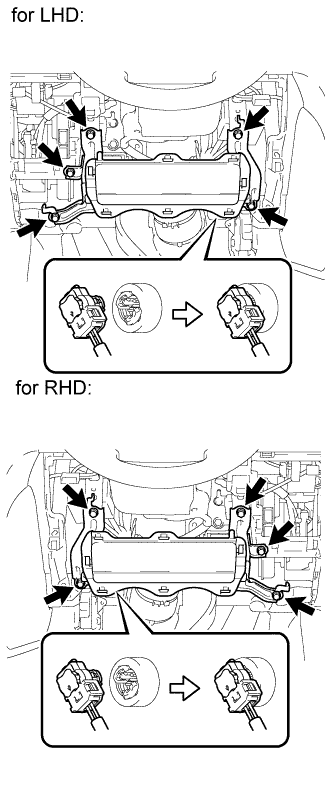
Connect the connector.
Note:When handling the airbag connector, take care not to damage the airbag wire harness.
-
Install the driver side knee airbag with the 5 bolts.
10 N*m 102 kgf*cm 7 ft.*lbf
-
-
Click here
INSTALL NO. 1 SWITCH HOLE BASE
-
Connect the connectors.
-
Attach the 4 claws to install the No. 1 switch hole base.
-
- Click here
INSTALL LOWER NO. 1 INSTRUMENT PANEL FINISH PANEL
-
Connect the connectors.
-
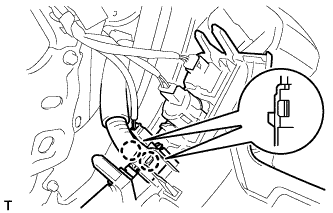
for Automatic Air Conditioning System:
-
Attach the 2 claws to install the room temperature sensor.
-
-
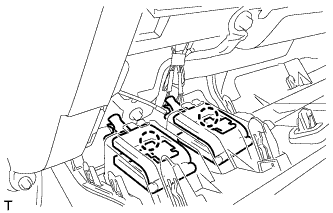
Attach the 2 claws to connect the 2 control cables.
-
w/ Driver Side Knee Airbag:
-
Attach the 16 claws to install the lower No. 1 instrument panel finish panel.
-
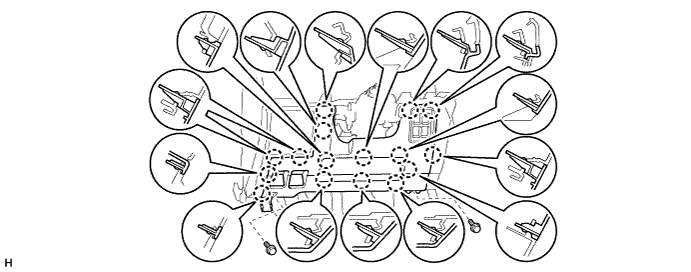
Install the 2 bolts.
-
-
w/o Driver Side Knee Airbag:
-
Attach the 9 claws to install the lower No. 1 instrument panel finish panel.
-
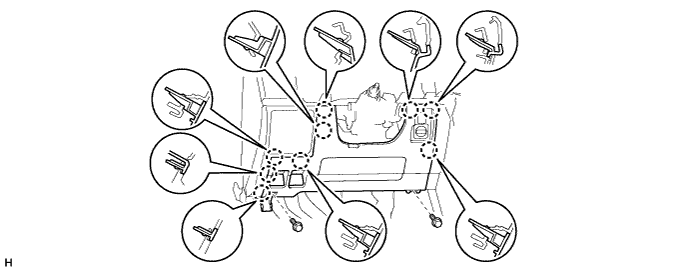
Install the 2 bolts.
-
-
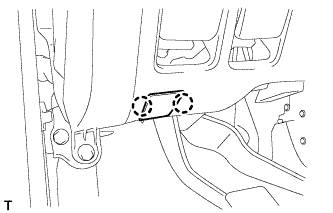
Attach the 2 claws to close the hole cover.
-
-
Click here
INSTALL COWL SIDE TRIM BOARD LH
-
Attach the 2 clips to install the cowl side trim board.
-
Install the cap nut.
-
-
Click here
INSTALL NO. 1 INSTRUMENT PANEL UNDER COVER SUB-ASSEMBLY (w/ Floor Under Cover)
-
Connect the connectors.
-
Attach the 3 claws to install the No. 1 instrument panel under cover.
-
Install the 2 screws.
-
-
Click here
INSTALL FRONT DOOR SCUFF PLATE LH
-
Attach the 3 claws and 4 clips to install the scuff plate.
-
Install the screw.
-
- Click here
INSTALL NO. 2 INSTRUMENT CLUSTER FINISH PANEL GARNISH
-
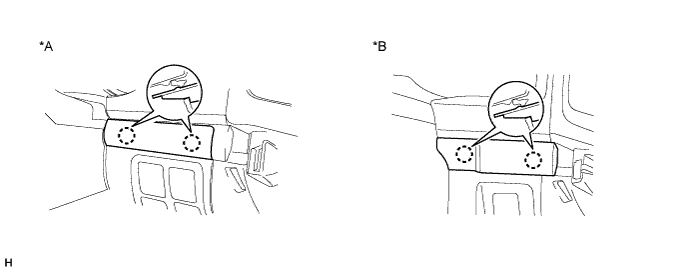
Attach the 2 claws to install the No. 2 instrument cluster finish panel garnish.
Table 1. Text in Illustration *A w/ Entry and Start System *B w/o Entry and Start System
-
-
Click here
INSTALL NO. 1 INSTRUMENT CLUSTER FINISH PANEL GARNISH
-
Attach the 3 claws to install the No. 1 instrument cluster finish panel garnish.
-
-
Click here
INSTALL INSTRUMENT SIDE PANEL LH
-
Attach the 6 claws to install the instrument side panel.
-
-
Click here
INSTALL LOWER CENTER INSTRUMENT CLUSTER FINISH PANEL SUB-ASSEMBLY
-
Connect the connectors.
-
Attach the 7 claws to install the lower center instrument cluster finish panel sub-assembly.
-
-
Click here
INSTALL LOWER INSTRUMENT PANEL PAD SUB-ASSEMBLY RH
-
Attach the 7 claws to install the lower instrument panel pad sub-assembly.
-
Install the clip and screw.
-
-
Click here
INSTALL NO. 1 INSTRUMENT PANEL FINISH PANEL CUSHION
-
Attach the 7 claws to install the No. 1 instrument panel finish panel cushion.
-
-
Click here
INSTALL LOWER INSTRUMENT PANEL PAD SUB-ASSEMBLY LH
-
Connect the connectors and attach the 2 clamps.
-
Attach the 8 claws to install the lower instrument panel pad sub-assembly.
-
Install the clip and screw.
-
-
Click here
INSTALL NO. 2 INSTRUMENT PANEL FINISH PANEL CUSHION
-
Attach the 7 claws to install the No. 2 instrument panel finish panel cushion.
-
- Click here
CONNECT CABLE TO NEGATIVE BATTERY TERMINAL
Note:When disconnecting the cable, some systems need to be initialized after the cable is reconnected (Click here).