- Click here
INSTALL VANE PUMP ASSEMBLY
-
Install the vane pump with the 2 bolts.
21 N*m 214 kgf*cm 15 ft.*lbf
-
- Click here
CONNECT SUCTION HOSE
-
Connect the suction hose to the vane pump assembly with the clip.
-
- Click here
CONNECT PRESSURE FEED TUBE
-
Install a new gasket to the pressure feed tube.
-
Connect the pressure feed tube with the union bolt.
50 N*m 510 kgf*cm 37 ft.*lbf
-
- Click here
CONNECT POWER STEERING OIL PRESSURE SENSOR CONNECTOR
-
Connect the connector.
-
Attach the wire harness clamp.
-
- Click here
INSTALL FAN AND GENERATOR V BELT
-
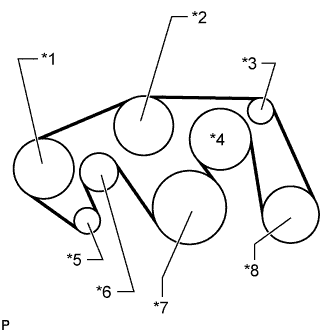
Set the V belt onto every part.
-
While turning the belt tensioner counterclockwise, remove the bar.
Table 1. Text in Illustration *1 Vane Pump *2 Water Pump *3 No. 1 Idler *4 Fan *5 Generator *6 Belt Tensioner *7 Crankshaft *8 Cooler Compressor Note:Make sure that the V belt is properly set to each pulley.
-
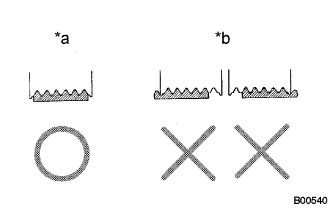
After installing the belt, check that it fits properly in the ribbed grooves.
Table 2. Text in Illustration *a CORRECT *b INCORRECT Tip:Make sure to check by hand that the belt has not slipped out of the grooves on the bottom of the pulley.
-
- Click here
INSTALL AIR CLEANER ASSEMBLY
-
Install the air cleaner with the 3 bolts.
5.0 N*m 51 kgf*cm 44 in.*lbf
-
- Click here
INSTALL AIR CLEANER HOSE ASSEMBLY
-
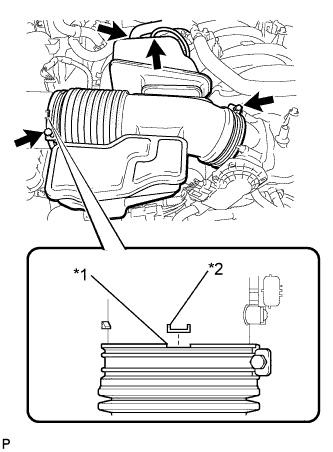
Install the air cleaner hose so that the protrusion of the air cleaner cap aligns with the groove of the hose as shown in the illustration.
Table 3. Text in Illustration *1 Groove *2 Protrusion -
Tighten the 2 clamps.
2.5 N*m 25 kgf*cm 22 in.*lbf -
Connect the vacuum hose.
-
Connect the No. 2 ventilation hose.
-
- Click here
INSTALL V-BANK COVER SUB-ASSEMBLY
-
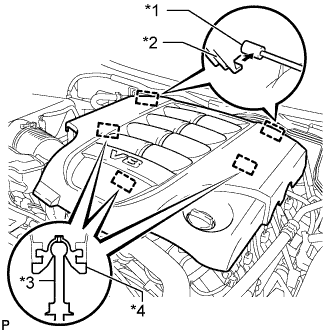
Attach the 2 V-bank cover hooks to the bracket. Then align the 3 V-bank cover grommets with the 3 pins, and press down on the V-bank cover to attach the pins.
Table 4. Text in Illustration *1 Bracket *2 Hook *3 Pin *4 Grommet
-
- Click here
INSTALL FRONT FENDER APRON TRIM PACKING A
-
Install the fender apron seal with the 3 clips.
-
- Click here
INSTALL FRONT WHEEL RH
for Aluminum Wheel 131 N*m 1336 kgf*cm 97 ft.*lbf for Steel Wheel 209 N*m 2131 kgf*cm 154 ft.*lbf - Click here
ADD POWER STEERING FLUID
- Click here
BLEED POWER STEERING FLUID
-
Check the fluid level.
-
Jack up the front of the vehicle and support it with stands.
-
Turn the steering wheel.
-
With the engine stopped, turn the wheel slowly from lock to lock several times.
-
-
Lower the vehicle.
-
Start the engine.
-
Idle the engine for a few minutes.
-
Turn the steering wheel.
-
With the engine idling, turn the wheel left or right to the full lock position and keep it there for 2 to 3 seconds, then turn the wheel to the opposite full lock position and keep it there for 2 to 3 seconds. *1
-
Repeat *1 several times.
Note:For vehicles with VGRS, if the steering wheel is turned from lock to lock repeatedly, the system may stop operating and the amount of rotation before the steering wheel locks may increase due to operation of the overheating prevention function. When the system temperature drops, the system operation automatically returns to normal.
-
-
Stop the engine.
-
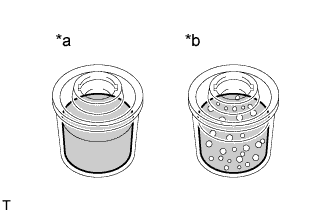
Check for foaming or emulsification.
Table 5. Text in Illustration *a Correct *b Incorrect If the system has to be bled twice because of foaming or emulsification, check for fluid leaks in the system.
-
Check the fluid level.
-
- Click here
INSPECT FOR POWER STEERING FLUID LEAK
- Click here
CONNECT CABLE TO NEGATIVE BATTERY TERMINAL
Note:When disconnecting the cable, some systems need to be initialized after the cable is reconnected (Click here).