-
Use the same procedures for the LHD vehicle and RHD vehicle.
-
The procedures listed below are for the LHD vehicle.
- Click here
INSTALL AIR CONDITIONING CONTROL ASSEMBLY
-
Connect the connectors.
-
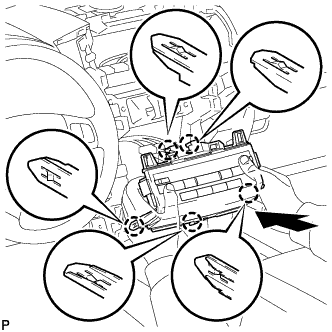
Insert the radio receiver and attach the 5 claws on its backside.
Note:When inserting the radio receiver, do not press the knobs on it.
-
-
Click here
INSTALL LOWER CENTER INSTRUMENT CLUSTER FINISH PANEL SUB-ASSEMBLY
-
Connect the connectors.
-
Attach the 7 claws to install the lower center instrument cluster finish panel sub-assembly.
-
-
Click here
INSTALL LOWER INSTRUMENT PANEL PAD SUB-ASSEMBLY RH
-
Attach the 7 claws to install the lower instrument panel pad sub-assembly.
-
Install the clip and screw.
-
-
Click here
INSTALL NO. 1 INSTRUMENT PANEL FINISH PANEL CUSHION
-
Attach the 7 claws to install the No. 1 instrument panel finish panel cushion.
-
-
Click here
INSTALL LOWER INSTRUMENT PANEL PAD SUB-ASSEMBLY LH
-
Connect the connectors and attach the 2 clamps.
-
Attach the 8 claws to install the lower instrument panel pad sub-assembly.
-
Install the clip and screw.
-
-
Click here
INSTALL NO. 2 INSTRUMENT PANEL FINISH PANEL CUSHION
-
Attach the 7 claws to install the No. 2 instrument panel finish panel cushion.
-
- Click here
INSTALL RADIO RECEIVER ASSEMBLY WITH BRACKET
-
w/ Cassette Tape Player:
-
w/o Multi-display:
-
-
Click here
INSTALL NO. 1 CENTER INSTRUMENT CLUSTER FINISH PANEL
-
Connect the connector.
-
Attach the 10 claws to install the No. 1 center instrument cluster finish panel.
-
-
Click here
INSTALL NO. 4 INSTRUMENT PANEL REGISTER ASSEMBLY
-
Connect the connector.
-
Attach the 6 claws to install the No. 4 instrument panel register.
-
-
Click here
INSTALL NO. 3 INSTRUMENT PANEL REGISTER ASSEMBLY
-
Connect the connector.
-
Attach the 6 claws to install the No. 3 instrument panel register.
-
-
Click here
INSTALL NO. 1 SPEAKER OPENING COVER ASSEMBLY
-
Attach the 8 claws to install the opening cover.
-
- Click here
CONNECT CABLE TO NEGATIVE BATTERY TERMINAL
Note:When disconnecting the cable, some systems need to be initialized after the cable is reconnected (Click here).