- Click here
INSTALL GASKET
-
Clean the ECM seal surface with non-residue solvent.
-
Attach a new gasket to the ECM.
-
- Click here
INSTALL ECM
-
Install the ECM with the 4 bolts.
8.0 N*m 82 kgf*cm 71 in.*lbf Note:
-
Make sure the gasket is not folded or caught on any area of the surrounding part.
-
Make sure there is no foreign matter caught between the gasket and surrounding part.
-
Do not damage the gasket.
-
-
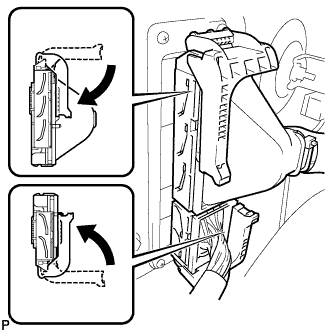
Connect the 2 ECM connectors and push each lock lever down to lock the ECM connectors.
Note:
-
Be careful not to allow dirt, water, or other foreign matter to adhere to the connecting parts when connecting the connectors.
-
Do not twist the wire harness when connecting the ECM connectors.
-
Make sure that the lock levers are raised 90° before connecting the ECM connectors. Failure to do this may cause the lock lever and terminals to break.
-
Make sure that the levers are securely locked.
-
-
- Click here
INSTALL CONNECTOR HOLDER BLOCK
-
Install the connector holder block with the 3 bolts.
8.0 N*m 82 kgf*cm 71 in.*lbf
-
- Click here
CONNECT CABLE TO NEGATIVE BATTERY TERMINAL
Note:When disconnecting the cable, some systems need to be initialized after the cable is reconnected (Click here).