- Click here
INSTALL REAR CRANKSHAFT OIL SEAL
-
Apply MP grease to the lip of a new oil seal.
-
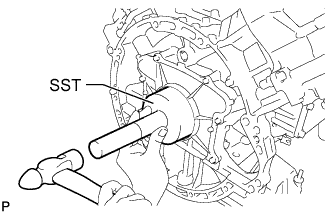
Using SST and a hammer, tap in the oil seal until its surface is flush with the rear oil seal retainer edge.
09223-56010 Note:
-
Keep the lip free from foreign matter.
-
Do not tap on the oil seal at an angle.
-
-
- Click here
INSTALL DRIVE PLATE AND RING GEAR SUB-ASSEMBLY
-
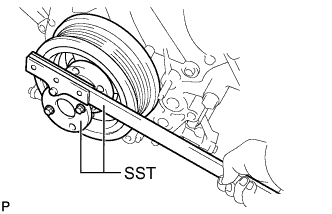
Using SST, hold the crankshaft.
09213-70011 09330-00021 -
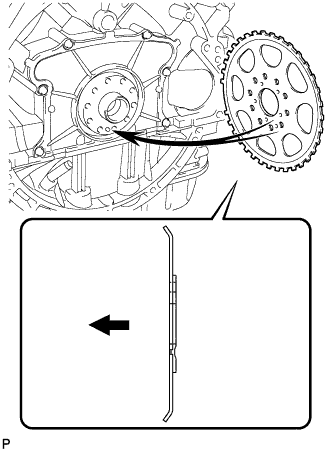
Install the crankshaft angle sensor rotor.
Table 1. Text in Illustration 
Engine Side Tip:
-
Align the pin hole of the crankshaft angle sensor rotor with the pin of the crankshaft.
-
As the crankshaft angle sensor rotor is not reversible, be sure to install it so that it is facing in the direction shown in the illustration.
-
-
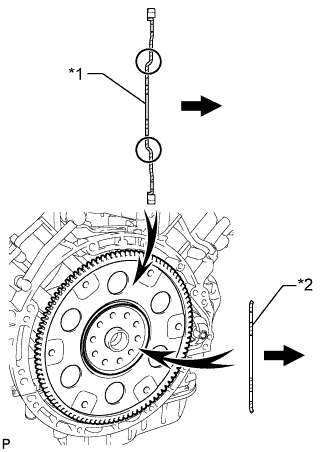
Install the drive plate and rear drive plate spacer onto the crankshaft.
Table 2. Text in Illustration *1 Drive Plate *2 Rear Drive Plate Spacer Automatic Transmission Side Tip:As the rear drive plate spacer and the drive plate are not reversible, be sure to install them so that they are facing in the direction shown in the illustration.
-
Install the drive plate and ring gear and bolts.
Tip:The bolts are tightened in 2 progressive steps.
-
Clean the bolts and bolt holes.
-
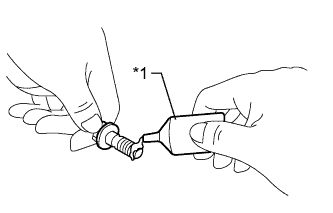
Apply adhesive to 2 or 3 threads at the end of each of the 10 bolts.
Adhesive Toyota Genuine Adhesive 1324, Three Bond 1324 or equivalent Table 3. Text in Illustration *1 Adhesive -
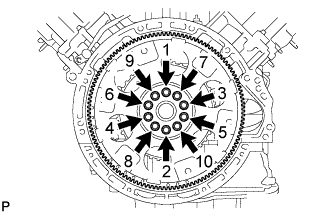
Step 1:
Install and uniformly tighten 10 new bolts in the sequence shown in the illustration.
30 N*m 301 kgf*cm 22 ft.*lbf Note:
-
Do not reuse the drive plate installation bolts.
-
Do not strike or damage the drive plate installation bolts. Be sure to handle them carefully.
-
-
Mark the upside of each drive plate installation bolt with paint.
-
Step 2:
Tighten the cylinder head bolts another 90°.
-
Check that the painted marks are now at a 90° angle to the upside.
Note:Do not start the engine for at least an hour after installing the drive plate.
-
-
- Click here
INSTALL AUTOMATIC TRANSMISSION ASSEMBLY
- Click here
CONNECT CABLE TO NEGATIVE BATTERY TERMINAL
Note:When disconnecting the cable, some systems need to be initialized after the cable is reconnected (Click here).