IMMOBILISER SYSTEM Security Indicator Light Does not Blink
DESCRIPTION
-
The certification ECU (smart key ECU assembly) blinks the security indicator light (radio receiver assembly) when the immobiliser is set (power switch off, or driver door is opened and closed with power switch on (IG)).
-
The certification ECU (smart key ECU assembly) receive the security indicator light signal from the main body ECU (multiplex network body ECU) via CAN communication when the theft deterrent system is arming preparation state or alarm sounding state. Then, certification ECU (smart key ECU assembly) blinks the security indicator light (radio receiver assembly).
WIRING DIAGRAM
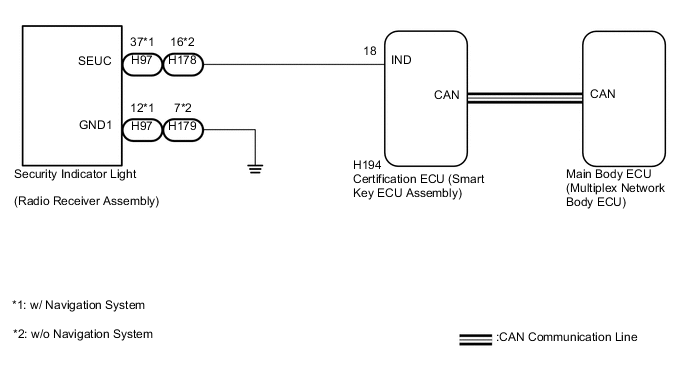
CAUTION / NOTICE / HINT
Note
-
When using the GTS with the vehicle power switch off, connect the GTS to the vehicle and turn a courtesy light switch on and off at intervals of 1.5 seconds or less until communication between the GTS and the vehicle begins. Then select the Model Code "KEY REGIST" under manual mode and enter the following menus: Body Electrical / Entry&Start(CAN). While using the GTS, periodically turn a courtesy light switch on and off at intervals of 1.5 seconds or less to maintain communication between the GTS and the vehicle.
-
Before replacing the certification ECU (smart key ECU assembly), refer to the Service Bulletin.
-
The immobiliser system uses the CAN communication system. Inspect the communication function by following How to Proceed with Troubleshooting (See page ). Troubleshoot the immobiliser system after confirming that the communication systems are functioning properly.
PROCEDURE
-
PERFORM ACTIVE TEST USING GTS
-
Connect the GTS to the DLC3.
-
Turn the power switch on (IG).
-
Turn the GTS on.
-
Enter the following menus: Body Electrical / Entry&Start / Active Test.
-
Perform the Active Test according to the display on the GTS.
Entry&Start Tester Display Test Part Control Range Diagnostic Note Immobiliser Indicator Security indicator light OFF/ON - OK The security indicator light operates normally.
NG 
CHECK AND REPLACE HARNESS AND CONNECTOR (SECURITY INDICATOR LIGHT - SMART KEY ECU ASSEMBLY) Click here
OK 
-
-
CHECK SECURITY INDICATOR LIGHT OPERATION
-
When the immobiliser is set, check that the security indicator light blinks.*1
OK The security indicator light blinks normally. -
When the theft deterrent system is in the arming preparation state, check that the security indicator light on Click here.*2
OK The security indicator light is on normally. Result Result Proceed to *1 is NG (*2 is OK) A *2 is NG (*1 is OK) B
A 
REPLACE CERTIFICATION ECU (SMART KEY ECU ASSEMBLY)
B
REPLACE MAIN BODY ECU (MULTIPLEX NETWORK BODY ECU) Click here
-
-
CHECK AND REPLACE HARNESS AND CONNECTOR (SECURITY INDICATOR LIGHT - SMART KEY ECU ASSEMBLY)
-
Disconnect the H194 certification ECU (smart key ECU assembly) connector.
-
Disconnect the H97 security indicator light (radio receiver assembly) connector*1.
-
Disconnect the H178 security indicator light (radio receiver assembly) connector*2.
-
Measure the resistance according to the value(s) in the table below.
Standard Resistance Tester Connection Condition Specified Condition H97-37 (SEUC) - H194-18 (IND)*1 Always Below 1 Ω H97-37 (SEUC) - Body ground*1 Always 10 kΩ or higher H178-16 (SEUC) - H194-18 (IND)*2 Always Below 1 Ω H178-16 (SEUC) - Body ground*2 Always 10 kΩ or higher
-
*1: w/ Navigation System
-
*2: w/o Navigation System
-
NG
REPAIR OR REPLACE HARNESS OR CONNECTOR
OK
-
-
CHECK HARNESS OR CONNECTOR (SECURITY INDICATOR LIGHT - BODY GROUND)
-
Measure the resistance according to the value(s) in the table below.
Standard Resistance Tester Connection Condition Specified Condition H97-12 (GND1) - Body ground*1 Always Below 1 Ω H178-7 (GND1) - Body ground*2 Always Below 1 Ω
-
*1: w/ Navigation System
-
*2: w/o Navigation System
Result Result Proceed to OK (w/ Navigation System) A OK (w/o Navigation System) B NG C -
A
REPLACE SECURITY INDICATOR LIGHT (RADIO RECEIVER ASSEMBLY) Click here
B
REPLACE SECURITY INDICATOR LIGHT (RADIO RECEIVER ASSEMBLY) Click here
C
REPAIR OR REPLACE HARNESS OR CONNECTOR
-