Click here
| DTC Code | DTC Name |
|---|---|
| Switch Operation of Remote Touch not Accepted |
Click here
PROCEDURE
- Click here
CHECK PANEL SWITCH
-
Check for foreign matter around the switches that might prevent operation.
OK No foreign matter is found.
- OKClick here
- NG
REMOVE ANY FOREIGN MATTER FOUND
-
- Click here
CHECK PANEL & STEERING SWITCH (OPERATION CHECK)
-
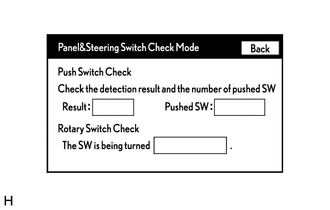
Enter the "Panel & Steering Switch Check Mode" screen. Refer to Check Panel & Steering Switch in Operation Check (Click here).
-
Operate the abnormal switch and check if the switch status is correctly displayed.
OK The switch status is correctly displayed as operated.
- OK
REPLACE RADIO RECEIVER ASSEMBLY (Click here)
- NG
REPLACE REMOTE OPERATION BOARD (Click here)
-