HV BATTERY REMOVAL

PROCEDURE
-
PRECAUTION
-
CHECK FOR DTCS
-
Check for DTCs Click here.
Note
Confirm that P0AA6 (Hybrid Battery Voltage System Isolation Fault) is not output before removing the HV battery. If this DTC is output, perform troubleshooting for this DTC first.
-
-
REMOVE SERVICE PLUG GRIP
-
REMOVE CONNECTOR COVER ASSEMBLY
-
CHECK TERMINAL VOLTAGE
-
INSTALL CONNECTOR COVER ASSEMBLY
-
REMOVE AUXILIARY BATTERY
-
REMOVE SPARE WHEEL COVER PAD LH
-
REMOVE SPARE WHEEL COVER PAD RH
-
REMOVE LUGGAGE HOLD BELT STRIKER ASSEMBLY (for Rear Side)
-
REMOVE REAR FLOOR FINISH PLATE
-
REMOVE LUGGAGE HOLD BELT STRIKER ASSEMBLY (for LH Side)
-
REMOVE ROPE HOOK (for LH Side)
-
REMOVE LUGGAGE COMPARTMENT INNER TRIM COVER LH
-
REMOVE LUGGAGE HOLD BELT STRIKER ASSEMBLY (for RH Side)
-
REMOVE ROPE HOOK (for RH Side)
-
REMOVE LUGGAGE COMPARTMENT INNER TRIM COVER RH (w/o Power Trunk Lid System)
-
REMOVE LUGGAGE COMPARTMENT INNER TRIM COVER RH (w/ Power Trunk Lid System)
-
REMOVE REAR SEAT ASSEMBLY
-
REMOVE REAR DOOR SCUFF PLATE LH
-
REMOVE REAR SEAT SIDE GARNISH LH
-
REMOVE ROOM PARTITION PANEL INSULATOR
-
REMOVE NO. 1 HYBRID BATTERY INTAKE DUCT
-
REMOVE NO. 4 HYBRID BATTERY SHIELD PANEL
-
DISCONNECT FRAME WIRE
-
REMOVE HV BATTERY
CAUTION:
Wear insulated gloves.
-
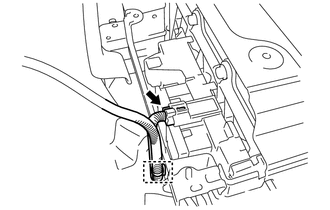
Disconnect the connector and wire harness clamp.
-
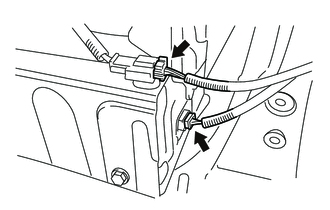
Disconnect the 2 connectors.
-
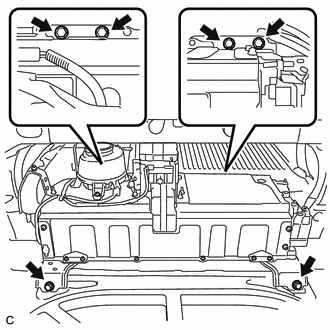
Remove the 6 bolts from the HV battery.
-
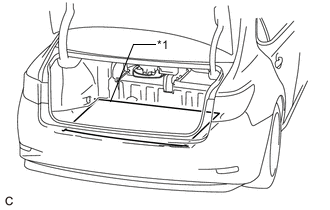
Text in Illustration *1 Cardboard Place a piece of cardboard in the luggage compartment.
-
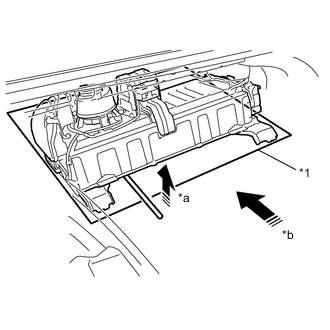
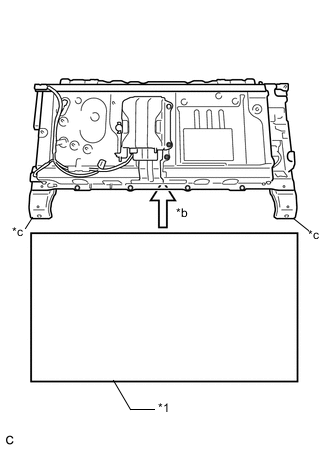
Cut and shape a piece of cardboard so that it fits the area between the HV battery bolt attachment positions, and then insert it as shown in the illustration.
Text in Illustration *1 Cardboard *a Hold up *b Insert *c HV battery bolt attachment position -
Using a tire lever to hold up the HV battery, insert the cardboard until it cannot be inserted any further.
Note
Secure the frame wire with electrical tape to prevent it from getting caught when moving the HV battery or other parts.
Tech Tips
Attach tape to the feet and edges of the HV battery to protect tools and the vehicle body.
-
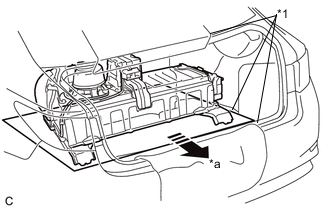
Text in Illustration *1 Cardboard *a Pull Pull the cardboard and HV battery together to the middle of the luggage compartment.
Note
Use cardboard or other similar material to protect the HV battery and vehicle body from damage.
-
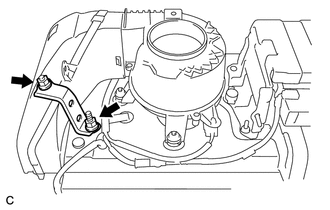
Remove the 2 nuts and No. 2 hybrid vehicle battery upper cover bracket.
-
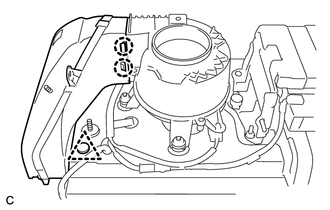
Remove the clip.
-
Disengage the 2 claws and remove the No. 2 hybrid battery intake duct.
-
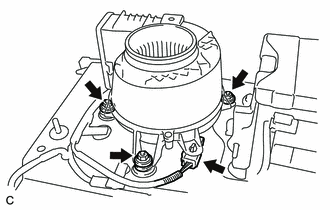
Disconnect the connector from the battery cooling blower assembly.
-
Remove the 3 nuts and battery cooling blower assembly from the HV battery.
Note
-
Be sure not to touch the fan part of the battery cooling blower assembly.
-
Do not lift the battery cooling blower assembly using the wire harness.
-
-
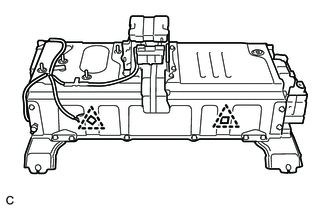
Remove the 2 clips from the HV battery.
-
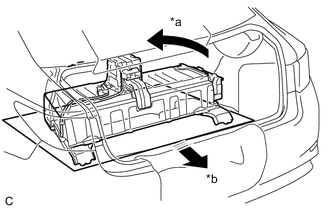
Text in Illustration *a Turn 180° *b Pull Turn the cardboard and HV battery 180° together.
-
Pull the HV battery together with the cardboard toward the rear of the vehicle.
-
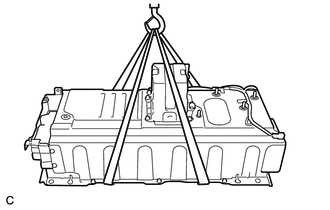
Using a suitable adaptor such as a rope, remove the HV battery while tilting it.
Note
While removing the HV battery from the vehicle, do not allow it to contact the vehicle.
-
-
REMOVE NO. 2 HYBRID VEHICLE BATTERY SHIELD PANEL
CAUTION:
Wear insulated gloves.
-
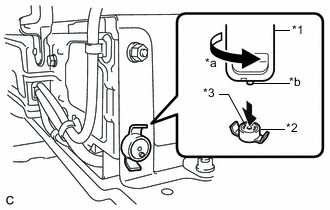
Text in Illustration *1 Service Plug Grip *2 Battery Cover Lock Striker *3 Button *a Turn *b Projection Using the service plug grip, remove the battery cover lock striker.
Tech Tips
Insert the projection part of the service plug grip, turn the button of the battery cover lock striker counterclockwise, and release the lock.
-
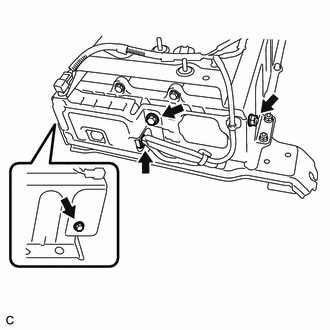
Disconnect the connector from the battery smart unit.
-
Remove the 2 bolts, nut and No. 2 hybrid vehicle battery shield panel from the HV battery.
-
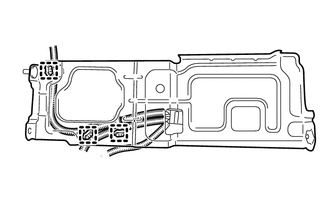
Disconnect the 3 wire harness clamps from the No. 2 hybrid vehicle battery shield panel.
-
-
REMOVE BATTERY SMART UNIT
CAUTION:
Wear insulated gloves.
-
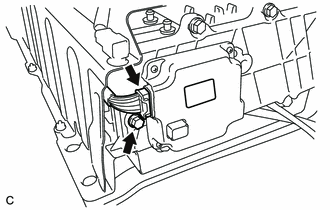
Disconnect the connector from the battery smart unit.
Note
Insulate the removed connector with insulating tape.
-
Remove the bolt and battery smart unit from the HV battery.
-
-
REMOVE NO. 1 HYBRID BATTERY SHIELD SUB-ASSEMBLY
CAUTION:
Wear insulated gloves.
-
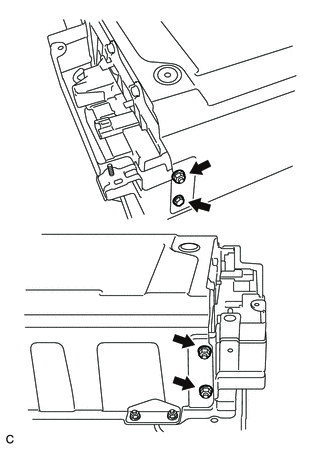
Remove the bolt, 3 nuts and No. 1 hybrid battery shield sub-assembly from the HV battery.
-
-
REMOVE HYBRID BATTERY JUNCTION BLOCK ASSEMBLY
-
SEPARATE NO. 2 HYBRID BATTERY PACK WIRE
CAUTION:
Wear insulated gloves.
-
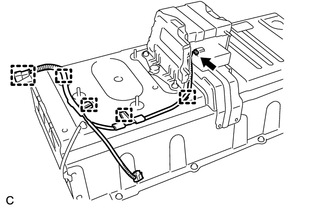
Disconnect the connector and 5 clamps, and remove the No. 2 hybrid battery pack wire from the HV battery.
-
-
REMOVE NO. 1 HYBRID VEHICLE BATTERY CARRIER BRACKET SUB-ASSEMBLY (for 2-piece Type)
-
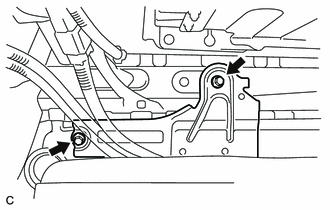
Remove the 2 bolts and No. 1 hybrid vehicle battery carrier bracket sub-assembly.
Tech Tips
Perform this procedure only when replacement of the No. 1 hybrid vehicle battery carrier bracket sub-assembly is necessary.
-
-
REMOVE NO. 2 HYBRID VEHICLE BATTERY CARRIER BRACKET SUB-ASSEMBLY (for 2-piece Type)
-
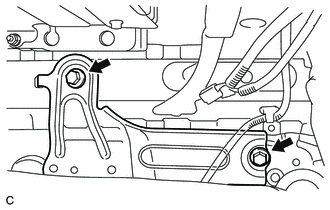
Remove the 2 bolts and No. 2 hybrid vehicle battery carrier bracket sub-assembly.
Tech Tips
Perform this procedure only when replacement of the No. 2 hybrid vehicle battery carrier bracket sub-assembly is necessary.
-
-
REMOVE NO. 3 HV BATTERY CARRIER BRACKET SUB-ASSEMBLY (for 1-piece Type)
-
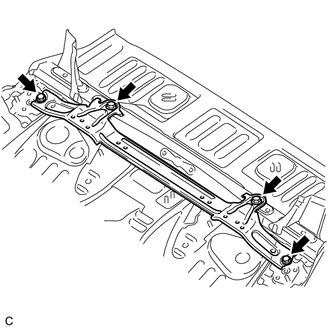
Remove the 4 bolts and No. 3 HV battery carrier bracket sub-assembly.
Tech Tips
Perform this procedure only when replacement of the No. 3 HV battery carrier bracket sub-assembly is necessary.
-