AIRBAG SYSTEM, Diagnostic DTC:B1692/81, B1693/81
| DTC Code | DTC Name |
|---|---|
| B1692/81 | Lost Communication with Door Side Airbag Sensor RH |
| B1693/81 | Door Side Airbag Sensor RH Initialization Incomplete |
DESCRIPTION
The door side airbag sensor RH is composed of a safing sensor, diagnostic circuit, lateral deceleration sensor, etc. When the airbag sensor assembly receives a signal from the lateral deceleration sensor, the airbag sensor assembly judges whether the SRS should be activated.If a malfunction is detected in the side satellite sensor bus circuit, the airbag sensor assembly stores DTCs B1692/81 and/or B1693/81.
| DTC No. | Detection Item | DTC Detection Condition | Trouble Area | Test Mode / Check Mode |
|---|---|---|---|---|
| B1692/81 | Lost Communication with Door Side Airbag Sensor RH |
|
|
Does not apply to test/check mode |
| B1693/81 | Door Side Airbag Sensor RH Initialization Incomplete |
|
|
Does not apply to test/check mode |
WIRING DIAGRAM
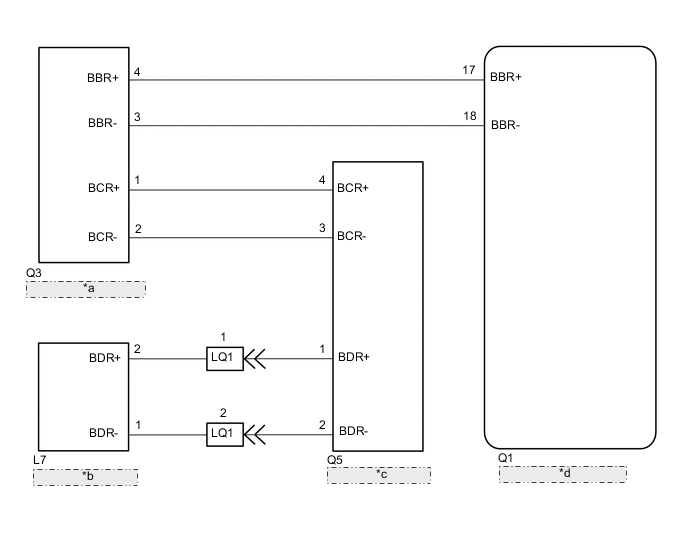
| *a | Side Airbag Sensor Assembly RH |
| *b | Door Side Airbag Sensor RH |
| *c | Rear Side Airbag Sensor RH |
| *d | Airbag Sensor Assembly |
CAUTION / NOTICE / HINT
Note
-
After turning the power switch off, waiting time may be required before disconnecting the cable from the negative (-) auxiliary battery terminal. Therefore, make sure to read the disconnecting the cable from the negative (-) auxiliary battery terminal notices before proceeding with work.
-
When disconnecting the cable from the negative (-) auxiliary battery terminal while performing repairs, some systems need to be initialized after the cable is reconnected.
-
After replacing the airbag sensor assembly, refer to initialization.
Tech Tips
To reproduce the DTC, wiggle each of the SRS airbag system connectors, or drive the vehicle on actual city roads or rough roads.
PROCEDURE
-
CHECK DTC
-
Turn the power switch off.
-
Turn the power switch on (IG), and wait for at least 60 seconds.
-
Clear the DTCs stored in memory.
Body Electrical > SRS Airbag > Clear DTCs -
Turn the power switch off.
-
Turn the power switch on (IG), and wait for at least 60 seconds.
-
Check for DTCs.
Body Electrical > SRS Airbag > Trouble CodesResult Result Proceed to DTC B1692/81 or B1693/81 is output A DTC B1692/81 or B1693/81 is not output B Tech Tips
Codes other than DTC B1692/81 and B1693/81 may be output at this time, but they are not related to this check.
B 
USE SIMULATION METHOD TO CHECK Click here
A 
-
-
CHECK CONNECTION OF CONNECTORS
-
Turn the power switch off.
-
Disconnect the cable from the negative (-) auxiliary battery terminal and wait for at least 90 seconds.
-
Check that the connectors are properly connected to the rear airbag sensor RH and door side airbag sensor assembly RH.
OK The connectors are properly connected. Result Proceed to OK NG
NG
CONNECT CONNECTORS PROPERLY
OK
-
-
CHECK CONNECTORS
-
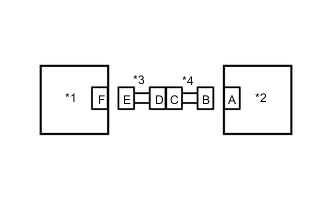
*1 Door Side Airbag Sensor RH *2 Rear Airbag Sensor RH *3 Front Door Wire RH *4 No. 2 Floor Wire Disconnect the connectors from the rear airbag sensor RH and door side airbag sensor assembly RH.
-
Check that the terminals of the connectors are not deformed or damaged.
OK The terminals are not deformed or damaged. Result Proceed to OK NG
NG
REPAIR OR REPLACE HARNESS OR CONNECTOR
OK
-
-
CHECK DOOR SIDE AIRBAG SENSOR ASSEMBLY RH CIRCUIT
-
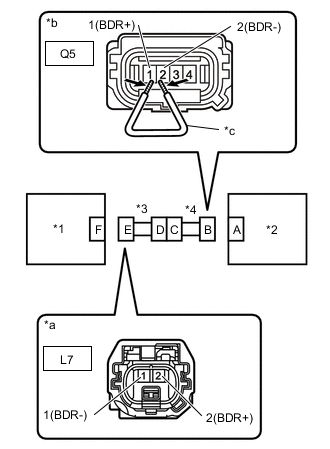
*1 Door Side Airbag Sensor Assembly RH *2 Rear Airbag Sensor RH *3 Front Door Wire RH *4 No. 2 Floor Wire *a Front view of wire harness connector
(to Door side airbag sensor assembly RH)
*b Front view of wire harness connector
(to Rear airbag sensor RH)
*c Service Wire Disconnect the cable from the negative (-) auxiliary battery terminal and wait for at least 2 seconds.
-
Turn the power switch on (IG).
-
Measure the voltage according to the value(s) in the table below.
Standard Voltage Tester Connection Condition Specified Condition L7-2 (BDR+) - Body ground Power switch on (IG) Below 1 V L7-1 (BDR-) - Body ground Power switch on (IG) Below 1 V -
Turn the power switch off.
-
Disconnect the cable from the negative (-) auxiliary battery terminal and wait for at least 90 seconds.
-
Using a service wire, connect terminals 1 (BDR+) - 2 (BDR-) of connector B.
Note
Do not forcibly insert the service wire into the terminals of the connector when connecting the wire.
-
Measure the resistance according to the value(s) in the table below.
Standard Resistance Tester Connection Condition Specified Condition L7-2 (BDR+) - L7-1 (BDR-) Always Below 1 Ω -
Disconnect the service wire from connector B.
-
Measure the resistance according to the value(s) in the table below.
Standard Resistance Tester Connection Condition Specified Condition L7-2 (BDR+) - L7-1 (BDR-) Always 1 MΩ or higher -
Measure the resistance according to the value(s) in the table below.
Standard Resistance Tester Connection Condition Specified Condition L7-2 (BDR+) - Body ground Always 1 MΩ or higher L7-1 (BDR-) - Body ground Always 1 MΩ or higher Result Proceed to OK NG
NG 
CHECK NO. 2 FLOOR WIRE Click here
OK
-
-
CHECK SIDE AIR BAG SENSOR ASSEMBLY RH
-
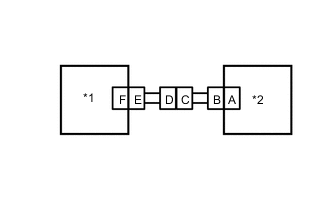
*1 Door Side Airbag Sensor Assembly LH *2 Rear Airbag Sensor RH Connect the connector to rear airbag sensor RH.
-
Interchange the door side airbag sensor RH with LH and connect the connectors.
-
Disconnect the cable from the negative (-) auxiliary battery terminal and wait for at least 2 seconds.
-
Turn the power switch on (IG), and wait for at least 60 seconds.
-
Clear the DTCs stored in memory.
Body Electrical > SRS Airbag > Clear DTCs -
Turn the power switch off.
-
Turn the power switch on (IG), and wait for at least 60 seconds.
-
Check for DTCs.
Body Electrical > SRS Airbag > Trouble CodesResult Result Proceed to DTC B1692/81 or B1693/81 is output A DTC B1697/82 or B1698/82 is output B DTC B1692/81, B1693/81, B1697/82 and B1698/82 are not output C Tech Tips
Codes other than DTCs B1692/81, B1693/81, B1697/82 and B1698/82 may be output at this time, but they are not related to this check.
-
Turn the power switch off.
-
Disconnect the cable from the negative (-) auxiliary battery terminal and wait for at least 90 seconds.
-
Return the door side airbag sensor assembly RH and LH to their original positions and connect the connectors.
B
REPLACE DOOR SIDE AIRBAG SENSOR ASSEMBLY RH Click here
C
USE SIMULATION METHOD TO CHECK Click here
A
-
-
CHECK REAR AIRBAG SENSOR RH
-
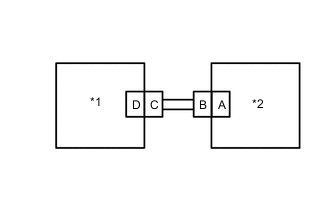
*1 Rear Airbag Sensor Assembly LH *2 Side Airbag Sensor Assembly RH Interchange the rear airbag sensor RH with LH and connect the connectors.
-
Disconnect the cable from the negative (-) auxiliary battery terminal and wait for at least 2 seconds.
-
Turn the power switch on (IG), and wait for at least 60 seconds.
-
Clear the DTCs stored in memory.
Body Electrical > SRS Airbag > Clear DTCs -
Turn the power switch off.
-
Turn the power switch on (IG), and wait for at least 60 seconds.
-
Check for DTCs.
Body Electrical > SRS Airbag > Trouble CodesResult Result Proceed to DTC B1692/81 or B1693/81 is output A DTC B1697/82 or B1698/82 is output B DTC B1692/81, B1693/81, B1697/82 and B1698/82 are not output C Tech Tips
Codes other than DTCs B1692/81, B1693/81, B1697/82 and B1698/82 may be output at this time, but they are not related to this check.
-
Turn the power switch off.
-
Disconnect the cable from the negative (-) auxiliary battery terminal and wait for at least 90 seconds.
-
Return the rear airbag sensor RH and LH to their original positions and connect the connectors.
A
REPLACE AIRBAG SENSOR ASSEMBLY Click here
B
REPLACE REAR AIRBAG SENSOR RH Click here
C
USE SIMULATION METHOD TO CHECK Click here
-
-
CHECK NO. 2 FLOOR WIRE
-
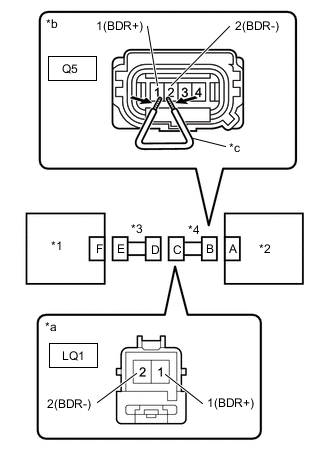
*1 Door Side Airbag Sensor RH *2 Rear Airbag Sensor RH *3 Front Door Wire RH *4 No. 2 Floor Wire *a Front view of wire harness connector
(to Rear Door Wire No.1)
*b Front view of wire harness connectorear
(to Rear Airbag Sensor RH)
*c Service Wire Disconnect the floor wire no.2 connector from the front door wire RH.
-
Disconnect the cable from the negative (-) auxiliary battery terminal and wait for at least 2 seconds.
-
Turn the power switch on (IG).
-
Measure the voltage according to the value(s) in the table below.
Standard Voltage Tester Connection Condition Specified Condition LQ1-1 (BDR+) - Body ground Power switch on (IG) Below 1 V LQ1-2 (BDR-) - Body ground Power switch on (IG) Below 1 V -
Turn the power switch off.
-
Disconnect the cable from the negative (-) auxiliary battery terminal and wait for at least 90 seconds.
-
Using a service wire, connect terminals 1 (BDR+) - 2 (BDR-) of connector B.
Note
Do not forcibly insert the service wire into the terminals of the connector when connecting the wire.
-
Measure the resistance according to the value(s) in the table below.
Standard Resistance Tester Connection Condition Specified Condition LQ1-1 (BDR+) - LQ1-2 (BDR-) Always Below 1 Ω -
Disconnect the service wire from connector B.
-
Measure the resistance according to the value(s) in the table below.
Standard Resistance Tester Connection Condition Specified Condition LQ1-1 (BDR+) - LQ1-2 (BDR-) Always 1 MΩ or higher -
Measure the resistance according to the value(s) in the table below.
Standard Resistance Tester Connection Condition Specified Condition LQ1-1 (BDR+) - Body ground Always 1 MΩ or higher LQ1-2 (BDR-) - Body ground Always 1 MΩ or higher Result Proceed to OK NG
OK
REPLACE FRONT DOOR WIRE RH
NG
REPLACE NO. 2 FLOOR WIRE
-