NETWORK GATEWAY ECU REMOVAL
CAUTION / NOTICE / HINT
Tech Tips
-
Use the same procedure for RHD and LHD vehicles.
-
The procedure listed below is for LHD vehicles.
PROCEDURE
-
PRECAUTION
Note
After turning the power switch off, waiting time may be required before disconnecting the cable from the negative (-) auxiliary battery terminal. Therefore, make sure to read the disconnecting the cable from the negative (-) auxiliary battery terminal notices before proceeding with work.
-
REMOVE LUGGAGE TRIM SERVICE HOLE COVER
-
DISCONNECT CABLE FROM NEGATIVE AUXILIARY BATTERY TERMINAL
-
REMOVE FRONT DOOR SCUFF PLATE RH
-
REMOVE NO. 2 INSTRUMENT PANEL UNDER COVER SUB-ASSEMBLY
-
REMOVE COWL SIDE TRIM BOARD RH
-
DISCONNECT INTEGRATION CONTROL AND PANEL ASSEMBLY
-
REMOVE INSTRUMENT PANEL CENTER REGISTER ASSEMBLY
-
REMOVE NO. 2 INSTRUMENT PANEL REGISTER ASSEMBLY
-
DISCONNECT FRONT DOOR OPENING TRIM WEATHERSTRIP RH
-
REMOVE INSTRUMENT SIDE PANEL RH
-
REMOVE GLOVE COMPARTMENT DOOR ASSEMBLY
-
REMOVE NETWORK GATEWAY ECU (for LHD)
-
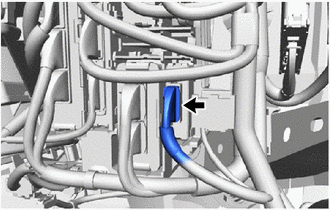
Disconnect the connector.
-
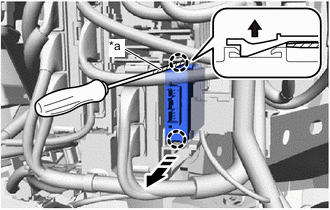
*a Protective Tape 
Pull up 
Remove in this Direction Using a screwdriver with its tip wrapped with protective tape, disengage the claws to remove the network gateway ECU as shown in the illustration.
-
-
REMOVE NETWORK GATEWAY ECU (for RHD)
-
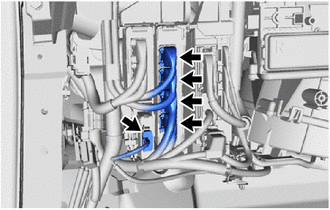
Disconnect the 5 connectors.
-
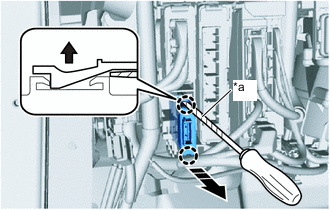
*a Protective Tape Pull up Remove in this Direction Using a screwdriver with its tip wrapped with protective tape, disengage the claws to remove the network gateway ECU as shown in the illustration.
-