FC STACK ON-VEHICLE INSPECTION

CAUTION / NOTICE / HINT
Note
If the vehicle has been subjected to a strong impact, the FC stack assembly may have been damaged, so perform an on-vehicle inspection according to the following procedure.
PROCEDURE
-
CHECK VEHICLE CONDITION
-
Check the left and right doors and rocker panels for any damage that requires sheet metal repair or replacement.
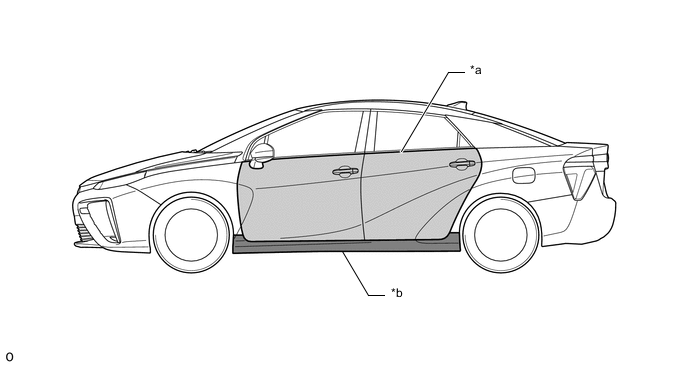
*a Door *b Rocker Panel Result Result Proceed to Damage is present CHECK WHETHER AIRBAG HAS DEPLOYED (SIDE AIRBAG)
Damage is not present CHECK WHETHER AIRBAG HAS DEPLOYED (FRONT AIRBAG)
-
-
CHECK WHETHER AIRBAG HAS DEPLOYED (SIDE AIRBAG)
-
Check whether the curtain shield airbag assembly LH, curtain shield airbag assembly RH, front seat airbag assembly LH and front seat airbag assembly RH have deployed.
Result Result Proceed to Airbag has not deployed. CHECK EV SYSTEM START
Airbag has deployed. REPLACE FC STACK ASSEMBLY
-
-
CHECK WHETHER AIRBAG HAS DEPLOYED (FRONT AIRBAG)
-
Check whether the horn button assembly, lower No. 1 instrument panel airbag assembly, instrument panel passenger without door airbag assembly and front seat cushion airbag assembly RH have deployed.
Result Result Proceed to Airbag has not deployed. CHECK EV SYSTEM START
Airbag has deployed. CHECK DTC OUTPUT (EV)
-
-
CHECK EV SYSTEM START
-
While depressing the brake pedal, press the power switch and check that the EV system turns on (READY).
Note
Repeatedly turning the EV system on (READY) could result in a malfunction, so be sure not to turn the EV system on (READY) repeatedly.
Result Result Proceed to EV System does not turn on (READY). CHECK DTC OUTPUT (EV)
EV System turns on (READY). END
-
-
CHECK DTC OUTPUT (EV)
-
Connect the GTS to the DLC3.
-
Turn the power switch on (IG).
-
Enter the following menus: Powertrain / EV / Trouble Codes.
-
Check for DTCs.
Powertrain > EV > Trouble CodesResult Result Proceed to DTC U0151-763 (Lost Communication with Airbag Control Module) is not output. CHECK DTC OUTPUT (SRS AIRBAG)
DTC U0151-763 (Lost Communication with Airbag Control Module) is output. REPLACE FC STACK ASSEMBLY
-
Turn the power switch off.
-
-
CHECK DTC OUTPUT (SRS AIRBAG)
-
Connect the GTS to the DLC3.
-
Turn the power switch on (IG).
-
Enter the following menus: Body Electrical / SRS Airbag / Trouble Codes.
-
Check for DTCs.
Body Electrical > SRS Airbag > Trouble CodesResult Result Proceed to DTC B1000 (Center Airbag Sensor Assembly Malfunction) is not output. READ VALUE USING GTS (FC STACK SHOCK HISTORY)
DTC B1000 (Center Airbag Sensor Assembly Malfunction) is output. REPLACE FC STACK ASSEMBLY
-
Turn the power switch off.
-
-
READ VALUE USING GTS (FC STACK SHOCK HISTORY)
-
Connect the GTS to the DLC3.
-
Turn the power switch on (IG).
-
Enter the following menus: Powertrain / EV / Data List / FC Stack Shock History.
-
Read the Data List.
Powertrain > EV > Data ListTester Display FC Stack Shock History Tech Tips
-
If the Data List item "FC Stack Shock History" is ON, even if the FC stack assembly is replaced, the history will not be cleared automatically (will not become OFF). In addition, disconnecting the cable from the negative auxiliary battery terminal will not clear the history either.
-
After replacing the FC stack assembly, use the GTS to perform the utility "FC Stack Shock History Clear".
Result Result Proceed to "FC Stack Shock History" is OFF. END "FC Stack Shock History" is ON. REPLACE FC STACK ASSEMBLY
-
-
Turn the power switch off.
-