VEHICLE STABILITY CONTROL SYSTEM VSC OFF Switch Circuit
DESCRIPTION
-
The skid control ECU assembly is connected to the combination meter assembly via CAN communication.
Pressing the VSC OFF switch turns off TRC operation, and pressing and holding this switch turns off TRC and VSC operation.
-
except Multi-information Display Type:
If TRC and VSC operations are turned off, the TRC OFF indicator and the VSC OFF indicator lights come on.
-
for 4WD:
When the 4WD control switch (transfer position switch) set to L4, VSC is prohibited and the VSC OFF indicator light turns on.
w/ Rear Differential Lock:
When the rear differential is locked, VSC is prohibited, and the VSC OFF and TRC OFF indicator lights turn on.
-
for Multi-information Display Type:
If TRC and VSC operations are turned off, the TRC OFF message will be displayed on the multi-information display and the VSC OFF indicator light will come on.
-
for 4WD:
When the 4WD control switch (transfer position switch) set to L4, VSC is prohibited and the VSC OFF indicator light turns on.
w/ Rear Differential Lock:
When the rear differential is locked, VSC is prohibited, the VSC OFF indicator turns on and the TRC OFF message is displayed.
WIRING DIAGRAM
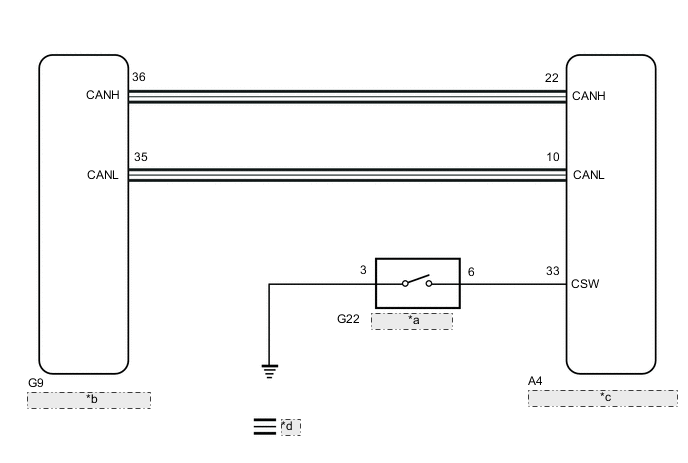
| *a | VSC OFF Switch |
| *b | Combination Meter Assembly |
| *c | Skid Control ECU (Brake Actuator Assembly) |
| *d | CAN Communication Line |
CAUTION / NOTICE / HINT
Note
-
When replacing the skid control ECU (brake actuator assembly), perform zero point calibration and store system information.
-
for 4WD:
As there may be malfunctions in the touch select 2-4 and high-low system related to when the transfer operates in L4, check the touch select 2-4 and high-low system first.
PROCEDURE
-
CHECK CAN COMMUNICATION SYSTEM
-
Check if CAN communication system DTCs are output.
for LHD with Central Gateway ECU: Click here
for RHD with Central Gateway ECU: Click here
for LHD without Central Gateway ECU: Click here
for RHD without Central Gateway ECU: Click here
Result Proceed to DTC is not output DTC is output
DTC is output 
CHECK CAN COMMUNICATION SYSTEM for LHD with Central Gateway ECU: Click here
CHECK CAN COMMUNICATION SYSTEM for RHD with Central Gateway ECU: Click here
CHECK CAN COMMUNICATION SYSTEM for LHD without Central Gateway ECU: Click here
CHECK CAN COMMUNICATION SYSTEM for RHD without Central Gateway ECU: Click hereDTC is not output 
-
-
CHECK IF SKID CONTROL ECU ASSEMBLY CONNECTOR IS SECURELY CONNECTED
-
Check if the skid control ECU assembly (brake actuator assembly) connector is securely connected.
OK The connector is securely connected. Result Proceed to OK (w/o Rear Differential Lock) OK (w/ Rear Differential Lock) NG
OK (w/o Rear Differential Lock) 
GO TO STEP 4 Click here
NG
CONNECT CONNECTOR TO SKID CONTROL ECU ASSEMBLY CORRECTLY
OK (w/ Rear Differential Lock)
-
-
CHECK FOR DIFFERENTIAL SYSTEM
-
Connect the GTS to the DLC3.
-
Turn the ignition switch to ON.
-
Turn the GTS on.
-
Enter the following menus: Powertrain / Four Wheel Drive / Trouble Codes.
-
Check for DTCs.
Powertrain > Four Wheel Drive > Trouble CodesResult Proceed to DTCs are not output DTCs are output
DTCs are output
GO TO DIFFERENTIAL SYSTEM (DIAGNOSTIC TROUBLE CODE CHART) Click here
DTCs are not output
-
-
READ VALUE USING GTS (TRC/VSC OFF MODE)
-
Reconnect the A4 skid control ECU (brake actuator assembly) connector.
-
Connect the GTS to the DLC3.
-
Turn the ignition switch to ON.
-
Select the Data List on the GTS.
Chassis > ABS/VSC/TRC > Data ListTester Display Measurement Item Range Normal Condition Diagnostic Note TRC/VSC Off Mode TRC/VSC off mode Normal, TRC OFF, Unknown or VSC OFF Normal: Normal mode
TRC OFF: TRC off mode
VSC OFF: VSC off mode
Unknown: Unspecified
Chassis > ABS/VSC/TRC > Data ListTester Display TRC/VSC Off Mode -
Check that the indicator light and mode condition on the GTS change according to VSC OFF switch operation.
Standard except Multi-information Display Type Switch Operation Mode Condition Display TRC OFF Indicator Light VSC OFF Indicator Light Not pressed Normal Does not come on Does not come on Pressing the VSC OFF switch TRC OFF Comes on Does not come on Pressing and holding the VSC OFF switch VSC OFF Comes on Comes on for Multi-information Display Type Switch Operation Mode Condition Display Multi-information Display (TRC OFF Message) VSC OFF Indicator Light Not pressed Normal Not displayed Does not come on Pressing the VSC OFF switch TRC OFF Displayed Does not come on Pressing and holding the VSC OFF switch VSC OFF Displayed Comes on Result Result Proceed to Indicator light and mode condition display do not change. A Mode condition display is normal, but indicator light does not change. B Indicator light and mode condition display are normal. C
B
INSPECT METER / GAUGE SYSTEM Click here
C
USE SIMULATION METHOD TO CHECK Click here
A
-
-
PERFORM ACTIVE TEST USING GTS (MULTI-INFORMATION DISPLAY AND VSC OFF INDICATOR LIGHT)
-
Select the Active Test on the GTS.
Chassis > ABS/VSC/TRC > Active TestTester Display Measurement Item Control Range Diagnostic Note TRC(TRAC) OFF Indicator Light
-
TRC OFF indicator light*1
-
Multi-information display (TRC OFF message)*2
-
Indicator light ON/OFF*1
-
Display ON/OFF*2
Observe combination meter assembly
Vehicle condition: Vehicle stopped
VSC OFF Indicator Light VSC OFF indicator light Indicator light ON/OFF Observe combination meter assembly
Vehicle condition: Vehicle stopped
-
*1: except Multi-information Display Type
-
*2: for Multi-information Display Type
Chassis > ABS/VSC/TRC > Active TestTester Display TRC(TRAC) OFF Indicator Light
Chassis > ABS/VSC/TRC > Active TestTester Display VSC OFF Indicator Light -
-
except Multi-information Display Type:
Check the TRC OFF indicator light and VSC OFF indicator light on the combination meter assembly turn ON or OFF in accordance with the GTS operation.
OK The TRC OFF indicator light and VSC OFF indicator light turn ON or OFF in accordance with the GTS operation. for Multi-information Display Type:
Check the multi-information display (TRC OFF message) and VSC OFF indicator light on the combination meter assembly turn ON or OFF in accordance with the GTS operation.
OK The multi-information display (TRC OFF message) and VSC OFF indicator light turn ON or OFF in accordance with the GTS operation. Result Proceed to OK NG
NG
INSPECT COMBINATION METER ASSEMBLY Click here
OK
-
-
INSPECT VSC OFF SWITCH
-
Turn the ignition switch off.
-
Remove the VSC OFF switch.
-
Inspect the VSC OFF switch.
OK The VSC OFF switch operates normally. Result Proceed to OK NG
NG
REPLACE VSC OFF SWITCH Click here
OK
-
-
CHECK HARNESS AND CONNECTOR (BRAKE ACTUATOR ASSEMBLY - VSC OFF SWITCH)
-
Disconnect the A4 skid control ECU (brake actuator assembly) connector.
-
Measure the resistance according to the value(s) in the table below.
Standard Resistance Tester Connection Condition Specified Condition A4-33 (CSW) - G22-6 Always Below 1 Ω A4-33 (CSW) or G22-6 - Body ground Always 10 kΩ or higher G22-3 - Body ground Always Below 1 Ω Result Proceed to OK NG
OK
REPLACE BRAKE ACTUATOR ASSEMBLY Click here
NG
REPAIR OR REPLACE HARNESS OR CONNECTOR
-
-
INSPECT COMBINATION METER ASSEMBLY
-
Turn the ignition switch off.
-
except Multi-information Display Type:
Perform the Active Test of the combination meter assembly using the GTS.
Body Electrical > Combination Meter > Active TestTester Display VSC TRC Indicator
Body Electrical > Combination Meter > Active TestTester Display Indicat. VSC OFF for Multi-information Display Type:
Perform the Active Test of the combination meter assembly using the GTS.
Body Electrical > Combination Meter > Active TestTester Display Meter Display 1
Body Electrical > Combination Meter > Active TestTester Display Indicat. VSC OFF -
Check the combination meter assembly.
OK except Multi-information Display Type: The TRC OFF indicator light turns on or off in accordance with the GTS. for Multi-information Display Type: The multi-information display and VSC OFF indicator light turns on or off in accordance with the GTS operation. Result Proceed to OK NG
OK
REPLACE BRAKE ACTUATOR ASSEMBLY Click here
NG
INSPECT METER / GAUGE SYSTEM Click here
-