HYBRID CONTROL SYSTEM, Diagnostic DTC:P1DEF-450
| DTC Code | DTC Name |
|---|---|
| P1DEF-450 | FC System No Activation |
DESCRIPTION
If the FC system does not complete its start-up procedure within a predetermined period of time after the power switch is turned on (READY), the EV control system determines this condition as a malfunction.
| DTC No. | Detection Item | DTC Detection Condition | Trouble Area | Warning Indicate |
|---|---|---|---|---|
| P1DEF-450 | FC System No Activation | The FC system does not complete its start-up procedure within 300 seconds after the power switch is turned on (READY). (1 trip detection logic) |
|
Master Warning Light: Comes on |
*1: If the start-up procedure of the FC system is not compete and only DTC P1DEF-450 is output without output of any other DTCs, air leakage may be occurring in the FC stack air intake system.
| DTC No. | System | Data List |
|---|---|---|
| P1DEF-450 | EV |
|
| FC | FC Total Voltage |
The following items can be helpful when performing repairs:
-
SMRB Status
-
SMRG Status
-
Boosting Converter Gate Shutdown Request
-
FC Converter Shutdown Request
-
FC Air Compressor Inverter Shutdown
Data List (EV)
-
FC Relay (+)
-
FC Relay (-)
Data List (FCDC)
CAUTION / NOTICE / HINT
CAUTION:
-
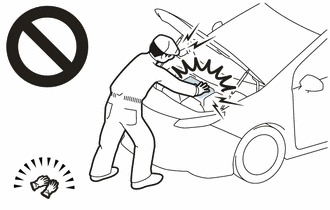
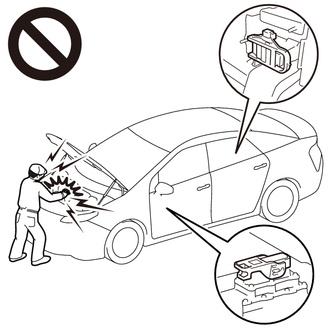
Before the following operations are conducted, take precautions to prevent electric shock by turning the power switch off, wearing insulated gloves, and removing the service plug grips from both FC stack assembly and EV battery.
-
Inspecting the high-voltage system
-
Disconnecting the low voltage connector of the inverter with converter assembly
-
Disconnecting the low voltage connector of the EV battery
-
Disconnecting the low voltage connector of the FC stack assembly
-
Disconnecting the low voltage connector of the FC converter assembly
Tech Tips
No removal order is specified for the service plug grips of the FC stack assembly and EV battery.
-
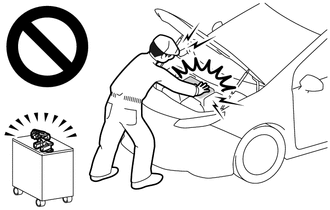
After removing the service plug grip from the EV battery, put it in your pocket to prevent other technicians from accidentally reconnecting it while you are working on the high-voltage system. After removing the service grip from the FC stack assembly, store it in a safe location and use the "HIGH-VOLTAGE, DO NOT TOUCH" sign to notify other technicians that you are working on the high-voltage system.
-
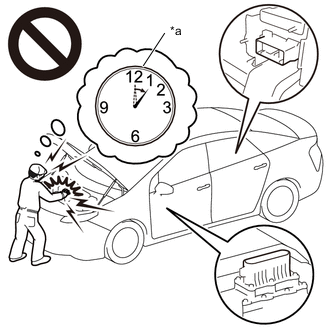
*a Without waiting for 10 minutes After removal of the service plug grips of both FC stack assembly and EV battery, wait for at least 10 minutes before touching the high-voltage connectors and terminals. After waiting for 10 minutes, check the voltage at the terminals in the inspection point in the inverter with converter assembly. The voltage should be 0 V before beginning work.
Tech Tips
At least 10 minutes are necessary to discharge the high-voltage capacitors inside the inverter with converter assembly and FC stack assembly.
Note
-
After turning the power switch off, waiting time may be required before disconnecting the cable from the negative (-) auxiliary battery terminal. Therefore, make sure to read the disconnecting the cable from the negative (-) auxiliary battery terminal notices before proceeding with work.
-
When reinstalling the service plug grip to the FC stack assembly or the EV battery, slide the lever of the service plug until the letters "UNLOCK" are completely hidden, and insert it firmly.
-
When the vehicle is parked with the power switch off, if the FC control ECU judges that the FC stack temperature will go below 0°C (32°F), it activates the FC air compressor, hydrogen pump and FC cooling water pump for a maximum of 180 seconds and drains water from the FC stack assembly. When performing inspection or repairs with the power switch off (not on (IG) or on (READY)), disconnect the cable from the negative (-) auxiliary battery terminal before performing work (If the auxiliary battery voltage is needed to conduct inspection, warm up the FC system beforehand).
Tech Tips
-
After the repair, clear the DTC and perform the following procedure to check that DTCs are not output.
-
Connect the GTS to the DLC3.
-
Turn the power switch on (IG).
-
Enter the following menus: Powertrain / FC / Data List / FC Mode, FC Intermittent Operation
-
In the P position, turn the power switch on (READY), and wait until the Data List (FC) item "FC Mode" becomes "FC Working" and item "FC Intermittent Operation" becomes "OFF" (It is necessary to wait for at least 7 minutes).
PROCEDURE
-
CHECK DTC OUTPUT (FC)
-
Connect the GTS to the DLC3.
-
Turn the power switch on (IG).
-
Enter the following menus: Powertrain / FC / Trouble Codes.
Powertrain > FC > Trouble Codes -
Check for DTCs.
Result Result Proceed to DTCs related to FC are not output. A DTCs related to FC are output. B -
Turn the power switch off.
B 
GO TO DTC CHART (FC CONTROL SYSTEM) Click here
A 
-
-
CHECK DTC OUTPUT (EV)
-
Connect the GTS to the DLC3.
-
Turn the power switch on (IG).
-
Enter the following menus: Powertrain / EV / Trouble Codes.
-
Check for DTCs.
Result Result Proceed to P1DEF-450 only is output. A Except above B -
Turn the power switch off.
B
GO TO DTC CHART (HYBRID CONTROL SYSTEM) Click here
A
-
-
CHECK DTC OUTPUT (FCDC)
-
Connect the GTS to the DLC3.
-
Turn the power switch on (IG).
-
Enter the following menus: Powertrain / FCDC / Trouble Codes.
-
Check for DTCs.
Result Result Proceed to DTCs related to FCDC are not output. A DTCs related to FCDC are output. B -
Turn the power switch off.
A
CHECK FOR INTERMITTENT PROBLEMS Click here
B
GO TO DTC CHART (FC BOOST CONTROL SYSTEM) Click here
-