REAR DISC BRAKE PAD REMOVAL
CAUTION / NOTICE / HINT
Note
-
After the brake pad has been replaced or after the piston of the brake caliper has been returned, because the clearance between the brake pad and the disc rotor is large, depressing the brake pedal may cause DTC C1214 (Hydraulic Control System Malfunction) to be stored. If this happens, check and clear DTCs after the procedure is complete.
-
With the auxiliary battery connected, even if the power switch is off, turning a door courtesy switch ON or operating the brake pedal will activate the brake control system, so disconnect the negative auxiliary battery terminal so that brake control is prohibited, even if only installing or removing the brake pad.
Tech Tips
-
Use the same procedure for the RH side and LH side.
-
The following procedure is for the LH side.
PROCEDURE
-
PRECAUTION
Note
After turning the power switch off, waiting time may be required before disconnecting the cable from the negative (-) auxiliary battery terminal. Therefore, make sure to read the disconnecting the cable from the negative (-) auxiliary battery terminal notices before proceeding with work.
-
DISABLE BRAKE CONTROL
-
REMOVE REAR WHEEL
-
DRAIN BRAKE FLUID
Note
If brake fluid leaks onto any painted surface, immediately wash it off.
-
REMOVE REAR DISC BRAKE PAD KIT
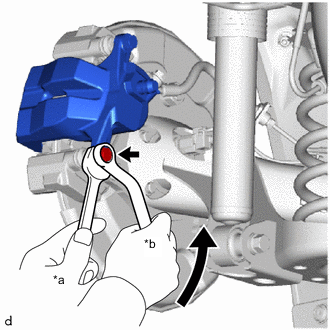
*a Hold *b Turn
-
Hold the rear disc brake cylinder slide pin, and remove the bolt.
-
Pull the rear disc brake cylinder assembly upward.
-
-
REMOVE REAR DISC BRAKE ANTI-SQUEAL SHIM KIT
-
Using a screwdriver, remove the rear disc brake pad wear indicator plate from each rear disc brake pad.
-
Remove the rear No. 1 disc brake anti-squeal shim and rear No. 2 disc brake anti-squeal shim from each rear disc brake pad.
-