INSTRUMENT PANEL SAFETY PAD(for RHD) DISASSEMBLY
PROCEDURE
-
REMOVE CENTER DEFROSTER NOZZLE ASSEMBLY
-
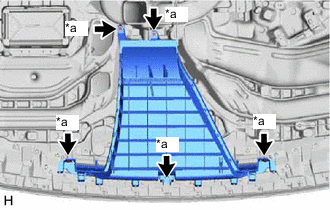
*a Screw <B> Remove the 5 screws <B> and center defroster nozzle assembly.
-
-
REMOVE NO. 2 INSTRUMENT PANEL SPEAKER PANEL SUB-ASSEMBLY
-
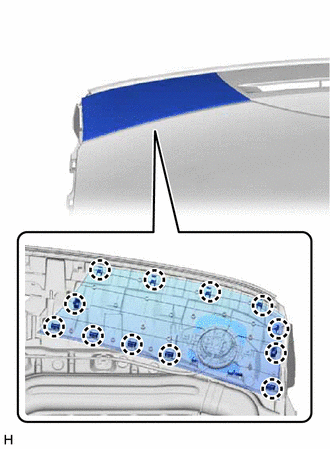
Detach the claw and remove the No. 2 instrument panel speaker panel sub-assembly.
-
-
REMOVE NO. 1 INSTRUMENT PANEL SPEAKER PANEL SUB-ASSEMBLY
-
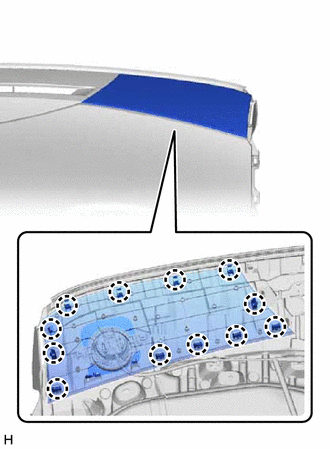
Detach the claw and remove the No. 1 instrument panel speaker panel sub-assembly.
-
-
REMOVE AUTOMATIC LIGHT CONTROL SENSOR
-
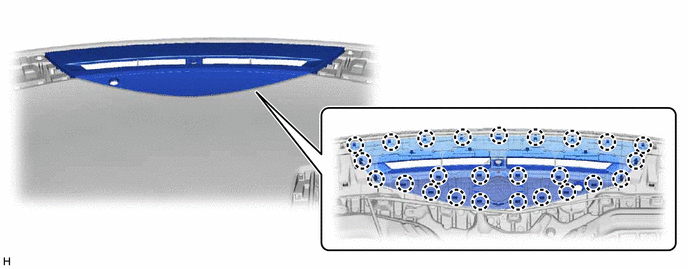
REMOVE NO. 1 DEFROSTER NOZZLE GARNISH
-
Detach the claw and remove the No. 1 defroster nozzle garnish.
-
-
REMOVE FRONT NO. 2 SPEAKER ASSEMBLY
Tech Tips
Use the same procedure for both front No. 2 speaker assemblies.
Note
Do not touch the cone part of the front No. 2 speaker assembly.
-
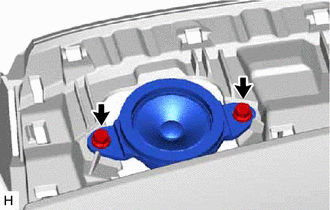
Remove the 2 screws.
-
Disconnect the connector and remove the front No. 2 speaker assembly.
-
-
REMOVE FRONT NO. 3 SPEAKER ASSEMBLY (w/ Front Center Speaker)
-
REMOVE NO. 2 INSTRUMENT PANEL CUP HOLDER
-
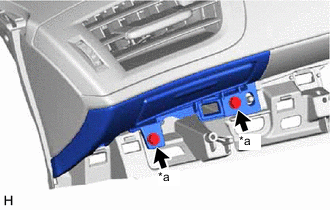
*a Screw <B> Remove the 2 screws <B>.
-
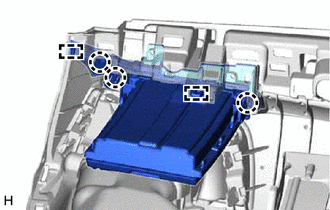
Detach the claw and guide and remove the No. 2 instrument panel cup holder.
-
-
REMOVE NO. 2 INSTRUMENT PANEL REGISTER ASSEMBLY
-
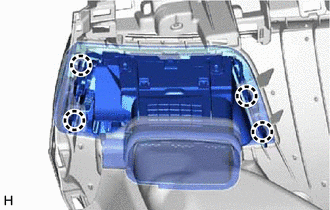
Detach the claw and remove the No. 2 instrument panel register assembly.
-
-
REMOVE NO. 1 INSTRUMENT PANEL REGISTER ASSEMBLY
-
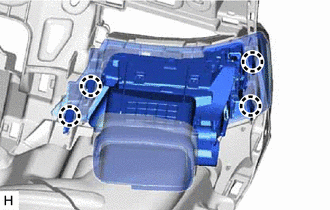
Detach the claw and remove the No. 1 instrument panel register assembly.
-
-
REMOVE NO. 2 INSTRUMENT PANEL WIRE
-
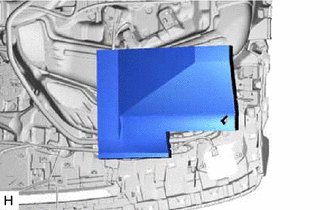
Remove the driver side cushion.
-
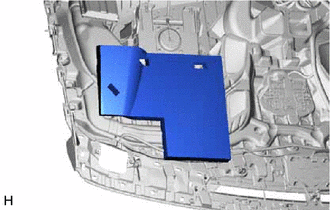
Remove the passenger side cushion.
-
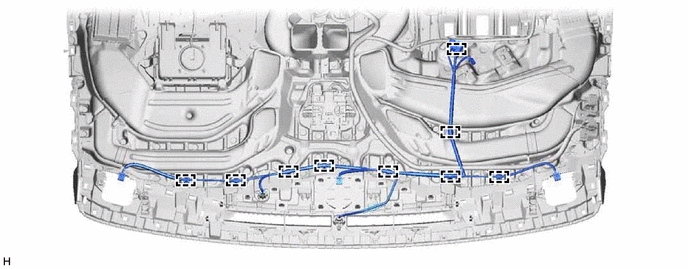
Detach the clamp and remove the No. 2 instrument panel wire.
-
-
REMOVE NO. 1 INSTRUMENT PANEL PIN
Tech Tips
Use the same procedure for both No. 1 instrument panel pins.
-
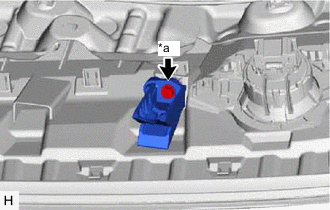
*a Screw <B> Remove the screw <B> and No. 1 instrument panel pin.
-
-
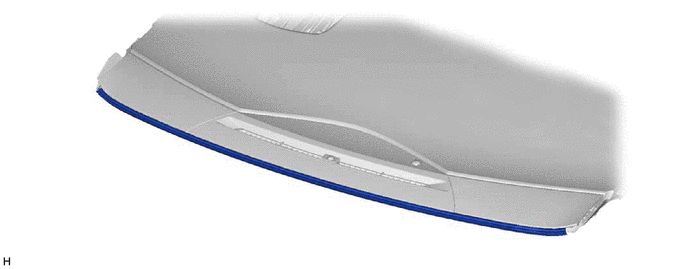
REMOVE INSTRUMENT PANEL CUSHION
-
Remove the instrument panel cushion.
-
-
REMOVE SIDE DEFROSTER NOZZLE LH
-
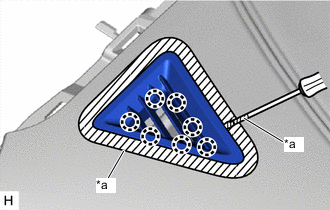
*a Protective Tape Put protective tape around the side defroster nozzle LH.
-
Using a screwdriver, detach the claw and remove the side defroster nozzle LH.
Tech Tips
Tape the screwdriver tip before use.
-
-
REMOVE SIDE DEFROSTER NOZZLE RH
-
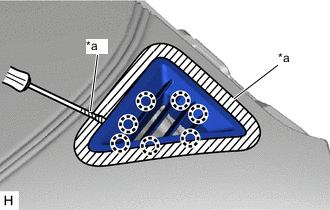
*a Protective Tape Put protective tape around the side defroster nozzle RH.
-
Using a screwdriver, detach the claw and remove the side defroster nozzle RH.
Tech Tips
Tape the screwdriver tip before use.
-
-
REMOVE NO. 2 INSTRUMENT PANEL WIRE
-
REMOVE INSTRUMENT PANEL PASSENGER WITHOUT DOOR AIRBAG ASSEMBLY
-
REMOVE NO. 1 ION GENERATOR SUB-ASSEMBLY
-
REMOVE AIR DUCT SUB-ASSEMBLY
-
REMOVE NO. 1 HEATER TO REGISTER DUCT
-
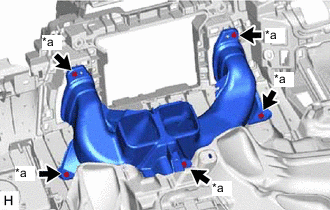
*a Screw <B> Remove the 5 screws <B> and No. 1 heater to register duct.
-
-
REMOVE NAVIGATION ANTENNA ASSEMBLY (w/ Navigation System)
-
REMOVE ANTENNA CORD SUB-ASSEMBLY (w/ Navigation System)
-
REMOVE INSTRUMENT CLUSTER FINISH PANEL SUB-ASSEMBLY
-
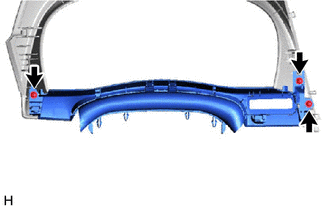
Remove the 3 screws and instrument cluster finish panel sub-assembly.
-
-
REMOVE INSTRUMENT CLUSTER FINISH PANEL END (w/o Navigation System)
-
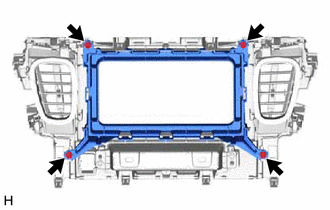
Remove the 4 screws and instrument cluster finish panel end.
-
-
REMOVE NO. 4 INSTRUMENT PANEL REGISTER ASSEMBLY (w/o Navigation System)
-
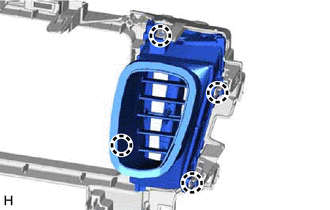
Detach the claw and remove the No. 4 instrument panel register assembly.
-
-
REMOVE NO. 3 INSTRUMENT PANEL REGISTER ASSEMBLY (w/o Navigation System)
-
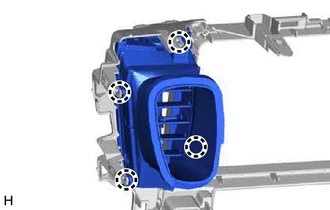
Detach the claw and remove the No. 3 instrument panel register assembly.
-
-
REMOVE CENTER INSTRUMENT PANEL BOX (w/o Navigation System)
-
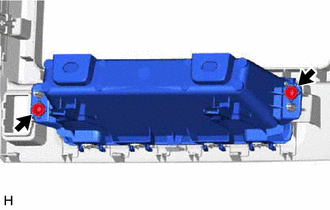
Remove the 2 screws and center instrument panel box.
-
-
REMOVE CENTER INSTRUMENT PANEL BOX SUB-ASSEMBLY
-
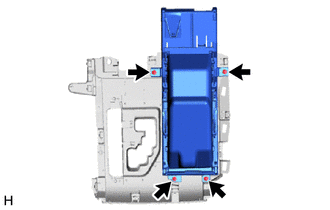
Remove the 4 screws and center instrument panel box sub-assembly.
-
-
REMOVE INSTRUMENT CLUSTER FINISH PANEL GARNISH ASSEMBLY
-
Fully open the lid of the center instrument panel box sub-assembly as shown in the illustration.
-
Using a screwdriver, detach the claw and guide and remove the instrument cluster finish panel garnish assembly.
Tech Tips
Tape the screwdriver tip before use.
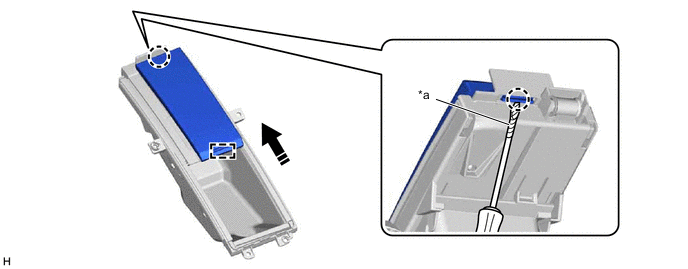
*a Protective Tape - - 
Opening Direction - -
-
-
REMOVE LOWER INSTRUMENT CLUSTER FINISH PANEL
-
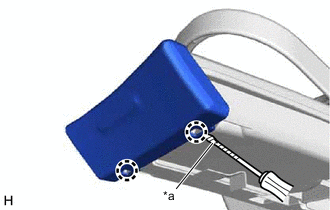
*a Protective Tape Using a screwdriver, detach the claw and remove the lower instrument cluster finish panel.
Tech Tips
Tape the screwdriver tip before use.
-
-
REMOVE INSTRUMENT PANEL EXTENSION
-
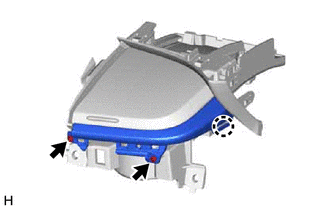
Remove the 2 screws.
-
Detach the claw and remove the instrument panel extension.
-
-
REMOVE INSTRUMENT PANEL HOLE COVER
-
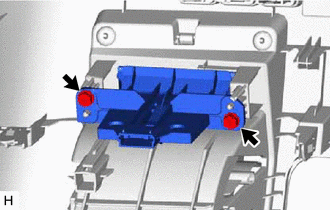
Remove the 2 screws and instrument panel hole cover.
-
-
REMOVE INSTRUMENT PANEL COIN BOX SUB-ASSEMBLY
-
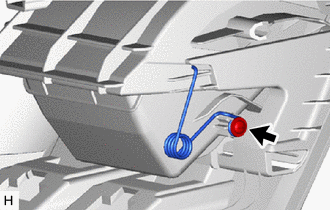
Remove the screw and spring.
-
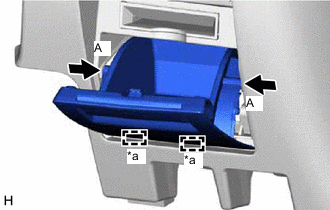
*a Hinge Press the parts labeled A in the illustration in the direction indicated by the arrows to release the stoppers.
-
Detach the hinge and remove the instrument panel coin box sub-assembly.
-
-
REMOVE GLOVE COMPARTMENT DOOR CHECK CUSHION
Tech Tips
Use the same procedure for both glove compartment door check cushions.
-
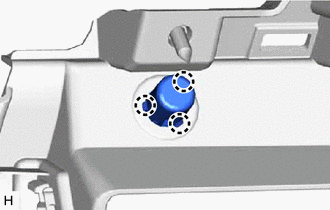
Detach the claw and remove the glove compartment door check cushion.
-
-
REMOVE LOWER INSTRUMENT SIDE PATCH
Tech Tips
Use the same procedure for both lower instrument side patches.
-
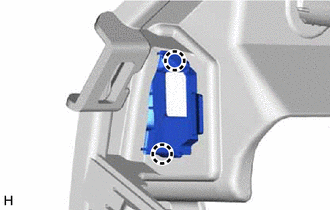
Detach the claw and remove the lower instrument side patch.
-